Coinoscope: Coin identifier
- 1.95K
- 3.7
- Installs
- 1.00M
- Price
- Free

Screenshots
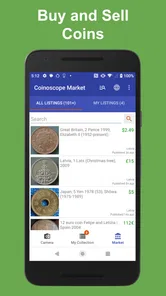
Analysis by Reviewed
I like the idea behind Coinoscope: Coin identifier: instead of searching through coin catalogues before you know what you have, you can start with a photo and use the match to guide your research. That makes it especially useful for the first question most people ask when they find an unfamiliar coin: “What am I looking at?” I’d treat its results as a helpful starting point, not as a final appraisal, but for casual discovery it has a clear purpose.
A quick first step, not a collector’s verdict
A camera-based identifier is most useful when you have no obvious country or inscription to search for. A coin’s image can narrow down the possibilities, while a text search usually depends on already knowing what details matter. In that sense, this Books & Reference app fills a practical gap between browsing general web results and consulting a specialist catalogue. It is free to install, although in-app purchases range from $0.99 to $49.99 per item, so I would check what is included before paying for anything.
There is an important distinction between identifying a coin and establishing its value. A visual match can point you toward a likely issue, but condition, authenticity, mint details and demand can all affect what a collector might pay. I wouldn’t use a quick estimate to price a sale or make a purchase without checking the match against other references. The app is strongest as a discovery tool; a specialist’s assessment is the better route when money or authenticity is at stake.
What a camera match can—and cannot—tell you
The most useful way to read a result is as a shortlist of clues. Compare the pictured design with the coin in your hand, paying attention to the lettering, portrait, symbols and date rather than relying on a broad resemblance. If several details line up, you have a promising identification to research further. If the image looks close but the date or inscription does not, I would keep looking instead of forcing the coin into the first match.
That distinction matters because many coins share familiar motifs: a building, an animal, a person in profile or a national emblem. A camera can help surface possibilities you might not think to search for, but it cannot make a worn or partly obscured detail readable simply because the image has been submitted. The less of the design you can see, the more cautious I’d be about treating any suggested identity as settled.
Discovering the World of Coins
So, what exactly is Coinoscope: Coin identifier? Well, it's a clever app designed to help you identify coins with nothing more than your smartphone camera. I was initially skeptical, but my curiosity got the better of me, and I decided to give it a shot. To my surprise, it turned out to be a rather nifty tool for any coin enthusiast or casual collector.
How It Works
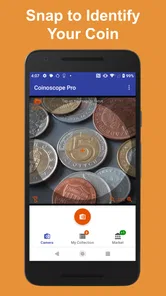
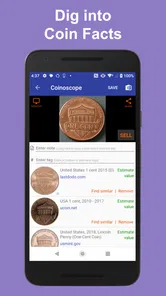
The process is as simple as it sounds. You open the app, point your camera at the coin in question, and snap a picture. The app then works its magic, scanning the image and comparing it to a vast database of coins from all over the world. Within seconds, you get detailed information about the coin's origin, age, and even its potential value.
More From Our News Desk

Weather by Xiaomi Review: Clear at a Glance, Less Clear Up Close

X Under Pressure: Can It Recover When Posting Goes Wrong?

Clash of Clans Is Won Between the Battles

Android Auto Makes the Case for Quieter Car Software

MobiOffice: Transforming Mobile Productivity with Seamless Integration

EA SPORTS FC™ Mobile Soccer: Redefining Mobile Sports Gaming
I tried it with a few coins I had lying around, and it identified them with impressive accuracy. The app's database seems pretty extensive, covering coins from various countries and eras, which is a huge plus. It's like having a virtual coin expert in your pocket!
Getting a more useful photo match
When a result looks plausible but not certain, I’d compare the design on both sides rather than settling on the first suggestion. Place the coin on a plain, contrasting surface, keep the image sharp, and avoid glare that washes out small lettering or raised details. If the first photo produces a confusing match, try another angle or a clearer shot; worn coins and similar designs can make image identification less decisive. This small bit of care is more useful than treating a quick camera result as proof.
For a realistic use, imagine finding a foreign coin in a drawer while sorting travel keepsakes. A photo can give you a lead on its origin, and you can then check the country, date and visible marks against the coin itself. That workflow is more dependable than guessing from a familiar-looking symbol, and it turns an idle curiosity into a short research task without requiring you to know numismatic terminology first.
Making a small coin-sorting session worthwhile
If I were working through a handful of mixed coins, I’d sort them into broad groups before taking pictures: coins that seem to share a country, ones with clearly different designs, and the ones whose origin is a mystery. That avoids confusing one result with another and makes it easier to revisit a doubtful match later. I’d also note each coin’s visible date and denomination as I go, since those details can help distinguish similar-looking designs once I start checking references.
A practical question is whether the app can replace a catalogue or a collector’s guide. I wouldn’t use it that way. A catalogue is better when you already have a likely country or series and want to work through exact varieties; a camera identifier is better at opening the search when you have little to go on. For me, the two approaches complement each other: use the picture to find a direction, then use a reliable reference to test it.
User Experience
One of the things I appreciated about Coinoscope is its user-friendly interface. The layout is intuitive, making it easy to navigate, even for someone who isn’t tech-savvy. The app is quick to load, and I didn't experience any lag or crashes during my time using it. It's quite refreshing to use an app that just works without any fuss.
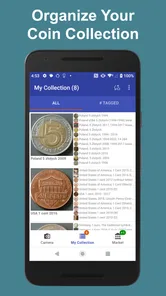
Another cool feature is the ability to save your coin searches. This is particularly handy if you want to build a digital collection or need to reference the information later. You can also share your findings with friends or fellow collectors directly from the app, which adds a nice social element to the experience.
Keeping track without mistaking notes for proof
Saved searches are useful when an identification is still in progress, not just when a result seems definitive. I’d use them to keep a record of the possibilities I want to revisit, especially if a coin needs better lighting or a closer look at its reverse. That gives me a simple way to avoid repeating the same first search and helps turn a batch of finds into an orderly research task.
There is a trade-off, though: a saved match is only as dependable as the comparison that led to it. If I were documenting a collection for insurance, sale or inheritance, I would keep the app’s suggestion separate from confirmed details and add a trusted reference or professional assessment where appropriate. The convenience of saving and sharing is real, but it shouldn’t make a tentative identification look more authoritative than it is.
Where it fits—and where it doesn’t
Saved searches are especially handy if you identify several coins at once: I’d keep uncertain matches alongside the coin’s own visible details, then revisit them when I have better light or time to compare. That makes the app more useful as a personal notebook than a one-off novelty. Sharing a result can also help a friend suggest what to inspect next, though a shared identification is still a lead to verify rather than an expert certification.
Coinoscope has a 3.7 average from around 11,000 ratings, and more than a million installs. That gives a new user a sense of its reach, but it doesn’t guarantee that every unusual, damaged or low-detail coin will match cleanly. Miccron’s app is rated for Everyone, was released in 2017 and is currently at version 4.6.2; it runs on Android 6.0 or later. Those basics make it accessible to many Android users, while anyone on iOS should check the relevant app store for availability on their device.
Who will get the most from it
I’d recommend it most to someone who has inherited a small box of mixed change, picked up an unfamiliar coin while travelling, or simply likes knowing the story behind objects at home. You don’t need to be a committed collector to get value from that first moment of recognition. It can also be a useful prompt for a parent and child looking at coins together: identify a possible country, then use the visible details to talk about what makes that coin different.
It is less suited to anyone who expects a photo alone to deliver a dependable selling price, certify authenticity, or identify a tiny variation between closely related issues. Those jobs call for careful comparison and, in some cases, a specialist. If your main interest is maintaining a precise collection inventory, a dedicated cataloguing method may also suit you better; Coinoscope is most compelling when the identity itself is the question.
Using a result responsibly
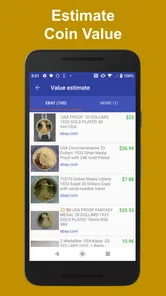
When a possible match includes a value, I’d treat that as a reason to investigate, not as a quote for a transaction. Before buying or selling, check the coin’s condition and distinguishing details against more than one dependable source, and remember that a price attached to an example may not apply to a worn coin in your hand. The same caution applies to unusual or potentially valuable finds: a camera result can direct your next step, but it cannot replace a proper examination.
For everyday curiosity, that limitation is manageable. If a coin turns out to be common, you have still learned what it is; if the match remains uncertain, you know which details to research next. The app’s value is in reducing the blank-page problem of coin identification, not in removing the need for judgement once the possibilities appear.
If you only need a formal valuation, want certainty about authenticity, or already know the coin’s identity and need specialist-grade research, a dedicated reference book, reputable collector community or professional dealer is a better next step. Those options take more effort, but they let you examine details and condition that a camera match alone cannot settle. For a quick first pass, however, the camera-led approach is more convenient than manually paging through broad catalogues.
Final Thoughts
In conclusion, Coinoscope: Coin identifier is a fantastic tool for anyone interested in coins. Whether you're a seasoned collector or just curious about that old coin you found in your attic, this app offers a quick and reliable way to satisfy your curiosity. Plus, it’s a fun way to learn about history and geography through the coins in your pocket.
So, if you've got some coins that you've been wondering about, why not give Coinoscope a try? It might just surprise you with what you discover. Happy coin hunting!
Coinoscope: Coin identifier Frequently Asked Questions
Is Coinoscope suitable for beginners who know little about coin collecting?
Yes. Coinoscope is designed around taking a coin photo and using the result to learn more about what you have, so you do not need to be an experienced collector to get started. It can be a useful first step when sorting coins or satisfying your curiosity, though identification and value estimates should be treated as guidance rather than a substitute for expert appraisal.
What is Coinoscope: Coin Identifier?
Coinoscope: Coin Identifier is a mobile app designed to help users identify coins using their smartphone camera. It's particularly useful for numismatists and coin collectors who want to quickly recognize coins from various countries and eras. The app uses image recognition technology to provide detailed information about the coin, including its origin, era, and potential value.
How does Coinoscope identify coins?
Coinoscope identifies coins using image recognition technology. Users simply take a photo of the coin, and the app processes the image to match it against a database of coins. This process provides users with information about the coin's country of origin, historical context, and potential market value, making it a valuable tool for collectors and enthusiasts. Clear, well-lit photos can make it easier to see the coin's details and get a useful match.
Can Coinoscope tell me how much my coin is worth?
Coinoscope can provide information about a coin's potential value, which can help you decide what to investigate next. Treat that figure as an estimate rather than a guaranteed sale price: condition, rarity, demand, and the details visible on a particular coin can all affect what a buyer might pay. For an important or potentially valuable find, compare the result with specialist references or seek an experienced appraisal.
Is Coinoscope available for both Android and iOS devices?
Yes, Coinoscope is available for download on both Android and iOS platforms. Users can find it on the Google Play Store for Android devices and the Apple App Store for iOS devices. This cross-platform availability ensures that a wide range of users can access the app and benefit from its coin identification features. On Android, it requires version 6.0 or later.
Pros
- Accurate coin identification
- User-friendly interface
- Extensive coin database
- Fast image processing
- Supports multiple languages
Cons
- Requires internet connection
- Ads can be intrusive
- Limited free features
- Occasional misidentification
- No offline mode











