CloudLibrary
- 8.02K
- 4.7
- Installs
- 1.00M
- Price
- Free

Screenshots
Analysis by Reviewed
Ever found yourself juggling multiple library cards, trying to get the best of each library's collection? Well, let me introduce you to the CloudLibrary app, your new best friend in the world of digital reading. Not only does it bring the library to your fingertips, but it also makes managing your borrowed books a breeze. I've been using it for a while now, and here's what I think about it.
What free access means in practice
CloudLibrary is a free Books & Reference app from OCLC, and that makes it easy to try without paying an app price. The important distinction is that free access to the app is not the same as a guarantee that every book you want will be available immediately. Borrowing depends on the library collection you can access, so I’d start by checking whether your library supports it and then search for a few authors or titles you actually care about. That quick check gives you a better sense of the value than browsing a general catalogue at random.
Its 4.6 average across around 51,000 ratings suggests that many readers find it useful, and it has over a million installs. It is rated for Everyone, with version 5.13.0.24 listed for devices running Android 10 or later. The app itself costs nothing, which suits occasional readers as well as people who borrow regularly; the practical value still comes down to the books your library makes available and how well the app fits your reading habits.
Seamless Access to a World of Books
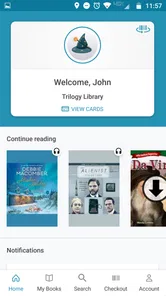
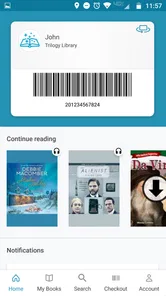
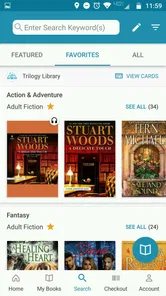
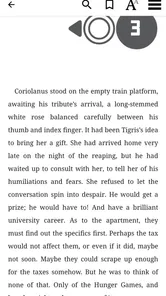
First things first, CloudLibrary offers seamless access to thousands of eBooks and audiobooks from a myriad of libraries. Once you've signed up and entered your library card details, you're good to go! It's like having an entire library in your pocket. The app’s interface is user-friendly, so even if you're not tech-savvy, you won't have a hard time navigating through it. The search function is quite robust, allowing you to search by title, author, or even genre, making it extremely convenient to find what you're looking for.
Finding a book without wasting your break
In everyday use, I’d treat the search tools as a way to make a small, deliberate shortlist rather than an endless browsing feed. If I had ten minutes during lunch, I could search for a known author, check the result, and save promising titles for later instead of trying to remember them after work. That is particularly useful when I’m choosing between reading and listening: I can look for a title in either format and decide which suits the moment. A useful habit is to search broadly first, then save the exact items that look worth borrowing; it keeps a casual browse from turning into a pile of half-remembered options.
Your Personal Reading Assistant
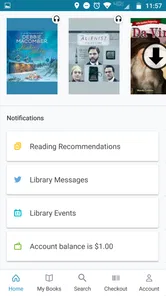
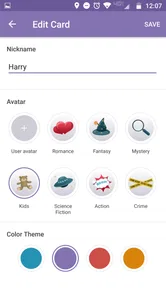
What I absolutely love about this app is how it feels like a personal reading assistant. It keeps track of all your borrowed books, sends you gentle reminders about due dates, and even suggests books based on your reading history. The recommendations have been spot on for me, introducing me to authors and genres I might not have explored otherwise. Plus, the ability to tag and create lists of books you want to read later is a game changer for any book enthusiast.
Those lists are most useful when I give them a purpose. I might keep one for books I want to read on holiday and another for audiobooks that suit a walk, rather than saving every interesting title in a single long queue. Recommendations can also be a pleasant way to branch out, but I wouldn’t rely on them as the only discovery method; a particular library’s collection shapes what is available to borrow. If a must-read is unavailable, saving it and choosing something accessible is a sensible way to keep reading instead of waiting on one title.
More From Our News Desk

Weather by Xiaomi Review: Clear at a Glance, Less Clear Up Close

X Under Pressure: Can It Recover When Posting Goes Wrong?

Clash of Clans Is Won Between the Battles

Android Auto Makes the Case for Quieter Car Software

MobiOffice: Transforming Mobile Productivity with Seamless Integration

EA SPORTS FC™ Mobile Soccer: Redefining Mobile Sports Gaming
Offline Access and Audiobook Features
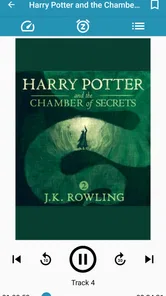
Another major win is the offline access. Once you've downloaded a book, you can read or listen to it anytime, anywhere, without worrying about internet connectivity. This is especially handy for those long flights or commutes where Wi-Fi might be sketchy. Also, for those who love audiobooks, the app offers adjustable playback speed and a sleep timer, which are nifty features for tailoring your listening experience.
A practical routine is to download a book before leaving home, then open it once while connected so I know I have the right title ready for the trip. For audiobooks, I’d set the sleep timer when listening in bed and adjust speed in small steps; faster playback can save time, but it is not helpful if I stop following the narration. Offline listening is valuable for a commute with patchy reception, though it still requires planning ahead rather than assuming a book will be ready the moment I lose a connection.
Where the trade-offs show
CloudLibrary is best understood as a library-borrowing companion, not a replacement for every way of getting books. Compared with buying an ebook from a retailer, borrowing avoids a purchase but ties the choice to what your library carries and makes available. Compared with a general reading app, its strength is that library access sits at the center of the experience; its limitation is that availability and access depend on the library you use. If I want a specific title right now and it is not available to borrow, a paid store or another service with access to that title may be more convenient.
The first setup can also feel like a hurdle if you do not already know which library card to use. I’d confirm the library connection before building a reading list, because saved plans are only useful when you can actually browse and borrow through that library. And while reminders help me keep track of borrowed books, I still treat them as a nudge rather than a reason to ignore due dates or assume every loan works the same way. The app works best when I use it as a straightforward borrowing tool, not as a promise of unlimited choice.
Making a library connection work for you
If you have more than one library card, I’d check the access options one at a time rather than assuming that a familiar card will automatically expose every collection you use. The practical question is not simply whether you can sign in, but whether the catalogue you reach has enough of the writers and formats you tend to choose. A short test search for a favorite author, a current interest, and an audiobook can reveal whether the service fits your routine before you invest time in organizing lists.
This is also a useful way to decide what to do when a title is missing. I would not keep repeating the same search or assume that a recommendation means a book can be borrowed immediately. Instead, I’d save the title if the app allows it, then pick an available alternative for the present moment. That small shift turns the library catalogue from a frustrating checklist into a source of options, while keeping expectations realistic about the collection tied to your access.
Room for Improvement
Of course, no app is perfect, and CloudLibrary has its quirks. Occasionally, I’ve experienced some lag when browsing through large collections, and there have been times when the app crashed unexpectedly. However, the developers seem committed to ironing out these issues with regular updates. It’s always a good sign when an app is actively being improved based on user feedback.
That friction matters most when I’m trying to browse quickly or switch between several searches, so I’d avoid leaving a complicated hunt until the last minute before a trip. If the app feels slow, narrowing the search to a title or author is more practical than repeatedly scrolling through a large selection. It is also worth remembering that a smooth app cannot make a library’s catalogue larger; some frustration may come from the borrowing options available, not just the interface.
A realistic day with borrowed reading
Imagine I’m planning a commute and know I’ll have a quiet evening later. I could use a short break to look for an audiobook for the journey and an ebook for home, then download what I want while I have a connection. If the audiobook is unavailable, I can choose another option rather than relying on an unconfirmed loan at the station. Later, I can pick up the ebook without having to find shelf space or remember which physical book I packed. The value here is not that every choice is instant; it is having reading and listening options prepared around the parts of the day when they make sense.
For a household or a reader with a crowded schedule, I’d also avoid treating the app as a permanent archive. The borrowing mindset is different from building a personal collection: I use a title while it is available to me, keep track of what I want to try next, and accept that the next reading choice may depend on the catalogue. Someone who wants to revisit the same ebook years later may prefer buying a copy, while a reader who enjoys rotating through library choices may find this arrangement more natural.
Who gets the most from it
I’d recommend it to readers who already have access to a participating library and want a simple way to keep borrowed ebooks and audiobooks together. It suits someone who reads in short sessions, listens while commuting, or likes to keep a future-reading list without buying every title. A realistic use would be checking out an ebook for a quiet evening, downloading it before a train ride, then switching to an audiobook for a walk when reading is inconvenient.
It is a weaker fit for someone who expects every new release to be ready on demand, wants to own a permanent digital copy, or mainly reads books outside their library’s collection. In those cases, a retailer or another reading service may be a better match, even if it involves a purchase or a different kind of access. With 7.8 thousand reviews, there is a substantial body of reader feedback around the app, but the best test for an individual user is still whether their own library’s selection matches what they like to read.
In conclusion, CloudLibrary is a fantastic tool for any book lover wanting to expand their reading horizons without the physical clutter. Its user-friendly interface, combined with the vast range of available books, makes it a must-have app for anyone with a library membership. Despite a few minor hiccups, the overall experience is overwhelmingly positive. So, if you haven’t already, give it a try and dive into the world of digital reading today!
My buy-or-skip verdict
Since the app is free, my decision would not hinge on an upfront app price. I’d try it if I had a library card and wanted borrowing, offline reading, or audiobooks in one place; there is little reason to pay simply to test whether the catalogue suits me. I’d skip it if I needed guaranteed access to a particular book or wanted a digital collection I own outright. For the right library member, it offers useful everyday convenience; for everyone else, the library connection is the deciding factor.
CloudLibrary Frequently Asked Questions
Can I browse CloudLibrary before I have a library card?
You can install CloudLibrary and explore its catalog, but borrowing requires a library card from a library that participates in the service. What you can browse and access depends on that library’s digital collection. If you are considering the app, it is worth checking whether your library uses CloudLibrary and whether you have an active card before expecting to borrow titles.
Does CloudLibrary let me read eBooks and listen to audiobooks in the same app?
Yes. CloudLibrary is designed for borrowing and reading eBooks as well as accessing audiobooks through participating libraries. You can use it to discover titles in your library’s digital collection and borrow those that are available. The selection depends on the library, so the range of books and audiobooks you see may differ from what another CloudLibrary user can access.
Do I need to live in a particular area or belong to a specific library to use CloudLibrary?
CloudLibrary connects readers with the digital collections of participating libraries, so access depends on having a library card from a library that uses the service. If you already have a card, check whether your library offers CloudLibrary before downloading. The app itself is free, but the titles you can browse and borrow are tied to your library’s collection.
What is CloudLibrary and what features does it offer?
CloudLibrary is a digital platform that provides users access to a wide range of eBooks and audiobooks from public and academic libraries around the world. Key features include personalized recommendations, offline reading, bookmarks, and synchronization across devices. The app is compatible with Android and iOS, allowing seamless access to your library's digital collection anytime, anywhere.
Is CloudLibrary free to use or are there any hidden costs?
CloudLibrary is free to download and use if you have a library card from a participating library. While there are no hidden costs, access to specific titles depends on your library's subscriptions and available digital collections. Occasionally, libraries may charge late fees if borrowed digital copies are not returned on time, though this is rare with digital lending.
Pros
- Extensive eBook collection
- User-friendly interface
- Offline reading available
- Cross-device synchronization
- Regular updates
Cons
- Limited audiobook selection
- Requires library membership
- Occasional app crashes
- No customization options
- Slow loading times











