CleanPro
- 25.00
- 3.6
- Installs
- 100.00K
- Price
- Free

Screenshots
Analysis by Reviewed
When a phone starts warning me about limited space, I usually do not need another complicated system tool. I need a clear way to see what is taking room, remove obvious clutter, and avoid deleting something important by mistake. That is the practical problem CleanPro tries to solve. It is a free storage and app-management tool from AJ IT Solutions, aimed at people who want a simpler cleanup routine on Android.
I approached it as a decision rather than a promise that every phone needs a dedicated cleaner. The useful question is whether a focused tool makes storage maintenance easier than opening the phone’s built-in settings, browsing a file manager, or checking apps one by one. CleanPro’s appeal is its straightforward purpose: it brings storage review, large-file cleanup, and app organization into one place. My experience with that kind of setup is that convenience matters most when the phone is already crowded and patience is low.
What I would check before choosing a storage cleaner
The first decision criterion is control. A cleaner should help me identify candidates for removal without turning cleanup into a blind “delete everything” exercise. Large videos, duplicate-looking downloads, abandoned installers, and apps I no longer use are not equally disposable. A good workflow separates discovery from deletion, giving me a chance to inspect what is selected.
The second criterion is focus. Some phones already include storage recommendations, cache controls, and app-uninstall screens. In that situation, an extra tool is worthwhile only if it makes those tasks noticeably easier. CleanPro is best understood as a convenience layer for people who prefer a dedicated cleanup view, not as a replacement for every maintenance feature built into Android.
I also look at how often I would realistically use it. If I only need to remove one large recording, the system settings may be quicker. If I regularly download media, install trial apps, or manage a phone shared with family members, a central cleanup screen can save repeated trips through separate menus. That distinction is important because a cleaner is useful when it changes behavior, not merely when it exists.
Finally, I consider the risk of over-cleaning. Storage tools can encourage a false sense that every large file is unnecessary. My preferred habit is to sort by size, open or identify the file, and then remove it only when I know what it is. The safest benefit here is better visibility, not automatic deletion. That mindset makes CleanPro more useful and reduces the chance of losing something valuable.
How the main cleanup workflow feels
CleanPro’s core idea is easy to understand: review storage, locate large items, and organize installed apps. That combination covers the three places where I usually find avoidable space usage. Large media is often the fastest win, while unused apps and forgotten downloads provide slower but more permanent relief.
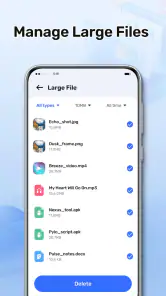
I would begin with the large-file view rather than deleting cache or miscellaneous items immediately. A long video, offline map, exported project, or messaging attachment may be large for a good reason. Reviewing the biggest candidates first gives me the greatest storage return for the least amount of work. It also makes the cleanup feel measurable without requiring me to inspect every folder.
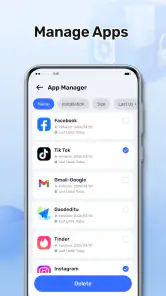
After that, I would move to app organization. This is more useful than simply asking which apps are installed. I would look for applications I downloaded for a one-time task, games I no longer open, and tools duplicated by features already present on the phone. Removing an unused app can free its application data as well as its installation space, but I would still check whether it contains saved work or offline content before uninstalling it.
The third step is a final review. I prefer to leave a little time between identifying files and confirming deletion, especially when the phone contains work documents or family photos. CleanPro can make the list easier to navigate, but the judgment remains mine. That is a strength rather than a weakness: the app supports a decision instead of pretending that file size alone tells the whole story.
Where CleanPro is most useful in everyday life
A realistic example is a weekend trip. I might record several videos, download playlists, save maps, and take a large number of photos. A few days later, the phone feels slower to manage because storage is crowded, but I do not want to scroll through every album. I would use the large-file section to identify long videos and offline media, keep the important items, and remove temporary downloads. Then I would review apps installed for travel, such as a local guide or transport tool, once I no longer need them.
Another useful situation is preparing for a system update or a new app installation. Rather than deleting random photos, I would first target files that offer substantial space savings. This is where a large-file-focused workflow has a practical advantage: it helps me reach a storage goal with fewer deletions. The trade-off is that the biggest files may also be the most important, so inspection is essential.
CleanPro can also help someone who is not comfortable navigating Android’s storage menus. A dedicated tool may feel less intimidating than moving between settings, file categories, and app-management screens. For a family member who repeatedly runs out of space, a short, repeatable routine could be more valuable than a technically richer system utility that is difficult to understand.
Three habits that make the app more effective
My first tip is to treat size as a sorting method, not a deletion rule. Start with the largest items, but verify their location and purpose. Screen recordings, camera exports, and downloaded films are common sources of quick savings, yet they can also be irreplaceable. If an item matters, move or back it up through your normal method before removing it.
My second tip is to separate temporary cleanup from app decisions. Removing a large download is reversible only if another copy exists, while uninstalling an app may remove locally stored information. I would handle files first, then review apps in a separate pass. This makes it easier to notice whether an app still has a role before I remove it.
My third tip is to use the tool before the phone becomes desperate. When storage is nearly full, every decision feels urgent and some apps may behave poorly. A brief review after a busy month of photos or downloads is calmer and more accurate. CleanPro works best as a periodic check rather than an emergency button that I open only after the phone refuses to save something.
A fourth, less obvious habit is to compare the space recovered with the effort involved. If a cleanup session removes only a few small items, I would stop instead of chasing insignificant clutter. The best targets are files that are both large and clearly disposable. This keeps the process efficient and prevents maintenance from becoming a daily chore.
Where the app wins over the usual alternatives
CleanPro’s strongest position is between built-in Android controls and full-featured file managers. Android settings are reliable for checking storage and uninstalling apps, but the experience can be spread across several screens. A file manager may offer deeper browsing, yet that depth can make it easier for an inexperienced user to delete from the wrong location. CleanPro’s narrower purpose is appealing when I want a guided storage review rather than complete file administration.
It is also more approachable than a manual cleanup routine. Without a dedicated tool, I might open the gallery, downloads folder, messaging apps, and app list separately. That approach gives me control, but it depends on remembering where clutter tends to accumulate. Bringing large files and installed apps into one cleanup habit can reduce that mental load.
The app’s positioning is helped by its low barrier to entry. It is free, carries an Everyone content rating, and has reached over one hundred thousand installs. Its average rating is 3.6 from around two hundred fifty ratings, with roughly two dozen written reviews. I read that as moderate interest rather than universal approval: enough adoption to show that the idea is useful to some people, but not a reason to assume it will suit every phone or cleanup style.
CleanPro is currently at version 1.1.0 and works on Android 7.0 or later. That broad compatibility makes it relevant for people using older Android devices that may not offer the same storage presentation as newer phones. At the same time, an older operating system can have different menus and file behavior, so I would still follow the phone’s own confirmation screens when removing anything important.
When a different option may fit better
I would choose the built-in Android storage manager if my phone already presents clear categories, large files, and app controls in a way I understand. There is no benefit in adding another layer for a simple one-off task. The system tools are also the natural choice when I want the fewest moving parts and prefer to keep maintenance inside the operating system.
A dedicated file manager may be better for someone who needs folder-level control, file transfers, renaming, archives, or detailed handling of documents. CleanPro’s focused approach is not a substitute for that broader toolkit. If my main problem is organizing work files rather than freeing space, a file manager would probably remain open more often.
Cloud storage or a computer backup is the better answer when the real issue is preserving photos and videos. A cleaner can help me find large media, but it does not replace a backup strategy. I would not use any cleanup app as my only protection for personal memories, project files, or records. The right sequence is to preserve what matters, then remove local copies when I am comfortable doing so.
I would also skip CleanPro if I expect a single tap to understand my intentions perfectly. Storage cleanup involves context. A large file may be important, and an unused-looking app may contain data I still need. People who want aggressive automation may find this decision-making process slower than expected, while people who value review and simplicity are more likely to appreciate it.
What switching to it actually involves
The cost of switching is not mainly financial because the app is free. The real cost is learning a new place to perform tasks that Android may already handle. I would need to establish which screen I trust, decide whether CleanPro becomes my regular review tool, and avoid checking the same storage information in several apps without a reason.
There is also a small habit cost. A useful cleanup session requires me to distinguish personal files from disposable downloads, inspect app relevance, and confirm removals. That is more effort than pressing a generic optimization button, but it is also more responsible. If I only need occasional storage relief, the built-in tools may have a lower total cost because they require no new routine.
For someone moving from manual cleanup, the transition could be worthwhile. Instead of searching separate locations, I can begin with the largest candidates and then turn to installed apps. I would keep the first session conservative, delete only items I recognize, and note which categories created the most clutter. That first review teaches me whether the app is genuinely saving time or merely rearranging familiar information.
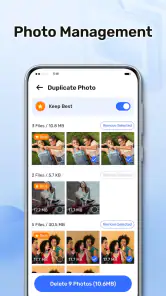
For someone moving from another cleaner, the decision depends on what that other tool does well. If I rely on duplicate detection, cloud integration, secure file shredding, or detailed folder operations, I should not assume CleanPro replaces those functions. Its value is concentrated in storage visibility, large-file cleanup, and app organization. Switching makes sense when those are the tasks I actually need.
Privacy-minded and cautious use
Any app that helps inspect storage deserves careful handling. I would read each confirmation screen, avoid deleting unfamiliar folders, and keep important files backed up. I would also resist the common temptation to remove every item labeled as temporary. Some cached or downloaded content may improve offline use, and clearing it can lead to extra downloads later.
The same caution applies to uninstalling apps. Before removing one, I would consider saved drafts, local databases, downloaded language packs, and account access. If an app has not been opened recently but contains information I may need, I would preserve that information first. CleanPro can make the candidate list easier to review, but it cannot know the personal value of every item.
My practical rule is simple: use the app for discovery, use my own judgment for selection, and use a backup for anything irreplaceable. That approach avoids both extremes—doing nothing until storage is full or deleting aggressively without understanding the consequences.
My recommendation for different Android users
I would recommend CleanPro to Android users who want a dedicated, uncomplicated way to inspect large files and review installed apps. It is especially sensible for people who frequently accumulate videos, downloads, or short-lived apps and would rather work from one cleanup routine than visit multiple system menus. Its free price and Everyone rating also make it easy to try without turning the decision into a purchase commitment.
I would be more cautious with users whose phones already have excellent storage controls or who need advanced file management. In those cases, the built-in settings or a full file manager may be more appropriate. I would also steer away from any cleanup approach that encourages automatic deletion without review, regardless of which tool is being used.
Overall, CleanPro is a practical choice when the problem is disorganization rather than mysterious performance issues. It can help me find the files that matter most to storage usage and make an informed pass through apps I no longer need. It does not eliminate the need for backups, and it should not be treated as a magic speed booster. My clear recommendation is to use CleanPro as a controlled storage review tool, not as an unattended delete button.
After trying the workflow, I would keep it if it helps me reach the right files faster than Android’s own menus. If it does not, uninstalling it and returning to system settings costs little because the app is free. That makes the decision straightforward: people who want a focused, human-guided cleanup routine should give it a chance, while users needing deep file operations or automatic backup should choose a different category of tool.
For my own use, its most convincing benefit is the combination of large-file discovery and app organization. Those are the areas where a crowded phone usually needs attention first. Used patiently, CleanPro from AJ IT Solutions is a sensible utility for keeping storage decisions visible, manageable, and under my control.
Pros
- Quickly removes junk files and temporary data.
- Simple interface makes cleaning tasks easy to understand.
- Can help free up storage space on older devices.
- Useful tools for identifying large or unnecessary files.
- Cleaning options can be reviewed before deleting anything.
Cons
- Some features may require a premium subscription.
- Deep scans can take longer on devices with large storage.
- Aggressive cleaning may remove files you wanted to keep.
- Battery usage can increase during scans and optimization.
- Frequent notifications may feel intrusive to some users.

- Category
- Tools
- Version
- 1.1.0











