CleanNow
- 13.00
- 4.7
- Installs
- 100.00K
- Price
- Free

Screenshots
Analysis by Reviewed
I usually notice storage problems at the worst possible time: when I am trying to record a video, install an update, or save a batch of photos. CleanNow is aimed at that exact frustration. It is a free Android tools app from Sudhakar Chippa that brings storage cleanup, large-file removal, screenshot management, and app organization into one place. After spending time with it, I see it as a straightforward maintenance tool rather than a dramatic system booster. Its value comes from making forgotten clutter easier to spot and deal with.
The app currently sits at version 1.0.7 and works on Android 8.0 or later, so it can reach a fairly broad range of phones. Its age rating is Everyone, which fits the simple purpose and uncomplicated interface. With a 4.7 average from around 500 ratings and more than 100K installs, it has already attracted a useful early audience. Those figures suggest that people understand the basic idea quickly, although they do not replace trying the cleanup process yourself.
How CleanNow feels in everyday use
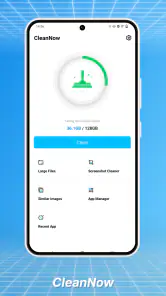
The first thing I liked is that CleanNow focuses on decisions I can actually make. Instead of treating storage as an abstract percentage, it directs attention toward categories that commonly become messy: oversized files, screenshots, and installed apps. That keeps the experience less intimidating than opening a file manager and browsing through folders with unclear names.
For a typical user, the most useful routine is a short review before a trip or a major phone update. I would open the app, look for unusually large videos or downloads, remove screenshots that are no longer needed, and then check whether an old app is still worth keeping. This order matters. Large videos often free more space than dozens of small images, while screenshots are usually easier to judge quickly. App cleanup comes last because deleting an app can affect saved data or a workflow I still rely on.
CleanNow is not something I would leave running constantly. It makes more sense as an occasional inspection tool. A few minutes every couple of weeks can prevent the familiar situation where the phone suddenly reports low storage. The app is especially approachable for someone who does not want to learn the folder structure of Android but still wants more control than simply deleting random items from the gallery.
The important strength is guided visibility, not magic performance improvement. Removing unwanted files can create free space, but it will not turn an older phone into a faster model, repair a damaged storage chip, or solve every cause of sluggishness. I appreciate that distinction because cleanup applications are often judged unfairly when users expect them to fix problems unrelated to storage.
Large files are where the practical benefit appears
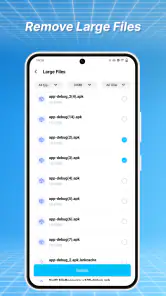
Large-file review is the part I would use first. A single long recording, downloaded film, or forgotten archive can occupy more room than an entire collection of ordinary documents. CleanNow makes that kind of clutter the first thing worth investigating, rather than asking me to remember which folder I used months ago.
My advice is to inspect the context before deleting anything. A large file may be an important work recording, an offline map, or a family video that has not yet been backed up. I would open or verify each candidate, keep anything irreplaceable, and only then remove the obvious leftovers. This is a small habit, but it prevents the most common mistake in storage cleanup: confusing “large” with “unimportant.”
There is also a useful trade-off here. A focused cleaner can save time, but it may encourage faster deletion than a full file manager would. If I am sorting years of personal media, I prefer a slower process with folders, dates, and backups. If I simply need to find the handful of files consuming disproportionate space, CleanNow is the more convenient starting point.
Screenshot cleanup solves a different kind of clutter
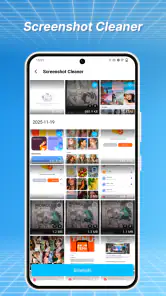
Screenshots deserve their own attention because they accumulate quietly. I take one to remember a payment reference, compare a product, save a conversation detail, or keep directions for a few minutes. Later, many of them become useless, yet they remain mixed with photos I want to preserve. A dedicated screenshot view changes the task from “sort my whole gallery” to “decide which temporary notes can go.”
I found this category particularly useful for people who use screenshots as a personal clipboard. Before deleting, I would check whether the information has been copied somewhere else. A screenshot containing a booking code may no longer matter after the journey, while a screenshot of a receipt may still be needed. CleanNow can make the candidates visible, but the judgment remains mine.
One practical workflow is to clean screenshots after finishing a project rather than every day. For example, after comparing several purchases, I can review the related captures together and remove the obsolete ones in one pass. That reduces interruptions and makes it easier to recognize why each image exists. The app is therefore more helpful when used as a review station than as an automatic eraser.
Managing apps without losing useful habits
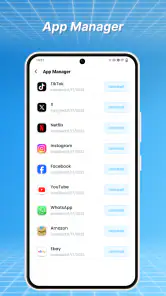
The app-management side is valuable when my phone has become a collection of experiments. I often install something for a single task, forget it, and then discover it months later. Seeing installed apps in a cleanup context encourages a more honest question: do I still use this, or am I keeping it because removing it feels inconvenient?
I would be cautious with apps that store local drafts, downloaded content, authentication details, or offline progress. Removing an app may also remove information associated with it, depending on how that application handles its data. CleanNow is best used to identify candidates, not to make every deletion decision on my behalf. I would keep communication, banking, travel, health, and work apps unless I already know how their data is preserved.
This is one area where the usual Android settings can be preferable. System settings are often better when I need detailed information about an individual app or want to manage a specific system component. CleanNow is more convenient for a broad sweep, while Android’s own controls remain the safer destination for a delicate, app-by-app investigation.
What the current version tells me
Version 1.0.7 places CleanNow in an early stage of its product life. I read that as a sign to value the focused foundation while keeping expectations sensible. The core direction is clear: help people identify storage pressure through large files, screenshots, and installed apps. That is enough for a useful utility, but it also means the quality of future refinement will matter.
For existing users, the current version should feel familiar rather than like a completely different product. The main benefit is continuity: once I learn where the important cleanup areas are, I can return to them without rebuilding a complicated system. That simplicity is a strength for occasional users, although people who want deep automation may eventually find the experience too narrow.
I would judge future progress by whether the app becomes more precise without becoming more confusing. Better grouping, clearer explanations before deletion, and safer review steps would improve the experience more than adding a long list of unrelated tools. A cleaner interface is useful only if it helps me make the right decision quickly.
Where CleanNow fits beside the usual alternatives
Android’s built-in storage controls are the obvious alternative. They are already part of the phone, so they are a sensible choice when I want system-level information or prefer not to install another utility. A file manager is better for detailed folder work, moving files to external storage, renaming items, and creating a personal archive. The gallery is usually the right place for careful photo organization.
CleanNow earns its place between those options. It gathers several common cleanup targets into a more approachable maintenance session. I do not need to remember which Android screen contains app management or search through folders for large downloads. In exchange, I give up some of the depth and control offered by dedicated tools. That is a fair trade for casual cleanup, but not for advanced file organization.
I would skip it if my main goal is automatic cloud backup, duplicate-photo analysis, secure file shredding, or detailed storage diagnostics. Those needs call for specialized tools or the phone’s own settings. I would also avoid relying on any cleaner as a substitute for a backup routine. A storage tool can help me find disposable material; it cannot make an unprotected personal file recoverable after an accidental deletion.
Small habits that make the app safer
I recommend starting with the least risky category. Screenshots that are clearly temporary are usually easier to verify than app data, and obvious large downloads are easier to recognize than files with generic names. After each deletion group, I would pause and check the available space rather than selecting everything in one sweep. This makes mistakes easier to catch and shows which category actually helped.
I would also avoid cleaning during a rushed moment. If I am standing at an airport gate or trying to install an urgent update, I may be tempted to remove files without checking them. A better approach is to use CleanNow earlier, when I have time to review names and previews. The app becomes much more useful when it supports a calm decision instead of an emergency purge.
Another good habit is to treat app removal as a separate session. Large files and screenshots can often be evaluated visually, but uninstalling an app may affect a longer-term workflow. I would first remove clearly abandoned experiments, then restart the phone or revisit the app list later. That two-step approach reduces the chance of deleting something I only use occasionally.
Who will appreciate it most
CleanNow is a good match for Android users who regularly run out of space but do not enjoy manual housekeeping. It should also suit people who take many screenshots, download media for temporary use, or install apps for one-off tasks. Families sharing a phone-management habit may find its focused categories easier to explain than a general file browser.
It is less compelling for someone who already has a disciplined folder system and routinely manages storage through Android settings. Power users may want duplicate detection, advanced filters, batch rules, or automation that goes beyond the focused cleanup areas here. If those capabilities are essential, a specialized file-management solution will probably be a better fit.
The free price lowers the barrier to testing it, and the Everyone rating makes it approachable for a broad audience. Still, free does not mean that every deletion is risk-free. I would install it because it simplifies discovery, not because I expect it to make independent decisions about personal files.
What I would watch as the app develops
The next stage for CleanNow should be about trust and clarity. I would want every cleanup suggestion to make its reason obvious, especially when a file name is vague or an app may contain local information. The more confidently the app explains what I am reviewing, the more comfortable I become using it regularly.
I would also watch how well it balances convenience with control. A useful cleaner should reduce repetitive searching while leaving the final decision visible and understandable. If future changes add more categories, they should remain connected to the central storage problem rather than turning the app into a crowded toolbox.
For now, my view is positive but practical. CleanNow will not replace Android settings, a file manager, a gallery, or a backup service, and it should not pretend to. What it does well is bring three familiar cleanup jobs into one focused place. If your phone is full of forgotten screenshots, oversized downloads, and apps you no longer recognize, CleanNow is a sensible first inspection step. I would use it periodically, review every deletion, and choose a deeper alternative only when my storage needs go beyond simple cleanup.
Pros
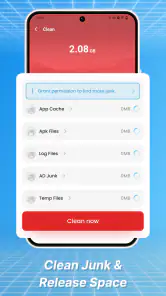
- Quickly removes junk files and temporary data.
- Simple interface makes cleaning easy for beginners.
- Helps free up storage space for photos and apps.
- Useful battery and memory tools in one place.
- Provides clear results after each cleaning scan.
Cons
- Some features may require a premium subscription.
- Cleaning suggestions can occasionally include unnecessary files.
- Frequent notifications may feel intrusive to some users.
- Background tools can use additional battery resources.
- Performance benefits may vary between different devices.

- Category
- Tools
- Version
- 1.0.7











