

ClassiPod
- 91.00
- 3.9
- Installs
- 100.00K
- Price
- Free

Screenshots
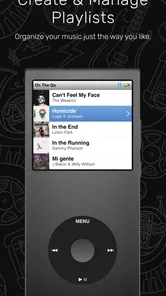
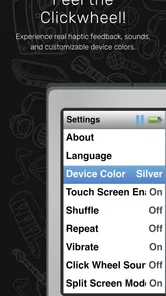
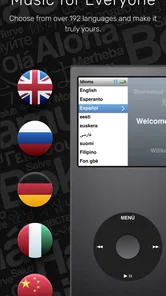
Analysis by Reviewed
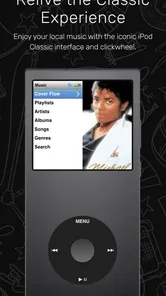
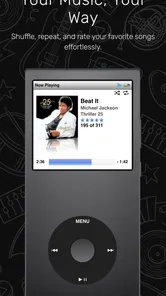
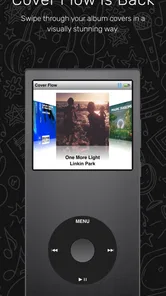
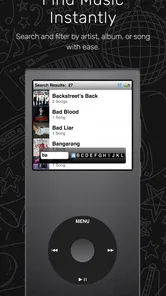
I have a soft spot for music players that stay out of the way, and ClassiPod makes a very clear argument for that kind of listening. Developed by Adeeteya, this free Music & Audio app is built around the feel of an iPod Classic while playing music stored locally on an Android device. Its appeal is not endless discovery, recommendations, or a cloud library. It is the simple pleasure of opening a personal collection and moving through it with a more deliberate, old-school interface.
After spending time with it, my view is straightforward: ClassiPod is most enjoyable when you already keep music on your phone and want a focused player instead of a streaming service. It gives local files a sense of occasion, particularly if you miss browsing by artist, album, and song rather than waiting for an algorithm to decide what comes next. At the same time, that narrow purpose is also its biggest limitation. Anyone expecting streaming access, a huge online catalog, or the convenience of a modern all-in-one music service should look elsewhere.
Why the iPod-inspired approach works
The central idea is easy to understand. ClassiPod tries to capture the character of the iPod Classic rather than imitate a typical contemporary Android audio app. That distinction matters because many current players treat a music library as a flat list or place streaming content at the center. Here, the experience feels more like browsing a collection you own.
That change in emphasis affects how I listen. With a streaming app, I often begin with a search box, a playlist, or a recommendation. With ClassiPod, I am more likely to think about an album I downloaded, an artist I have not played recently, or a group of songs I deliberately copied to my phone. The interface encourages a slower choice, which can be refreshing when I do not want another feed competing for attention.
The iPod reference is also more than a visual novelty. It gives the application a recognizable personality. A standard local player can be perfectly functional but forgettable; this one has a point of view. If you remember using a click-wheel player, or simply like compact interfaces that make a personal library feel organized, the design direction is immediately appealing.
Still, I would not recommend choosing it solely because of nostalgia. The real question is whether your listening habits match a local-first workflow. If your music is already saved on the device, the concept has practical value. If nearly everything you hear comes from a streaming subscription, the retro presentation will not make up for the missing catalog.
Local listening is the real test
ClassiPod makes the most sense for people who maintain their own files. That might include albums purchased as downloads, music transferred from a computer, recordings kept for offline use, or a carefully edited collection that does not depend on an internet connection. In those situations, the app gives a dedicated home to music that can otherwise get buried among folders and unrelated media.
More From Our News Desk

 Gmail
GmailGmail in a Busy Inbox: Who Benefits Most?
From first account to crowded workday, Gmail earns its place through dependable search and flexible sorting—but its best fit depends on how much inbox maintenance you can tolerate.

 Prime Video
Switching to Prime Video: What Changes in Your Viewing Routine
Prime Video can make a compelling second home for streaming, but switching means learning a different catalog, rental layer, and route from browsing to playback.

 Universal TV Remote Control
Universal TV Remote Control Works Best as a Reliable Backup
A phone remote earns its place through quick setup and reliable habits. Here is how to get more from Universal TV Remote Control—and where its limits show.

 Weather - By Xiaomi
Weather by Xiaomi Review: Clear at a Glance, Less Clear Up Close
Xiaomi’s weather app makes everyday forecasts quick to scan, but its calm surface can leave useful details and recovery paths harder to find than they should be.

 X
XX Under Pressure: Can It Recover When Posting Goes Wrong?
A resilience-focused review of X, examining setup, mistaken posts, interruptions, weak connections, and the gaps that matter when recovery needs to be dependable.

 Clash of Clans
Clash of Clans Is Won Between the Battles
Its raids are quick; its community is a long-term project of coordination, teaching, rivalry, and shared responsibility—with all the friction that entails.
Latest News



A realistic example is a commute through an area with unreliable reception. Before leaving, I would place a few albums on the phone, open the player, and choose something from the collection without worrying about signal strength or a service changing its catalog. The benefit is not dramatic technology; it is predictability. The songs I expect to have are the songs available to play.
That same workflow suits travel. A long flight, a train journey, or a weekend away can be easier when the music is already on the device. Streaming apps often handle downloads well, but those downloads remain tied to their service and account. A local player takes a different approach: once the files are present, the listening experience is centered on the device itself.
There is also a useful separation between music and online distractions. I can listen without browsing artist pages, checking recommendations, or being nudged toward something unrelated. For people who use music to concentrate, read, or settle down before sleep, that reduced scope may be a genuine advantage.
What I liked about the library experience
The strongest part of the app is the way it encourages intentional browsing. I found myself treating albums as complete objects instead of skipping through isolated tracks. That is a small but meaningful difference from the usual streaming habit, where the next song is often chosen by a playlist or an automated queue.
It is also a good fit for listeners who have already done the work of organizing their files. A tidy library makes any local player easier to use, and ClassiPod benefits from clear artist, album, and track information. If your collection has inconsistent names or incomplete artwork, the experience can feel less polished because the app is presenting the material you supplied rather than replacing it with a fully managed online catalog.
This leads to one of my most practical tips: prepare the collection before judging the player. Group albums consistently, check that track information is readable, and remove duplicate files if your library has accumulated them over time. That preparation is not a special requirement unique to this app, but its classic-library approach makes organization more visible. A carefully maintained collection feels rewarding; a messy one becomes part of the interface.
Another useful habit is to keep a small selection ready for specific situations rather than copying everything at once. A travel folder, a focus folder, and a favorite-albums folder can make local browsing much quicker. The app is at its best when the library feels curated, not when it is treated as a dumping ground for every audio file on the phone.
The important trade-off: charm versus modern convenience
ClassiPod’s focused design is refreshing, but it also means the app is not trying to replace every music service. A streaming application remains the better choice when I want to discover unfamiliar artists, follow new releases, search a broad catalog, or move between devices through an account. Those services are built around availability and discovery, while this player is built around possession and browsing.
A more conventional Android music player may also be preferable for someone who wants a large settings panel, extensive playback customization, or a utilitarian file-by-file approach. ClassiPod’s identity is tied to its iPod-like presentation, so users who prefer maximum control may find the experience less flexible than a feature-heavy alternative.
The trade-off is not automatically negative. More features can make a player harder to understand, and a giant settings menu is not useful to everyone. I would rather see ClassiPod commit to its focused idea than turn into a crowded imitation of a streaming platform. The important thing is to choose it with the right expectations.
Where the experience can become frustrating
The main weakness is the dependence on a local collection. If your music is not already stored on the device, the app cannot provide the instant gratification that people associate with streaming. The first step becomes finding, transferring, and organizing files. For some listeners, that is part of the fun; for others, it is unnecessary work.
There is a second kind of friction in the classic approach: browsing is pleasant when you know what you want, but less helpful when you do not. I can move through an owned library with purpose, yet I will not receive the same discovery assistance I would get from a service built around mixes and recommendations. Someone who chooses music by mood without maintaining a personal collection may quickly run out of reasons to open the app.
Library cleanliness matters as well. Local players depend heavily on the quality of the files and their embedded information. Missing album details, unusual naming, or duplicate tracks can make navigation feel confusing. This is not a reason to reject ClassiPod, but it is a reason to understand where responsibility sits: the app presents your collection, while you remain responsible for making that collection coherent.
I also think the retro concept will divide users. Some people will find it warm and distinctive; others will see it as an unnecessary layer over ordinary playback. If you have no interest in the iPod Classic style, the interface may feel like a theme rather than a meaningful improvement. In that case, a simpler local player may be a better match.
Who should install it
I would recommend ClassiPod to listeners who own music files, prefer offline playback, and enjoy navigating a library instead of being guided by a recommendation engine. It is particularly suitable for someone rebuilding a personal collection after years of relying on streaming, or for a listener who wants a separate space for albums that matter to them.
It could also work well for a family member who wants a straightforward music app without signing up for a streaming ecosystem. The Everyone content rating makes it broadly approachable, and the free price removes the need to make a financial commitment before trying the idea. The application supports Android devices running version 7.0 or later, which covers a wide range of phones still in use.
I would be more cautious about recommending it to a person whose entire library lives online. If you mainly ask for new music, follow editorial playlists, or expect synchronized listening across several devices, a mainstream streaming app will be more useful. The same applies to listeners who do not want to manage files, artwork, or library organization themselves.
It is also not my first suggestion for someone searching for a professional audio toolkit. ClassiPod’s strongest quality is the way it frames local listening, not the promise of an exhaustive set of studio or audiophile controls. Its value comes from the relationship between the interface and the collection, not from trying to satisfy every possible technical preference.
How the current release fits into the picture
The app reached Android users on March 26, 2025, and the current version is 1.12.0. That places it in a relatively recent stage of its life, which is worth remembering when comparing it with long-established players that have had years to accumulate options and compatibility work. I see that as a reason to evaluate the core experience rather than expect the breadth of a mature streaming platform.
Its adoption is already meaningful for a focused utility, with over 100 thousand installs. The average rating is 3.9 from around 974 ratings, alongside roughly 91 written reviews. I would read those figures as a sign of a product people are trying and discussing, but not as proof that it will suit every library or phone. Local playback experiences can vary depending on how a person stores music, so personal testing remains important.
The developer, Adeeteya, has chosen a narrow concept instead of presenting another generic music player. That gives the app a stronger identity than many alternatives, but it also raises the standard for execution. When an application promises an iPod-inspired experience, small details in navigation and library presentation matter more than they would in a basic file player.
My practical way of using it
If I were setting it up for regular use, I would begin with a manageable collection rather than importing every audio file immediately. I would choose a few complete albums and some dependable favorites, then check how naturally I could move between them. This reveals whether the browsing style fits my habits before I spend time reorganizing a larger library.
For daily listening, I would use it when I already know the kind of music I want: an album for a walk, a familiar set for work, or offline tracks for travel. I would switch to a streaming app when I wanted to explore something new. That combination makes more sense to me than demanding one application handle both jobs equally well.
A further tip is to think of the phone as a small personal jukebox, not a backup of an entire computer library. A selected collection is easier to browse and less likely to bury the music I actually want. The iPod-inspired design becomes much more convincing when the device feels intentionally stocked.
I would also keep expectations realistic around file management. The app can make listening to local music more enjoyable, but it does not remove the need to understand where those files came from or how they are arranged. Anyone willing to spend a little time on that preparation is more likely to appreciate the result than someone looking for instant setup.
My verdict
ClassiPod is a focused local music player with a clear personality, and its best feature is the way it makes an owned collection feel worth browsing. I like that it does not pretend to be a complete streaming replacement. Instead, it offers a calmer alternative for people who want their music on the device, available offline, and presented with an iPod Classic-inspired sense of purpose.
The limitations are equally clear. It is less suitable for discovery, cloud-based libraries, and listeners who do not want to organize files. Its retro direction will appeal strongly to some people and barely matter to others. Those are not minor details; they determine whether the app feels thoughtful or restrictive.
For me, the recommendation is specific: install it if you have local albums and miss choosing music from a personal library. Give it a fair test with a small, well-organized collection, especially if you travel or often listen without a reliable connection. Skip it if your priority is a vast online catalog, automated recommendations, or seamless streaming across multiple services. Used for the job it was designed to do, ClassiPod is a pleasing reminder that a music app does not need to be enormous to make listening feel personal.
ClassiPod Frequently Asked Questions
Does ClassiPod work on my device?
ClassiPod is a Music & Audio app for Android, with a minimum operating system requirement of version 7.0. Before downloading, check your device’s Android version and make sure it meets that requirement. The app’s focus is local music playback, so consider whether that suits the way you listen to music and the features you expect from a player.
What kind of music app is ClassiPod?
ClassiPod is a local music player app designed to capture the essence of the iPod Classic. It is intended for listening to music stored on your device, rather than serving as an educational tool or a platform for class materials. If you enjoy a classic music-player feel and want an app centered on your local music, ClassiPod may be worth exploring.
What is ClassiPod, and what can I use it for?
ClassiPod is an educational application designed to help students organize and access class-related content in one place. Depending on the available version and your institution’s setup, it may include lessons, study materials, assignments, announcements, schedules, or communication tools. It is best suited to learners who want a more convenient way to follow their academic activities from an Android or iOS device.
Is ClassiPod free to download and use?
The application may be available to download at no initial cost, but some features can depend on your school, course provider, account type, or subscription arrangement. Before installing it, check the official store listing and any information supplied by your institution. Also review possible in-app purchases, premium tools, or access requirements, since availability and pricing can vary by region and platform.
Do I need an account or an invitation from my school to use ClassiPod?
In many educational platforms, users need to sign in with an account created by a school, teacher, organization, or course administrator. ClassiPod may therefore require registration details, an invitation code, or credentials supplied by your institution. If you can install the app but cannot access its main features, contact the relevant administrator rather than creating multiple accounts or entering incorrect information repeatedly.
Pros
- Simple interface makes browsing classic music easy.
- Supports playlists for organizing favorite tracks.
- Lightweight design uses little storage space.
- Quick search helps locate songs and artists efficiently.
- Familiar iPod-style layout feels nostalgic and accessible.
Cons
- May lack advanced features found in modern music players.
- Compatibility with newer audio formats may be limited.
- The interface can feel dated on larger phone screens.
- Playlist management may be basic for extensive music libraries.
- Some features may depend on locally stored music files.











