

CircleIn- Circle in Daily
- 366.00
- 2.9
- Installs
- 10.00K
- Price
- Free

Screenshots
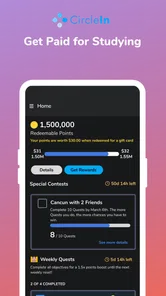
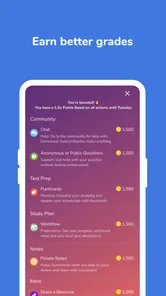

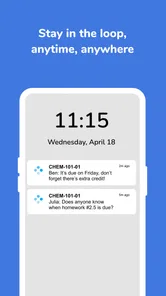
Analysis by Reviewed
Starting a new study app can feel awkward because the value usually depends on what happens after installation. CircleIn is designed around a simple idea: students can connect with classmates about homework and also interact with students beyond their own school community. In my experience, that makes it more useful as a place to get unstuck than as a traditional lesson app. It does not replace a textbook, teacher, or carefully structured course, but it can add a social layer when a problem is taking too long to solve alone.
CircleIn is a free education app from CircleIn Inc. It is aimed at students, carries an Everyone age rating, and has been available since August 9, 2017. The current Android release is version 3.15.1 and requires Android 7.0 or later. The app has passed the early-experiment stage, with over ten thousand installs, although its average rating sits at 2.9 from around four hundred ratings. That combination tells me to approach it with realistic expectations: there is a useful idea here, but the experience may depend heavily on how active and helpful the available student community is.
What to expect when you open CircleIn
The most important thing to understand before signing in is that CircleIn is not primarily a private answer key. Its appeal comes from connecting with people around schoolwork. You may use it to ask about a confusing assignment, compare approaches, or find encouragement when studying feels isolating. The quality of the result depends on how clearly you explain the question and whether the right people are available to respond.
That social design changes the way I would use it. If I wanted a complete, sequential mathematics course, I would choose a dedicated learning platform. If I wanted a quick definition, a search engine might be faster. CircleIn sits between those options: it is better suited to the moment when I understand the general topic but need another student’s explanation, a second way to approach the task, or help deciding what to try next.
The nationwide angle is potentially valuable for subjects where classmates share the same workload but not always the same strengths. A student in one school may receive a useful explanation from someone studying the same subject elsewhere. At the same time, a broader community can mean more variation in answer quality. I would treat replies as study guidance rather than automatically correct solutions, especially for questions involving calculations, essay interpretation, or assignment rules set by a particular teacher.
CircleIn is also not the right choice for someone who wants completely silent, individual study. The central concept involves interaction, so users who dislike asking questions publicly or waiting for responses may find a focused flashcard or note-taking app more comfortable. I would also skip it as a first choice if the main goal is exam preparation through a fixed curriculum. Its strength is the conversation around schoolwork, not a guaranteed sequence of lessons.
How I would prepare before the first question
After installing the app, I would begin by deciding what kind of help I actually need. “I do not understand this chapter” is difficult for another student to answer. A narrower request such as “I know which formula to use, but I do not understand why the second step changes the sign” gives the conversation a clear starting point. This is one of the easiest ways to improve the usefulness of a community study app without needing any advanced technique.
More From Our News Desk

 Gmail
GmailGmail in a Busy Inbox: Who Benefits Most?
From first account to crowded workday, Gmail earns its place through dependable search and flexible sorting—but its best fit depends on how much inbox maintenance you can tolerate.

 Prime Video
Switching to Prime Video: What Changes in Your Viewing Routine
Prime Video can make a compelling second home for streaming, but switching means learning a different catalog, rental layer, and route from browsing to playback.

 Universal TV Remote Control
Universal TV Remote Control Works Best as a Reliable Backup
A phone remote earns its place through quick setup and reliable habits. Here is how to get more from Universal TV Remote Control—and where its limits show.

 Weather - By Xiaomi
Weather by Xiaomi Review: Clear at a Glance, Less Clear Up Close
Xiaomi’s weather app makes everyday forecasts quick to scan, but its calm surface can leave useful details and recovery paths harder to find than they should be.

 X
XX Under Pressure: Can It Recover When Posting Goes Wrong?
A resilience-focused review of X, examining setup, mistaken posts, interruptions, weak connections, and the gaps that matter when recovery needs to be dependable.

 Clash of Clans
Clash of Clans Is Won Between the Battles
Its raids are quick; its community is a long-term project of coordination, teaching, rivalry, and shared responsibility—with all the friction that entails.
Latest News



I would also keep the original assignment, notes, or textbook page open while using CircleIn. That lets me describe the exact point of confusion instead of reconstructing it from memory. For writing assignments, I would explain the prompt and ask for feedback on my reasoning rather than asking someone to produce the response. That approach protects the learning value and makes it easier to tell whether a reply genuinely addresses the task.
Because the app connects students, I would avoid sharing personal details that are unrelated to the homework. A subject, topic, and question are usually enough to begin. I would not post private school information, contact details, or anything that a teacher has marked as confidential. The practical rule is simple: share the academic problem, not your whole identity.
Getting through the first setup without overthinking it
The first setup should be approached as a way to make the app useful quickly, not as a form-filling exercise. I would use an account identity that makes it easy for other students to recognize the academic context, then look for the areas connected to my current classes or immediate study needs. If the app presents choices about subjects or communities, I would select only the ones I am likely to use soon. A smaller, relevant starting point is easier to understand than a crowded collection of topics.
My advice is not to spend the first session browsing endlessly. The store summary promises a way to circle in with classmates on homework and connect with students nationwide, but browsing alone does not test whether the app fits your routine. A better first session is short and purposeful: identify one current assignment, find the appropriate academic space, and prepare one precise question.
There is a useful trade-off here. Choosing broad interests may expose you to more possible conversations, while choosing only a narrow subject area can make the feed easier to follow. For a first-time user, I prefer relevance over volume. If the opening experience feels quiet, I would not immediately assume the app is broken; the available activity may simply vary by subject, time, or the number of students currently looking at that topic.
Before relying on the app for an urgent deadline, I would test the basic flow with a low-pressure question. That reveals how comfortable the posting process feels and whether responses arrive quickly enough for my schedule. It also prevents a common mistake: waiting until the night before an important submission to discover that a social study tool works best when there is time for a conversation to develop.
The first meaningful success: ask, check, and apply
My recommended first action is to post one question that includes three pieces of context: the subject, the step that caused trouble, and what you have already tried. For example, instead of asking for the answer to a science problem, I would identify the concept, describe my current interpretation, and point out the result that seems inconsistent. This gives another student something concrete to respond to and shows that I am trying to learn rather than outsource the assignment.
When a reply arrives, I would compare it with my notes and then attempt a similar problem without copying the wording. That is the point at which CircleIn becomes genuinely useful. A response is only valuable if it helps me perform the next step independently. If the explanation makes sense, I would acknowledge the helpful part and, if necessary, ask one focused follow-up instead of restarting the entire question.
A realistic everyday scenario would be a student working on homework after school who can complete the first half of an exercise but keeps making the same mistake in the final step. The student posts the exact transition that causes trouble, receives another way to think about it, and then tries a comparable exercise from the worksheet. In that situation, the app is not replacing instruction; it is shortening the period of confusion between class and independent practice.
Another practical use is checking your study plan with peers. If I have several assignments and cannot decide which topic to review first, a short conversation with students working through similar material may reveal which concept is causing the most difficulty. I would still make the final decision myself, but the community can provide perspective that a solitary checklist cannot.
One non-obvious advantage of this workflow is that writing the question often exposes the real problem. I may begin by thinking I need help with an entire unit, then realize that the difficulty is one definition or one skipped step. CircleIn works best when I use the act of asking as a diagnostic tool rather than treating the app as a button that produces an answer.
Where first-time users can become confused
The biggest possible confusion is expecting every interaction to behave like an instant search result. A student community cannot guarantee that the first response will be immediate, complete, or correct. If a question is urgent, I would use CircleIn alongside my class materials and another reliable source rather than making it the only support available.
A second source of friction is the difference between a helpful explanation and a confident-sounding answer. Students may use different methods, abbreviations, or assumptions. For mathematics and science, I would verify the reasoning by working through the steps. For history or literature, I would compare interpretations with the assignment prompt and course material. The app can broaden my understanding, but it does not remove the need for judgment.
There is also a social learning curve. Some users are comfortable posting publicly, while others worry that their question sounds too basic. In my experience, the best way around that hesitation is to make the question specific and honest. Saying exactly where the reasoning stopped is more useful than trying to sound advanced. The app’s value comes from making academic exchange practical, not from performing expertise.
I would also avoid turning every conversation into a request for completed work. That can produce a short-term result while leaving the original gap untouched. A better prompt asks for a hint, an explanation of a method, or feedback on an attempted solution. This is especially important for essays and take-home assignments, where the student needs to retain ownership of the final work.
The rating of 2.9 is worth keeping in mind when deciding how much patience to bring to the experience. It does not tell me that every session will be frustrating, but it does suggest that the app may not feel equally polished or useful for everyone. I would give it a fair trial with a real study question, then judge it by whether the conversations improve my understanding rather than by the promise of the concept alone.
Using classmates and the wider student community differently
Classmates and nationwide students serve different purposes. Classmates are more likely to understand the teacher’s wording, the class pace, and the expectations around a particular assignment. Students elsewhere may offer a fresh explanation or know another method. I would start locally when the question depends on classroom context, then look more broadly when I need a different perspective on the underlying subject.
This distinction gives CircleIn a practical role that ordinary group chats do not always provide. A class chat can be fast, but it may become dominated by reminders, jokes, or repeated requests for answers. A study-focused environment has a better chance of keeping the conversation tied to the academic problem. Still, I would not assume that every discussion is automatically organized or equally deep; I would guide the interaction by asking focused questions and summarizing what I still need.
Compared with a private tutor, CircleIn is more accessible in the sense that it is free and peer-based, but it cannot offer the same consistency or individualized progression. Compared with a search engine, it can provide human context, yet it may take longer and require more careful checking. Compared with flashcards, it is better for confusion that needs explanation and worse for repetitive memorization. Those differences make the choice fairly clear: use CircleIn when another person’s perspective is likely to unlock the problem.
One useful trade-off is speed versus perspective. A search may give me a definition in seconds, while a student conversation may take longer but reveal why I misunderstood the idea. I would use the faster option for a simple fact and CircleIn for a conceptual obstacle. Mixing tools this way keeps the app from being judged unfairly for something it was not designed to do.
How to turn one helpful reply into a study habit
After the first successful exchange, I would save the useful idea in my own notes using my own wording. I would record the mistake, the corrected reasoning, and one small example. This step matters because a community answer can disappear into a busy feed, while a personal note becomes part of a revision system. CircleIn starts the learning conversation; my notes preserve the result.
I would then return with a follow-up only when it adds something new. A good follow-up might ask why a method works in a different example or whether an alternative approach is valid. Repeating the same question in slightly different language creates noise and does not build understanding. The goal is to move from receiving help to testing whether I can use it.
Another advanced but simple workflow is to use the app before asking a teacher, not instead of asking a teacher. If peer discussion clarifies the basic concept but leaves a question about the course requirement, I would bring that precise question to the teacher. This makes the teacher conversation more efficient and avoids presenting an unverified peer answer as settled fact.
I would also pay attention to the subjects where CircleIn actually helps me. Some students may find the social format excellent for problem-solving but less useful for memorizing vocabulary. Others may benefit from peer explanations in writing or science. After a few sessions, I would keep the app in the parts of my routine where it produces a clear improvement and stop opening it out of habit when a notebook or reference source is faster.
Who should try it, and who should choose something else
I recommend CircleIn to students who learn well through discussion, can describe a problem clearly, and want support between formal lessons. It is particularly suitable for someone who often reaches a specific sticking point rather than needing an entire course from the beginning. The free price also makes it easy to test without committing to a paid tutoring service.
I would be more cautious for students who need guaranteed expert instruction, immediate answers, or a strict study sequence. A dedicated course platform is a better fit for structured exam preparation, while a tutor may be preferable when mistakes have serious consequences or the material is far beyond the student’s current level. Someone who strongly prefers private study may also find a focused productivity or revision app less distracting.
The Everyone rating makes the app broadly approachable, but younger students should still use sensible online boundaries and involve a trusted adult when something feels uncomfortable. The same advice applies to any student community: keep conversations academic, avoid unnecessary personal information, and verify important guidance through class materials or a teacher.
For iPhone and iPad users, I would check the relevant Apple storefront for availability before planning a study routine. Android users should make sure their device meets the Android 7.0 requirement. In either case, I would test the app with a modest question first, because the real value is not simply having it installed; it is finding out whether the available student conversations fit the subjects and schedule I actually have.
My final take after using it as a study companion
CircleIn is most convincing when I treat it as a bridge between “I am stuck” and “I can try the next step.” Its peer-centered approach can make homework feel less solitary, and the connection between classmates and students nationwide gives users more than one possible perspective. The strongest results come from precise questions, active checking, and applying the explanation to a fresh example.
It is not a replacement for a teacher, tutor, textbook, or structured learning course. Activity, response quality, and usefulness may vary, and the average rating of 2.9 means I would not recommend relying on it blindly. Still, I think it is worth a careful trial for students who want conversational help with real assignments and are willing to participate rather than wait for automatic solutions.
My suggested path is straightforward: install it, choose a current subject, prepare one narrow question, and test the answer by solving a similar problem yourself. If that first exchange helps you understand the method instead of merely completing the task, keep it as part of your study toolkit. If you need a fixed curriculum or guaranteed expert feedback, choose a more specialized alternative. The best reason to use CircleIn is not convenience alone, but the chance to turn a specific moment of confusion into an explanation you can actually use.
CircleIn- Circle in Daily Frequently Asked Questions
What is CircleIn – Circle in Daily, and what can I use it for?
CircleIn – Circle in Daily is designed to help users stay connected, organized, and engaged through a shared social experience. Depending on the available features, you may use it to communicate with people in your circles, share updates, follow daily activities, or participate in group interactions. Before downloading, review the app’s current description and supported features, since functionality can vary between Android and iOS versions.
Is CircleIn – Circle in Daily free to download and use?
The application may be available as a free download, but some features, services, or content could require in-app purchases, a subscription, or payment through another platform. We recommend checking the store listing carefully before installing it, especially the pricing section and subscription terms. Also verify whether the free version includes the tools you need or only provides limited access to the main experience.
Does CircleIn – Circle in Daily require an account or personal information?
Many social and communication applications require users to create an account so they can save preferences, connect with others, and access their information across devices. CircleIn may request details such as an email address, phone number, username, profile information, or permission to send notifications. Read the privacy policy before registering, and only provide information you are comfortable sharing with the service.
Can I control who sees my information or activity in CircleIn?
Privacy controls are especially important in an app built around circles, groups, or daily sharing. Before using CircleIn, explore its profile, visibility, invitation, blocking, and notification settings. Check whether posts or activities can be limited to selected contacts or groups, and confirm what information is visible by default. Avoid sharing sensitive personal details until you understand the app’s audience and privacy options.
Will CircleIn – Circle in Daily work on my Android or iPhone?
Compatibility depends on your device model, operating system version, region, and the app’s current technical requirements. Check the official Google Play Store or Apple App Store listing before downloading to confirm supported versions and available features. A stable internet connection may also be necessary for account access, messaging, synchronization, or shared content, while older devices could experience slower performance or limited support.
Pros
- Simple interface makes daily check-ins quick and easy.
- Encourages consistent self-reflection through regular journaling.
- Helpful for spotting changes in mood and daily habits.
- Personal entries can support better emotional awareness over time.
- Useful as a lightweight companion for building mindful routines.
Cons
- Benefits depend on using the app consistently over time.
- May feel too basic for users wanting advanced wellness tools.
- Daily prompts may become repetitive after extended use.
- Limited value for users who prefer detailed progress analytics.
- Should not replace professional help for serious emotional concerns.











