Circle 1st generation
- 1.96K
- 1.7
- Installs
- 500.00K
- Price
- Free

Screenshots
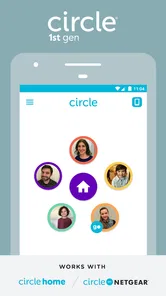
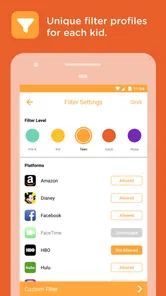
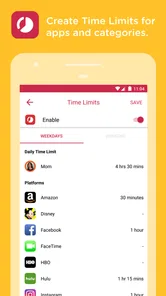
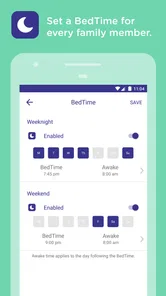
Analysis by Reviewed
Circle 1st generation is a lifestyle app with a very specific job: it is designed to be used with Circle with Disney hardware. I approached it less like a general family-management app and more like the control panel for an older connected-home setup. That distinction matters, because the experience depends heavily on whether you already use the first-generation Circle device. Without that hardware, there is little reason to keep this app on your phone.
My first impression was that the app makes the most sense as part of a repeatable household routine. Instead of opening it only when something goes wrong, I would use it to check the connected Circle setup, adjust the controls that matter for the day, and then leave it alone. That approach keeps the app from becoming another screen constantly demanding attention. It is a practical tool, but not a broad digital-wellbeing platform that stands on its own.
How Circle 1st generation fits into everyday family routines
The app comes from Aura Sub LLC and is listed as a free lifestyle app for everyone. It was released on May 18, 2016, and the current version is 2.1.15.1, with Android 6.0 or later required. Those details place it firmly in the category of an older companion app rather than a newly designed parental-control service. I would keep that context in mind before installing it, especially if you expect the polish, visual clarity, and device support of a modern app.
The basic workflow is straightforward in concept. You use the app alongside Circle with Disney, review the connected setup, and make changes from the phone instead of treating the hardware as a completely separate object. In a family setting, that can be useful because the person managing the home does not need to handle every adjustment from the same room as the device. The value is in having a central place for the controls that belong to that first-generation system.
A realistic example would be a parent preparing for a school night. Earlier in the day, I would check the current setup, make sure the household rules are appropriate for the evening, and avoid changing several things at once. When bedtime approaches, I would make the one adjustment that matters rather than repeatedly experimenting with settings. The app is better suited to this calm, planned workflow than to frantic troubleshooting while children are already asking for access.
That habit also makes the app easier for more than one adult to understand. If the household uses a consistent routine, the app becomes a shared reference point instead of a collection of improvised decisions. One person can make a change, explain what was changed, and return the configuration to its normal state later. This is one of the more useful practical lessons with an older companion app: consistency often matters more than constantly searching for additional controls.
What I would check before relying on it
The first question is not whether the app is free. It is whether you own and still use the compatible first-generation Circle equipment. The store summary specifically positions the app as something to use with Circle with Disney, while the short description identifies it as Circle 1st generation. That makes compatibility the starting point. If you are looking for controls that work directly with a phone, tablet, browser, or current Wi-Fi system without the original hardware, this is probably the wrong place to begin.
More From Our News Desk

Weather by Xiaomi Review: Clear at a Glance, Less Clear Up Close

X Under Pressure: Can It Recover When Posting Goes Wrong?

Clash of Clans Is Won Between the Battles

Android Auto Makes the Case for Quieter Car Software

MobiOffice: Transforming Mobile Productivity with Seamless Integration

EA SPORTS FC™ Mobile Soccer: Redefining Mobile Sports Gaming
I would also check the phone’s Android version before spending time setting everything up. The minimum requirement is Android 6.0, so an older phone may not qualify, while a newer phone may run it but still deliver an experience that feels dated. Compatibility with the operating system is only one part of the picture; the connected Circle equipment and the way your home network is arranged are equally important to the overall experience.
Another point worth considering is who will actually manage the app. This is not the sort of tool I would casually install on every family member’s phone. I would choose the adult or adults responsible for household settings, agree on a simple routine, and avoid making changes from multiple devices unless everyone understands the consequences. That reduces the chance of one person undoing another person’s adjustment without realizing it.
Settings that deserve a deliberate review
My advice is to begin with the settings you expect to use repeatedly, not with an attempt to explore every screen in one sitting. The first-generation experience is easier to manage when the household decides what “normal” looks like. For example, you might establish a standard weekday arrangement and treat special occasions as temporary exceptions. The important part is knowing which change is temporary and remembering to restore the usual setup afterward.
I would pay particular attention to how the app presents the connection between the phone, the Circle hardware, and the home network. If a control appears not to work, I would first confirm that the hardware is available and that the phone is operating in the same familiar household context used during setup. This is a better troubleshooting habit than repeatedly tapping the same command. Older companion apps can feel unreliable when the real issue is the connected device or network path.
The in-app purchase range is listed as $4.99 to $49.99 per item, so I would review any purchase screen carefully before confirming anything. The app itself is free, but free installation does not automatically mean every part of the experience is included without charge. I would treat the purchase flow as something to evaluate against the family’s actual needs, rather than assuming that paying will solve compatibility or usability problems.
That distinction is important. A purchase cannot turn first-generation hardware into a newer system, and it cannot guarantee that the app will match the expectations set by more recent parental-control products. I would only consider spending money after confirming that the relevant feature works with the equipment already in the home and that it addresses a real problem in the daily routine.
Shortcuts are really repeatable habits
Circle 1st generation does not need to be opened constantly to be useful. In my experience, the fastest pattern is to decide in advance when the app belongs in the day: perhaps during a morning check, before homework, and during the evening transition. The exact schedule should reflect the household, but the principle is the same. Fewer, intentional visits are easier to manage than continuous monitoring.
I would also avoid changing several settings simply because the app is open. When a family member asks for a temporary exception, I would make the smallest necessary adjustment, note mentally why it was made, and restore the regular arrangement when the exception ends. This creates a simple audit trail in your own memory. It is a surprisingly effective way to prevent temporary choices from becoming permanent by accident.
Another useful pattern is to keep the app’s role separate from conversation. Technical controls can support a family agreement, but they should not replace one. If a child knows that the household has a predictable routine, the app is less likely to feel like an invisible switch being pulled at random. I would explain the broad rule, use the app to apply it, and reserve the phone for management rather than turning every disagreement into a settings session.
For households with two adults, a shared checklist is more valuable than a complicated personal system. I would write down the normal weekday arrangement, the usual exception process, and the person responsible for restoring temporary changes. This is not a feature of the app; it is a practical way to make an older connected-home tool less confusing. It also helps when one adult is away and the other needs to take over without guessing.
Where the older design starts to show
The low average rating of 1.7 from around 4.3 thousand ratings is a serious warning sign, even though the app has passed half a million installs. I would not ignore that feedback when deciding whether to build a household routine around it. A large install base shows that many people have tried the app, but it does not guarantee that the current experience will be smooth on every phone or with every home setup.
For me, the main limitation is the narrow dependency on the first-generation Circle ecosystem. That can be a strength when the hardware is already installed and working, but it becomes a weakness when someone is starting from scratch or comparing it with current alternatives. A newer family-safety service may offer broader device coverage, clearer account management, and a more consistent experience across phones and operating systems. A router-level solution may also be a better fit for someone who wants network-wide controls without maintaining a legacy companion app.
I would also be cautious about treating the app as a complete answer to every family technology concern. A device-linked controller can be useful for the environment it was designed for, but it should not be confused with education, communication, or a complete safety strategy. If your main goal is managing one child’s phone directly, a platform-native family tool may be more appropriate. If your goal is protecting every device in the house, a current network-management product may be more practical.
The app’s age is another consideration. Released in 2016, it belongs to a different generation of mobile software. Even when it performs its intended task, navigation and presentation may feel less immediate than newer apps. I would be patient during setup, avoid assuming that every delay means a failed command, and verify the result through the connected Circle system rather than trusting a quick visual impression alone.
That verification habit is especially important before making a rule that affects the whole household. I would change one thing, allow the system time to respond, and then confirm that the intended result actually occurred. Making multiple adjustments in rapid succession creates uncertainty: if something goes wrong, you no longer know which change caused it. One-at-a-time testing is slower at first but much faster when troubleshooting.
Who should use it, and who should move on
I can recommend Circle 1st generation to someone who already owns compatible first-generation Circle with Disney hardware, wants to keep that setup in service, and is comfortable with a focused companion app. It can fit a household that prefers a small number of repeatable controls over a large dashboard full of options. The free download also makes it reasonable to test the basic experience before considering any in-app purchase.
I would be more hesitant for a family buying new equipment today. The app’s purpose is too closely tied to the first-generation system to make it a sensible general recommendation for everyone. If you need support for newer connected devices, detailed cross-platform management, or a modern interface, I would compare current alternatives first. The right choice depends less on the app’s name than on whether your hardware and your expectations belong to the same generation.
I would also skip it if your household does not want a shared management routine. The app works best when adults agree on who changes settings and when temporary changes are reversed. If everyone expects to manage access independently, the resulting confusion may outweigh the convenience. In that situation, a service with clearer multi-user administration could be a better fit, assuming it supports the devices you need to manage.
Privacy-minded users should make their own careful decision about any connected-home product before adopting it. The app is part of a system that links household technology with family routines, so I would read the current permissions and privacy information shown during installation and setup. I would not install it on a child’s phone merely because the app is rated for everyone; the age rating describes suitability, not the best management arrangement.
My verdict after using the old-school workflow
Circle 1st generation is best understood as a maintenance tool for an existing Circle with Disney setup, not as a universal lifestyle app. I like the idea of a dedicated control point and the way a consistent routine can make household management less reactive. The most effective use is simple: check the system at planned moments, make targeted changes, confirm the result, and return temporary settings to normal.
At the same time, the average rating should make any prospective user cautious, and the first-generation dependency sharply limits its audience. The app’s free status is helpful for testing, but the listed in-app purchases mean I would not spend money until I had confirmed both compatibility and a clear benefit. A newer alternative is likely better for people starting from zero, managing a wide range of devices, or expecting a polished modern experience.
My final recommendation is therefore conditional rather than enthusiastic. If the original Circle hardware is already part of your home and the app still supports the routine you need, it may remain useful when handled with realistic expectations. If you are searching for a fresh family-management solution, I would look beyond it. The real skill with this app is not discovering endless controls; it is building a small, reliable habit around the controls it was made to provide.
That is where Circle 1st generation can still earn its place. It does not need to be the center of family life, and I would not treat it as one. Used sparingly, with one responsible workflow and careful attention to the connected hardware, it can be a practical companion for the system it belongs to. Used as a modern all-purpose parental-control app, it is much harder to recommend.
For readers deciding whether to try it, my advice is to start with the free installation, confirm that your first-generation Circle equipment is recognized, and test the ordinary daily routine before exploring purchases. Keep changes small, involve the other adult managers in the household, and compare the experience with newer alternatives if anything feels uncertain. That approach gives you a fair answer quickly without committing your family to an outdated workflow.
Circle 1st generation Frequently Asked Questions
Is Circle 1st generation free to download, and could I encounter extra charges?
Circle 1st generation is free to download, but the overall experience may involve additional costs. The app has in-app purchases ranging from around $4.99 to $49.99 per item, so review any purchase prompts carefully before confirming. It is also worth considering whether you need the dedicated Circle hardware, since the app is designed to work with that system rather than serve as a complete standalone solution.
What should I know about its rating and popularity before installing?
Circle 1st generation has an average rating of 1.7 from around 4,300 ratings, with about 2,000 written reviews. That gives prospective users a reason to read recent feedback and consider whether other families’ experiences match their needs. It has over 500,000 installs, but popularity alone does not guarantee compatibility with your phone, home network, or Circle hardware.
What is Circle 1st generation, and what does it do?
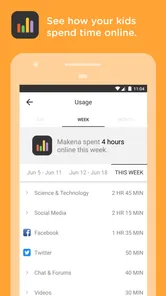
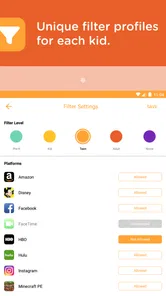
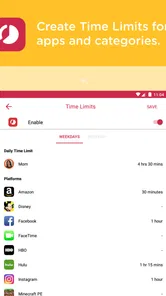
Circle 1st generation is an early version of the Circle parental-control and family-management system. It is designed to help parents manage children’s internet access, set daily time limits, apply bedtime schedules, filter online content, and review basic usage information. The exact features depend on the Circle device, mobile app version, and supported operating system, so users should confirm compatibility before downloading or purchasing anything.
Is Circle 1st generation compatible with my Android or iPhone?
Circle 1st generation was released on May 18, 2016, and its current version is 2.1.15.1. The Android version requires Android 6.0 or later; iPhone users should check the current App Store requirements before installing. Because it was created for older hardware and earlier operating systems, newer phones may install the companion app but offer limited functionality, while older devices may no longer connect reliably to the original Circle hardware.
Does Circle 1st generation work without the Circle hardware device?
Circle 1st generation was primarily designed to work with its dedicated Circle home-network device, which manages connected devices through the household Wi-Fi network. The mobile application acts as a control panel rather than a complete standalone parental-control solution. Families should verify whether their router and Circle hardware are supported, and understand that mobile data usage outside the home network may not be managed in the same way.
Pros
- Simple controls make it easy to learn and play immediately.
- Short rounds are convenient for quick gaming sessions.
- Minimalist visuals keep the gameplay clear and distraction-free.
- Increasing difficulty provides a steady challenge over time.
- Works well for players who enjoy reflex-based arcade games.
Cons
- The gameplay can feel repetitive after extended sessions.
- Limited content may reduce long-term replay value.
- Precision becomes demanding
- which may frustrate some players.
- Visual presentation is basic compared with newer arcade titles.
- Some devices may experience occasional performance or control issues.












