Aura: Security & Protection
- 6.18K
- 4.5
- Installs
- 1.00M
- Price
- Free

Screenshots





Analysis by Reviewed
I think a security app earns its place on a phone when it helps me make better decisions, not just when it promises broad protection. Aura is a finance-focused app from Aura Sub LLC, aimed at monitoring personal data and helping users react to scams and identity risks. Its appeal is the chance to bring several kinds of digital protection into one place, though I’d still treat it as one layer of a careful online routine rather than a substitute for common sense.
Quick checks versus constant protection
My expectation for an app like this is that opening it for a quick check should feel straightforward, while any deeper review of alerts or account details may take more attention. That distinction matters: a security dashboard is useful only if I can understand what needs action without turning every phone check into a lengthy investigation. I’d make a habit of reviewing notices when I have time to follow through, rather than dismissing them while busy.
A practical workflow is to use the app as a prompt to verify suspicious messages through the company or person’s official channel, not by replying to the message itself. If a warning arrives while I’m shopping or handling bills, I’d pause the transaction and check the relevant account independently. The alert can help me notice a potential issue; the follow-up still depends on careful verification.
Where it fits in an everyday routine
Imagine receiving an unexpected message about a delivery while commuting. I would avoid tapping its link, check whether I’m expecting a parcel through a source I already trust, and then review any relevant Aura notice when I can give it proper attention. That small pause is a more realistic benefit than expecting an app to make every risky decision automatically.
This kind of service suits people who want a central place to pay attention to identity and scam concerns, especially if they handle personal information online regularly. It may be less appealing to someone who wants only a basic password vault or a single-purpose security tool. Those users may prefer a focused alternative they already understand, rather than maintaining another account and learning another dashboard.
Value, limits, and fit
Aura is free to download, with in-app purchases ranging from around twelve dollars to just under four hundred dollars per item, so I’d check the purchase details carefully before committing to anything. It has an average rating of 4.5 from around twenty-seven thousand ratings, and more than half a million installs. It is rated for Everyone, which makes it accessible to a broad audience, but adults should still guide younger users through privacy and scam decisions rather than assuming an app can do that for them.
The app was released on February 16, 2021, and its current version is 3.51.0. It requires Android 10 or later. I’d check that requirement before installing, particularly on an older phone; an incompatible device is a more concrete obstacle than any general guess about speed or battery use. For performance, I’d judge it by whether it remains comfortable to open during normal use and whether its alerts are clear enough to act on. I wouldn’t assume that a security app is invisible or effortless on every device.
More From Our News Desk

Weather by Xiaomi Review: Clear at a Glance, Less Clear Up Close

X Under Pressure: Can It Recover When Posting Goes Wrong?

Clash of Clans Is Won Between the Battles

Android Auto Makes the Case for Quieter Car Software

MobiOffice: Transforming Mobile Productivity with Seamless Integration

EA SPORTS FC™ Mobile Soccer: Redefining Mobile Sports Gaming
With around 4,900 reviews, Aura has drawn plenty of user feedback, but no rating can tell me whether its approach matches my own needs. The key trade-off is breadth versus simplicity: a consolidated service can reduce the need to juggle separate tools, while a narrower app may be easier to understand if I only need one specific function. I’d also take time to read what a selected in-app purchase includes before paying, since the range is wide.
In today's fast-paced digital world, keeping our online presence secure is more important than ever. That's where Aura: Security & Protection steps in. As someone who's constantly connected, I took it upon myself to dive into this app and see if it lives up to its promise of providing a secure digital experience.
Getting Started with Aura
First things first, setting up Aura: Security & Protection was a breeze. With a user-friendly interface, the app makes it incredibly easy to navigate through its features. Right off the bat, I appreciated the onboarding process which guides you through the initial setup, ensuring you have all the necessary permissions enabled for optimal security.
Features That Stand Out
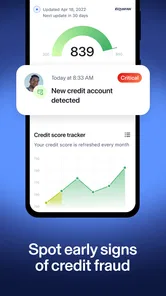
One of the features that caught my attention was the real-time threat protection. Whether you're browsing the web or shopping online, Aura keeps a vigilant eye out for any suspicious activity, alerting you immediately. It's like having a digital bodyguard that never takes a break!
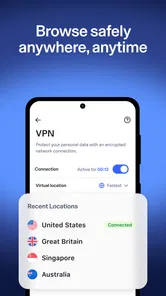
Another noteworthy feature is the VPN service integrated within the app. This ensures your internet connection is encrypted, keeping your data safe from prying eyes. Plus, with the added benefit of browsing anonymously, you can access your favorite content without any geographical restrictions.
For those of us who tend to forget passwords, Aura's password manager is a lifesaver. It securely stores all your passwords and even generates strong ones for you. No more using "password123" as your go-to!
Performance and Usability
When it comes to performance, Aura doesn't disappoint. The app runs smoothly in the background without hogging your device's resources. I noticed no lag or slowdowns, which is a big plus for someone like me who multitasks between different apps throughout the day.
Usability-wise, the app is designed to cater to both tech-savvy users and those who might not be as familiar with technology. The clean layout and intuitive icons make it easy for anyone to navigate and make the most out of the app's offerings.
Final Thoughts
After spending some quality time with Aura: Security & Protection, I can confidently say it's a must-have for anyone looking to bolster their digital security. The combination of real-time protection, a reliable VPN, and a handy password manager makes it a comprehensive package.
In conclusion, if you're on the hunt for an app that offers robust security features without compromising on performance, give Aura a try. It's like having a personal security guard in your pocket, and who wouldn't want that?
A sensible way to handle alerts
For me, the most useful way to approach an identity and scam app is to decide in advance what I’ll do when something catches my attention. I would treat a notification as a reason to pause, not as proof that an account has been compromised or that a message is definitely fraudulent. That distinction keeps a helpful warning from becoming a source of unnecessary alarm.
A low-friction routine is to review alerts at a predictable moment, such as after finishing errands or before paying household bills. I’d open the relevant service directly, using a trusted app or a saved address, and check whether the issue appears there too. This avoids the common trap of following a link embedded in a message that is itself the thing I should be questioning.
It also helps to keep a short record of actions I take: which account I checked, whether I changed a password, and whether I need to return to the issue. That simple habit is useful when a concern is not resolved in one sitting. The app can bring attention to a risk, but keeping track of the response is still my responsibility.
Choosing between a broad service and separate tools
The main alternative is not necessarily another all-in-one app. Some people prefer to use the security controls already built into their email, bank, browser, and phone, then add a dedicated password manager if that is the gap they actually need to fill. That approach can be cheaper or simpler for someone who already checks those accounts regularly and does not want a separate identity-protection dashboard.
A bundled service makes more sense when I want a single place to start reviewing several kinds of concerns and I’m willing to learn its layout. The trade-off is that a broad dashboard can feel like more than I need if my only goal is to store passwords or review suspicious texts. I’d choose based on the problem I’m trying to solve, not on the appeal of having the largest feature list.
There is also a practical question of attention. Adding another security app can help make risks more visible, but it can create another stream of alerts to interpret. If I already receive frequent notifications, I’d decide which ones deserve immediate attention and which can wait for a scheduled review. A quieter, consistent routine is better than installing a tool and then ignoring every prompt.
Who is likely to get the most from it
I’d consider Aura if I regularly shop, manage bills, and share personal details online, and I want a central service to help me stay alert to scams and identity concerns. It is also a reasonable fit for someone who tends to postpone security housekeeping: a visible dashboard can serve as a reminder to review risks instead of leaving everything to memory.
I would be more cautious about recommending it to someone who expects a single install to make every online decision safe. No app can remove the need to verify a request, use sound account habits, or think before sharing sensitive information. It may also be the wrong match for someone who wants no extra account, no new dashboard, or only one narrowly defined tool.
For a household, I’d talk through the app’s purpose with younger users rather than treating its Everyone rating as a substitute for guidance. A family member who receives an alarming message should know to stop, avoid responding through the message, and ask a trusted adult before sharing details or making a payment. The best result comes from combining technology with habits people can actually follow.
What I would check before relying on it
Before making Aura part of my routine, I’d look closely at the exact plan or purchase shown in the app and decide whether its included services match my needs. The in-app purchase range is broad, so I would not assume that every feature I might want is part of the free download. I’d also make sure I understand how to manage any ongoing commitment before confirming a purchase.
I’d then test the everyday workflow with low stakes: find where alerts appear, learn how to revisit them, and work out what information each notice provides. That is more useful than waiting for a stressful moment to figure out the interface. If I cannot tell what a prompt is asking me to do, I would pause and verify the underlying issue independently rather than acting in a rush.
Questions about speed and stability are best answered on the actual phone I plan to use. Android devices differ, and the app’s Android 10 minimum gives me a clear compatibility check without telling me how it will feel on every supported device. I would try it during ordinary use and watch for whether opening it, navigating between sections, and handling notifications remain comfortable for me.
Performance verdict
My performance judgement is therefore practical rather than based on a promise of invisible protection: a security app earns trust when I can reach the information I need, understand the next step, and return to normal phone use without friction. The original hands-on account describes smooth operation and no noticeable slowdown, but I would still leave room for differences between phones, background activity, and personal settings.
Likewise, I would not make a firm claim about battery use or recovery after an interruption without observing those things on my own device. If the app closes while I’m switching tasks, I’d reopen it and check whether I can pick up the alert or review I was handling. For an urgent account issue, I would go straight to the bank, email provider, or other service involved instead of waiting on one app to be my only route back to the problem.
Overall, Aura is most convincing as a structured reminder and a consolidated place to pay attention to digital risks, not as a replacement for careful decisions or every specialist tool. I’d give it a try if that wider approach suits the way I manage personal information, while keeping expectations grounded and checking paid options before choosing them. If I only need a password vault or prefer the security tools I already use, a focused alternative may be the more sensible fit.
Aura: Security & Protection Frequently Asked Questions
What does Aura: Security & Protection aim to help users protect?
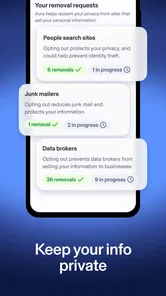
Aura is designed for people who want to monitor personal data, stop scams early, and protect their digital identity. Its focus is broader than a single security task: the app brings digital protection into a mobile experience. Before downloading, consider which kinds of risks matter most to you and whether Aura’s emphasis on personal information and scam awareness matches what you are looking for.
Who develops Aura: Security & Protection, and what kind of app is it?
Aura: Security & Protection is a finance app developed by Aura Sub LLC. Its focus is personal data monitoring, scam prevention, and digital identity protection. It is intended for people who want to keep an eye on their information and receive help protecting their digital lives through a mobile app.
What devices can install Aura: Security & Protection?
Aura: Security & Protection is available on Android and iOS, with a minimum operating system requirement of version 10. Before downloading, check that your device meets this requirement and has enough available storage for the installation. The app is rated for Everyone, so its store age classification does not restrict it to adults.
What is Aura: Security & Protection?
Aura: Security & Protection is a comprehensive mobile application designed to safeguard your digital life. It offers features such as identity theft protection, financial fraud alerts, VPN, password manager, and antivirus scanning. By providing these tools, Aura ensures that your personal information and online activities remain secure from cyber threats.
Is Aura: Security & Protection free to use?
Aura: Security & Protection is free to download, but it also offers in-app purchases. The app’s purchase options range from around $12 to $396 per item, so check the current terms in the app before committing. Aura: Security & Protection offers a free trial period during which users can access most of its features. However, to continue using the app with all its functionalities after the trial period, a subscription is required. The subscription plans are designed to offer flexibility, catering to various user needs and preferences.
Pros
- Comprehensive identity protection feature.
- Real-time alerts for suspicious activities.
- User-friendly interface.
- Includes VPN for secure browsing.
- Dark web monitoring.
Cons
- Subscription required for full features.
- May slow down device performance.
- Occasional false alerts.
- Limited free version capabilities.
- VPN may reduce internet speed.