

CineTap
- 20.00
- 4.5
- Installs
- 50.00K
- Price
- Free

Screenshots
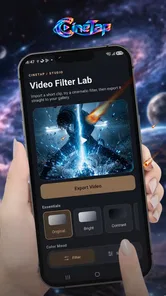



Analysis by Reviewed
When I need to shorten a phone video, I want the edit to be clear and the sharing decision to stay mine. CineTap is a video-editing app centered on trimming and exporting, so I see it as a practical option for small jobs rather than a complete production workspace. That narrower purpose makes the important questions straightforward: can I make the cut I intended, does the exported clip look right, and do I feel comfortable with the choices presented on my device?
That last point matters because video can contain personal details even when the edit itself is simple. A recording might show a home, a child, a conversation, or a work screen. I would not treat an editor’s basic purpose as proof of how it handles files or personal information; I would pay attention to what I can actually review and control before using it with sensitive footage.
A small test can answer the practical questions
For a first try, I would choose a short, unimportant clip and make one obvious cut. That lets me judge whether the trimming process feels understandable, whether the result begins and ends where I expect, and whether exporting fits my routine. It is a better first test than handing over an important recording or spending time on a long video before I know whether the controls suit me.
I would then play the exported file from start to finish. This quick check answers a question that a timeline alone cannot: whether the saved result is the clip I meant to make. If I plan to send it to someone, I would make that decision only after reviewing the output, rather than treating export and sharing as one automatic step.
Where it fits among editing options
Video editors often compete by offering effects, templates, music, captions, or tools for assembling several shots. Those extras can be useful, but they also add choices and complexity. CineTap’s focus on trimming and exporting may appeal when the footage already works and only needs a cleaner start or finish. For a polished montage, a branded social post, or layered storytelling, I would compare it with an editor that explicitly offers those creative tools.
The trade-off is about matching the tool to the job, not assuming that a simpler editor is automatically better or worse. A focused workflow can reduce distractions when I just need a shorter clip; it is not a substitute for detailed audio work, a multitrack timeline, or a repeatable publishing process. I would decide based on the edit I need to make, not on the number of tools an app appears to promise.
In a crowded video-editing category, CineTap has a more limited stated role than all-in-one creative suites. It is free, developed by Khalid.bdarnh, and rated for Everyone. Its current version is 3.3, with an average rating of 4.5 from around 1,400 ratings. I treat those details as useful context, not as a guarantee that its trimming controls or export will match my preferences.
More From Our News Desk

 Gmail
GmailGmail in a Busy Inbox: Who Benefits Most?
From first account to crowded workday, Gmail earns its place through dependable search and flexible sorting—but its best fit depends on how much inbox maintenance you can tolerate.

 Prime Video
Switching to Prime Video: What Changes in Your Viewing Routine
Prime Video can make a compelling second home for streaming, but switching means learning a different catalog, rental layer, and route from browsing to playback.

 Universal TV Remote Control
Universal TV Remote Control Works Best as a Reliable Backup
A phone remote earns its place through quick setup and reliable habits. Here is how to get more from Universal TV Remote Control—and where its limits show.

 Weather - By Xiaomi
Weather by Xiaomi Review: Clear at a Glance, Less Clear Up Close
Xiaomi’s weather app makes everyday forecasts quick to scan, but its calm surface can leave useful details and recovery paths harder to find than they should be.

 X
XX Under Pressure: Can It Recover When Posting Goes Wrong?
A resilience-focused review of X, examining setup, mistaken posts, interruptions, weak connections, and the gaps that matter when recovery needs to be dependable.

 Clash of Clans
Clash of Clans Is Won Between the Battles
Its raids are quick; its community is a long-term project of coordination, teaching, rivalry, and shared responsibility—with all the friction that entails.
Latest News



A focused editor, with trust judged by what I can see
I judge a focused editor by how clearly it lets me make and check a small change, not by assuming anything about what happens to my footage behind the scenes. In this section, I’ll look at the practical trust questions I would raise before choosing a clip, including how to separate a successful export from the decision to share it. That leads to a closer look at the controls I can verify on my own device.
Best suited to quick, deliberate edits
The core tasks are editing, trimming, and exporting video. That makes CineTap easiest to recommend for straightforward jobs: cutting off the few seconds before a recording starts, removing an awkward ending, or preparing a shorter clip to send to someone. I would reach for this kind of tool when the footage is already good enough and the edit is mostly about timing.
A sensible everyday workflow is to choose a source clip, identify the portion worth keeping, trim away the dead time, and export a separate finished version. I would watch the beginning and end once before committing: a cut that looks neat on a timeline can still remove the first word of a sentence or leave an abrupt final frame. That quick check is more valuable than adding decoration to a clip whose only problem is its length.
The distinction between a basic editor and a fuller creative suite matters here. Apps built around templates or effects are often better when I want a stylized social post; a desktop editor is a better fit for layered projects or careful sound work. CineTap’s stated focus makes it worth considering for uncomplicated edits, while people who need a broad creative toolkit should compare alternatives before settling on it.
What I would check before exporting
For a trim-only job, the most important practical question is whether I can make a precise cut without losing track of the original. I would preview both edges of the selection and confirm that the exported clip starts and stops where intended. This is especially useful with speech: leave a small natural lead-in and tail rather than cutting right against a syllable, unless the goal is a deliberately abrupt edit.
I would also treat export as a separate decision, not an afterthought. Before sharing, check that the result plays from beginning to end and that the intended clip—not an unintended portion of the source—is what gets sent. If I need to preserve an untouched original, I would keep it until the edited copy has been checked. That simple habit makes a lightweight editing workflow safer without assuming anything about how the app stores files.
One useful trade-off is to make a short test edit before spending time refining a long recording. A small sample can reveal whether the controls feel precise enough for the task and whether the finished output meets expectations. If the edit depends on frame-level timing, multiple shots, or carefully balanced audio, that test helps me decide early whether I should move to a more capable editor instead of forcing a basic workflow to do specialist work.
Trust is about visible choices, not assumptions
Video can be personal: a clip may show a child, a home interior, a work document, or someone who did not expect to be filmed. I would therefore be careful about what I choose to edit and where I send the finished version. The app’s role as a video editor does not by itself tell me what happens to a file behind the scenes, so I would not treat the editing purpose as proof of any particular privacy practice.
Before selecting a sensitive recording, I would review the permission prompts that appear on my device and consider whether each requested access makes sense for the action I am taking. I would pay attention to the choices the operating system presents, rather than granting access automatically. If I am uncomfortable with a prompt or cannot understand why it is needed, I would pause and decide whether to continue with a less sensitive clip.
That is a practical trust check, not a claim about CineTap’s permissions or data handling. I would also look for any in-app explanations, privacy information, or account controls that are actually visible before relying on the app for private material. I would not infer that an account is required, that a particular data practice is in place, or that a control exists unless I can see it for myself.
Keep control of the clip and the sharing decision
My strongest recommendation for maintaining control is to separate editing from publishing. First make the cut, then review the exported result, and only then choose where to share it. This gives me a chance to catch an accidental section or an unwanted detail before the clip leaves my device. It is particularly helpful when a video contains faces, location clues, or conversation that was not meant for a wider audience.
I would use a duplicate or otherwise preserve the original whenever the footage matters. Trimming should solve a specific problem, not leave me with only one version of a recording I may later want in full. For routine clips, keeping the original until the export has been checked is a modest precaution; for important footage, I would be even more cautious and use a workflow with clear file management and dependable backups.
There is also a useful boundary between editing and managing content. CineTap’s described purpose centers on preparing video, so I would not choose it on the assumption that it will organize a growing library, provide collaboration tools, or manage publishing. If those are central needs, I would compare apps that explicitly support them. A focused editor may be convenient precisely because it does less, but that simplicity is not a substitute for features outside its stated job.
Who should consider it—and who should look elsewhere
I would consider CineTap if I mostly need to shorten phone footage and export a cleaner clip, and I prefer a task-oriented tool over a larger editor. It may suit someone preparing a brief family update, removing the wait at the start of a recording, or sending a concise demonstration to a colleague. The key is having a clear, limited edit in mind rather than expecting the app to transform the footage.
I would look elsewhere if my work relies on layered timelines, detailed audio treatment, transitions, captions, color correction, or a repeatable production workflow. Those needs call for tools whose editing capabilities are explicitly built around that complexity. I would also be cautious about using any editor for highly sensitive recordings until I had personally reviewed its visible permission prompts and privacy explanations.
On Android, CineTap is listed for devices running version 7.0 or later, and it has more than 50,000 installs. It was released on August 13, 2026; because that date is later than the present review context, I would verify its availability in the relevant store before relying on it. The Everyone content rating makes its intended audience broad, but it does not replace a parent’s judgment about a particular video or device use.
A cautious recommendation for simple edits
My verdict is measured: CineTap is worth considering for basic video trimming and export when the goal is to make a small, practical edit. Its free price removes a purchase decision, and the rating and install figures suggest that other users have tried it, but neither fact guarantees a fit for every device or editing style. I would test it with an unimportant clip first, check the result carefully, and pay attention to the choices shown on my device.
If that small trial feels straightforward and the output suits the way I share videos, the app may be a convenient addition for occasional edits. If I need more control, more creative tools, or stronger confidence about handling sensitive footage, I would choose an alternative designed for those priorities. CineTap makes the most sense when I want a short route from an ordinary recording to a shorter, checked clip—and I remain in charge of what gets exported and shared.
A realistic routine for occasional clips
Imagine I record a quick demonstration for a colleague: the useful explanation begins after I have set the phone down, and the clip runs on after the point is made. A trimming-focused editor is a sensible place to handle that cleanup. I would preserve the original, remove the unneeded lead-in and ending, then watch the exported copy to make sure the explanation still makes sense without its surrounding context.
That workflow also helps when sending a family clip. I would check not only the cut but the frame at either edge, since an unintended face or private detail can appear for just a moment. If the goal is simply to make a video shorter, careful review is often more useful than a visual effect; if the clip needs captions, music, or a sequence of scenes, I would move to a tool built for those needs.
Questions I would settle on the device
Would I use it for a long or important recording? I would first try a short sample and confirm the result, keeping the untouched source until I know the workflow suits me. Is a phone running Android 7.0 or later within the stated requirements? Yes, though I would still check compatibility for my particular device in the store. Does the Everyone age rating mean every video is appropriate for every viewer? No; it describes the app’s rating, while the footage and the way a family uses a device still need individual judgment.
I would also distinguish the app’s free price from any assumption about its wider experience: I would check the actual screens and choices I encounter rather than presume particular account settings, permissions, or data practices. For privacy-sensitive work, that means taking time to inspect prompts and any explanations that are visible before choosing a clip. If I cannot make sense of a choice, I would use a less sensitive recording or another workflow.
My bottom line after weighing the trade-offs
The strongest case for CineTap is a narrow one: a person has a video that is already usable and wants to cut away material before exporting. That makes it a reasonable candidate for occasional, uncomplicated edits, especially when a larger creative suite would be more tool than the task requires. The trade-off is equally clear: anyone expecting a full editing bench should compare alternatives rather than mistake a focused purpose for a complete production workflow.
I would start with a disposable test clip, check the saved result, and make my own decision about the visible permission and privacy choices before using personal footage. The app’s rating, install count, and no-cost entry point can offer context, but they do not replace that hands-on check. If the simple workflow fits and the output meets my needs, I would keep it in mind for quick trims; if precision, creative depth, or clearer assurances are essential, I would choose another editor.
CineTap Frequently Asked Questions
What is CineTap, and what can I do with it?
CineTap is presented as an app for discovering and exploring movies, but its exact features can vary by version and platform. Before downloading, check the app-store listing to confirm whether it offers film information, recommendations, watchlists, trailers, or streaming links. Also note that a movie-discovery app does not necessarily provide films for viewing; availability and playback options should be verified in the listing.
Is CineTap free to download and use?
The app may be free to install, but that does not guarantee that every feature is free. Check the Google Play or Apple App Store listing for in-app purchases, subscriptions, advertising, or other charges before installing. If CineTap offers paid plans, review their pricing, renewal terms, and cancellation instructions carefully, and avoid entering payment details unless you understand what the purchase includes.
Can I watch full movies directly in CineTap?
Do not assume that CineTap streams full-length movies simply because it is focused on cinema. Some movie apps provide discovery tools, titles, cast details, trailers, or links to other services rather than hosting video. Check the current store description and the app’s terms to learn what playback, if any, is available. Where streaming is offered, catalogues can differ by country and may require a separate subscription.
Is CineTap available for Android and iPhone, and what should I check before installing?
Availability can differ between Android and iOS, and an app with the same or a similar name may not be the same product. Search for CineTap in the official Google Play Store or Apple App Store, then check the developer name, supported devices, latest update, ratings, and minimum operating-system requirements. Installing through an official store helps reduce the risk of downloading an imitation or an unsafe package.
What permissions or personal information might CineTap require?
The information CineTap collects and the permissions it requests depend on the app version and its features. Review the privacy policy and the store’s data-safety or privacy disclosures before installation, especially if the app asks for account details, location access, or permission to access photos or other device data. Grant only permissions that make sense for the feature you want to use, and avoid sharing sensitive information unnecessarily.
Pros
- Simple interface makes it easy to browse available movies and shows.
- Useful search tools help you find titles without scrolling through long lists.
- Personalized recommendations can surface content that matches your interests.
- Watchlist features make it convenient to save titles for later.
- Availability on mobile devices lets you browse wherever you are.
Cons
- Catalog availability may vary by country or region.
- Some titles may link to third-party services rather than play in the app.
- Recommendations may take time to reflect your viewing preferences.
- Streaming options can depend on subscriptions to other platforms.
- The app’s usefulness may be limited if its catalog lacks your preferred titles.











