Cincinnati Bengals
- 696.00
- 3.0
- Installs
- 100.00K
- Price
- Free

Screenshots

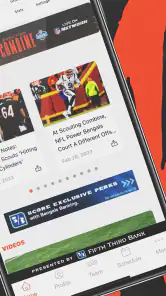

Analysis by Reviewed
Following the Cincinnati Bengals is easier when the information you need is gathered in one place, and that is the basic appeal of Cincinnati Bengals. This free Sports app is the official mobile companion for the NFL team, developed by YinzCam, Inc. I approached it less like a general sports portal and more like a team-specific tool: useful when the Bengals are the team I want to follow, but not necessarily the best choice when I need broad coverage of the entire league.
My overall impression is mixed but practical. The app has a clear purpose, costs nothing to download, and gives Bengals supporters a direct way to keep the team close on an Android or iOS device. At the same time, its average rating of 3.0 from around 2.7 thousand ratings suggests that the experience is not consistently smooth for everyone. I would not dismiss it for that reason, but I would install it with realistic expectations rather than assuming an official app will automatically be the most polished sports app on my phone.
What the Bengals app is really useful for
The strongest reason to use this app is focus. Instead of filtering a national sports service to find Cincinnati news, I can open a team-centered space and look for Bengals-related information first. That matters on game day, when I want fewer unrelated headlines and less time spent navigating through teams I do not follow.
This narrow focus also makes the app more suitable for different kinds of supporters. A committed fan may use it as a regular check-in point, while a casual follower might open it before a game, during a busy weekend, or after seeing a Bengals headline elsewhere. I would especially recommend trying it if team-specific updates matter more to you than a large collection of league-wide tools.
The app is rated for Everyone, which makes it approachable for a broad audience. That does not mean every person will enjoy it equally. A fan who follows several NFL teams, multiple sports, or detailed statistical markets may find a dedicated league service more efficient. The Bengals app is at its best when Cincinnati is the center of the experience.
One useful habit is to treat it as a starting point rather than your only sports source. I can use the team app to stay oriented around Bengals activity, then turn to a broader sports application when I need comparisons, coverage of another game, or a wider view of the league. That division of labor avoids forcing one app to do everything.
A realistic everyday scenario
Imagine that I am commuting home before a Bengals game. I have only a few minutes and do not want to search through a general news feed. I open the app to check the latest team-focused information, glance at what is relevant to the upcoming matchup, and close it again. Later, if I need broader context about the opponent or other games, I switch to a general sports service.
More From Our News Desk

Clash of Clans Is Won Between the Battles

Android Auto Makes the Case for Quieter Car Software

MobiOffice: Transforming Mobile Productivity with Seamless Integration

EA SPORTS FC™ Mobile Soccer: Redefining Mobile Sports Gaming

How Microsoft OneDrive Became a Mobile Productivity Giant

How Google Translate Breaks Language Barriers Effortlessly
That workflow sounds simple, but it is where a team app earns its place. The value is not necessarily in replacing every sports tool; it is in reducing the effort required to reach Bengals-specific content. If the app loads reliably on my device and presents current information clearly, that focused access can be more convenient than repeatedly searching the web.
There is also a social side to using an official team app, even when I am not actively reading every screen. Opening a team-branded product feels more direct than browsing an anonymous news feed. However, branding alone is not enough for me to trust an app with personal information or to overlook technical problems. The official connection establishes relevance, not a guarantee of perfect performance.
How it compares with broader sports alternatives
Compared with a general sports app, this Bengals release should feel more specialized. A broad alternative is usually better for people who want scores and news across many teams, while this app makes more sense for someone whose main interest is Cincinnati. The trade-off is straightforward: specialization can reduce clutter, but it can also limit the usefulness of the app outside Bengals coverage.
Compared with simply using a mobile browser, the app may be more convenient for repeated visits because the team identity is already established in the product. A browser is often better when I want to avoid installing another app or when I am looking for information beyond the team’s own space. I would choose the app for regular team following and the browser for occasional, broad searches.
It also differs from a live-score service. Score-focused apps tend to emphasize speed, league-wide schedules, alerts, and compact statistics. A team app has a more personal and editorial feel, but it may not be the most efficient option for checking every game happening at once. If my priority is a complete scoreboard, I would use the specialist tool. If my priority is the Bengals themselves, this app has the clearer purpose.
Trust, controls, and moments that deserve attention
When I review an official sports app, I separate trust in the publisher from trust in the everyday mobile experience. Here, YinzCam, Inc. is identified as the developer, and the product has been available since December 30, 2011. That long presence gives the app a recognizable history, but it does not answer every practical question about privacy, permissions, or account handling. I still pay attention to what the app asks me to approve during installation and use.
The current version is 3.7.3, and the listed minimum operating-system requirement is 10. Before installing, I would check that my phone meets that requirement and that the operating system is reasonably current. Compatibility is a small detail that can prevent a frustrating first launch, especially if I am installing the app shortly before a game and do not have time to troubleshoot.
The app is free, which lowers the barrier to trying it. Free access is helpful because I can test whether the team-focused experience fits my habits without committing money. It does not remove the need for careful attention, though. I would still review any permission request, notification prompt, sign-in screen, or data choice as it appears rather than accepting everything automatically.
My trust rule is simple: official branding earns attention, not automatic permission. If the app asks for access that seems unrelated to the way I plan to use it, I would pause and consider whether that access is necessary for my chosen experience. I would also revisit notification settings after the first use, because sports apps can become distracting when every update is treated as urgent.
Permissions and visible choices
I do not treat the presence of a permission prompt as proof that an app is unsafe, and I do not treat the absence of an obvious prompt as proof that everything is risk-free. The sensible approach is to look at each request in context. For a Bengals supporter, a notification choice may be useful; for someone who only opens the app once a month, it may be unnecessary.
My preferred setup would be deliberately limited. I would enable only the notifications that help me follow the team, keep optional access disabled unless I understand its purpose, and check the operating system’s app-permission page after installation. This is a useful workflow for any sports app, but it matters particularly here because the app’s main benefit is convenience, and convenience can tempt people to approve choices without reading them.
Account controls deserve the same care. If the app offers a sign-in or profile step during use, I would decide whether that account is genuinely needed for the features I want. I would avoid reusing an important password, and I would look for a clear sign-out option if I ever use the app on a shared device. These are ordinary precautions, but they give me more control than treating an official app as automatically private.
Data-sensitive moments in normal use
The most data-sensitive moments are not limited to installation. They can occur when I create or access an account, respond to a prompt, enable notifications, or allow the app to use device capabilities. I would slow down at each of those points. A rushed pre-game setup is exactly when I am most likely to accept a choice I would normally question.
I would also be careful with notification content on a locked screen. Sports alerts can reveal team preferences, game activity, or other details to anyone who can see the phone. If that matters to me, I would adjust lock-screen previews through the operating system rather than leaving every alert fully visible. This lets me keep timely updates without making them more public than necessary.
Another practical consideration is shared use. If family members borrow my phone, I would check whether the app remains signed in and whether any profile information is visible. I would also avoid entering personal details while connected to an unfamiliar device. These steps are not signs that the app is uniquely dangerous; they are sensible boundaries for any account-based mobile experience.
The app’s Everyone rating makes it suitable for a wide audience, but younger users may still need help understanding notifications, accounts, and permission choices. A parent can make the experience more controlled by checking the phone’s permission and notification settings together with the child. That is more useful than relying on the age label alone.
Where the experience may feel limited
The rating of 3.0 indicates a divided user experience, and I would take that seriously. A team app can be valuable in principle yet still disappoint if it feels slow, if information is difficult to reach, or if a particular update introduces instability. Since sports use is often time-sensitive, even a short delay feels more irritating before or during a game than it would in a casual app.
The narrow team focus can also become a limitation. If I want a single place for several teams, league-wide results, or a deeper cross-sport routine, I would probably be better served by a broader sports application. Installing this one alongside another app may be worthwhile, but expecting it to replace every sports source would create unnecessary friction.
There is a similar trade-off with notifications. Alerts can make the app feel useful when I am waiting for important Bengals news, but too many prompts can turn it into background noise. I would start with a restrained setup and add only what I actually miss. That approach is better than disabling everything after a flood of unwanted alerts.
Who should install it, and who should skip it
I would recommend giving this app a try if Cincinnati is the team you follow most closely, you prefer official team-focused coverage, and you want a free way to keep the Bengals within easy reach. It is also a reasonable choice for a fan who wants a dedicated companion without paying for access.
I would skip it if I rarely follow the Bengals, if my main need is a complete league scoreboard, or if I already have a general sports app that gives me everything I want with less switching. I would also avoid making it my only source if I need highly detailed comparisons across teams or sports. The app’s value comes from its focus, and that same focus limits its range.
For someone unsure about privacy choices, my advice is not simply “install” or “do not install.” I would install it only when the Bengals-specific purpose is useful, then review permissions, notifications, and account prompts one by one. If the controls feel understandable and the app fits my routine, I would keep it. If I cannot see a good reason for a requested choice, I would decline it or remove the app.
My final view after weighing convenience against control
Cincinnati Bengals is a sensible free companion for fans who want a team-specific sports experience, but it is not a universal replacement for broader sports tools. Its official identity, focused purpose, Everyone rating, and availability across modern mobile systems make it easy to consider. Its 100K-plus installs show that it has reached a substantial audience, while the 3.0 average rating reminds me to judge the actual experience on my own device rather than relying on the official label.
I would keep the app’s role modest and clear: use it for Bengals-centered updates, manage notifications carefully, and turn to a broader alternative when I need league-wide coverage. The most important practical step is to preserve user choice. I would inspect every permission and account prompt, limit lock-screen exposure, and avoid sharing more information than the feature requires.
In the end, I would recommend trying it to a committed Bengals supporter, especially someone who wants a free official starting point on a phone running the required operating system. I would not recommend it blindly to every sports fan. If the focused coverage matches your habits and the controls feel comfortable, it can earn a place on your device; if you need wider coverage or a more consistently polished experience, another sports app may be the better everyday choice.
Cincinnati Bengals Frequently Asked Questions
Is the Cincinnati Bengals app free, and what devices can run it?
The Cincinnati Bengals app is free to download and is categorized as a sports app. It is published by YinzCam, Inc., and is available for devices running iOS 10 or later. Before installing, check that your device meets this requirement and has enough available storage. The app is intended for Bengals fans seeking official team content on their phone or tablet.
Who publishes the Cincinnati Bengals app, and is it the official team app?
The app is published by YinzCam, Inc., and its store summary describes it as the official app of the Cincinnati Bengals. That makes it a convenient starting point for fans who want team-focused information and features in one place. As with any app, review its current store page and permissions before installing so you know what to expect on your device.
What is the Cincinnati Bengals app used for?
The Cincinnati Bengals app is designed for fans who want quick access to official team information in one place. After exploring its main sections, users can typically follow breaking news, game schedules, scores, standings, rosters, team updates, videos, and other Bengals content. It is especially useful on game days when you want timely information without searching through several different websites or social media accounts.
Can I watch Cincinnati Bengals games through the app?
The app may provide game updates, live scores, play-by-play information, highlights, interviews, and links to official viewing options, but it should not automatically be considered a free live-streaming service. Access to full games usually depends on broadcasting rights, your location, the NFL season, and whether you have an eligible television or streaming subscription. Check the current app features and regional availability before downloading.
Does the Cincinnati Bengals app require an account or subscription?
Many basic features, such as reading news, checking schedules, viewing scores, and browsing team information, may be available without creating an account. However, certain services can require registration, including personalized notifications, ticket-related functions, exclusive content, or account-linked purchases. The app itself is free to download, while some content or services could depend on subscriptions, memberships, or third-party providers.
Pros
- Official team news
- scores
- schedules
- and Bengals updates in one place.
- Useful game-day information helps fans follow the team throughout the season.
- Roster and player details make it easy to keep track of the squad.
- Provides a convenient way to stay connected with Bengals community content.
- Free access to essential team information for Cincinnati supporters.
Cons
- Some features may require an internet connection to work properly.
- Notifications can become frequent during games and major team announcements.
- Content is mainly valuable to Bengals fans
- limiting its broader appeal.
- Video and media availability may vary by location or broadcasting rights.
- The app may use noticeable storage and background data for media updates.
- Category
- Sports
- Version
- 3.7.3





