

Cicis Pizza
- 411.00
- 4.7
- Installs
- 100.00K
- Price
- Free

Screenshots




Analysis by Reviewed
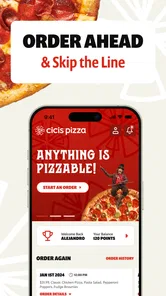
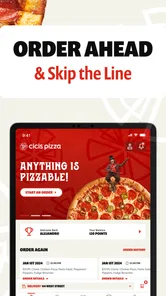
I found Cicis Pizza most useful when I treated it as a quick ordering tool rather than as a full restaurant guide. The app is made for Cicis customers who already know what they want and need a simpler route to pickup or delivery. In my experience, that narrow purpose is also its main strength: I can move from craving to order without working through a general food marketplace.
At the same time, the smoothest experience depends on a few practical details that are easy to overlook. Location, store availability, the difference between pickup and delivery, and the information entered at checkout all matter more than the bright, straightforward interface suggests. If one of those pieces is wrong, it can feel as though the app has failed when the real issue is the order setup.
Cicis Pizza is a free Food & Drink app from Cicis, rated for Everyone. It has a 4.7 average from around 2.6 thousand ratings, with more than 100 thousand installs. Those figures suggest that it has found a clear audience among people who want to order Cicis food from a phone, but they do not mean every order will be equally convenient. I would still check the details carefully before confirming a meal for a group.
Where the ordering experience can slow you down
The first place I would look when an order feels confusing is the restaurant selection. A pizza order is tied to a particular Cicis location, and the available choices can depend on whether that location handles the kind of order I am trying to place. Entering an address or choosing a store is therefore not just a preliminary formality. It determines what I can actually order and how the food will reach me.
This matters especially when I am ordering from a new area. A store that is convenient for pickup may not be the best choice for delivery, while a location that appears nearby may not be the one I expected. I avoid building the entire basket before checking the selected restaurant. If I change the location later, I want to review the basket again rather than assume every item and option carried over exactly as intended.
Another common sticking point is the difference between browsing and committing. The app is focused on Cicis Pizza, not on comparing several restaurants or discovering a broad range of cuisines. That is helpful when the decision is already made, but less helpful when I am still deciding what to eat. A general delivery service may offer more comparison tools, while this app is better suited to a direct Cicis order.
I also pay close attention to the order type. Pickup and delivery are not interchangeable workflows. Pickup requires me to think about travel time and the selected store. Delivery requires an accurate destination and enough time for the order to arrive. If I choose the wrong path early, the later screens may feel restrictive even though they are simply following that choice.
More From Our News Desk

 Instagram
Instagram’s Power Comes From Its Place in Your Phone
A close look at how Instagram turns Meta’s reach, recommendation systems and everyday camera habits into durable platform power—and what that costs users.

 Gmail
GmailGmail in a Busy Inbox: Who Benefits Most?
From first account to crowded workday, Gmail earns its place through dependable search and flexible sorting—but its best fit depends on how much inbox maintenance you can tolerate.

 Prime Video
Switching to Prime Video: What Changes in Your Viewing Routine
Prime Video can make a compelling second home for streaming, but switching means learning a different catalog, rental layer, and route from browsing to playback.

 Universal TV Remote Control
Universal TV Remote Control Works Best as a Reliable Backup
A phone remote earns its place through quick setup and reliable habits. Here is how to get more from Universal TV Remote Control—and where its limits show.

 Weather - By Xiaomi
Weather by Xiaomi Review: Clear at a Glance, Less Clear Up Close
Xiaomi’s weather app makes everyday forecasts quick to scan, but its calm surface can leave useful details and recovery paths harder to find than they should be.

 X
XX Under Pressure: Can It Recover When Posting Goes Wrong?
A resilience-focused review of X, examining setup, mistaken posts, interruptions, weak connections, and the gaps that matter when recovery needs to be dependable.
Latest News



For a family order, the basket deserves a slower review than a solo snack. I check quantities, customizations, and whether I have accidentally added an item while exploring the menu. This is one of the less obvious habits that saves time: I decide the order type and restaurant first, then build the basket, then review it from the beginning before moving to payment or confirmation.
Why a fast order can still require attention
The app’s simple purpose can create a false sense that every order will take only a few taps. In reality, group meals contain more opportunities for mistakes. A missing item, an incorrect quantity, or an old address is much more frustrating when several people are waiting. I would rather spend an extra minute checking the final summary than rely on memory after adding several choices.
For an everyday example, imagine ordering dinner after work for a household that wants pickup. I would first select the restaurant I can realistically reach, choose pickup, assemble the order, and confirm that the selected location matches my route home. If the app asks for contact or order details, I would enter them carefully and keep the confirmation available until the food is collected. That workflow is less glamorous than simply tapping through, but it reduces the most avoidable errors.
Delivery brings a different kind of friction. I would check the address character by character, especially in an apartment building, office, or shared property. If the destination is unusual, I would avoid assuming that a familiar saved address is still correct. The app can only work with the information supplied during the order; it cannot know that I moved, changed buildings, or want the food delivered to a side entrance.
Setup checks that make the first order easier
Before judging the app, I would start with a clean setup. Cicis Pizza runs on Android devices using version 7.0 or later, so compatibility is a sensible first check. The current version is 6.5.8, and keeping the installed app current is a practical way to avoid problems caused by an outdated build. I would also make sure the phone has a stable internet connection before beginning an order.
A weak connection can interrupt menu loading, delay a store response, or make a button appear unresponsive. Tapping repeatedly in that situation can create uncertainty about whether an action happened once or several times. My safer approach is to wait briefly, check whether the screen changed, and review the basket before trying again. That is particularly important around checkout, where duplicate actions are more concerning than a slow menu screen.
I would also begin with the correct location information instead of treating it as something to fix later. If the app requests a restaurant or destination, I enter the details deliberately and look for a visible confirmation that the choice was accepted. A location mismatch can make the menu, order type, or delivery path seem wrong even when the app itself is functioning normally.
For pickup, I think about the practical handoff before I order. I want the selected store to be one I can reach, and I keep the order confirmation accessible on my phone. For delivery, I verify the destination and any information needed to identify the correct building. These are simple checks, but they are more useful than repeatedly closing and reopening the app.
Another setup habit is to avoid starting with a complicated group order when I am still learning the interface. I would place a straightforward order first, observe how the restaurant selection and confirmation work, and then use the same pattern for a larger meal. This is not because the app is difficult; it is because learning the flow with fewer moving parts makes later troubleshooting much easier.
The app is free to install, which makes trying it low-risk. I still distinguish between the cost of using the app and the cost of the food order itself. Free access does not remove the need to inspect the final order details before confirming. I would never assume that installing the app tells me what a particular meal will cost or how a specific restaurant will handle it.
Checks worth making before tapping the final button
- Restaurant: confirm that the selected Cicis location is the one intended for pickup or delivery.
- Order type: make sure the choice matches the plan, especially when switching from collecting food to having it delivered.
- Basket: review quantities and options from the top instead of checking only the last item added.
- Destination: recheck delivery details when ordering from work, a hotel, or a recently changed address.
- Connection: if the screen is slow, pause before tapping again and inspect the order status.
These checks are useful because they target the points where a food-ordering app has the least room for interpretation. They also help separate an app problem from an input problem. If the restaurant, order type, and destination are correct, I have a much clearer starting point if something later needs attention.
How I recover when an order does not behave as expected
My first recovery step is always to stop making changes. If a confirmation screen takes time to appear, I do not immediately rebuild the basket or submit again. I check whether the order has already progressed, look for confirmation information, and review any visible order status. Repeating the same action can make the situation harder to understand.
If the basket looks wrong before confirmation, I correct it there rather than hoping the final step will fix it. I remove an unintended item, adjust the quantity, and read the summary again. When the restaurant or order type is wrong, I go back to that choice and then reassess the basket. A change at the restaurant level can affect the rest of the workflow, so I do not assume that a previously prepared order is still perfect.
When the app becomes unresponsive, I use basic, low-risk steps: wait for the connection to recover, close and reopen the app, and try again without immediately repeating a payment or submission action. I also check whether the phone itself has a stable connection by opening another ordinary service. If other apps are struggling too, the problem may be the network rather than Cicis Pizza.
Updating the app is another reasonable recovery step when an update is available. The installed version may not be the current one, and a fresh version can address ordinary compatibility or stability issues. I would not erase important order information casually, however. Before clearing anything or reinstalling, I would make sure I know the details needed to reconstruct the order and that I have not left a pending action unresolved.
For a failed-looking order, I separate three situations: the basket never submitted, the submission is uncertain, or the order appears confirmed but something is wrong afterward. Each needs a different response. A basket that never submitted can usually be rebuilt. An uncertain submission should not be duplicated until I have checked for confirmation. A confirmed order should be handled using the available order details rather than started from scratch.
This distinction is one of the most useful lessons I took from using the app. “The screen did not change” is not the same as “the order did not happen.” A slow connection can leave the interface behind the action. Reviewing the confirmation state before trying again is a small habit with a big practical payoff, particularly when ordering for several people.
When the app is not the cause
Not every disappointing result comes from the software. A restaurant may be busy, a delivery route may take longer than expected, or a selected location may not be the most suitable one for the order. The app is the place where I submit the request, but it cannot control every part of preparing and handing over food.
That is why I avoid judging the whole experience from one slow screen. I look at where the problem occurred. If the menu will not load, connection or compatibility is a reasonable suspect. If the order was accepted but the timing is different from what I expected, the restaurant and delivery process may be more relevant. If the food is incorrect, I keep the confirmation details and describe the mismatch clearly when seeking help.
The same principle applies to location information. A phone can suggest a place incorrectly, and an address can be entered with a small mistake that has large consequences. I treat automatic location assistance as a convenience, not as a substitute for reading the selected restaurant and destination. This is especially important when I am away from home or ordering for someone else.
There is also a limit to what this app should be expected to do. It is not the best choice for comparing multiple pizza chains, coordinating a large event across different restaurants, or exploring a broad marketplace of cuisines. A general delivery platform may be more convenient for those tasks. I choose Cicis Pizza when the restaurant is already the decision and I want a focused route to the order.
Who will get the most from this Cicis-focused workflow
I would recommend the app to regular Cicis customers, families placing repeat orders, and anyone who prefers dealing directly with the restaurant’s own ordering experience. It is also useful when I already know the meal I want and do not need a marketplace to help me compare alternatives. The focused design can remove distractions that are common in broader food apps.
It suits pickup especially well when I am passing a Cicis location and want to organize the order before arriving. The key benefit is not that it eliminates every step, but that it keeps the order centered on Cicis rather than mixing the restaurant with unrelated listings. For a planned family meal, that focus can make the process easier to repeat.
I would be more cautious recommending it to someone who is undecided about dinner, wants to compare delivery fees or restaurant menus in one place, or expects sophisticated planning for a large event. A marketplace app may offer better comparison, while a phone call or direct conversation may be more appropriate for unusual arrangements. This app is strongest when the request fits its straightforward purpose.
People who use older Android phones should check the operating-system requirement before spending time troubleshooting. The minimum is Android 7.0, so a device below that level is not a suitable starting point. On a compatible device, I would still keep the operating system and app reasonably current, because food ordering depends on reliable connectivity and a working checkout flow.
The Everyone age rating makes the app broadly accessible, but the practical user still needs to be comfortable entering order and delivery information. Parents ordering for a household may appreciate the simple focus, while younger users should have an adult handle payment and delivery decisions where appropriate. The rating describes access, not the judgment needed to place an accurate order.
My practical verdict after using it
Cicis Pizza does one job clearly: it gives Cicis customers a direct way to arrange pickup or delivery from a mobile device. I like that focus. When I know the restaurant, have a stable connection, and check the location and order type before building the basket, the app feels more useful than a general service cluttered with unrelated choices.
Its weaknesses are mostly tied to the same focused design. It is not a universal food-discovery tool, and a smooth order still depends on careful setup. A wrong restaurant, stale address, slow connection, or repeated tap at checkout can create friction that no simple interface can fully prevent. I also would not use it as my first choice when comparison shopping matters more than ordering from Cicis.
The most reliable workflow is simple: choose the correct restaurant, select pickup or delivery intentionally, build the basket, review every item, confirm the destination, and pause before repeating an action if the screen is slow. Keeping the confirmation available afterward gives me a useful reference if the order needs attention.
With those habits, I see this free app as a practical companion for Cicis regulars rather than a replacement for every food-ordering option. I would install it if Cicis is already part of my routine and I value a direct ordering path. If I mainly want to browse many restaurants, compare alternatives, or arrange something outside a normal pickup or delivery order, I would choose a broader service instead.
Overall, my recommendation is positive but specific: use it when the restaurant choice is already made, and give the setup details the attention they deserve. The best experience comes from treating the app as a focused ordering workflow, not as a complete solution to every food-planning problem.
Cicis Pizza Frequently Asked Questions
Is Cicis Pizza available on both Android and iOS?
Cicis Pizza is a Food & Drink app from Cicis, with versions for Android and iOS. Before downloading, check that your device meets the operating system requirements shown in its official app store. The app is free to download and is intended for everyone. Once installed, it provides a way to order Cicis favorites for pickup or delivery, with availability depending on your selected restaurant.
Who develops the Cicis Pizza app, and is it a popular choice?
The app is developed by Cicis and focuses on ordering Cicis food rather than serving as a general restaurant guide. It has a 4.7 average from around 2.6 thousand ratings, with more than 100 thousand installs. Those figures suggest that many customers use it, but the experience can still depend on the restaurant you select, especially for local menu options, order handling, and available services.
What is the Cicis Pizza app used for?
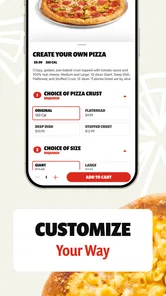
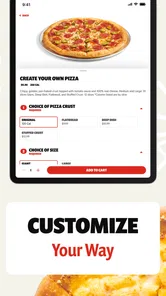
The Cicis Pizza app is designed to make ordering from Cicis more convenient. Depending on your location and the services available there, you can browse the menu, customize selected items, place pickup or delivery orders, find nearby restaurants, and view current deals. The available features may vary by restaurant, so it is worth checking your local store before ordering.
Can I order Cicis Pizza for delivery or pickup through the app?
In supported locations, the app may let you choose between pickup and delivery when placing an order. Pickup is generally handled directly by the selected Cicis restaurant, while delivery availability, fees, estimated times, and service areas can depend on local partners and store policies. Before confirming payment, review the address, total cost, and expected preparation or delivery time.
Does the Cicis Pizza app offer coupons, discounts, or rewards?
Cicis frequently promotes buffet specials, pizza deals, limited-time offers, and other discounts, although the exact promotions can change by location and date. Some offers may be available in the app, while others may require a coupon code or have restrictions such as participating restaurants, minimum purchases, or specific redemption times. Always read the terms before applying a deal.
Pros
- Generous buffet format lets diners try several pizza varieties in one visit.
- Family-friendly atmosphere works well for casual group meals.
- Dessert and salad options add variety beyond the main pizza selection.
- Many locations offer affordable pricing for larger families and groups.
- Carryout availability makes it convenient for quick pizza meals at home.
Cons
- Quality and freshness can vary depending on location and busy periods.
- Buffet selections may be limited during slower hours.
- Some locations have dated interiors or inconsistent maintenance.
- Nutritional information may be difficult to find for every menu item.
- Popular pizzas can disappear quickly before staff bring out replacements.











