Church Center
- 1.45K
- 4.4
- Installs
- 1.00M
- Price
- Free

Screenshots
Analysis by Reviewed
When a church app feels confusing, the first question I ask is whether the problem is the app itself or the way a particular church has set it up. Church Center is meant to connect people with their own congregation, so the experience depends on having the right church selected and on that church using the parts of the service you need. That makes it useful when it fits your community, but less like a general-purpose social app you can open and use without any local context.
Where people can get stuck
The most common friction is knowing where to begin: a church may share a sign-in or access process, and a new member may not know which congregation to choose or what information to use. I’d start with the church’s own instructions rather than repeatedly trying different details. If you attend more than one congregation, take a moment to confirm you are looking at the right one before searching for a group, event, or schedule.
It also helps to keep expectations realistic. Church Center brings church-related tasks together, but it cannot make every congregation organize its information in the same way. If a page or activity you expect is not visible, that may reflect how your church manages its services rather than a fault with your phone. For help with access or local information, the church’s office or the person who invited you is often the most direct first stop.
Setup checks that save time
Before relying on the app for a busy week, I’d check that your profile details are current and that you can reach the parts your church uses. A misspelled email address or an old contact detail can make follow-up harder, especially if you are coordinating with a group or keeping track of serving plans. Make these checks while you have time, not while standing outside an event wondering whether you registered.
For households, it is worth deciding whose profile should handle a particular task. Keeping contact information accurate and using the relevant person’s details can prevent confusion around registrations or schedules. I would also avoid assuming that one person’s view automatically covers every family member; check the information shown for the person involved before treating a task as complete.
Choosing the right routine for a household
A useful habit is to agree on who will check which church details, rather than having several family members assume someone else has handled them. For example, one person can review event information while the person attending confirms their own registration details. That division is especially helpful when a household has different schedules, but it only works if everyone knows whose profile is being used for each task.
If you are new to the congregation, start with one straightforward activity, such as locating an event or checking a group detail, before relying on the app for several responsibilities at once. This gives you a chance to learn how your church labels its information and where it places updates. I find that a small first test is less stressful than trying to set up every part of church life on the phone in one sitting.
More From Our News Desk

Weather by Xiaomi Review: Clear at a Glance, Less Clear Up Close

X Under Pressure: Can It Recover When Posting Goes Wrong?

Clash of Clans Is Won Between the Battles

Android Auto Makes the Case for Quieter Car Software

MobiOffice: Transforming Mobile Productivity with Seamless Integration

EA SPORTS FC™ Mobile Soccer: Redefining Mobile Sports Gaming
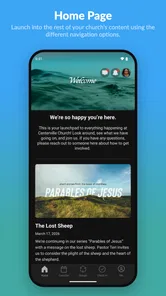
Ever found yourself juggling between different apps to manage your church activities? Well, let me introduce you to the Church Center App. It's like having your entire church community right in your pocket. You can forget about missing out on any church events or struggling to find that one contact you need from your group.
Connecting with Your Church Community
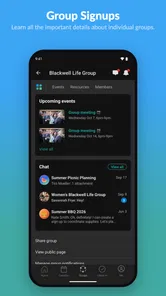
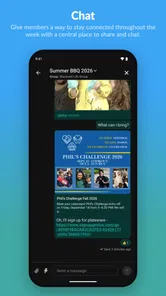
One of the standout features of the Church Center App is how it seamlessly connects you with your church community. Whether you're looking to join a small group, sign up for an event, or simply get in touch with fellow members, this app has got you covered. It's all about bringing people together, and it does so with ease. The interface is user-friendly, making it easy even for those who aren't tech-savvy.
Events and Registrations Made Easy
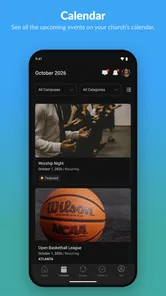
Let’s talk about events. With this app, you can view all upcoming events at your church and even register for them directly through the app. No more hassle of visiting the church office or dealing with paper forms. Just a few taps on your phone, and you're all set. Plus, it sends you reminders so you won’t forget about that important meeting or community gathering. Pretty neat, right?
A practical way to use this is to check the event details before making plans, then register as soon as you know you can attend. For example, if a family schedule changes midweek, checking your registration and any event information in one place can be simpler than searching old messages. I would still keep an eye on church announcements for last-minute changes; an app is useful for organizing details, but it is not a substitute for information your church shares directly.
Making event details easier to act on
When an event involves other people, I would treat the registration as one step in a small planning routine: confirm who is going, check the details shown by the church, and make sure the right person’s information is attached. If plans change, revisit the event rather than relying on memory or an old message. This is a simple way to avoid the common mismatch between “I thought we were signed up” and what the organizer can actually see.
The app is most useful here when the church keeps event information current and members use it as the shared reference point. If your congregation posts changes in another channel, make that channel part of your check too. The convenience comes from reducing scattered searching, not from assuming every update will appear in exactly the same place.
Managing Your Giving
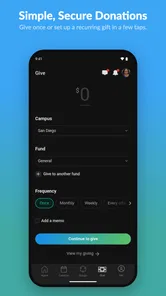
Now, if you're like me, you might sometimes forget to bring cash for offerings or donations. But with the Church Center App, you can manage your giving directly from your smartphone. It's secure, fast, and incredibly convenient. You can set up one-time donations or schedule recurring gifts, ensuring that you support your church consistently without any hiccups.
Convenience is not the only consideration here. Before setting up a recurring gift, I’d review the amount and schedule carefully and make sure the account details are correct. Someone who prefers to give in person or keep donations separate from phone-based tasks may reasonably stick with their usual method. The app is most helpful when mobile giving suits your habits, not because it should replace a choice you are comfortable with.
Choosing whether mobile giving fits
For someone who already gives through another routine, there is no need to change simply because a phone option is available. I would first decide whether a mobile record and a repeatable schedule would genuinely make giving easier. If you do choose recurring giving, take the time to check the details before saving, and keep your own expectations clear about what you intend to contribute. A convenient workflow still deserves a careful review.
This is also an area where personal preference matters more than app convenience. Some people want giving and event planning together; others prefer to keep financial activity separate from their general church browsing. Both approaches are reasonable. Church Center is a better fit when its giving workflow matches the way you already want to manage this part of your participation.
Personalized Experience
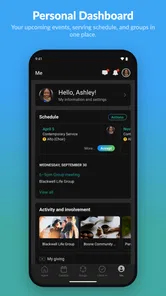
Another thing I love about this app is the personalized experience it offers. You can update your profile, manage your contact information, and even track your serving schedules. It’s like your personal church assistant, keeping everything organized and at your fingertips.
Serving plans and everyday coordination
Serving schedules are more useful when you check them as part of a regular routine, rather than only when someone asks whether you are available. I would look ahead at the commitments your church has placed in your view, then contact the relevant person promptly if something conflicts. That gives the organizer a chance to respond and keeps a scheduling question from turning into a last-minute surprise.
For a realistic weekday example, imagine a family deciding whether to attend a church gathering after work. One person checks the event details, confirms the right household member is registered, and checks the serving schedule before promising to help. If the screen does not settle a question, they can ask the church contact directly instead of guessing. The app can make the pieces easier to find, while the final coordination still depends on clear communication between people.
Recovering a workflow when something goes wrong
If something appears missing or a registration does not look right, I’d first reopen the relevant area and check the details you entered rather than immediately repeating the action. Confirm the church, profile, and event, then look for any confirmation or reminder you already received. This simple check can prevent duplicate registrations or uncertainty about whether a task went through.
If the issue remains, try again when your connection is stable and use the church’s normal contact route for anything time-sensitive. For a serving commitment or event happening soon, asking the organizer to confirm your status is more reliable than guessing from an incomplete screen. Keeping a note of what you tried also makes it easier to explain the problem without starting over.
When the app is not the cause
Sometimes the missing piece is not a technical failure at all. A congregation may not use a particular part of the service, may organize its information differently, or may have a local process for new members. Before reinstalling or repeating a task, I’d check whether the church expects you to access that information another way. The person who sent you the invitation can often clarify what should be available to you.
If you can open other areas but one church-specific item is absent, that is a useful clue to share when asking for help. Explain which congregation and profile you are using, what you expected to find, and what you already checked. That gives the church a more practical starting point than a vague report that “the app is not working,” and helps distinguish an access question from a local information question.
When another option is a better fit
Compared with relying on scattered email threads, printed notices, and separate conversations, Church Center can make church activities easier to find in one place. But it is not a universal replacement for every communication channel. Someone who only wants a broad calendar, does not participate in the church’s online processes, or prefers face-to-face coordination may find the app unnecessary. It works best when your congregation actively maintains the information you want to use.
Compared with a general calendar app, Church Center is aimed at church-related participation rather than organizing every part of someone’s life. A calendar may be better for combining work, school, and personal commitments; email or a messaging service may be better for a conversation that needs a quick, direct reply. I see the app as a local hub for the church tasks your congregation has chosen to put there, not a replacement for all those everyday tools.
It is particularly suitable for regular attendees who need to keep track of events, group involvement, giving, or serving commitments in one church context. It is less compelling for someone who visits occasionally, does not need to register for anything, or prefers to receive all church information in person. Before investing time in setting up a routine, ask whether your congregation actually uses the areas you care about; that answer matters more than the app’s general feature range.
Church Center is a free lifestyle app from Planning Center, and its broad adoption—over a million installs and an average rating of 4.5 from around 4,200 ratings—suggests it serves many church communities. It is rated for Everyone, first appeared on November 26, 2018, and its current version is 2025.11.26, with Android 7.0 or later required. Those details make it accessible to many users, though the most important practical question is still whether your own church uses it consistently.
In conclusion, the Church Center App is a game-changer for anyone looking to stay connected with their church community. It combines all the necessary tools into one app, making church life more engaging and manageable. If you want to enhance your church involvement and have all the community details at your disposal, this app is definitely worth checking out.
My practical verdict
I’d recommend it to people who regularly attend a church that uses Church Center for events, groups, giving, or serving schedules. It can reduce the small bits of back-and-forth that make participation harder, especially when you check details ahead of time and keep your profile accurate. If your church does not rely on it, or you prefer not to manage community activities on your phone, a direct conversation or the church’s existing communication method may suit you better. The app is a helpful hub, not a guarantee that every church task will happen inside one screen.
My strongest practical recommendation is to judge it by one recurring need, not by whether it promises to gather every church activity. If you frequently check a group, sign up for events, or confirm serving plans, try making that task part of a weekly routine and see whether it genuinely saves you effort. If you only open it occasionally, keep the church’s usual communication route handy and avoid treating the app as the sole place to look for urgent changes.
There is a small but important trade-off: a shared digital hub is convenient only when the congregation keeps its information clear and members know how to use it. A person who wants a simple, universal noticeboard may prefer a calendar or direct messages, while someone involved in several church activities may appreciate having these tasks gathered around their congregation. For me, that local fit is the deciding factor. When it is there, Church Center can make participation feel more organized; when it is not, the simplest route is still to ask the church directly.
Church Center Frequently Asked Questions
What should I know about Church Center before downloading it?
Church Center is a Lifestyle app developed by Planning Center, with the short description “Church Center” and a focus on connecting congregants with their church. It is free to download and is rated for Everyone. Its current version is 2025.11.26, and it requires Android 7.0 or later. The app is available for Android and iOS.
Do I need to be part of a church to use Church Center?
Church Center is intended to connect you with your church community, so its usefulness depends on whether your church uses it and what it makes available there. Once connected with your church, you can use the app to explore information such as events, groups, services, and news. It is most relevant for people who want to keep up with their church’s activities and take part in community life.
What is the Church Center App used for?
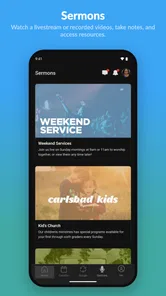
The Church Center App is designed to connect users with their church community, allowing them to easily access information about events, groups, and services. It serves as a comprehensive platform to find and join groups, register for events, manage donations, and stay updated with the latest church news. It's a convenient tool for churchgoers to stay engaged in their community.
How do I register for an event using the Church Center App?
To register for an event through the Church Center App, first navigate to the 'Events' section. Browse through the list of available events and select the one you're interested in. Tap on the event to view details and find the 'Register' button. Follow the prompts to complete your registration, ensuring you provide all necessary information.
Is the Church Center App free to use?
Yes, the Church Center App is free to download and use. It is available on both Android and iOS platforms. However, while the app itself is free, some events or activities within the app may require a fee, depending on your church’s policies. Always check the details of the specific event or group for any applicable costs.
Pros
- User-friendly interface for easy navigation
- Quick access to church events and groups
- Secure online giving and donation tracking
- Personalized church community experience
- Integration with church management software
Cons
- Limited features for non-member users
- Requires internet connection for full access
- Occasional sync issues with events
- No dark mode option available
- Notifications can be overwhelming












