

CHEF iQ
- 1.03K
- 4.3
- Installs
- 100.00K
- Price
- Free

Screenshots
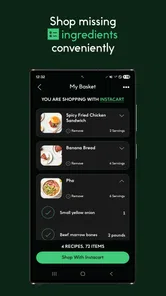
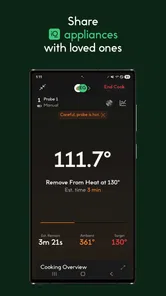
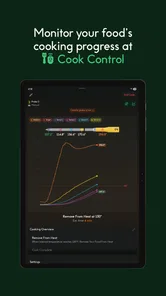
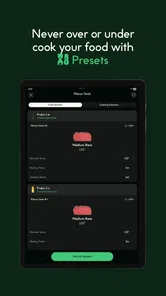
Analysis by Reviewed
I approached CHEF iQ as a cooking companion rather than just another recipe app. It comes from CHEF iQ, sits in the Food & Drink category, and is free to use. Its basic idea is appealing: help me move from deciding what to cook to actually putting a meal on the plate. That sounds simple, but the usefulness of a cooking app depends on how well it behaves when my hands are busy, my attention is split, or I am trying to make dinner with ingredients that do not quite match a picture.
My overall impression is positive, with an important qualification. The app is most helpful when I want structure and inspiration in the kitchen, not when I need a completely hands-off cooking system. The experience feels designed for people who enjoy learning through guided recipes and practical cooking information. It is less convincing for someone who only wants a very fast list of familiar meals, a bare shopping checklist, or an app that can be operated without frequently looking at the screen.
How the cooking experience feels to use
The first thing I noticed is that the app’s purpose is easy to understand. The central journey is about discovering a dish, working through its preparation, and ending with something ready to serve. That clear direction matters because cooking apps can easily become crowded with photos, categories, recommendations, and promotional distractions. Here, I found the concept easier to grasp than a general recipe website filled with unrelated results.
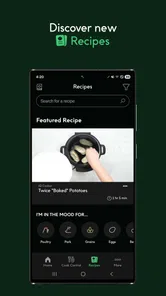
Navigation is most comfortable when I already know what kind of help I want. If I am choosing a meal for the evening, browsing works well as a starting point. If I have a specific ingredient in mind, the search-oriented approach is more useful than scrolling endlessly. I also appreciate that the app encourages me to think beyond the recipe title: preparation, cooking, and plating are connected parts of the same task rather than separate activities.
That said, clarity is not the same as effortless access. Cooking involves interruptions, and I sometimes need to stop reading to wash vegetables, check a pan, or find a utensil. Any recipe interface becomes harder to use when I have to repeatedly unlock or touch the phone. CHEF iQ is therefore best treated as a guide I consult in stages, not as a voice-only instructor that can replace visual checking.
The app has a 4.3 average from around 7.4 thousand ratings, which suggests that many people find the overall experience worthwhile. It has also passed 100 thousand installs, giving it the feel of an established cooking tool rather than an obscure experiment. Those figures do not guarantee that every recipe or screen will suit every person, but they do make it easier for me to recommend trying it before committing to a more complicated cooking system.
Readability and mental load
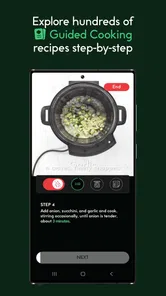
For me, the strongest accessibility quality is the way a guided recipe can reduce mental load. Instead of holding every instruction in my head, I can focus on one stage at a time. That is especially useful when a dish has several components or when timing matters. I am less likely to forget whether I have already added an ingredient, and I can return to the current part of the process instead of rereading an entire recipe.
More From Our News Desk

 Instagram
Instagram’s Power Comes From Its Place in Your Phone
A close look at how Instagram turns Meta’s reach, recommendation systems and everyday camera habits into durable platform power—and what that costs users.

 Gmail
GmailGmail in a Busy Inbox: Who Benefits Most?
From first account to crowded workday, Gmail earns its place through dependable search and flexible sorting—but its best fit depends on how much inbox maintenance you can tolerate.

 Prime Video
Switching to Prime Video: What Changes in Your Viewing Routine
Prime Video can make a compelling second home for streaming, but switching means learning a different catalog, rental layer, and route from browsing to playback.

 Universal TV Remote Control
Universal TV Remote Control Works Best as a Reliable Backup
A phone remote earns its place through quick setup and reliable habits. Here is how to get more from Universal TV Remote Control—and where its limits show.

 Weather - By Xiaomi
Weather by Xiaomi Review: Clear at a Glance, Less Clear Up Close
Xiaomi’s weather app makes everyday forecasts quick to scan, but its calm surface can leave useful details and recovery paths harder to find than they should be.

 X
XX Under Pressure: Can It Recover When Posting Goes Wrong?
A resilience-focused review of X, examining setup, mistaken posts, interruptions, weak connections, and the gaps that matter when recovery needs to be dependable.
Latest News



This kind of structure can help people who find long blocks of instructions tiring, including cooks who are new to the kitchen or anyone whose concentration is affected by stress. It also supports a calmer workflow for parents preparing food while keeping an eye on other tasks. The benefit is not that the app makes cooking automatic; it is that it can turn a vague sequence into smaller decisions.
I would still recommend reading the whole recipe before starting. That small habit reveals whether the meal requires preparation that takes place before the main cooking begins. It also lets me collect ingredients and tools in advance, which reduces the need to move back and forth between the counter and the phone. For users with memory difficulties, this preparation step may be more valuable than simply opening the recipe and beginning immediately.
People with low vision should judge the app on their own device rather than assuming that every screen will be comfortable. Text size, contrast, zoom behavior, and the arrangement of controls all depend on the phone and operating-system settings as well as the app itself. I found that a clean screen is helpful, but a cooking app can still become difficult when instructions are dense or when I need to read from a distance while standing at the stove.
Users who rely on screen readers may also want to test the main tasks first: finding a recipe, opening its instructions, moving through the stages, and returning to a previous step. I would not treat the app as automatically accessible simply because it is modern or visually organized. The practical question is whether the labels and controls make sense when the screen is not being viewed in the usual way.
Hands, movement, and sensory comfort
Cooking creates a special motor challenge because both hands may be occupied, wet, or covered in food. I found it useful to position the phone before beginning rather than carrying it around the kitchen. A stand or a safe, visible surface can make the experience less frustrating, particularly for anyone with limited reach, tremor, reduced grip strength, or difficulty making repeated precise taps.
That workaround also helps users who cannot comfortably hold a phone while preparing ingredients. It does not turn the app into a hands-free tool, but it changes the task from repeatedly picking up the device to checking it at planned moments. I would prepare the next step mentally before touching the screen, then clean or dry my hands before interacting with it. This simple routine reduces accidental taps and makes the app more practical for people with motor limitations.
For users with limited dexterity, the main trade-off is between the value of detailed guidance and the effort of controlling the interface. A printed recipe may be simpler to operate because it never locks, scrolls, or changes state. On the other hand, a printed page cannot offer the same feeling of a staged digital workflow. I would choose CHEF iQ when the recipe complexity justifies that extra interaction, and use a paper copy when I need maximum physical simplicity.
Sensory needs deserve equal attention. Food preparation can already involve strong smells, heat, splashing, and visual clutter. An app cannot remove those conditions, but it can either add to the overload or help organize it. I prefer using it before the busiest part of cooking, when I can decide what to prepare without the pressure of a hot pan. Once the meal is underway, fewer screen checks are better.
People sensitive to bright displays may find a phone screen uncomfortable in a dim kitchen, while others may struggle to read it under strong overhead lighting. Adjusting the device’s brightness and display settings can help, but the result will vary. I also would not rely on a screen near steam, oil, or water without thinking carefully about where it is placed. The app is a kitchen aid, not a reason to put a fragile device in an unsafe position.
Different routines and everyday situations
A realistic use case for me is a weekday evening when I have chicken, vegetables, and a limited amount of time but no clear plan. I can browse for an idea, inspect the method before shopping or preparing, and use the instructions as a checklist while cooking. The app is valuable in that moment because it narrows the number of decisions. I do not need to invent a complete meal from scratch, yet I still have room to adapt the dish to what is available.
Another useful situation is cooking with someone who has less experience. Rather than giving a beginner a long recipe and leaving them to interpret every phrase, I can use the app as a shared reference. We can divide the work into manageable stages, with one person preparing ingredients and the other checking the current instruction. This can make the kitchen feel more collaborative, although it still requires clear communication and supervision around heat, knives, and food safety.
The app may also suit people who are trying to build confidence after a long break from cooking. The guided format gives the session a beginning and an end, which is less intimidating than opening a huge collection of recipes. I like it for learning a repeatable process: read first, prepare the ingredients, cook in sequence, and plate with intention. That habit is more useful than chasing a different complicated dish every night.
For households with different abilities, I would treat the app as one part of a shared system. One person might choose the recipe and organize ingredients, while another handles tasks that are physically easier for them. Someone with limited standing tolerance could do planning and measuring at a table, then join for the final stages. The app supports this division indirectly by giving everyone a common set of instructions, but it does not replace the need to adapt the kitchen itself.
When I compare it with ordinary recipe websites, CHEF iQ feels more focused on the cooking journey and less like a broad search engine. Websites can be better when I need a very specific dietary variation, a quick substitution, or many independent opinions. A cookbook can be better when I want a stable, glanceable page and no device near the food. CHEF iQ wins when I want digital guidance and discovery in one place.
Compared with a plain notes app, it offers a more purposeful cooking environment. Notes are excellent for saving a family recipe or writing personal changes, but they do not give me the same sense of moving through a designed cooking process. Compared with a video, the app is potentially easier to consult at my own pace because I am not forced to pause and rewind a demonstration. Video remains better for showing knife technique, texture, and visual cues that words cannot fully explain.
What may still get in the way
The biggest limitation is dependence on the phone as an active kitchen object. If I am cooking with messy hands, limited mobility, poor balance, or a need to avoid repeated screen interaction, the digital format can become a barrier. I can reduce that friction with setup and planning, but I cannot remove it completely. Anyone seeking a truly hands-free or audio-first cooking experience should be cautious before making this their only resource.
There is also a difference between following a recipe and understanding food. A guided sequence can tell me what to do, but I still need judgment about heat, ingredient condition, pan size, and doneness. That matters for users who are learning, because a screen can feel authoritative even when the kitchen situation differs from the expected one. I would use the app as support, not as a substitute for basic safety awareness or practical observation.
Adaptability can be another point of friction. Real households deal with allergies, cultural preferences, missing ingredients, limited budgets, and different equipment. A recipe may remain useful after substitutions, but changing several elements can alter cooking time and texture. If I need highly specialized dietary filtering or exact nutritional control, I would look for a service built specifically around that purpose rather than assume a general Food & Drink app will cover it.
People who dislike visual browsing may not get much from the discovery side. The app’s appeal depends partly on being willing to explore dishes and engage with the cooking process. If my only goal is to store ten familiar family meals, a simple document or recipe manager may be faster. Likewise, a person who never wants to use a phone in the kitchen may be happier with a printed cookbook and a timer.
Device compatibility is reasonably broad for Android users because the current version is 5.4.0 and the app works from Android 7.0 onward. That makes it approachable for people who do not own a recent phone, although the actual comfort of the experience will still depend on screen size, display settings, performance, and the user’s preferred accessibility tools. The app is free, which lowers the barrier to testing it, but free access does not eliminate the need to decide whether its workflow fits a particular household.
The age rating is Everyone, so I see it as suitable for a broad audience. That should not be confused with independent cooking ability: children and inexperienced users still need appropriate supervision around sharp tools, heat, and raw ingredients. In an inclusive review, that distinction matters. An app can be easy to open while the activity it supports remains physically demanding or safety-sensitive.
Who I would recommend it to
I would recommend CHEF iQ to a home cook who wants more direction than a blank search box provides, but more flexibility than a rigid meal plan. It is a good match for someone building confidence, experimenting with new dishes, or trying to make weeknight cooking feel more organized. It can also help a household coordinate tasks because everyone can refer to the same recipe path.
I am especially positive about it for users who benefit from breaking a complex activity into smaller steps. That includes busy cooks, beginners, and people who find planning more difficult than the actual chopping and stirring. The best results come when the user previews the recipe, gathers equipment, places the phone safely, and treats each instruction as part of a deliberate routine.
I would suggest skipping it, or using it only as a secondary tool, if screen interaction is physically difficult, if visual text is hard to access on the available device, or if the user needs specialized dietary management. It is also not my first choice for someone who wants only a personal recipe archive. In those cases, a large-print cookbook, a simplified notes system, or a purpose-built accessible cooking tool may be a better fit.
One practical tip is to test the app during a low-pressure meal rather than on a night when everything must go perfectly. Open a recipe, inspect the navigation, check whether the text is comfortable, and see how often you need to touch the phone. This reveals more than a quick browse. If that trial feels manageable, the app is more likely to remain useful when the cooking becomes busy.
My inclusive verdict
CHEF iQ succeeds because it gives cooking a clear digital shape: discover something appealing, prepare with guidance, and finish the meal with a sense of completion. I like that it can reduce decision fatigue without turning the kitchen into a purely automated process. Its free status and broad Android support make experimentation easy, and its established audience gives me reasonable confidence that it is worth trying.
Its accessibility is more situational than universal. The guided structure can support attention, confidence, and shared cooking, but the phone remains a visual and physical interface placed in a demanding environment. Users with motor, sensory, or visual needs should test the actual recipe workflow with their own settings and equipment. A safe phone position, advance preparation, and realistic expectations make a noticeable difference.
My final recommendation is therefore measured but favorable: try it if you want a friendly cooking guide and are comfortable consulting a screen while preparing food. The most inclusive way to use it is to adapt the surrounding routine, not to expect the app alone to solve every access need. For me, that makes it a useful companion for discovery and structured practice, while a cookbook, notes app, video, or specialized dietary tool may still be the better choice in specific situations.
CHEF iQ Frequently Asked Questions
Is CHEF iQ available for Android and iOS, and what devices can run it?
CHEF iQ is a mobile app in the Food & Drink category, and it is available for Android and iOS users through their respective app stores. On Android, it supports devices running version 7.0 or later. Before installing, make sure your phone’s operating system is compatible and that you have enough space for the app and any updates.
How much does CHEF iQ cost to download?
CHEF iQ is free to download, making it easy to try its recipes and cooking guidance without paying for the app itself. Keep in mind that using connected thermometer features requires compatible CHEF iQ hardware, which is a separate purchase. The app’s free download does not necessarily mean that every device, accessory, or feature involved in the broader cooking setup is free.
What is CHEF iQ and what can I use it for?
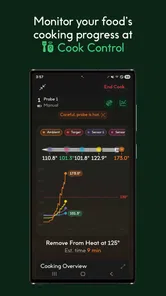
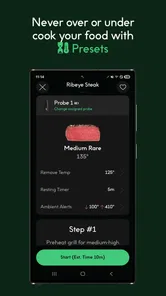
CHEF iQ is a smart cooking app designed to work with the CHEF iQ Smart Thermometer and compatible kitchen accessories. It provides guided recipes, cooking instructions, temperature monitoring, and alerts intended to help users prepare meat, poultry, seafood, baked dishes, and other foods more accurately. The app is especially useful for beginners who want step-by-step guidance, as well as experienced cooks looking for better temperature control.
Do I need the CHEF iQ Smart Thermometer to use the app?
Many of CHEF iQ’s most useful features are built around the company’s smart thermometer, including wireless temperature tracking, estimated cooking progress, and alerts when food reaches the selected target. However, the app may also offer recipes, cooking guides, and other informational content without the device. Before downloading, users should check which features are available independently and which require purchasing compatible CHEF iQ hardware.
Is CHEF iQ suitable for beginners?
Yes, CHEF iQ is generally suitable for beginners because it combines recipes with clear cooking steps and temperature-based guidance. Instead of relying only on fixed cooking times, the app helps users understand when food is actually ready by monitoring its internal temperature. That said, users still need to prepare ingredients correctly, position the probe safely, and follow basic food-safety practices, since an app cannot replace proper kitchen judgment.
Pros
- Smart cooking guidance helps reduce guesswork for beginners.
- Recipe library offers useful inspiration for everyday meals.
- Ingredient substitutions make recipes more flexible and practical.
- Cooking history helps track favorite dishes and past results.
- Works well for users building confidence with kitchen techniques.
Cons
- Some advanced features may require a paid subscription.
- The app can feel overwhelming when first exploring its tools.
- Recipes may not suit every dietary preference or regional cuisine.
- Reliable internet access may be needed for full content access.
- Extra smart accessories can increase the overall cost of using it.











