Checkbook - Account Tracker
- 4.29K
- 3.6
- Installs
- 100.00K
- Price
- Free

Screenshots
Analysis by Reviewed
I find Checkbook - Account Tracker most useful when I treat it for what it is: a focused digital register for recording money coming in and going out, rather than a complete personal-finance command center. If you still balance a bank account with a paper notebook, a spreadsheet, or a string of mental calculations, this app offers a simpler middle ground. It keeps the familiar checkbook idea while putting it on a phone, and that narrow purpose is both its biggest strength and its main limitation.
After using it as a finance app, I would recommend it to someone who wants a lightweight transaction log without the visual noise of a large budgeting platform. I would not choose it for someone expecting automatic bank connections, investment monitoring, detailed spending reports, or a shared household finance system. Its value comes from deliberate manual tracking: you enter what happened, keep an eye on the running balance, and use that record to avoid surprises.
What makes the checkbook approach work
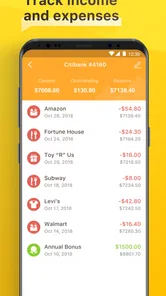
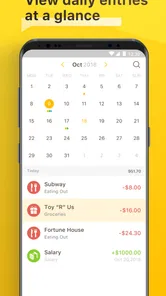
The basic idea is easy to understand. Instead of waiting for a bank statement to tell you where your balance stands, you record purchases, deposits, withdrawals, and other account activity as you make them. That makes the app feel closer to a paper checkbook register than to a modern financial dashboard. I like that distinction because it keeps the main job visible: knowing what has already left an account, even when the bank has not fully processed it yet.
That last point is especially useful in everyday life. Imagine paying for groceries on the way home, then using your debit card for fuel before the first transaction has settled. If I record both immediately, the balance I see in the app reflects my commitments rather than only the transactions that have cleared. This is a practical habit for anyone who has ever looked at a bank balance, assumed the money was available, and then remembered several pending purchases too late.
The app is also a reasonable fit for people who dislike the complexity of full budgeting tools. Many finance apps divide spending into categories, build charts, import transactions, and ask users to maintain a detailed financial profile. Those features can be useful, but they also create setup work. Checkbook - Account Tracker takes a more direct route. I can open it, enter a transaction, and return to whatever I was doing without turning a small purchase into a financial administration project.
That simplicity does require discipline. Because the system depends on what I enter, it cannot rescue me from forgetting a cash purchase or delaying a deposit. I see that as an important trade-off rather than a hidden flaw. The app is strongest when I use it as a daily register, not when I expect it to reconstruct my finances automatically after several weeks of neglect.
A practical routine for keeping the balance useful
My preferred workflow would be to record a transaction at the moment it happens, then use the app before making a larger discretionary purchase. That second check is where a manual register becomes more valuable than a quick glance at a banking app. The bank may show cleared funds; the register can show cleared funds plus the payments I have already committed to.
More From Our News Desk

Weather by Xiaomi Review: Clear at a Glance, Less Clear Up Close

X Under Pressure: Can It Recover When Posting Goes Wrong?

Clash of Clans Is Won Between the Battles

Android Auto Makes the Case for Quieter Car Software

MobiOffice: Transforming Mobile Productivity with Seamless Integration

EA SPORTS FC™ Mobile Soccer: Redefining Mobile Sports Gaming
For recurring bills, I would enter them as soon as they are paid or scheduled according to the way I personally manage the account. The important thing is consistency. If I record some commitments but ignore others, the running figure becomes misleading. A useful trick is to make a short evening check part of the routine: compare the day’s receipts and payments with the entries, then correct anything while the details are still fresh.
Cash users may get more from this approach than they expect. A banking app often has little to say about cash until I deposit it, while a register can preserve the record from the moment I spend it. That makes Checkbook - Account Tracker suitable for someone who uses one main account but still handles occasional cash. It can also help a person who wants a private record of small purchases without connecting financial accounts to another service.
Another non-obvious benefit is the way manual entry encourages awareness. Automatic imports are convenient, but they can make spending feel invisible. Writing down a takeaway meal, a subscription payment, or an impulse purchase creates a small pause. I would not claim that the app changes spending behavior by itself, but the act of entering each transaction can expose habits that disappear inside a long bank feed.
Where it sits beside banking and budgeting apps
I see three common alternatives in this category. The first is the official banking app, which is better for confirmed balances, transfers, statements, and account security tasks. The second is a spreadsheet, which offers more freedom for formulas and custom reports but demands more setup and maintenance. The third is a full budgeting service, which generally provides stronger analysis and automation but can feel excessive for someone who only wants a register.
Checkbook - Account Tracker sits between those options. It is more purpose-built than a blank spreadsheet and more focused than a full budget suite. At the same time, it does not replace the bank’s official record, and I would never use a manual register as the only place to verify a payment or investigate an unfamiliar transaction. The sensible arrangement is to use the app for planning and day-to-day awareness, then use the bank for final confirmation.
This distinction matters for people with several accounts. If I need a complete picture across checking, savings, credit cards, loans, and investments, a simple checkbook-style tool may become another record to maintain. Its focused design is convenient for one account or a small number of manually managed accounts, but the workload grows as financial complexity grows. Someone with irregular income or many transfers should think carefully about whether manual entry will remain realistic.
The app comes from TinyWork Apps and has been available since July 24, 2015. Its current version is 2.1.2, and it runs on Android from version 7.0 onward. Those details make it approachable for people using an older compatible phone, although I would still keep the app updated when updates are available and maintain normal caution around financial information on any device.
What I like, and where the experience becomes limited
The clearest strength is focus. The store summary describes it as a replacement for a paper checkbook register, and that description matches the experience better than labels such as “complete money manager” would. I do not have to learn a complicated financial system before recording a purchase. The familiar register model lowers the barrier for someone who understands balancing a checkbook but does not want to build a spreadsheet.
I also appreciate the usefulness of a manually adjusted balance. A bank balance can be technically accurate while still being practically incomplete because pending card purchases, written checks, or planned withdrawals have not settled. A personal register gives me a place to account for those obligations earlier. That is the strongest reason I would install this app for a friend: it can reduce the gap between what the bank displays and what the person has actually promised to spend.
The age rating is Everyone, and the app is free to install. Optional in-app purchases range from $0.99 to $19.99 per item. For a cautious user, the sensible approach is to begin with the free experience and decide whether the available workflow is enough before paying for anything. I would not treat optional purchases as a reason to choose or reject the app without first deciding whether its manual register model fits my habits.
Its public reception is mixed rather than universally enthusiastic. It holds a 3.6 average from around 9.3 thousand ratings, with roughly 4.3 thousand written reviews, and it has passed 100 thousand installs. I read that combination as evidence of a useful but not universally satisfying tool. The audience is large enough to show that the checkbook concept still has appeal, while the middling average suggests that expectations matter: people wanting a straightforward register may be comfortable, while people looking for automation may feel constrained.
The friction I would want new users to understand
Manual tracking is the central weakness. If I forget to enter a transaction, the app cannot know about it. If I enter the wrong amount, choose the wrong account, or record a payment twice, the balance becomes unreliable until I notice the mistake. That is not a minor inconvenience for someone who wants hands-off finance management. It is the fundamental cost of choosing a register over synchronization.
There is also a psychological trap in relying too heavily on the displayed balance. A neat number can create confidence even when the underlying entries are incomplete. I would make a habit of comparing the register with the bank account during reconciliation, especially after several days away from the app. The app can help me organize my own record, but the bank statement remains the authority for cleared activity.
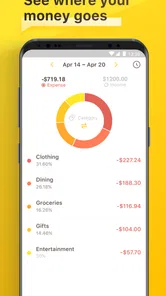
Another limitation is analytical depth. A register can tell me that money moved, but it is not automatically the same thing as understanding why my finances feel tight. If I want to compare dining costs month by month, build a savings plan, forecast irregular income, or examine debt repayment, I would prefer a budgeting tool designed for those questions. Checkbook - Account Tracker is better at “What is my usable balance after these entries?” than “What long-term pattern is shaping my finances?”
That makes the app less suitable for couples who need simultaneous access, families coordinating several spending sources, or users who want automatic categorization. It may also frustrate anyone who rarely remembers to record cash and card activity. In those cases, a bank app with transaction feeds or a more automated finance service is likely to be the better fit, even if it feels less private or more elaborate.
Small habits that get more value from a simple register
I would start with one account rather than trying to recreate an entire financial life on the first day. Enter the current balance carefully, then add only the transactions that still affect the account. This avoids the common mistake of spending an hour importing old history that will not improve today’s decisions. Once the register is trustworthy, adding another account becomes a deliberate choice instead of a source of clutter.
For pending payments, I would record them immediately and use a consistent note or description that makes them easy to recognize later. When the bank finally clears the payment, I would check the amount and date rather than blindly adding another entry. That simple reconciliation habit prevents the most damaging manual-register error: treating one payment as two separate deductions.
For shared household spending, I would decide in advance who is responsible for entering transactions. If two people independently maintain the same balance without a shared process, the record can become less reliable than no record at all. This is one situation where the app’s simplicity does not solve coordination. A shared spreadsheet or a finance service built around household access may be a better choice.
I would also use the register as a short-term decision tool, not as a substitute for reviewing statements. Before a weekend trip or a large purchase, checking recent entries can reveal commitments that are easy to forget. After the statement arrives, comparing the two records can uncover forgotten subscriptions, duplicated entries, or cash withdrawals that need clarification. The app is most valuable in that loop between intention and confirmation.
Who should install it
I think Checkbook - Account Tracker is a good match for a person who wants a digital replacement for a paper register, prefers manual control, and mainly needs a running account balance. It is particularly appealing to someone who finds full budgeting apps overwhelming, or to a user whose bank app shows transactions but does not make it easy to account for pending spending.
It can also suit students, first-time account holders, and anyone trying to build the habit of checking available money before spending. The interface concept is easier to explain than a category-heavy budget: record the movement, watch the balance, and reconcile it with the bank. That straightforward mental model is valuable for learning basic account management.
I would suggest skipping it if automatic imports are essential, if you need detailed financial reports, or if your finances involve many accounts and frequent transfers. I would also hesitate to recommend it to someone who already struggles to keep receipts or remember payments. In that case, the app may become a second chore rather than a useful safeguard. A more automated option would better match that person’s behavior, even if it offers less direct control.
As an Android app, it is available to users whose devices meet the Android 7.0 minimum. The free entry point makes it easy to test the workflow without committing immediately, while the optional purchase range means users should pay attention to which additions they actually need. I would judge it by one practical question: after a week, is the balance more trustworthy because I consistently record transactions? If the answer is yes, the app is doing its job.
My final view is positive but deliberately narrow. Checkbook - Account Tracker is a useful manual register, not a full financial management system. I like it because it respects a simple workflow and addresses a real everyday problem: the difference between money that appears available and money that is already spoken for. Its weakness is inseparable from that design; without regular entries and occasional reconciliation, the convenience disappears.
I would recommend it to a friend who misses the clarity of a paper checkbook but wants that record on a phone. I would point someone seeking automation, shared finance tools, or serious budgeting toward another category of app. For the right user, this focused approach is refreshingly practical. For everyone else, its modest scope will feel less like simplicity and more like work.
Checkbook - Account Tracker Frequently Asked Questions
Who develops Checkbook - Account Tracker, and is it available for my device?
Checkbook - Account Tracker is a finance app from TinyWork Apps. It is available for Android devices running version 7.0 or later, and it is rated for Everyone. Before downloading, check that your device meets the operating-system requirement and that the app is offered in your region’s store. Its straightforward focus makes it worth considering if you want a digital alternative to a paper checkbook register.
What is Checkbook - Account Tracker used for?
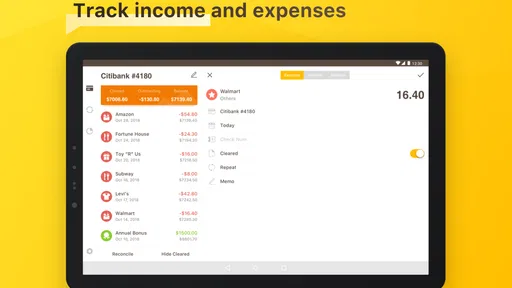
Checkbook - Account Tracker is designed to help you monitor personal finances by recording income, expenses, deposits, withdrawals, and account transfers in one place. After testing the app, its main strength is straightforward transaction tracking rather than full banking automation. It can be useful for managing checking accounts, cash spending, savings, or shared household budgets, especially if you prefer entering transactions manually and reviewing your balance regularly.
Does Checkbook - Account Tracker connect directly to my bank account?
The app is primarily intended for manual financial tracking, so users should not assume that it automatically connects to every bank or imports transactions like a full-service budgeting platform. Depending on the version and device, available synchronization or backup features may vary. Before downloading, check the current store description and permissions carefully. Manual entry can take more effort, but it also gives you greater control over the information you record.
Can I manage multiple accounts and currencies in the app?
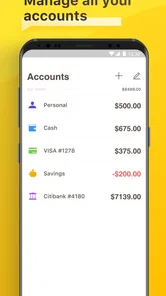
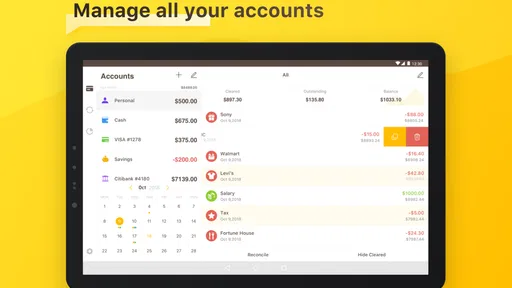
Checkbook - Account Tracker is generally suitable for people who want to keep separate records for several financial accounts, such as checking, savings, cash, or credit-related balances. You should review the account and currency options available in the current release, because support can differ between platforms and updates. If you regularly handle multiple currencies, confirm that the app supports your preferred setup before relying on it for international finances.
Is my financial information safe when using Checkbook - Account Tracker?
Because a checkbook app may contain sensitive details about your spending and account balances, privacy should be considered before entering real financial data. Avoid recording complete bank passwords, card security codes, or other information that the app does not need. Review its privacy policy, permissions, backup options, and any available passcode or biometric protection. Keeping your phone updated and protected is also important when using a personal finance tracker.
Pros
- Simple interface makes recording income and expenses quick.
- Supports multiple accounts for better organization of personal finances.
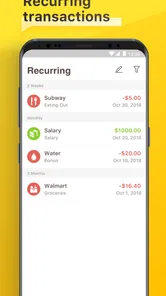
- Recurring transactions reduce the need for repetitive manual entries.
- Budget tracking helps monitor spending against planned limits.
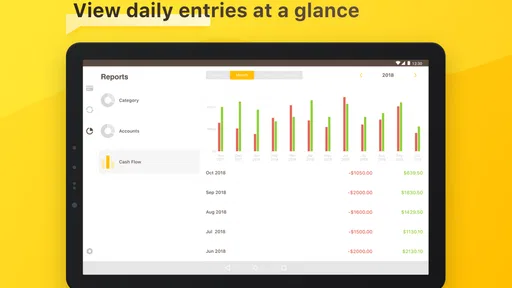
- Useful reports provide a clearer view of financial activity over time.
Cons
- Some advanced features may require a paid upgrade.
- Manual entry can become tedious for users with many transactions.
- Limited banking integration may not suit users wanting automatic imports.
- Customization options for categories and reports may feel restricted.
- Users must maintain accurate entries for balances and reports to stay reliable.












