Cards Wallet - Digital Wallet
- 141.00
- 4.5
- Installs
- 1.00M
- Price
- Free

Screenshots
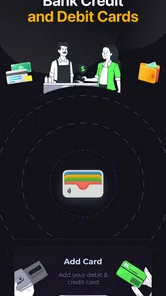
Analysis by Reviewed
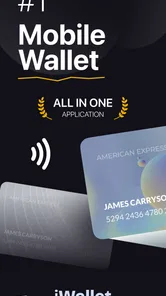
I started using Cards Wallet - Digital Wallet with a familiar problem: my physical wallet had become a messy stack of loyalty cards, membership passes, tickets, and small cards I rarely carried but occasionally needed. This free lifestyle app takes a focused approach by putting those items into one digital wallet on Android. Instead of treating it like a banking replacement, I found it more useful as an organized place for everyday cards, barcodes, and QR codes.
The appeal is easy to understand. When I am standing at a shop counter or entering a venue, I want the relevant code ready without searching through a drawer or opening several separate apps. Cards Wallet is built around that moment. Its store summary describes a secure digital wallet for cards, passes, barcodes, and QR codes, while the short description simply calls it “Cards Wallet.” That simplicity is also the key to judging it fairly: it is most valuable when it reduces small bits of daily friction.
It is available free of charge, with optional in-app purchases ranging from $9.99 to $69.99 per item. The app is suitable for Everyone, runs on Android 7.0 and later, and is currently at version 1.43. SUNMARE DIGITAL TEKNOLOJI YAZILIM SANAYI TICARET is the developer. With a 4.5 average from around 11 thousand ratings and more than a million installs, it has clearly found an audience among people who want a dedicated home for digital cards rather than another general-purpose productivity tool.
From a cluttered wallet to a usable digital routine
I start with a small, deliberate collection rather than transferring every card at once: the items I reach for during ordinary errands, plus one occasional pass I usually have to hunt down. That makes it easier to tell whether the wallet is genuinely saving time or merely moving clutter from my pocket to my phone. From there, I look at what happens when several cards are in regular rotation and the routine gets busier.
Starting with the cards I actually carry
My first useful step was not adding everything at once. I began with the cards that repeatedly caused inconvenience: a loyalty card used during weekly shopping, a membership pass, and a barcode I normally kept as a screenshot. That small starting set made the app easier to evaluate because I could see whether it helped during real errands instead of merely looking tidy on the first day.
The important distinction is between storing a card and replacing the service behind it. Cards Wallet gives the digital item a convenient home, but it does not turn a loyalty card into a payment card or make every venue accept a phone automatically. I treated each saved item as a digital representation that still depends on the shop, organization, scanner, or event accepting its barcode or QR code.
That mindset prevents one of the most common disappointments with wallet apps. I would not move bank cards, identity documents, or anything essential into this app simply because it is called a wallet. I use it for cards and passes whose main practical need is quick presentation. For sensitive material, I prefer the official service or a platform wallet designed specifically for that purpose.
More From Our News Desk

Weather by Xiaomi Review: Clear at a Glance, Less Clear Up Close

X Under Pressure: Can It Recover When Posting Goes Wrong?

Clash of Clans Is Won Between the Battles

Android Auto Makes the Case for Quieter Car Software

MobiOffice: Transforming Mobile Productivity with Seamless Integration

EA SPORTS FC™ Mobile Soccer: Redefining Mobile Sports Gaming
Building the collection without recreating the same clutter
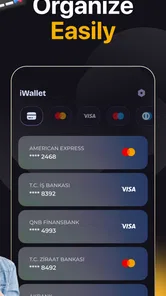
Adding cards is most useful when I make the collection purposeful. I group my thinking by situation rather than by the order in which I received the cards: shopping, travel, memberships, and occasional events. Even if the app does not change the underlying card, this approach makes the digital wallet easier to navigate when I am in a hurry.
A good habit is to remove expired or abandoned items soon after they stop being useful. Digital storage can hide clutter more effectively than a physical wallet, which means an overloaded app can eventually recreate the same search problem. I also keep the displayed card information recognizable enough to identify it quickly. A generic label such as “barcode” is much less helpful than the name of the store or organization.
One practical trade-off appears here. A physical card can be handed to someone else instantly, while a digital card requires the phone to be available and the correct item to be open. On the other hand, the phone is usually already with me, and the app saves space in my pocket. The better choice depends on whether speed, backup access, or physical convenience matters most for a particular card.
The everyday workflow: prepare, present, and move on
A realistic example is a supermarket visit. Before reaching the checkout, I open Cards Wallet and select the loyalty card I plan to use. I keep the screen ready while unloading groceries, then present the barcode when the cashier or scanner is ready. The successful outcome is modest but worthwhile: I earn the relevant loyalty benefit without carrying another plastic card or searching through photos.
The same flow works for a club pass or a venue code. I open the stored item before reaching the entrance, check that the barcode or QR code is visible, and hand the phone to the attendant or hold it toward the scanner. This preparation matters more than it sounds. A wallet app is helpful when it reduces the number of steps at the point of use; it is less helpful if I start searching only after the queue has stopped moving.
My best tip is to prepare for the handoff, not just the storage. Increase the phone’s screen brightness when a scanner struggles, keep the correct card selected, and avoid switching between unrelated apps while someone is waiting. These are simple habits, but they address the real weakness of digital cards: the moment of presentation is shared with another person, a scanning device, and sometimes a time-sensitive queue.
Where the handoffs happen
Cards Wallet sits between the original issuer and the person or machine receiving the code. The issuer creates the card or pass, I place a digital version in the app, and a cashier, receptionist, gate attendant, or scanner reads it. Each handoff can introduce friction. A barcode that looks clear to me may not scan at the expected distance, and an organization may insist on its own application or a physical card.
This is why I do not delete the original email, account, or official app immediately after saving a card. The official source remains the safer fallback when a pass changes, a code needs refreshing, or an attendant refuses a stored copy. Cards Wallet is excellent as a quick-access layer, but it should not be treated as the only source of truth for time-sensitive access.
That distinction also answers an important question about convenience: does one wallet guarantee universal acceptance? No. The app can organize the code I need to show, but acceptance belongs to the business or organization using it. For ordinary loyalty barcodes and similar passes, the workflow can be smooth. For tickets, transport credentials, or access systems that update dynamically, the official channel may be the better choice.
What the result feels like after regular use
After building a small collection, the benefit becomes less about novelty and more about consistency. I no longer need to remember which pocket contains a membership card or which photo contains a barcode. The app gives me one place to check first. That is especially useful for occasional cards: items I need often enough to keep, but not often enough to memorize.
I also like the separation from payment activity. Some people want one app to handle cards, tickets, and payments, but I find a dedicated card organizer less distracting when the task is simply showing a code. It feels closer to a digital card holder than a financial account. That focused role makes it easier to recommend to someone who wants organization without changing how they pay.
The result is not dramatic automation. It is fewer small interruptions. I still need to unlock or access my phone, choose the right item, and sometimes adjust the screen for a scanner. The app earns its place when those steps are quicker than carrying several cards or digging through screenshots. If I only have one card and use it rarely, the improvement may be too small to matter.
Security is part of the workflow, not a decorative label
The store summary presents the app as secure, and that is a useful expectation, but I still treat phone security as the foundation. A wallet containing passes and barcodes is convenient precisely because it concentrates useful information. I keep my device protected and avoid saving anything in the app that I would not want displayed if someone gained access to my unlocked phone.
I also distinguish between a barcode and a credential. A loyalty barcode is generally a different kind of item from an identity document, a payment method, or a pass that grants entry. Cards Wallet’s broad card-and-code concept makes it tempting to store everything in one place, but my personal rule is to use the least risky tool that does the job. For official identification or financial transactions, a dedicated official solution remains more appropriate.
Another practical point is backup planning. A phone-based wallet is dependent on the phone, its battery, and access to the stored item. I keep an alternative way to prove membership or retrieve an important pass when the consequence of failure would be serious. That may mean retaining the issuer’s app, email, account, or physical card. The extra backup is not a criticism of this particular app; it is sensible handling for any digital wallet used away from home.
Where this app is better than the usual alternatives
The most obvious alternative is a physical wallet. Physical cards work without a battery and are easy to hand over, but they take up space and become difficult to sort when the collection grows. Cards Wallet wins when I want a compact digital set and already carry my phone. The physical option wins for reliability during a dead battery, poor visibility, or a business that does not accept phone-based presentation.
Another alternative is storing screenshots in the photo gallery. Screenshots are quick to create, but they mix barcodes with personal photos, duplicate old versions, and force me to remember when an image was captured. A dedicated wallet gives the cards a more intentional home. The trade-off is that I must spend time importing and organizing the items instead of simply taking a screenshot.
Official retailer and event apps are often better when the pass changes automatically or links directly to an account. They can provide the freshest version and may handle special entry rules more reliably. Cards Wallet is better when I have several unrelated cards and do not want a separate app for every store or organization. In other words, it is a consolidation tool, not a universal replacement for issuer-specific software.
Platform wallet tools can be preferable for people who already use them for payments, boarding documents, and system-level shortcuts. Their advantage is integration with the phone. Cards Wallet makes more sense to me when the main task is keeping a broad assortment of ordinary cards, barcodes, and QR codes together. The choice comes down to whether I value deep platform integration or a dedicated, straightforward collection.
Where the flow breaks down
The first weak point is the handoff to a scanner. Not every scanner behaves the same way, and a digital display can be awkward if the code is not immediately visible or if the phone dims at the wrong moment. I prepare the screen before reaching the counter, but that does not eliminate every problem. A physical card remains the faster fallback in some shops.
The second weak point is changing information. If an organization replaces a code, changes a pass, or requires a live account connection, a stored copy may become outdated. I check important items before using them, particularly when the pass controls entry rather than a small loyalty benefit. For dynamic credentials, I would choose the official service instead.
The third is collection maintenance. A wallet that stores everything can become a digital junk drawer. I periodically review old cards, rename unclear entries, and keep only the items I genuinely expect to use. This is one of the non-obvious costs of convenience: the app removes physical clutter, but it does not remove the need for organization.
There is also the matter of optional purchases. The app is free to start, but in-app purchases are listed from $9.99 to $69.99 per item. I would examine what an optional purchase changes before paying, especially if my needs are limited to a few basic cards. Someone with a large collection may find extra paid capabilities worthwhile, while a light user should first confirm that the free experience solves the original problem.
Who should install it, and who should skip it
I would recommend Cards Wallet to Android users who carry several loyalty cards, membership passes, barcodes, or QR codes and want one dedicated place to reach them. It is particularly suitable for people who already use their phone at checkout or at entrances and are tired of keeping separate screenshots, emails, and plastic cards.
I would also consider it for a household routine where one person regularly manages several non-payment cards. The useful outcome is not sharing sensitive financial access; it is having a predictable place to find ordinary codes during errands. Before relying on it, I would test the cards at low-stakes locations and learn which businesses accept the digital presentation.
I would skip it if I carry only one physical card, rarely use barcodes, or need guaranteed offline access through a physical credential. I would also choose an official issuer app for passes that update frequently, depend on an account connection, or have strict entry requirements. People looking for a full banking wallet should not mistake this lifestyle app for a replacement for payment or identity services.
My final take after following the whole route
The strongest reason to use Cards Wallet is not that it stores cards; it is that it gives repeated, ordinary handoffs a predictable starting point. I can move from a cluttered pocket or gallery to a single digital collection, prepare the correct code before the queue reaches me, and keep the original provider as a fallback when the situation demands it.
Its limitations are equally clear. It depends on the phone, acceptance varies by organization, and a saved code may not be the same as a live official pass. Those are important boundaries, but they do not cancel the app’s everyday value. They define the situations in which I use it confidently and the situations in which I keep another option ready.
For a free lifestyle app with a focused purpose, the experience is practical rather than flashy. The 4.5 average and audience of over a million installs suggest that this simple problem resonates with many users. My recommendation is straightforward: install it if your wallet is full of ordinary cards and codes, start with a few frequently used items, test the presentation process, and keep official alternatives for anything time-sensitive or essential.
Cards Wallet - Digital Wallet Frequently Asked Questions
Is Cards Wallet - Digital Wallet free to download?
Cards Wallet - Digital Wallet is free to download, so you can try its basic card-organizing features without an upfront purchase. The app also offers in-app purchases, with listed items ranging from $9.99 to $69.99 each. Check the purchase details shown in the app before confirming anything, and consider whether the available features suit your needs before paying.
Which devices can run Cards Wallet - Digital Wallet?
The app requires Android 7.0 or later, so check your device’s operating-system version before downloading. Cards Wallet - Digital Wallet is a lifestyle app developed by SUNMARE DIGITAL TEKNOLOJI YAZILIM SANAYI TICARET. Its content rating is Everyone, making it suitable for a broad audience, though individual users should still review the app’s permissions and privacy practices.
What is Cards Wallet - Digital Wallet used for?
Cards Wallet - Digital Wallet is designed to keep your loyalty cards, membership cards, gift cards, and other scannable cards in one organized place. Instead of carrying a physical wallet full of plastic cards, you can add digital versions to the app and display their barcodes or card details when needed. It is especially useful for shopping, traveling, and managing cards you use regularly.
How do I add a card to Cards Wallet - Digital Wallet?
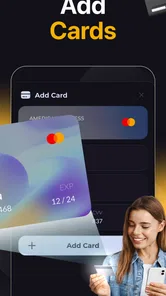
Adding a card is generally straightforward: open the app, choose the option to add a new card, select the appropriate card type or merchant, and scan the barcode with your phone’s camera. If scanning is unavailable or the barcode is difficult to read, you can usually enter the card number manually. Before relying on the app, check that the saved barcode matches your original card.
Can I use Cards Wallet - Digital Wallet without an internet connection?
In many situations, cards saved in a digital wallet can be displayed without an active internet connection, which is convenient in stores, airports, or areas with weak reception. However, certain features may require connectivity, such as downloading updates, synchronizing information, displaying advertisements, or accessing cloud backups. It is recommended to open the app once before leaving home and confirm that your important cards are available offline.
Pros
- Stores loyalty cards
- tickets
- and passes in one convenient place.
- Quickly displays barcodes for scanning at participating stores.
- Reduces the need to carry a bulky physical wallet.
- Simple interface makes adding and finding cards easy.
- Keeps frequently used cards accessible even while traveling.
Cons
- Compatibility may vary between retailers
- cards
- and pass formats.
- Some features may require an internet connection or account access.
- Barcode scanning can fail if screen brightness or image quality is poor.
- Limited support for certain regional cards or local loyalty programs.
- Device loss may make stored passes temporarily inaccessible.












