

Car Play Connect for Android
- 466.00
- 4.3
- Installs
- 100.00K
- Price
- Free
Screenshots
Analysis by Reviewed
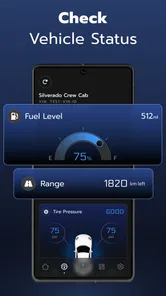
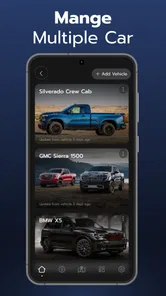
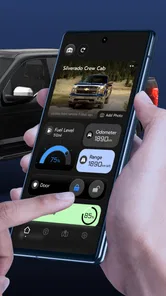
I’m often tempted by phone-based car tools because they promise to make the handoff between my phone and dashboard feel simpler. Car Key Smart Remote Connect is an Auto & Vehicles app from LeoStudio Global Ltd. Its central idea is to connect a phone with a car display, bringing driving-related information and controls into one place. That can be appealing when I want navigation, calls, music, and vehicle status to feel less scattered, but the value depends heavily on whether the car and phone work with the app.
A phone-to-car connection is the main draw
The useful part of this concept is not simply having another app on my phone; it is the possibility of using the car’s display as a more convenient place to access driving essentials. When the connection works as intended, I can imagine checking a route or handling music without switching between several unrelated tools. For anyone who spends a lot of time in the car, reducing that small amount of friction can make a routine trip feel more organized.
I would treat the app as a companion to a compatible vehicle rather than assume that installing it automatically turns any phone into a universal key. Before relying on it, I’d check that the car supports the connection method and functions I need, then test the setup while parked. That simple check matters: a phone app can only communicate with vehicle systems that are available to it, and compatibility is more important here than an attractive interface or a long feature list.
Simplifying Your Daily Commute
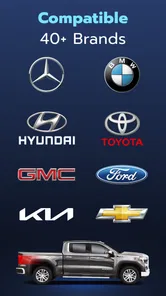
First things first, setting up the Car Key Smart Remote Connect is a breeze. The installation process is straightforward, even for those who aren’t particularly tech-savvy. You just download the app, follow the on-screen instructions, and voila, you’re all set to go. The app is compatible with a wide range of car models, which is a big plus if you’re driving something that’s not the latest trend.
Making the connection useful in everyday driving
A practical way to approach setup is to decide what I want to use most before I get in the car: directions, music, calls, or a glance at vehicle status. I’d establish the connection at home, confirm that the display responds, and make sure the controls I expect are actually available. Doing this before a busy commute avoids trying to troubleshoot while parked at the roadside or rushing out of a car park.
For example, on a weekday trip to an unfamiliar appointment, I could prepare the route before leaving, then use the car display for navigation and keep a call or music option within reach. The benefit is less about adding new driving abilities and more about bringing common tasks together. I’d still set the destination while stopped and keep my attention on the road; a connected display should make access easier, not encourage fiddling while moving.
Compared with using a phone mount and separate navigation and audio apps, a car-focused connection can feel tidier if the vehicle supports it. A phone mount remains the more dependable choice when compatibility is uncertain, and built-in car systems may be better if they already handle the features I use well. This app makes most sense when it fills a real gap rather than duplicating a dashboard setup that is already working.
More From Our News Desk

 Gmail
GmailGmail in a Busy Inbox: Who Benefits Most?
From first account to crowded workday, Gmail earns its place through dependable search and flexible sorting—but its best fit depends on how much inbox maintenance you can tolerate.

 Prime Video
Switching to Prime Video: What Changes in Your Viewing Routine
Prime Video can make a compelling second home for streaming, but switching means learning a different catalog, rental layer, and route from browsing to playback.

 Universal TV Remote Control
Universal TV Remote Control Works Best as a Reliable Backup
A phone remote earns its place through quick setup and reliable habits. Here is how to get more from Universal TV Remote Control—and where its limits show.

 Weather - By Xiaomi
Weather by Xiaomi Review: Clear at a Glance, Less Clear Up Close
Xiaomi’s weather app makes everyday forecasts quick to scan, but its calm surface can leave useful details and recovery paths harder to find than they should be.

 X
XX Under Pressure: Can It Recover When Posting Goes Wrong?
A resilience-focused review of X, examining setup, mistaken posts, interruptions, weak connections, and the gaps that matter when recovery needs to be dependable.

 Clash of Clans
Clash of Clans Is Won Between the Battles
Its raids are quick; its community is a long-term project of coordination, teaching, rivalry, and shared responsibility—with all the friction that entails.
Latest News



One useful habit is to test each task separately instead of treating a successful connection as proof that everything is ready. I’d check that the map appears, then try audio, then confirm whether calls behave in a way I can manage safely. If only one part proves useful, that is still a practical result; there is no need to reorganize my whole driving routine around functions I do not use.
I’d also decide in advance what I want the display to do during a trip. For a familiar commute, I may not need navigation at all, so music controls or a quick look at vehicle status could be the only reason to connect. On an unfamiliar route, I’d prioritize directions and avoid exploring other controls until I have parked. That small distinction keeps the app from becoming another source of distraction.
Features That Impress
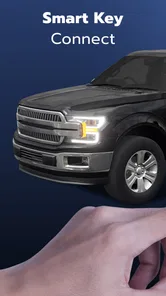
The app offers a bunch of cool features that really stand out. My personal favorite is the remote start option. Imagine it’s a freezing winter morning, and you can start your car’s engine from the comfort of your bed. Yes, it’s that amazing! Another feature worth mentioning is the car locator. If you’re anything like me, losing your car in a crowded parking lot is a regular occurrence. With this app, all you need to do is open it, and it’ll guide you straight to your vehicle.
I’d be cautious about treating a phone as the only way to access a vehicle. I would keep the regular key available until I had tested the connection in the places I actually park and drive, especially if I depend on the car for work or family commitments. A remote feature is only useful when the car supports it and the connection is reliable; it should not replace a backup plan or the driver’s normal checks before setting off.
For someone who often forgets where they parked, a locator can be more valuable after a long day than during the drive itself. I’d use it as a convenience for retracing my way through a large lot, not as a substitute for noticing nearby signs or remembering the parking level. Likewise, remote start is a feature I would verify on the specific vehicle before building a cold-morning routine around it. The practical question is not whether a feature sounds useful, but whether it is available and dependable in my own setup.
There is a meaningful difference between an app that displays car-related options and one that can operate every function on every vehicle. I would avoid assuming that the name “remote” guarantees a particular level of control. My approach would be to try only the controls the connected car actually presents, learn what happens when the phone is not nearby or reception is poor, and keep ordinary access methods available. That is especially important if other people use the car and need a predictable way to get in.
Security is always a concern when it comes to smart technology, but this app has got you covered. It uses advanced encryption to ensure your car is safe from unwanted access. Plus, you can set up a unique PIN or use biometric authentication for added peace of mind.
Even with security measures in place, I’d treat basic phone hygiene as part of using any vehicle-connected tool. A screen lock, careful handling of the phone, and not leaving it accessible in a shared space are sensible habits. I would also make sure anyone who borrows the car knows the normal key procedure, rather than assuming they can use my phone or account. Convenience is best when it does not leave other drivers uncertain about access.
What to expect from the app and its cost
Car Key Smart Remote Connect is free to install, and it is rated for Everyone. It has a 4.5 average from around 3,500 ratings, with more than 100,000 installs. Those figures suggest that other drivers are exploring the idea, though they cannot tell me whether a particular car will pair successfully. The app was released on July 31, 2023, and version 3.1.1 is listed for devices running Android 8.0 or later. Optional in-app purchases range from $4.99 to $99.99 per item, so I’d check what a purchase actually unlocks before spending anything.
That pricing detail is worth keeping in mind if I only want basic phone-to-car convenience. I’d first try the free experience and confirm that the functions I care about work with my vehicle; a paid item is hard to justify if the car connection itself is unreliable or if the dashboard already covers my needs. The developer, LeoStudio Global Ltd., positions it among vehicle-related tools, so I’d judge it by practical compatibility rather than by the promise of replacing every car control.
Before considering an in-app purchase, I’d write down the specific problem I hope it will solve. If I want a more convenient route view, I would compare that benefit with the navigation I already use. If I am interested in a remote vehicle function, I’d first confirm that it appears and works in the free setup. This keeps the decision tied to a real need instead of paying because a feature name sounds useful.
The app’s age rating is Everyone, but that does not make it a shared family key by itself. A parent or household driver should still establish who will hold the phone, who can operate the car, and what the backup arrangement is. In practice, the regular key remains the simplest common denominator for a household with different phones or different comfort levels with connected tools.
Usability and Design
The user interface is sleek and intuitive, which makes navigating through the app a pleasant experience. The buttons are clearly labeled, and everything you need is just a tap away. I also appreciate the fact that the app doesn’t bombard you with ads, because let’s be honest, there’s nothing more annoying than pop-ups when you’re in a hurry.
However, it’s worth noting that the app does require a stable internet connection to function properly. This might be a bit of a drawback if you’re in an area with poor reception, but other than that, it runs smoothly without any glitches.
That makes a quick trial more useful than relying on assumptions: I’d test the connection in the driveway, then check it again in a familiar parking spot and on a regular route. If service drops in places where I need access, I’d keep a conventional key and use the vehicle’s existing controls instead. For a driver who mainly wants dependable navigation, a dedicated offline-capable map may also be the safer choice than relying on a connected app in an area with weak reception.
For a realistic weekday, I might connect before leaving home, glance at the route on the car display, and use the phone-to-car setup for audio while heading to work. If I stop somewhere with weak reception, I would not count on a connected function as my only way to get information or access the vehicle. The trip can continue with the regular key and the car’s usual controls; that fallback is not a failure, but part of using the app sensibly.
Compared with a built-in infotainment system, this app is most attractive when the car’s own interface is limited or awkward and the phone connection brings a useful set of tasks together. Compared with a basic phone mount, it may look cleaner, but a mount can be simpler and less dependent on vehicle compatibility. Drivers who need navigation above all else may prefer a dedicated mapping app, while someone whose car already handles calls and music smoothly may see little reason to add another layer.
One point I would check before making it part of a routine is whether the display stays readable and useful from the driver’s seat without extra adjustments. A connection that technically works but requires repeated tapping is not a meaningful improvement. I’d set things up while parked, choose the most useful screen or controls, and then leave them alone on the road. If the setup invites constant attention, I would switch back to the car’s simpler controls.
The strongest case for this app is a driver whose vehicle can use its connected functions and who wants a single phone-based route to common in-car tasks. Someone with an older or unsupported car, poor mobile coverage, or a dashboard they already like may gain little from it. I’d also skip relying on it as a standalone car key until I had personally confirmed exactly what works with my vehicle and kept a backup ready.
It is also not the best choice for someone expecting a universal replacement for a physical key or a guaranteed fix for every dashboard limitation. If I share a vehicle with drivers who do not want to use a phone, or if I routinely travel where connectivity is unreliable, a conventional key and the car’s built-in features are the more sensible foundation. I would consider the app an optional convenience layer, not something every driver needs.
Before making a final decision, I’d ask myself three practical questions: does my vehicle connect in the way I need, which one or two tasks would genuinely save me effort, and can I still use the car normally if the phone connection is unavailable? If those answers are clear and the first test goes well, the app may earn a place in my routine. If not, there is little value in forcing a phone-based workflow that does not suit the car.
Final Thoughts
Overall, the Car Key Smart Remote Connect app is a fantastic addition to the world of smart technology. It’s practical, user-friendly, and offers features that genuinely enhance your day-to-day driving experience. While it might not be perfect, the convenience and peace of mind it provides are well worth it. So, if you’re looking to upgrade the way you interact with your vehicle, this app is definitely worth considering. Happy driving!
Car Play Connect for Android Frequently Asked Questions
Can I use Car Key Smart Remote Connect without connecting it to a vehicle?
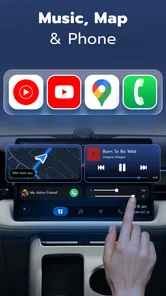
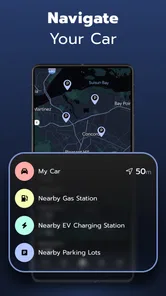
Car Key Smart Remote Connect is intended to connect a phone to a car and display features such as maps, navigation, phone calls, music, and car status. Before downloading, consider whether those are the functions you want to access from your phone. The app is listed in the Auto & Vehicles category and is developed by LeoStudio Global Ltd.
What should I check before installing Car Key Smart Remote Connect on my phone?
Check that your device runs Android 8.0 or later and that you are comfortable with the app’s available purchase options. Car Key Smart Remote Connect is free to download, with in-app purchases ranging from $4.99 to $99.99 per item. Its content rating is Everyone, so it is suitable for a general audience.
What is Car Key Smart Remote Connect?
Car Key Smart Remote Connect is a mobile application designed to provide users with the convenience of controlling their car's locking system through their smartphone. It offers features like remote locking/unlocking, engine start, and vehicle tracking. This app aims to enhance vehicle security and user convenience, making it a popular choice for tech-savvy car owners. Its stated purpose also includes connecting a phone to a car and displaying maps, navigation, phone calls, music, and car status.
Is Car Key Smart Remote Connect compatible with all car models?
Car Key Smart Remote Connect is compatible with a wide range of car models, but not all. Users should check the app's compatibility list or consult their car manufacturer's specifications before downloading. The app works best with newer models equipped with modern electronic systems, ensuring a seamless integration for optimal performance. Since the app is designed to connect a phone to a car, checking compatibility is an important step before relying on it for vehicle controls.
How secure is Car Key Smart Remote Connect?
The security of Car Key Smart Remote Connect is a top priority for its developers. The app uses advanced encryption protocols to safeguard user data and prevent unauthorized access. Regular updates are provided to address any potential vulnerabilities, ensuring a secure and reliable experience for users who wish to control their cars remotely. As with any app used alongside vehicle controls, use it thoughtfully and follow your vehicle manufacturer's guidance.
Pros
- Easy setup and pairing process.
- Wide compatibility with car models.
- User-friendly interface and design.
- Efficient remote control features.
- Enhances vehicle security.
Cons
- Requires stable internet connection.
- Limited features in free version.
- Potential battery drain on devices.
- May not work with older car models.
- Subscription required for premium features.













