

Captain D's
- 1.05K
- 4.7
- Installs
- 100.00K
- Price
- Free

Screenshots

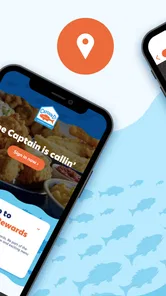


Analysis by Reviewed
Ordering a quick seafood meal sounds simple until I am hungry, short on time, and trying to decide whether to eat in, take food away, or arrange a pickup. Captain D's is built for that moment. Developed by Captain D's, this free Food & Drink app puts the restaurant’s mobile ordering experience on my phone rather than making me start from a browser every time. I found it most useful as a repeat-order tool: once I know what I like, the process becomes much less of a chore.
The app has a 4.7 average from around 10K ratings, with roughly 1.1K written reviews and more than 100K installs. Those figures suggest that it has found a dependable audience, but they do not automatically make it right for everyone. My view is more practical: it is a worthwhile companion for regular Captain D's customers, while occasional visitors may see it as a convenient extra rather than an essential download.
How I use it when I need food without the usual back-and-forth
My baseline workflow starts before I am ready to eat. I open the app, look through the available choices, and decide whether I want a familiar meal or something different. That small separation matters. Browsing while standing in a queue encourages rushed decisions; browsing beforehand lets me compare seafood meals, sides, and other choices at my own pace.
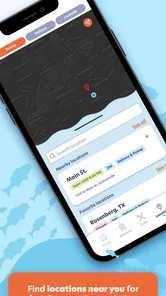
Once I have settled on an order, I treat the location and collection method as part of the decision rather than leaving them until the final moment. A restaurant app is only useful if the selected branch is the one I can realistically reach. For a workday lunch, I would check the destination before building a complicated order. For a family meal, I would review the whole basket first so that missing sides or drinks do not become an annoying second trip.
This is where the app feels different from simply walking into a restaurant. The phone becomes a planning surface. I can think through the order, remove an item that no longer sounds right, and check the final choices before committing. I do not have to rely on memory while speaking over background noise or while other people are waiting behind me.
A realistic example is a weekday evening when I am driving home and want Captain D's for two people. I would decide the order while parked, select the restaurant that fits my route, and use the app to reduce the amount of time spent at the counter. The important habit is not tapping quickly; it is preparing the order before arrival. That makes the experience calmer and reduces the chance of choosing something merely because it is easy to say aloud.
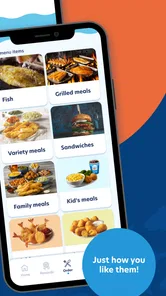
I also like using the app as a menu reference even when I am not immediately ordering. That can help when someone else in the household asks what is available or when I am trying to plan a meal around a particular side. It is more practical than guessing from memory, although I would still treat the selected restaurant and the current ordering flow as the final check before making plans around a meal.
More From Our News Desk

 Instagram
Instagram’s Power Comes From Its Place in Your Phone
A close look at how Instagram turns Meta’s reach, recommendation systems and everyday camera habits into durable platform power—and what that costs users.

 Gmail
GmailGmail in a Busy Inbox: Who Benefits Most?
From first account to crowded workday, Gmail earns its place through dependable search and flexible sorting—but its best fit depends on how much inbox maintenance you can tolerate.

 Prime Video
Switching to Prime Video: What Changes in Your Viewing Routine
Prime Video can make a compelling second home for streaming, but switching means learning a different catalog, rental layer, and route from browsing to playback.

 Universal TV Remote Control
Universal TV Remote Control Works Best as a Reliable Backup
A phone remote earns its place through quick setup and reliable habits. Here is how to get more from Universal TV Remote Control—and where its limits show.

 Weather - By Xiaomi
Weather by Xiaomi Review: Clear at a Glance, Less Clear Up Close
Xiaomi’s weather app makes everyday forecasts quick to scan, but its calm surface can leave useful details and recovery paths harder to find than they should be.

 X
XX Under Pressure: Can It Recover When Posting Goes Wrong?
A resilience-focused review of X, examining setup, mistaken posts, interruptions, weak connections, and the gaps that matter when recovery needs to be dependable.
Latest News



The best routine for repeat customers
People who visit Captain D's regularly should create a simple personal routine. I would keep a mental shortlist of dependable meals, one alternative for a different appetite, and a side combination that works for the household. The app then becomes a quick confirmation tool instead of a place where I start from zero every time.
That approach also exposes one of the app’s trade-offs. Digital ordering is efficient when I already know what I want, but it can feel slower when I am exploring every option. A paper menu or a conversation with staff may be better for a first-time visitor who wants recommendations or needs to ask detailed questions. The app gives me control over selection; it does not replace the value of human guidance.
Settings and choices worth checking before ordering
The most important “settings” here are practical choices inside the ordering process rather than technical customizations. I pay attention to the chosen restaurant, the way I intend to receive the food, and the final basket. These checks sound obvious, yet they are exactly where a rushed mobile order can go wrong.
I recommend checking the restaurant first, especially if several Captain D's locations are within reach. The closest branch on a map is not always the most convenient one for a trip that already has a fixed route. Choosing the right location early also prevents me from spending time assembling an order that I later need to rebuild elsewhere.
Next, I review the order as a group rather than item by item. For a solo meal, this means checking that the main dish and side match what I intended. For a family order, I look for duplicated items, missing portions, and choices that may not suit everyone. This is a useful advanced habit because the app can make adding items feel effortless, and effortless adding is not always the same as thoughtful ordering.
I also consider how much customization I genuinely need. If I have a straightforward order, I prefer keeping it simple. If a meal requires several changes, I slow down and read each available option carefully. The benefit of digital ordering is that I can inspect the choices privately; the limitation is that a screen may not explain an unusual request as clearly as a staff member can.
Another good habit is leaving enough time for the order to make sense in the real world. I would not use a mobile workflow as an excuse to cut a journey impossibly close. Traffic, parking, and restaurant demand still exist outside the screen. The app can make ordering more organized, but it cannot remove the need for sensible timing.
Shortcuts that make the app feel faster
The fastest pattern I found is preparation, not a secret button. I decide what type of meal I want before opening the menu, then use the app to confirm the available choices. If I open it without any idea what I am looking for, I tend to spend longer comparing items and may end up with a less satisfying order.
For repeat visits, I use a three-pass method. On the first pass, I choose the restaurant and the general meal. On the second, I add the main items and sides without constantly reconsidering them. On the third, I inspect the complete order for mistakes. Separating selection from proofreading reduces the mental clutter that comes from changing decisions while also trying to remember what is already in the basket.
When ordering for other people, I collect everyone’s choices before touching the app. This is more efficient than passing the phone around while the basket is still changing. It also gives me a chance to resolve conflicts, such as two people wanting different sides or one person changing their mind repeatedly. The app handles the digital part; a clear household decision handles the human part.
I would also avoid using the app for last-second experimentation when I am already late. A familiar order is a better match for a rushed pickup than a basket built from several minutes of browsing. Conversely, if I have time, browsing can be useful because I can compare the whole meal rather than defaulting to the first familiar item.
One non-obvious advantage is that mobile ordering creates a record of my own decision process. I can notice patterns: perhaps I consistently add more food than I need, or perhaps I keep forgetting a side that matters to me. That awareness helps me improve future orders. It is not a flashy feature, but it is a genuine benefit of using the app repeatedly rather than treating every visit as an isolated transaction.
Where the convenience has limits
I would not describe Captain D's as a complete replacement for every way of ordering. Its value depends heavily on already wanting food from this particular restaurant. If I am comparing several chains, looking for the broadest range of cuisines, or trying to coordinate orders from different restaurants, a general food-delivery service may be more suitable. The dedicated app is focused, and that focus is both its strength and its boundary.
It is also not the best choice for a customer who needs extensive personal assistance before ordering. Someone with detailed dietary questions, an unusual request, or uncertainty about ingredients may prefer speaking directly with restaurant staff. A digital menu can present choices clearly, but it cannot guarantee that every personal concern will be resolved through tapping alone.
Another limitation is the possibility of overconfidence. Seeing a polished order screen can make the whole process feel more predictable than it really is. I still check the selected location and the final basket, and I avoid assuming that mobile convenience means immediate service in every situation. The app improves organization; it does not turn a restaurant visit into an entirely frictionless process.
There is also a social trade-off. Ordering privately is convenient, but it can make it easier to overlook what other diners actually want. When I am ordering for a group, I use the app only after confirming the choices with everyone. That small rule prevents the phone from becoming the decision-maker.
Device compatibility is reasonably broad for an app released on Jan 20, 2023. The current version is 3.2.0 and it runs on Android 7.0 or later, which makes it accessible to people who are not using a recent phone. Still, anyone relying on an older device should keep the operating system and app in workable condition, because an outdated phone can make any ordering process feel more awkward than it needs to be.
Who should install it, and who can skip it
I would recommend it to regular Captain D's customers, households that repeat similar orders, and anyone who prefers deciding before reaching the restaurant. It is especially useful when a person values a quieter ordering process, wants to reduce time spent at the counter, or needs to coordinate several items without relying on memory.
It also makes sense for people who already know their preferred meals but dislike repeating the same spoken order. The app gives that customer a more deliberate workflow: choose, inspect, and submit. The free price removes the main barrier to trying it, although the real benefit only appears if Captain D's is already part of the person’s eating routine.
I would skip it if I visit the chain only once, if my phone has very limited storage or unreliable connectivity, or if I prefer asking staff for recommendations every time. I would also choose a broader delivery platform when convenience means comparing restaurants rather than ordering from one specific brand. Installing a dedicated app for a single occasional meal may create more digital clutter than value.
The age rating is Everyone, so the app is positioned for a broad audience. That does not mean every ordering situation is equally simple for every user. Older customers or anyone less comfortable with mobile menus may still find a counter conversation easier, while experienced smartphone users will likely appreciate being able to review choices at their own pace.
My verdict after building a repeatable habit
Captain D's works best when I use it as a focused ordering companion, not as a replacement for judgment. The strongest workflow is straightforward: choose the location early, decide the meal before rushing, review the complete basket, and leave realistic time for collection. Those habits make more difference than trying to move through the screens as quickly as possible.
The app’s 4.7 average and audience of over 100K installs show that many people find this focused approach useful. I can understand why: the free app removes repeated menu friction and gives regular customers a more controlled way to order from Captain D's. Its current version, 3.2.0, also makes it a reasonable option for compatible Android phones.
My final recommendation is conditional but positive. If Captain D's is somewhere I visit often, I would install it and build a dependable routine around it. If I am searching for restaurant discovery, detailed personal assistance, or the widest delivery comparison, I would use a different tool. The real strength is repeatable convenience, not unlimited flexibility. Used with that expectation, it earns a place on my phone; used as a universal food-ordering solution, it will feel too narrow.
For me, that balance is what makes Captain D's worth trying. It does not need to do everything. It simply needs to make a familiar Captain D's order easier to plan, check, and place, and for regular customers, it accomplishes that without charging for the app itself.
Captain D's Frequently Asked Questions
Is the Captain D’s app free, and which devices can run it?
The Captain D’s app is free to download and is listed for devices running version 7.0 or later of its supported operating system. It is a Food & Drink app from Captain D’s, with a general Everyone age rating. Check your device’s operating-system version and the app store page before installing so you can confirm compatibility and download the official app.
What is the Captain D’s app used for?
The Captain D’s app is designed to make ordering seafood and fast-food meals more convenient. After installing it, users can typically browse the menu, review available meal options, customize selected items, choose pickup or delivery where supported, and place an order from participating restaurants. It may also provide restaurant locations, opening hours, promotions, and account features, although availability can vary by location and app version.
Can I order Captain D’s food for delivery through the app?
Delivery availability depends on your address, the participating Captain D’s restaurant, and the delivery services operating in your area. When using the app, enter your location before choosing delivery to see whether the option is available. Some restaurants may offer pickup only, while others may connect orders with a third-party delivery provider. Fees, minimum order requirements, estimated times, and menu availability should be checked before payment.
Does the Captain D’s app offer coupons, rewards, or special deals?
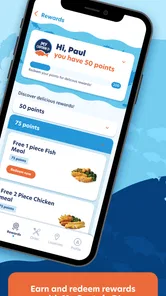
Captain D’s may provide digital promotions, limited-time offers, coupons, or rewards through its app, website, email program, or other official channels. The exact benefits can change frequently and may require creating an account or joining a loyalty program. Before ordering, review the offer’s expiration date, participating locations, minimum purchase rules, and exclusions, since promotions are not always valid at every restaurant or combinable with other discounts.
Is it necessary to create an account to use Captain D’s?
Some basic features, such as viewing menu items or finding nearby restaurants, may be available without registering. However, an account can be useful for saving favorite orders, storing preferred locations, tracking rewards, receiving personalized promotions, and making future checkouts faster. Depending on the ordering method and location, guest checkout may be available, but users should review the information requested and the app’s privacy practices before creating an account.
Pros
- Simple menu makes it easy to browse seafood and combo options.
- Useful for checking nearby locations before planning a visit.
- Family-friendly menu includes meals for different appetites.
- Seasonal deals can make selected meals more affordable.
- Restaurant information is presented in a clear
- accessible layout.
Cons
- Menu details may vary by location and are not always fully consistent.
- Some offers may require extra steps or have location restrictions.
- Seafood choices may be limited outside larger Captain D’s locations.
- The app may feel less useful if you rarely visit the restaurant.
- Prices
- nutrition
- and availability can change without much notice.











