Camera - Fast Snap with Filter
- 391.00
- 4.3
- Installs
- 10.00M
- Price
- Free

Screenshots
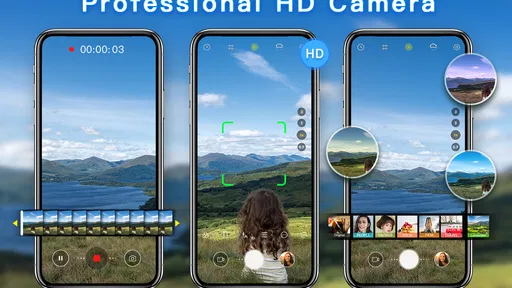
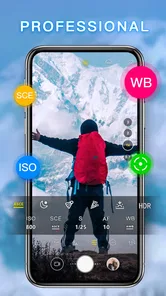
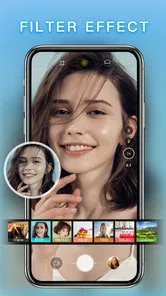
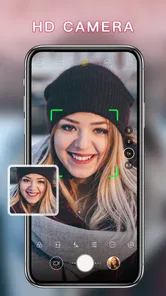
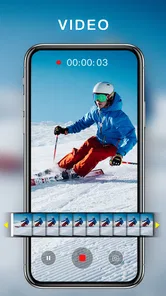
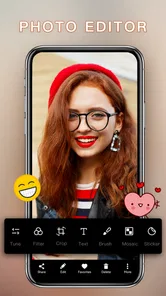
Analysis by Reviewed
I judge a camera app by whether I still reach for it once the novelty wears off. Camera - Fast Snap with Filter makes a promising first impression: it is a free photography app from 1 Bit, and its focus is quick photos, video and beauty-style selfies. For a casual shooter, that clear purpose is appealing. I would treat it as an extra camera to try for spontaneous moments, rather than assume it needs to replace the camera already on your phone.
A first-week test that reveals its real role
When I try a camera app, I don’t judge it by how many effects I can browse in one sitting. I ask whether it helps with a specific moment that would otherwise be awkward to capture. Here, the useful test is to use it when I want a quick picture with a look chosen before shooting, then notice whether that feels easier than opening my usual camera and editing later.
A realistic example is a walk with a friend when the light changes as you pass a shop window. I might want a quick portrait, not a long session adjusting settings. The app’s fast-shot emphasis and live filter preview make that kind of casual use a natural fit: choose a restrained look, frame the person, and take the photo before the moment passes. If the light is poor or the subject is moving unpredictably, though, I would still take more than one shot when time allows rather than assume speed alone guarantees a keeper.
It is also worth deciding what you expect from a beauty selfie before you start. If you want a polished but still familiar version of your face, a light touch is more likely to stay appealing later than an effect chosen just because it looks striking on the screen. I would take a quick test image, look at it outside the live preview, and only then settle on a style. That small pause helps avoid filling the camera roll with near-identical selfies that seemed better while composing them.
What makes it useful beyond the first week
Ever tried capturing a fleeting moment only to miss it because your camera app lagged? Yeah, I’ve been there too. But let me tell you about this nifty app, Camera - Fast Snap with Filter, that’s been a game-changer for me. Whether you’re a professional photographer or just someone who loves capturing life’s little moments, this app’s got something for you.
Lightning-Fast Capture
One of the biggest headaches with smartphone cameras is the lag. You know, that tiny delay between pressing the button and the picture actually being taken. Well, with this camera app, that’s a thing of the past. The app lives up to its name by offering a truly rapid capture speed. I was genuinely impressed with how quickly it snapped photos, making it perfect for those spontaneous shots.
That quick-shot emphasis is most useful when the subject will not wait: a child making a funny face, a pet suddenly looking up, or a friend laughing across the table. I’d keep the phone ready before the moment happens, since opening any camera app after the action starts can still cost you the shot. For a planned portrait or a carefully composed landscape, speed matters less than framing and light, so I would slow down and check the scene rather than rely on a fast shutter alone.
More From Our News Desk

 Gmail
Gmail in a Busy Inbox: Who Benefits Most?
From first account to crowded workday, Gmail earns its place through dependable search and flexible sorting—but its best fit depends on how much inbox maintenance you can tolerate.

 Prime Video
Switching to Prime Video: What Changes in Your Viewing Routine
Prime Video can make a compelling second home for streaming, but switching means learning a different catalog, rental layer, and route from browsing to playback.

 Universal TV Remote Control
 Works Best as a Reliable Backup
A phone remote earns its place through quick setup and reliable habits. Here is how to get more from Universal TV Remote Control—and where its limits show.

 Weather - By Xiaomi
Weather by Xiaomi Review: Clear at a Glance, Less Clear Up Close
Xiaomi’s weather app makes everyday forecasts quick to scan, but its calm surface can leave useful details and recovery paths harder to find than they should be.

 X
X Under Pressure: Can It Recover When Posting Goes Wrong?
A resilience-focused review of X, examining setup, mistaken posts, interruptions, weak connections, and the gaps that matter when recovery needs to be dependable.

 Clash of Clans
 Is Won Between the Battles
Its raids are quick; its community is a long-term project of coordination, teaching, rivalry, and shared responsibility—with all the friction that entails.
Latest News



Filters Galore
Now, let’s talk about the filters because, honestly, they’re a blast. The app comes loaded with a variety of filters that can transform any mundane photo into a work of art. From vintage vibes to vibrant colors, there’s something to suit every mood and style. I spent a solid hour just playing around with different filters and was amazed at how each one added a unique twist to my photos.
A practical way to keep those effects from becoming tiring is to choose a small handful that suit the pictures you take most, then use them consistently instead of changing the look on every shot. For a family album or a series from one outing, a restrained choice can make the photos feel connected. I would also compare a filtered preview with the unfiltered scene before committing: dramatic color can be fun, but it may not be the best choice when accurate skin tones or the look of a place matters.
Intuitive Interface
I’m all about simplicity, and this app nails it with its user-friendly interface. Everything is laid out neatly, making it easy to access the features you need without any hassle. Even if you’re not tech-savvy, you’ll find it a breeze to navigate. The settings are straightforward, allowing you to adjust things like exposure and focus with minimal fuss.
Another cool feature is the app’s ability to let you preview filters in real-time. This means you can see exactly how your photo will look before you even take it. It’s a small touch, but it’s those little details that make a big difference.
That live preview is particularly handy when the light is changing. Before taking a selfie by a window, for example, I’d compare a couple of looks on screen and settle on one before making several near-identical shots. It can reduce trial and error, but a preview is still a guide, not a guarantee that the finished image will look exactly the same on every display. If the moment is fleeting, I’d prioritize getting the shot and experiment with the visual style when there is time.
Choosing between this and your usual camera
Compared with the camera app that comes with a phone, this one’s clearest appeal is making filters and a selfie-oriented look part of the shooting process. A built-in camera is often the more sensible default if you already know where its controls are, want to keep your routine simple, or rely on options it provides. I would not switch just because a separate camera sounds exciting; I would switch for moments when choosing a visual treatment before taking the picture genuinely saves effort.
It also sits differently from a dedicated photo editor. An editor is a better fit when I want to keep an untouched original, make careful adjustments afterward, or revise a picture several times. A camera with live previews is more immediate, but that convenience can encourage committing to an effect before seeing the image in a larger view. For important portraits or pictures I plan to keep for a long time, I’d favor a neutral capture when possible and make deliberate edits later.
There is a useful middle ground: use the app for casual shots where the mood matters more than detailed control, and keep the standard camera or an editor for everything that needs a more careful workflow. This avoids expecting one small camera app to handle every kind of photography. It also gives the app a clear reason to stay installed rather than turning it into another tool I open only to compare effects.
Where it fits in a camera routine
For an everyday user who wants quick access to filters and a straightforward camera experience, this app has a sensible role. Imagine you’re out for coffee and a friend catches a perfect, unposed moment: a fast capture is more valuable than a long editing session afterward. For a more deliberate shoot, a phone’s built-in camera may be the better first choice if you already know its controls or depend on its particular shooting options. Dedicated editing apps also suit people who prefer to take a neutral photo first and make careful changes later.
I would not recommend treating a beauty selfie or a filter as a substitute for good light and a steady hand. If faces look too altered for your taste, choose a subtler treatment or skip the effect; the point is to keep the result looking like you. Likewise, anyone who needs extensive manual control or a dependable, carefully organized photography workflow may find a simple quick-capture app limiting. Its appeal is convenience, not a promise to cover every photographer’s needs.
Small habits that help it last
To make the app useful beyond an initial burst of experimentation, I’d give it a narrow job. For example, I might use it for informal portraits, quick snapshots during a day out, or short video moments when I want to start from a camera designed around fast capture. I would avoid using it for every photo by default. A tool with a specific purpose is easier to remember and less likely to create a messy, inconsistent set of results.
One helpful habit is to check the framing before reaching for a filter. A clean background and a little space around the subject often matter more than a dramatic color treatment. I’d also keep the phone steady for video and avoid changing the visual style halfway through a short clip unless that change is intentional. These are simple choices, but they make a quick camera workflow feel considered rather than rushed.
Another small trade-off is that a live effect can shape what I notice. I may focus on whether a filter looks attractive and miss a distracting object at the edge of the frame. Before taking a picture I want to keep, I’d briefly check the corners, face position, and light, then decide whether the effect improves the scene. That glance costs little and helps prevent the novelty of the preview from becoming the whole experience.
Keeping it useful month after month
The app is free, rated for Everyone, and has an average rating of 4.3 from around 36,000 ratings, with more than 10 million installs. It was released on May 30, 2019, and version 1.5.13 supports Android 7.0 and later. Those details make it easy to see why people might try it, but my longer-term test would be simpler: does it help me get a photo I would otherwise miss, and do I still like the results after the novelty of browsing filters fades?
To make that decision without turning the camera into a chore, I’d use it for a week in the situations where speed or an in-camera look genuinely helps, then compare the results with my regular camera. If I keep reaching for it on walks, at casual gatherings, or for quick selfies, it has earned a place. If I only open it to scroll through effects, it is probably not adding much to my routine. Keeping the app current and occasionally checking that its controls still feel familiar is a lighter maintenance burden than building an elaborate editing habit around it.
That routine does not need a strict schedule. I’d simply notice whether I still choose it naturally after the first round of testing, and whether its pictures remain enjoyable when viewed later rather than only in the moment of capture. If I begin avoiding it because I have to rethink the controls or keep comparing effects, that is a sign the extra step is no longer paying for itself. A camera app should make taking pictures feel easier, not turn a casual outing into a decision about software.
When the novelty starts to wear thin
Filters can be a source of creative energy, but they can also make every picture feel like the same experiment. If I find myself applying an effect automatically, I would take a short break from it and look at what the scene actually needs: perhaps a different angle, softer light, or no treatment at all. The point is not to avoid filters; it is to make them a choice rather than a habit that flattens every subject into one look.
There is also a limit to the convenience of an all-in-one shooting moment. When I want precise control, a dependable sequence of settings, or a careful edit that I can revisit, a more specialized camera or editing workflow is a better match. Someone who mostly photographs documents, distant subjects, or carefully staged scenes may get more value from their phone’s standard camera. I see this app as an enjoyable side option, not a universal replacement.
For people who wonder whether it is suitable for a first-time camera user, I think its straightforward controls make casual experimentation approachable. The more important question is whether the user wants quick photos with visual effects or wants to learn a deeper photography workflow. The former is a natural match; the latter may outgrow the app’s simple appeal. Since it is free, trying it is a low-commitment way to find out, but keeping it should depend on actual use rather than the temptation to collect camera apps.
Why You Should Try It
So why should you give it a shot? Well, apart from the speedy capture and filters, it’s just a fun app to have on your phone. Whether you’re capturing a sunset, your pet doing something adorable, or just a silly selfie, this app makes it all so much more enjoyable. Plus, it’s a way to give photos a distinct look before sharing them, without making every casual picture into a project.
In a nutshell, if you’re looking for an app that combines speed, style, and ease of use, then this is worth downloading. I’d recommend it most to people who take spontaneous photos and enjoy choosing a look while they shoot. If your priority is fine-grained camera control, or you already like the results and workflow of your phone’s standard camera, there may be little reason to switch. For me, its lasting value depends on whether those quick captures and filter previews become useful habits rather than a brief novelty. Give it a try, keep the effects that suit your eye, and let the pictures—not the number of filters—decide whether it stays.
Camera - Fast Snap with Filter Frequently Asked Questions
Can Camera - Fast Snap with Filter take both photos and videos?
Yes. Camera - Fast Snap with Filter is designed to shoot HD photos and videos, so it can suit users who want to capture still images as well as moving moments. Its focus is on quick camera use, filters, and beauty selfies. If you mainly need a dedicated camera app for everyday photography and video capture, those are the core uses to consider.
Is Camera - Fast Snap with Filter free to download?
Camera - Fast Snap with Filter is free to download. That makes it easy to try as a photography app for capturing photos, videos, and beauty selfies without paying upfront. Before installing, it is still sensible to review the app’s current store page and any purchase details shown there, so you understand what is included in the version offered for your device.
What does the Everyone content rating mean for Camera - Fast Snap with Filter?
Camera - Fast Snap with Filter has an Everyone content rating, so it is intended for a broad audience. That can be reassuring if you are choosing a camera app for general photo-taking rather than mature entertainment. The rating does not change how the camera works, but it gives you a useful point of reference when deciding whether the app is suitable for your household.
What is Camera - Fast Snap with Filter designed to do?
Camera - Fast Snap with Filter is a photography app designed to shoot HD photos and videos and create beauty selfies. It is a camera-focused option for people who want to capture images and video, with an emphasis on quick shooting and filters. The app is free, and its description presents it as a straightforward camera tool rather than a full photo-editing suite.
What features does Camera - Fast Snap with Filter offer?
Camera - Fast Snap with Filter is designed to enhance your photography experience with a variety of features. It offers real-time filters, allowing users to apply effects before capturing the photo. Additionally, the app boasts a quick snap function for capturing moments instantly, and provides various editing tools for post-capture enhancements. With user-friendly navigation, it caters to both amateur and professional photographers looking for efficient and creative photo solutions.
Pros
- Quick access to camera features.
- Variety of filters for photo enhancement.
- User-friendly interface design.
- Fast photo capturing.
- Lightweight app with minimal storage use.
Cons
- Limited editing tools available.
- No cloud backup for photos.
- Ads can be intrusive.
- No manual focus option.
- Limited sharing options.