

Beauty Camera & Makeup Camera
- 19.00
- 4.6
- Installs
- 1.00M
- Price
- Free

Screenshots
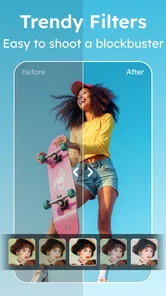
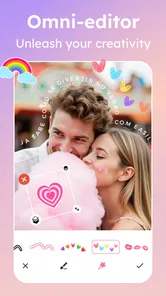
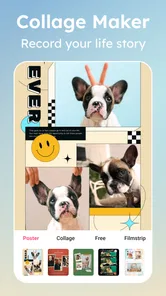
Analysis by Reviewed
I’d start with a simple goal: take one ordinary selfie and make a small, deliberate change. That is the most reassuring way to approach Beauty Camera & Makeup Camera, a free beauty app from 1 Bit. Rather than treating every control as something to use, I’d compare the original with a lightly edited version and keep only changes that still look like me.
What to expect from the first session
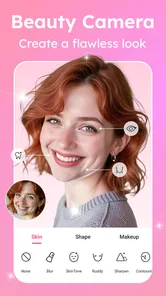
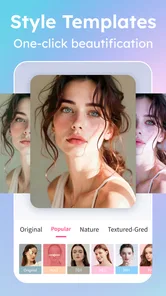
The app brings together selfie retouching, makeup effects, shape adjustments, AI stickers, and photo editing tools. That range makes it handy when I want to experiment in one place, but it also means the best result depends on restraint. A filter that looks fun in a preview may feel too strong once the image is saved or viewed somewhere else.
It’s rated for Everyone, and its average rating is 4.5 from around 3.5 thousand ratings; it has passed 500 thousand installs. Those figures suggest a familiar, approachable kind of photo app, not a substitute for learning makeup or a full desktop editor. The app is free to install, with optional in-app purchases ranging from $0.99 to $14.99 per item, so I’d explore the basic workflow before considering any paid extras.
From install to a useful first result
After opening it, I’d choose a clear, well-lit selfie and make one adjustment at a time. Start with skin smoothing, then check the image at its normal viewing size; zoomed-in editing can make a subtle correction seem stronger than it really is. If the lighting is uneven, try an editing adjustment before changing facial shape. This order helps preserve a natural look and makes it easier to tell which change actually improved the photo.
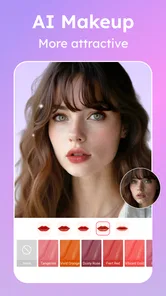
For a first makeup test, I’d pick a single look and compare it with the untouched image before adding stickers or more edits. A useful everyday case is getting ready to share a casual photo after work: a small polish can lift the picture without turning it into a completely different version of you. If the image is meant to show a makeup look accurately, though, heavy smoothing or reshaping can be misleading, so I’d leave those tools off.
How it fits beside other beauty apps
Compared with using a phone’s standard editor, this app is more focused on face-centered changes and playful styling. Compared with a dedicated makeup try-on tool, its appeal is the mix of retouching, shape controls, stickers, and general photo editing in the same app. That all-in-one approach suits quick experiments, while someone who wants precise color grading, detailed layer work, or a faithful preview of real cosmetics may be happier with a specialist editor or the built-in camera tools.
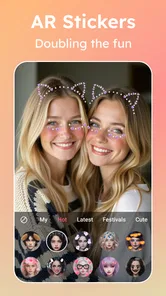
One practical tip is to keep an untouched copy of the original and make edits in stages. That gives you a clean fallback if a saved version feels overdone later, and it makes side-by-side comparisons much more useful than relying on memory. I’d also treat AI stickers as a finishing touch rather than the starting point: first decide whether the photo works, then add decoration only if it serves the mood.
More From Our News Desk

 Gmail
GmailGmail in a Busy Inbox: Who Benefits Most?
From first account to crowded workday, Gmail earns its place through dependable search and flexible sorting—but its best fit depends on how much inbox maintenance you can tolerate.

 Prime Video
Switching to Prime Video: What Changes in Your Viewing Routine
Prime Video can make a compelling second home for streaming, but switching means learning a different catalog, rental layer, and route from browsing to playback.

 Universal TV Remote Control
Universal TV Remote Control Works Best as a Reliable Backup
A phone remote earns its place through quick setup and reliable habits. Here is how to get more from Universal TV Remote Control—and where its limits show.

 Weather - By Xiaomi
Weather by Xiaomi Review: Clear at a Glance, Less Clear Up Close
Xiaomi’s weather app makes everyday forecasts quick to scan, but its calm surface can leave useful details and recovery paths harder to find than they should be.

 X
XX Under Pressure: Can It Recover When Posting Goes Wrong?
A resilience-focused review of X, examining setup, mistaken posts, interruptions, weak connections, and the gaps that matter when recovery needs to be dependable.

 Clash of Clans
Clash of Clans Is Won Between the Battles
Its raids are quick; its community is a long-term project of coordination, teaching, rivalry, and shared responsibility—with all the friction that entails.
Latest News



Choosing a photo and setting a realistic goal
Before editing, I’d decide where the picture is going and what I want it to communicate. A playful sticker can fit a message to friends, while a restrained portrait may suit a profile image better. That small decision helps narrow the choices and prevents the familiar trap of piling on effects simply because they are available.
Light matters more than a long edit. A photo taken near a window or in even outdoor shade gives skin smoothing and makeup effects a clearer starting point than a dim, mixed-light snapshot. If the face is partly in shadow, I’d first try a general photo adjustment and assess whether the result still looks believable; aggressive retouching cannot reliably restore detail that the original image never captured.
For people who take several similar selfies, I’d use one image as a test rather than immediately editing the entire set. Try a small change, inspect it at normal size, and only then decide whether the same approach suits the other shots. The same effect can read differently across lighting and expressions, so repeating settings without checking each photo can make a collection look strangely inconsistent.
Small choices that make editing easier
There is a useful distinction between correcting a distraction and changing the identity of a portrait. If a temporary shine or uneven light draws attention away from the expression, a modest edit may help. If the face shape, skin texture, and makeup are all altered together, it becomes harder to judge what the photograph actually represents. I’d use the tools to support the moment, not to set a standard every future photo has to match.
A second practical trade-off is that a polished image may not look the same on every screen or in every social feed. I’d avoid judging an edit only while the controls are open: step back, view the whole picture, and ask whether the effect is still noticeable in the way I intended. When the answer is no, undoing one layer is often better than adding another correction to compensate.
For a quick profile refresh, I’d keep the crop and expression familiar, make one restrained adjustment, and save a version I can compare with the original. For a more playful post, I’d do the opposite: choose a clear visual idea first, then see whether a sticker or makeup effect strengthens it. These separate workflows help the app feel like a practical tool rather than a collection of buttons to test at random.
Transform Your Selfie Game
Let's dive into what makes the Beauty Camera & Makeup Camera app stand out. The moment you open the app, you're greeted with a user-friendly interface that even the most tech-challenged among us can navigate with ease. The app is designed to provide a seamless experience, allowing you to focus on what truly matters: looking fabulous!
Features That Wow
One of the coolest aspects of this app is its real-time makeup application. You can try on different looks as if you're standing in front of a virtual mirror. From subtle to bold, the app offers a spectrum of makeup styles that suit any occasion. The lipstick shades, eyeshadow palettes, and blush options are simply endless.
Beyond makeup, the app helps enhance your natural beauty with its beautification tools. You can smooth out your skin, adjust lighting, and even reshape certain features if you're feeling adventurous. It's like having a mini photoshop right in your pocket!
Why It Stands Out
Many apps promise to enhance your selfies, but what sets this one apart is the level of customization it offers. You can tweak each element to match your personal style or the vibe you're aiming for. Plus, the app's ability to save your favorite looks means you can easily recreate them anytime.
Another noteworthy feature is the app's social media integration. You can effortlessly share your stunning photos directly from the app to platforms like Instagram and Facebook. It's a game-changer for influencers and anyone who loves showcasing their looks online.
Using it for ordinary plans, not just selfies
I can see this being useful for more than a polished front-facing portrait. If I’m choosing between two makeup ideas before heading out, a quick preview can help me settle on a direction, as long as I treat the screen result as inspiration rather than an exact promise of how cosmetics will look in person. For a family group picture or a casual video-call profile, a modest touch-up may also be enough to make the image feel considered without demanding a separate editing session.
It is less suited to documenting a real-world makeup result for a client, product review, or before-and-after comparison. In those situations, even a small change to skin texture or facial proportions can undermine the point of the image. I’d use the original camera photo, or a general editor with only neutral crop and exposure adjustments, when accuracy matters more than styling.
One approach I find helpful is to keep two versions with different purposes: a lightly corrected portrait for everyday use and a more expressive one for a playful post. That avoids trying to make a single image serve every context. It also makes it easier to be honest with myself about whether I want a natural-looking portrait or a deliberately embellished one.
Where the all-in-one approach helps—and where it doesn’t
The convenience here is having beauty-oriented changes and decorative options together. I don’t have to move from a face retouching app to a sticker editor just to make a casual shareable image. The trade-off is that an all-in-one toolkit is not automatically the best choice for every task: a basic phone editor can be quicker for a crop, while a specialist retouching app may offer more control when precision is the goal.
If I were new to photo editing, I’d resist comparing every option at once. I’d make a clean portrait first, then try a makeup look, and only after that explore shape changes or stickers. This order makes it easier to learn what each family of tools contributes. It also reduces the chance that a dramatic result will leave me unsure whether I liked the makeup, the retouching, or simply the combined effect.
People deciding whether to install it may wonder if it is useful without paying. I’d begin with the free experience and only consider an in-app purchase if I had a specific reason to use an extra item; the listed purchases range from $0.99 to $14.99 per item. There is no need to make that decision before trying a basic selfie edit, and I would not pay simply because a feature catches my eye in a moment of curiosity.
One thing I particularly appreciate is the app's commitment to user privacy. With all the customization and sharing options, it's good to know that your data is kept secure.
A sensible next step
The app was released on October 29, 2021, and version 1.3.6 supports devices running Android 8.0 or later. I’d check that compatibility before installing, then give myself a few minutes to test one portrait rather than trying every effect at once. If controls feel crowded, return to the original photo and repeat the edit more slowly; that makes it easier to learn what each adjustment changes.
I’d recommend it to casual selfie-takers who enjoy trying makeup styles or adding a playful finish without switching between several apps. I’d skip it if my priority were faithful product photography, detailed professional retouching, or an unaltered record of how a look appears in person. The strongest reason to keep using it is creative flexibility, but the most convincing result is usually the one where the edits support the photo instead of taking it over.
Before deciding to keep it
After a first session, I’d ask whether I can name one specific job I expect the app to do again. If the answer is “try a makeup direction,” “make a casual portrait feel a little more finished,” or “add a playful detail,” it has a clear place in my routine. If I only opened it because I felt every selfie needed correction, I’d pause; editing should be an option, not a requirement for feeling comfortable sharing a photo.
For a first-time user, the most reliable path is simple: choose a well-lit picture, make one change, compare it at normal size, and stop when the photo still feels recognizably yours. The mix of selfie-focused tools is convenient, but it is the ability to choose less—not the number of effects used—that makes the final image work for me.
Final Thoughts
The app is more than just a tool for vanity; it's a creative outlet for anyone looking to explore different facets of their personal style. Whether you're a makeup novice or a seasoned pro, this app has something for everyone. So, go ahead and give it a whirl—you might just find your new favorite look!
Beauty Camera & Makeup Camera Frequently Asked Questions
Who develops Beauty Camera & Makeup Camera, and what kind of app is it?
Beauty Camera & Makeup Camera is a beauty app developed by 1 Bit. It focuses on taking and editing photos, with tools for skin smoothing, shaping, makeup, AI stickers, and other photo adjustments. If you are looking for a camera app centered on portrait enhancement and creative edits, its beauty-focused approach may suit your needs.
Which devices can run Beauty Camera & Makeup Camera?
Beauty Camera & Makeup Camera is available for Android, and it requires Android 8.0 or later. Before downloading, check your device’s Android version in its settings to make sure it meets that requirement. The app is rated for Everyone, so its content rating is suitable for a broad audience, though families may still wish to review its features together.
What features does the Beauty Camera & Makeup Camera offer?
The Beauty Camera & Makeup Camera app provides a variety of features designed to enhance your photos. Users can enjoy real-time beautification tools, virtual makeup application, skin smoothening, and filter effects. Additionally, the app includes advanced editing tools for fine-tuning and adjusting images, offering a comprehensive suite for all your beauty editing needs.
Is the Beauty Camera & Makeup Camera app free to use?
The app is free to download, and it also includes in-app purchases ranging from $0.99 to $14.99 per item. This means you can try the app without paying upfront, while some optional items may involve a charge. Check the purchase details shown in the app before confirming anything, especially if you share your device or payment method with someone else.
Does the Beauty Camera & Makeup Camera app require an internet connection?
While basic features of the Beauty Camera & Makeup Camera can be used offline, some functionalities, such as downloading additional filters or sharing edited photos directly to social media, may require an internet connection. It's best to have internet access to fully utilize all features and receive updates.
Pros
- User-friendly interface
- Wide range of filters
- Real-time beauty effects
- High-quality photo output
- Customizable makeup options
Cons
- Contains ads
- In-app purchases required
- Requires internet connection
- Limited free features
- Occasional app crashes












