Calculator - photo vault
- 12.04K
- 4.8
- Installs
- 10.00M
- Price
- Free
Screenshots
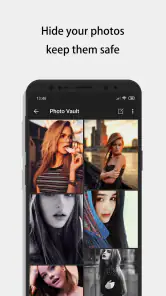
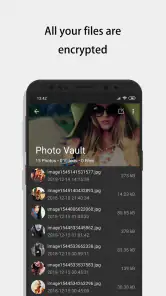


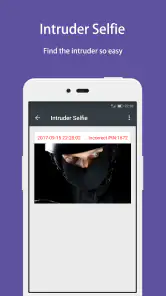
Analysis by Reviewed
I see Calculator - photo vault as a privacy tool for a specific kind of everyday problem: keeping selected pictures and videos out of casual view without making the app itself look like a vault. Its calculator front is the first layer of discretion, while the hidden area gives you a separate place to manage private files. That setup can be useful, but it works best when you treat it as one part of a careful routine rather than a substitute for thinking about backups and access.
A practical routine for adding private files
My suggested starting point is to decide what you actually want to move before opening the vault. Import a small group of items, check that they appear inside the app, and then confirm what remains in your regular gallery. That last check matters: moving something into a private space and removing any visible original are separate steps, so don’t assume the gallery copy has disappeared automatically.
A realistic example is a phone you sometimes hand to a friend to show holiday pictures. You could keep everyday shots in the normal gallery and move a few personal images or videos into the vault, then use the calculator screen when someone else is nearby. This makes casual browsing less likely, although it cannot stop someone who already knows your passcode or has access to your unlocked phone from exploring more deeply.
Settings and habits worth checking
Before relying on any vault, I would test the entry code and password-recovery process while the contents are still easy to replace. The app has email-based password recovery, which is reassuring, but it also means the email account used for recovery deserves protection. A strong, distinct code and a secured email account are more useful than choosing a memorable number that someone close to you could guess.
I’d also make a habit of opening the app after importing files, especially after moving several items at once. Check that each file opens as expected and that the folders make sense to you. For videos, a quick playback check can catch a failed or incomplete transfer before you delete anything from another location. These small checks take a little time, but they are a sensible trade-off when the files matter.
Where discretion has limits
A disguised calculator is aimed at preventing casual discovery, not making your phone invisible or invulnerable. Someone who knows the app’s purpose may try the code, and anyone using your device with your permission can still ask questions about what they see. I would not use it as my only copy of important documents or as a secure archive for files that must never be lost; keep a separate, carefully protected backup when losing the originals would be serious.
The app is free to install and is developed by FishingNet. It sits in the video-player and editor area of app stores, though its practical role is closer to a private media vault than a player. It has a 4.8 average from around 487,000 ratings, with more than 12,000 written reviews and over 10 million installs. It is rated for Everyone, supports Android 6.0 and later, and its current version is 11.0.0. Optional in-app purchases range from $0.99 to $14.99 per item, so I’d check the purchase screen before buying anything. People looking for a conventional video editor, or a vault with clearly documented backup and device-transfer workflows, should compare alternatives before committing.
More From Our News Desk

Weather by Xiaomi Review: Clear at a Glance, Less Clear Up Close

X Under Pressure: Can It Recover When Posting Goes Wrong?

Clash of Clans Is Won Between the Battles

Android Auto Makes the Case for Quieter Car Software

MobiOffice: Transforming Mobile Productivity with Seamless Integration

EA SPORTS FC™ Mobile Soccer: Redefining Mobile Sports Gaming
When this kind of vault fits
I think the app makes the most sense for someone who wants a quick separation between everyday media and a small, deliberately chosen private collection. It is particularly useful when the concern is an accidental glance: a friend scrolling through the gallery, a child borrowing the phone to look at pictures, or a family member browsing while you pass the device across a table. The calculator appearance adds a little friction for a casual browser without asking you to maintain a second phone or a complicated filing system.
That is different from treating the vault as a general-purpose security product. If you need reliable access to essential records across multiple devices, or you routinely share files with a partner or team, a well-managed cloud storage account with appropriate access controls may be a better fit. If you mainly want to keep photos out of the camera roll, your phone’s built-in hidden album may involve fewer steps. I’d choose this app when the disguise itself is useful, not simply because it offers another place to store files.
A calmer way to manage imports
One practical habit is to avoid making a large, rushed transfer just before handing your phone to someone. Instead, import a few files at a time when you can verify them. Give folders names that will still make sense months later, and keep the selection narrow enough that you can notice if something is missing. A vault becomes harder to trust when it turns into a catch-all drawer with no clear idea of what was moved or where it went.
I’d also keep a short mental checklist for each import: confirm the destination, open the file inside the vault, check whether the gallery still shows a copy, and decide what to do with that original. This is especially useful for videos, which can be easy to overlook in a long list and more frustrating to replace if a transfer did not complete as expected. The extra review is not glamorous, but it prevents the common mistake of assuming that “hidden” and “safely backed up” mean the same thing.
Disguise, access, and everyday expectations
The calculator front is most valuable when it blends into your normal app grid and you know how to reach the vault without fumbling. I would make sure I can enter the code confidently before relying on the disguise in a real situation. At the same time, I would avoid showing the access routine to people from whom I want privacy; a disguised icon cannot help much if the person has already watched you open the hidden area.
There is also a social limit that no interface can solve. If someone borrows your unlocked phone for a long time, they may notice an unfamiliar app, ask why it is there, or explore settings and folders. The app can reduce casual discovery, but it is not a promise that private files will remain secret under every kind of access. I would use it for reasonable personal boundaries, not to conceal something that depends on strong forensic protection or to defend against a determined person with control of the device.
How it compares with familiar options
Compared with a standard gallery, the main difference is the extra step between opening the app and seeing selected media. That separation is convenient for privacy, but it also means you need to remember which collection lives where. A built-in hidden album is often simpler if your only goal is to tidy the main photo grid; a calculator-style vault is more suitable when you specifically want the app to appear ordinary at a glance.
Compared with a file manager, this approach is less about browsing every document on the phone and more about setting aside chosen items behind a dedicated entry point. And compared with a conventional video editor, it is not the tool I would open to trim clips, add effects, or prepare a polished export. Its place among video players and editors can be confusing at first, so I would judge it by the privacy workflow rather than expect editing tools from that category label.
There is a trade-off in keeping things local and self-contained: the vault may feel straightforward for one phone, while moving to a new device or rebuilding after a loss takes more planning. Before placing irreplaceable files inside, I would work out where a separate backup will live and how I will protect it. If you cannot explain that recovery plan to yourself, keep the vault limited to items you can afford to lose or recreate.
Who should look elsewhere
I would skip this app if you need a transparent, shared archive with a clear multi-device routine, or if you want a simple way to organize every photo and video you own. The disguise and separate access are useful only if they solve a real problem for you; otherwise, they add another place to check and another code to remember. People who frequently forget credentials should set up recovery carefully and test it before moving important media.
It may also be the wrong choice if your main concern is protecting files from someone who can regularly unlock and inspect your phone. In that situation, the broader device lock, account security, and your physical control of the phone matter more than a calculator screen. For ordinary privacy from accidental browsing, though, the extra barrier can be worthwhile as long as expectations stay realistic.
Have you ever found yourself in a situation where you needed to hide photos or files on your smartphone? Well, let me introduce you to the Calculator - photo vault app. At first glance, it looks like your usual calculator app, but don’t let the plain interface fool you. This app is a clever disguise for a secure vault where you can stash away all those sensitive photos and files you don’t want others to stumble upon.
Your Secret Keeper
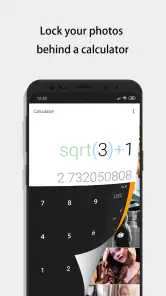
Once you download and open the app, it greets you with a basic calculator interface. But here’s the twist: when you type in your secret code and hit the equals button, voilà, you’re granted access to your hidden vault. Talk about being sneaky! I found this feature particularly intriguing because it’s like having a secret passageway to your personal treasures.
Features that Impress
One of the standout features of Calculator - photo vault is its ease of use. Setting it up is a breeze, and the intuitive interface ensures that even the least tech-savvy users can navigate it without a hitch. Once inside the vault, organizing your files is as simple as dragging and dropping them into folders.
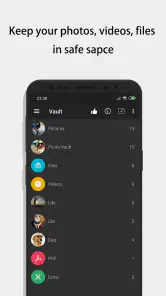
The app doesn't just stop at photos. You can also store videos and other types of files, making it a versatile option for those who want to keep a variety of content under wraps. Plus, the app offers the ability to take pictures directly from the vault, which means you can snap photos without them showing up in your regular gallery.
Security You Can Trust
In terms of security, this app goes the extra mile to ensure your data is safe. It uses advanced encryption to protect your files, giving you peace of mind that your hidden treasures are well-guarded. Additionally, the app offers break-in alerts, so you’ll always know if someone is trying to snoop around in your vault.
Another nifty feature is the ability to recover your password via email, so you don’t have to worry about being locked out of your own vault. That’s a relief for someone like me who tends to forget passwords!
The Final Verdict
In a world where privacy is becoming increasingly important, having an app like this can be a real lifesaver. The Calculator - photo vault disguises itself cleverly while offering robust security features that keep your sensitive files safe from prying eyes. It’s easy to use, efficient, and most importantly, discreet.
Whether you’re looking to hide personal photos, videos, or documents, this app has got you covered. So, if you’re in the market for a secure way to manage your private files, give this app a whirl. You might just find it’s the secret keeper you’ve been searching for!
A considered recommendation
My strongest recommendation is to treat the vault as a privacy layer, not as a complete preservation system. The most dependable routine is modest: keep only selected files there, verify every move, protect the recovery email, and maintain a separate backup for anything irreplaceable. Those steps make the app more useful without asking it to solve problems that belong to device security or backup planning.
The experience is aimed at Android users, with support starting at Android 6.0. The app is free to install, though optional purchases are available, and I would take a moment to review any purchase prompt rather than assuming every extra is necessary. Its Everyone age rating also makes it broadly accessible, but private content still calls for sensible judgment about who can handle the phone and how the account is protected.
For someone who wants a discreet place for a handful of personal photos and videos, the combination of a calculator-style entrance, folders, and direct photo capture gives the app a clear purpose. For someone who wants a full media manager, a guaranteed recovery system, or a defense against determined access, it is not enough on its own. Used with realistic expectations and a repeatable checking habit, it can be a handy privacy convenience rather than a vault I would trust blindly.
Calculator - photo vault Frequently Asked Questions
What does Calculator - Photo Vault look like, and what is its main purpose?
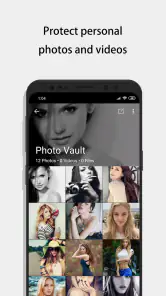
Calculator - Photo Vault presents itself as a calculator, while its main purpose is to hide photos and videos in a private vault. Its calculator-style appearance can make the app less noticeable when someone glances at your phone. If you are considering it, think about whether you want a separate place for private media rather than relying only on your phone’s regular photo gallery.
Is Calculator - Photo Vault free to download, and what might cost extra?
Calculator - Photo Vault is free to download, so you can try its disguised calculator interface without paying upfront. The app also offers in-app purchases, with prices ranging from $0.99 to $14.99 per item. Review the purchase options shown in the app before confirming anything, especially if you only need its basic photo- and video-hiding features.
What is Calculator - Photo Vault and how does it work?
Calculator - Photo Vault is a privacy-focused application that disguises itself as a calculator on your phone. It securely stores your photos, videos, and other files behind a fully functional calculator interface. To access the vault, you simply enter a secret passcode on the calculator keypad, allowing you to manage and organize your private content without anyone suspecting its true function.
Is Calculator - Photo Vault safe for storing sensitive information?
Yes, Calculator - Photo Vault is designed with robust security features to protect your sensitive information. It uses encryption to ensure that your photos and videos are safe from unauthorized access. Additionally, the app requires a passcode to access the vault, providing an extra layer of security. However, it's always recommended to back up your files in a secure place.
Can I recover my files if I forget the passcode to the vault?
If you forget the passcode to your Calculator - Photo Vault, recovering your files can be challenging. The app is designed to prioritize security, so there's no straightforward way to bypass the passcode. Some versions may offer a recovery option through security questions or an email reset, but it's crucial to set these up during the initial app setup to ensure you can regain access if needed.
Pros
- Securely hides private photos
- User-friendly interface
- Supports multiple file formats
- Strong password protection
- Offers cloud backup
Cons
- Limited free storage space
- Ads in free version
- No video support
- Limited editing features
- Requires internet for backup
- Category
- Video Players & Editors
- Version
- 11.0.0











