Cadpage
- 1.80K
- 4.3
- Installs
- 100.00K
- Price
- Free

Screenshots
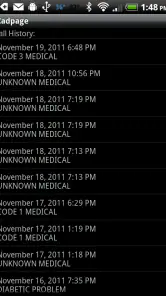
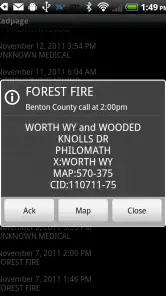
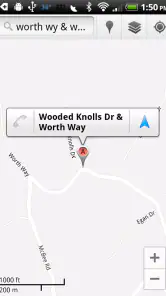
Analysis by Reviewed
When an emergency call comes through, the difference between noticing a message and acting on it quickly matters. That is the narrow but important job I found at the center of Cadpage: it is a communication app built for firefighter and EMS incident response, with the goal of helping the right person get moving sooner. Rather than trying to become a general-purpose messaging platform, it focuses on turning emergency information into something useful during the first moments of a response.
I see it as a specialist tool rather than an app most people would install casually. Its audience is clear: volunteer firefighters, EMS personnel, and others who need to react to incident notifications while away from a station or dispatch desk. The app is developed by CADPage, and its long presence in this space gives it a practical, work-oriented feel. It was released in August 2010, and the current version is 2.2.13-26GR.
The store rating sits at 4.3 from around 3.8 thousand ratings, while the app has passed 100 thousand installs. Those figures do not tell me whether it fits every department’s workflow, but they do suggest that Cadpage has found a lasting audience among people with a real need for incident awareness. It is free to install, rated for Everyone, and works on Android six and later. Some in-app items cost about ten dollars, so I would still check the available options before treating the free installation as the complete experience.
Turning an incident notification into a faster response
The capability that matters most here is the way Cadpage presents emergency incident information for response. In everyday terms, the app is meant to reduce the effort between receiving an alert and understanding what it requires from you. That sounds simple, but emergency messages can be easy to miss, difficult to scan, or inconvenient to interpret when someone is driving, working, sleeping, or handling family responsibilities.
In my view, the real value is not that Cadpage replaces dispatch. It is that it gives responders a focused channel for incident information. A general messaging app may bury an alert among conversations, photos, group replies, and unrelated notifications. A normal email inbox has the same problem, only with more delay and clutter. Cadpage is designed around the incident itself, so the user can treat the alert as an action prompt rather than another message to sort through.
That distinction is especially useful for volunteer responders. A full-time crew may already be near a station or connected to a department system, but a volunteer could be at home, at work, or out shopping. For that person, an incident notification is valuable only if it can be recognized quickly and understood well enough to decide what to do next. The app’s purpose is to make that first decision less dependent on manually searching through ordinary communication channels.
The strongest benefit is reduced cognitive friction at the moment an alert arrives. Cadpage does not need to be exciting or visually elaborate to be useful. In fact, a restrained, task-focused approach is more appropriate here. When an incident is active, I would rather have a clear prompt that helps me orient myself than a feature-heavy interface demanding attention for its own sake.
You May Like

Clash of Clans Is Won Between the Battles

Android Auto Makes the Case for Quieter Car Software

MobiOffice: Transforming Mobile Productivity with Seamless Integration

EA SPORTS FC™ Mobile Soccer: Redefining Mobile Sports Gaming

How Microsoft OneDrive Became a Mobile Productivity Giant

How Google Translate Breaks Language Barriers Effortlessly
What using it feels like in practice
The practical experience depends heavily on how a responder’s department handles emergency communications, so I would not treat the app as a universal replacement for every existing dispatch arrangement. Its usefulness begins when the relevant incident information reaches the app in a form the user can act on. From there, the important questions are straightforward: What happened? Where is it? Is it relevant to my role? What should I do next?
That workflow is different from using a standard chat application. In a chat, important information can be mixed with conversation and may require opening several messages to reconstruct the situation. In an email system, a responder might need to search by subject or sender. Cadpage’s specialist purpose makes it better suited to the moment when the user needs an incident-centered view rather than a broad communications inbox.
I also think the app works best when it is treated as part of a response routine, not as a standalone source of authority. A responder should still follow the procedures of their department and use the officially designated channel for confirmation, updates, and operational decisions. Cadpage can help surface the event, but an alert on a phone should not automatically be treated as permission to improvise outside established instructions.
That is one of the first questions I would ask before installing it: will it fit the way my department sends and manages incident information? If the answer is yes, the app can become a useful early-warning layer. If the answer is no, its value may be limited even if the interface itself feels convenient. Specialist communication tools are only as effective as the workflow around them.
Another practical point is attention management. I would configure the app with the expectation that emergency alerts deserve a different level of attention from ordinary notifications, while still avoiding careless assumptions about what the phone will do in every situation. Before relying on it, I would test the complete path during a non-emergency exercise: receiving an alert, opening it, identifying the location, and confirming that the information is readable under pressure.
That test is more useful than simply installing the app and waiting. It reveals whether the device is placed where the responder can notice it, whether the notification is easy to distinguish from other alerts, and whether the user understands what the message means. The app may shorten the path from notification to awareness, but good preparation determines whether that shortened path actually helps.
A realistic volunteer responder scenario
Imagine a volunteer firefighter finishing a shift at work. The phone is in a pocket, and the person is not watching a department group chat. An incident notification arrives while the volunteer is walking toward a car. With a general messaging setup, the alert might be overlooked or blended into several other messages. With Cadpage serving its intended role, the responder has a more direct way to notice that an emergency event needs attention.
The next decision is not necessarily “drive immediately.” The volunteer may need to check whether they are available, whether they can respond safely, and whether their department’s instructions require a particular confirmation. The useful effect is that the event becomes visible sooner, giving the responder more time to make that decision responsibly.
A similar situation could happen at home during the night. A responder may not want to keep a general chat application open or depend on someone posting the right information in the right group. A dedicated incident channel makes more sense because the person’s attention is directed toward response-related information instead of the entire social and administrative stream.
This is where I think the app’s purpose becomes concrete. It is not about making emergency work feel modern. It is about making a relevant alert harder to lose among ordinary phone activity. That is a modest goal, but in a time-sensitive role, modest improvements in attention can have practical value.
Useful habits that make the capability more dependable
My first recommendation would be to build a simple verification routine before depending on Cadpage during a real call. Use a training or test notification if your department supports one, then check how quickly the alert is recognized and whether the incident details are clear from the normal position of the phone. This catches problems that a store page cannot reveal, such as an alert being lost in a crowded notification shade or the user not knowing which part of the message matters most.
Second, keep the app’s role clear in your mental checklist. Cadpage can help you notice and interpret an incident, but it should not replace department procedures, radio discipline, or safe driving. If you are already on the road, the fastest response is not necessarily the safest response. I would use the app to improve awareness, then follow the proper operational process rather than treating a phone alert as a complete dispatch briefing.
Third, separate “I received an alert” from “I am available to respond.” Those are different decisions. A responder may be at work, caring for a child, unwell, outside the service area, or otherwise unable to attend. Cadpage is most helpful when it gives that person earlier awareness without encouraging unsafe or unrealistic commitments.
Finally, I would review the setup after a few weeks of normal use. If alerts are too easy to confuse with routine notifications, the workflow needs adjustment. If the app is producing information that the department does not use, the user needs clearer guidance. The hidden strength of a specialist app is often not a secret button; it is the way it supports a consistent routine when the user has already decided how to act.
The trade-off between focus and flexibility
Cadpage’s narrow purpose is both its advantage and its limitation. Because it is aimed at firefighter and EMS incident response, it is more relevant than ordinary communication tools for that specific job. However, people looking for a broad team workspace, long-form discussion, file sharing, scheduling, or general volunteer coordination should not expect this app to cover every need. A department may still need other tools for administration and day-to-day communication.
This also means the app is not the right choice for someone who simply wants a family safety messenger or a general emergency news feed. Its value comes from a responder’s relationship with incident information, not from casual public updates. Installing it without a clear operational reason could add another notification source without solving a real problem.
There is also a human limitation: faster notification does not guarantee better decisions. An alert can arrive at an inconvenient time, and a responder may still need clarification before acting. If the department’s process is unclear, the app cannot invent that missing coordination. I would judge Cadpage by whether it improves the first step of awareness, not by whether it eliminates every communication problem that follows.
The in-app purchase range is another point worth considering. The initial download is free, which makes it easy to evaluate, but optional items priced at roughly ten dollars each mean that some users may spend beyond the installation. I would first identify which functions are necessary for the intended workflow and avoid paying for anything that does not have a clear operational benefit.
Compared with ordinary SMS, Cadpage offers a more specialized context for emergency response, while SMS may be easier for a department to use with almost anyone. Compared with a group chat, Cadpage should create less noise around the incident, whereas chat tools are usually better for discussion and quick back-and-forth. Compared with email, it is more purpose-built for prompt awareness, while email remains more suitable for records, attachments, and non-urgent notices.
Those comparisons do not make Cadpage universally superior. They show where it belongs. I would choose it when the main problem is noticing and handling incident notifications. I would choose a broader platform when the main problem is coordinating people, documents, schedules, or ongoing conversations.
Who is most likely to benefit
The clearest audience is a firefighter or EMS responder who needs a focused way to stay aware of incidents while away from a station. Volunteers stand to gain particularly because their availability changes throughout the day and they may not be watching a department communication channel continuously. For them, a dedicated alert path can be more practical than relying on informal messages.
It can also suit responders who already have a reliable department workflow but want a clearer way to distinguish incident information from everyday phone activity. The app’s free starting point makes evaluation straightforward, and the Everyone age rating avoids making it feel like a tool restricted to a narrow age group, although its professional purpose is clearly aimed at adults serving in response roles.
I would be more cautious if you are not connected to an organization that uses compatible emergency communication practices. In that case, the app may not provide enough value to justify another specialized notification channel. Likewise, if you need a complete dispatch management system, a team collaboration suite, or a public emergency information service, another option may be a better fit.
Device compatibility is reasonably approachable for many Android users because the minimum requirement is Android six. Still, compatibility is only the first checkpoint. The more important question is whether the app works naturally with the procedures, expectations, and notification habits of the specific department. A tool that fits one response group may feel unnecessary to another with a different communication setup.
My final view after looking at its real role
I like Cadpage because it appears to understand a specific problem instead of pretending to solve every communication problem at once. Its central promise is practical: help a firefighter or EMS responder notice an incident and get oriented quickly. That focus gives it a reason to exist alongside ordinary messaging tools.
At the same time, I would not install it blindly or assume that a notification app can replace department procedure. I would test it, confirm how it fits the local workflow, and make sure every responder understands the difference between receiving information and being ready to act. Those steps are not criticisms of the app; they are necessary whenever a phone becomes part of an emergency routine.
For the right user, Cadpage is a focused communication aid rather than a general chat app. It is free to begin with, has a long history, and has attracted a substantial user base, but its real value depends on whether its incident-centered approach matches your role. If you are a responder who regularly needs timely awareness of emergency calls, I think it is worth evaluating. If you only want broad team messaging or everyday coordination, I would look elsewhere and keep this tool for the job it was built to support.
Cadpage Frequently Asked Questions
Can I install Cadpage on my phone?
Cadpage is an Android app that requires Android 6.0 or later. It is intended for people who need emergency incident alerts, particularly firefighters and EMS responders. Before downloading, check that your device meets the minimum operating-system requirement and that your department or paging provider supports the app’s setup. Cadpage is free to download, though in-app purchases are available.
Who develops Cadpage, and is it suitable for general users?
Cadpage is developed by CADPage and is a communication app focused on emergency incident response. Its main audience is firefighters, EMS responders, and other public-safety personnel who need to receive and understand dispatch alerts. It is rated for Everyone, but its usefulness depends on having a compatible dispatch source and a relevant role or need; it is not a general-purpose messaging app.
What is Cadpage and what does it do?
Cadpage is a mobile alert application designed primarily for volunteer firefighters, emergency medical responders, and other public-safety personnel. It monitors compatible emergency dispatch messages and presents them in a clearer, more useful format on an Android device. Depending on the configured service, alerts may include the incident type, location, dispatch notes, and mapping information, helping responders quickly understand where they are needed.
Does Cadpage work with every emergency dispatch system?
No. Cadpage is not universally compatible with every dispatch system or agency. Its operation depends on whether your local department, paging provider, or dispatch format is supported and correctly configured. Before downloading, responders should check the app’s compatibility information or ask their department administrator which setup is required. Some systems may need specific settings, permissions, or a subscription to function properly.
Is Cadpage free to download and use?
Cadpage is free to download, but in-app purchases are available and may cost between $9.99 and $10.00 per item. Whether a purchase is relevant depends on the service and setup you use. Check the purchase details shown in the app before proceeding, and make sure your department’s supported configuration is in place so you understand what is needed for your intended use.
Pros
- Quickly identifies emergency incidents from supported dispatch messages.
- Useful for volunteer responders who need alerts while away from a computer.
- Displays incident details in a more readable format than raw dispatch text.
- Can help responders decide whether an alert requires immediate attention.
- Designed around practical emergency-response needs rather than general social features.
Cons
- Coverage and accuracy depend on compatible dispatch sources and local configuration.
- Some features may require a paid subscription or in-app purchase.
- Emergency alerts can be delayed by phone connectivity or background restrictions.
- The interface may feel dated compared with newer emergency notification apps.
- Not a replacement for official dispatch systems or direct emergency communications.

- Category
- Communication
- Version
- 2.2.13-26GR











