

BusZone
- 149.00
- 4.5
- Installs
- 10.00K
- Price
- Free

Screenshots
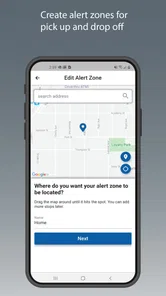
Analysis by Reviewed
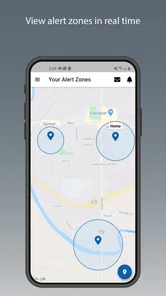
BusZone is the kind of education app that solves a very specific family problem: keeping track of a child’s school bus without relying entirely on guesswork, messages, or repeated calls. I found its focus refreshingly narrow. Rather than trying to become a complete school-management platform, it is built around helping parents see a child’s bus location in real time. That makes it most useful during the small but stressful gaps between “the bus has left” and “my child is safely home.”
In my experience, that narrow purpose is also the key to judging it fairly. This is not an app I would open for homework, school announcements, or general family scheduling. I would use it as a practical arrival-awareness tool, especially when a child is young, the route is unfamiliar, or the household needs to coordinate who will meet the bus. If that sounds like your daily problem, BusZone deserves a closer look.
How the everyday BusZone routine works
The most natural workflow is simple. A parent checks the app when the child is expected to be on the way home, looks at the bus’s current position, and uses that information to decide when to head outside. That can replace the vague routine of watching the clock and wondering whether a delay is normal. The value is not in staring at a map continuously; it is in making a quick, informed decision at the right moment.
A realistic example is a parent working from home while a child rides back from school. Instead of interrupting a meeting to call the child or asking another family member to wait outside for an unknown amount of time, the parent can check the live location and judge whether there is enough time to finish the task at hand. The same habit works for a grandparent or babysitter who needs a clear handoff without knowing the route personally.
I would treat the location as guidance rather than a promise that the bus will arrive at an exact minute. Traffic, stops, boarding delays, route changes, and the time it takes a child to leave the vehicle can all affect the final handoff. The strongest use of BusZone is therefore not “the map says the bus is here, so the doorbell will ring immediately.” It is “the bus is getting close, so now I should prepare.” That distinction prevents unnecessary frustration.
For a family using the app for the first time, the best starting habit is to check it at the same points in the day for several school days. Notice how the displayed position relates to the actual arrival, then adjust your routine. If the bus usually reaches a nearby landmark shortly before your child gets off, that landmark becomes a useful personal cue. This is more dependable than opening the app randomly and expecting the screen to explain the entire route.
BusZone is free, which lowers the barrier for families who only need this focused function. It is rated for Everyone, so its purpose is suitable for a broad household audience. The app comes from ByteCurve, LLC, and its current version is 2.1.7. Those details matter less than whether your child’s transportation setup is compatible with the service, but they do make it clear that this is an established app rather than a one-off experiment.
More From Our News Desk

 Gmail
GmailGmail in a Busy Inbox: Who Benefits Most?
From first account to crowded workday, Gmail earns its place through dependable search and flexible sorting—but its best fit depends on how much inbox maintenance you can tolerate.

 Prime Video
Switching to Prime Video: What Changes in Your Viewing Routine
Prime Video can make a compelling second home for streaming, but switching means learning a different catalog, rental layer, and route from browsing to playback.

 Universal TV Remote Control
Universal TV Remote Control Works Best as a Reliable Backup
A phone remote earns its place through quick setup and reliable habits. Here is how to get more from Universal TV Remote Control—and where its limits show.

 Weather - By Xiaomi
Weather by Xiaomi Review: Clear at a Glance, Less Clear Up Close
Xiaomi’s weather app makes everyday forecasts quick to scan, but its calm surface can leave useful details and recovery paths harder to find than they should be.

 X
XX Under Pressure: Can It Recover When Posting Goes Wrong?
A resilience-focused review of X, examining setup, mistaken posts, interruptions, weak connections, and the gaps that matter when recovery needs to be dependable.

 Clash of Clans
Clash of Clans Is Won Between the Battles
Its raids are quick; its community is a long-term project of coordination, teaching, rivalry, and shared responsibility—with all the friction that entails.
Latest News



What I would check before depending on it
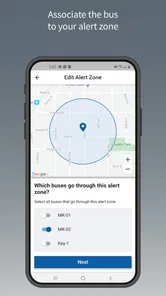
The first question is not whether the map looks useful; it is whether the bus your child rides appears in the app’s working setup. A real-time location tool is only helpful when the relevant route and vehicle information are available to the family. Before building your entire pickup routine around it, I would open the app during a normal school day and confirm that the expected bus can be identified and followed.
This is an important practical distinction from ordinary map apps. Google Maps or Apple Maps may help you estimate a drive, but they are not automatically aware of a particular school bus’s operational position. A school communication portal might provide schedules or messages, but a schedule is not the same as a live view. BusZone’s usefulness comes from narrowing attention to the child’s bus rather than asking a parent to infer its progress from general traffic information.
I would also make sure the adults who may handle pickup understand the same routine. If one parent checks the bus while another waits outside, agree on what “close” means in your household. For one family, that may mean preparing coats and shoes; for another, it may mean walking to the stop. The app becomes more effective when it supports a repeatable handoff plan instead of creating several people who all refresh the screen and interpret it differently.
Settings and phone habits worth checking
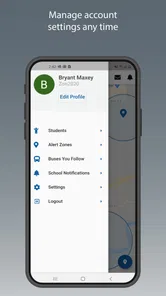
Experienced use begins with the phone itself. I would check that the app is not being aggressively restricted by battery-saving controls, especially if the phone tends to suspend background activity. I would also review notification behavior and make sure the app is allowed to present the information in the way the parent actually prefers. I am not assuming BusZone offers a particular notification system; the useful point is to make the phone’s handling of the app predictable before an important pickup.
Another sensible check is account and device readiness. If two caregivers may need access, decide which device will be the primary one and which will be the backup. A backup phone is useful when the main device is charging, left at work, or being used by another family member. This is a small operational detail, but it prevents a common mistake: assuming that one person’s successful setup automatically gives the entire household a reliable process.
I would avoid treating privacy and safety as reasons to share the app casually. A child’s route information is sensitive in the everyday sense, even when the app is designed for parents. Keep access limited to people who genuinely need it, and avoid displaying the live map in public conversations or screenshots. That is not a criticism of BusZone specifically; it is a sensible boundary for any tool that shows a child’s transportation whereabouts.
Compatibility is another practical consideration. BusZone requires Android 7.0 or later, so owners of very old Android devices should check the operating system before planning around it. On a supported phone, I would still install it early enough to test the workflow rather than waiting for a rainy afternoon or an unexpected schedule change. A location app should be familiar before it becomes part of a safety-related routine.
Faster patterns for busy households
The quickest way to use BusZone is to turn it into a short decision process. First, open it around the time the bus normally begins approaching the child’s stop. Second, identify whether the vehicle is still far away, moving into the neighborhood, or close enough that leaving now makes sense. Third, close the app and get ready instead of repeatedly checking every minute. This reduces screen time while preserving the information that actually changes your decision.
A useful refinement is to create two check points rather than one. The first tells you whether the bus is progressing normally; the second tells you when to move from preparation to pickup. This is better than waiting for a perfect visual cue, because the final part of a route can change quickly. It also helps a parent avoid the opposite problem: walking out too early and spending several minutes waiting without knowing whether the bus is delayed.
For households with changing schedules, the app works best alongside a simple human backup. If a child attends an activity, visits another approved stop, or is collected by a different adult, the parent should not assume the usual BusZone routine still applies automatically. Keep a short note or shared message explaining who is responsible that day. The live location can support the plan, but it cannot replace the plan.
I also recommend using the app as a confirmation tool after a disruption, not just as a routine tracker. If the bus appears later than expected, a parent can decide whether to keep waiting, contact the school, or ask another caregiver to assist. The benefit is that the conversation begins with a clearer picture of the route rather than a vague feeling that something is wrong. That can save time, while still leaving room for direct communication when the situation calls for it.
One trade-off is that a live map can encourage overchecking. Parents who refresh constantly may feel more anxious, not less, particularly when the vehicle pauses at a stop. My preferred pattern is to establish a reasonable check rhythm and use the screen only when it answers a real question. BusZone is strongest when it reduces uncertainty; it is less helpful when it becomes another source of compulsive monitoring.
Where the app fits among familiar alternatives
Compared with calling a child, BusZone can be more practical when the child is not allowed to use a phone during the school journey or is too young to give reliable updates. Compared with texting another parent, it gives the caregiver a direct view rather than depending on someone else noticing the bus. Compared with a printed timetable, it responds better to the ordinary unpredictability of traffic and loading time.
It is also more focused than a broad family organizer. A calendar can tell you that school ends at a certain time, but it cannot by itself show where the bus is. A school portal may be the better choice for announcements, attendance information, or changes sent by administrators. I would not replace those tools with BusZone. I would use each for its strongest job: school communications for official information, a calendar for planning, and BusZone for the immediate transportation check.
Families who already receive dependable route alerts through another official service may find less reason to add a separate app. Likewise, if a child walks home, is collected directly from school, or rides a service without a supported live-location workflow, BusZone may not solve the actual problem. The app’s focused design is an advantage only when the family’s transportation routine matches it.
The rating of 4.5 from around 846 ratings suggests that many users find the basic idea worthwhile, while the 10K-plus install level places it in the category of a smaller, purpose-built utility rather than a massive household platform. I would read those figures as signs of useful adoption, not as proof that every route or family setup will behave identically. Transportation tools depend heavily on local arrangements, so personal compatibility matters more than popularity alone.
Advanced limits to keep in mind
The biggest limitation is the gap between seeing a vehicle and knowing exactly what will happen at the doorstep. A bus can be visible on a route while the child is still several minutes away from leaving it. A map can show movement without explaining a delay, a temporary stop, or a change in the child’s pickup arrangement. For that reason, I would never use the app as the only response to a serious concern about a child’s whereabouts.
There is also a human reliability limit. The parent must open the app, interpret what is shown, and act on it. If the phone is offline, the battery is empty, or the caregiver is busy and forgets to check, the workflow breaks. That does not make BusZone poor; it simply means the app is an aid, not an autonomous childcare system. A dependable family routine should include a backup contact and a clear instruction for what to do when the expected bus does not appear as usual.
Another limitation is that real-time information can feel more precise than it really is. The moving marker creates a sense of exactness, but the parent still needs judgment about distance, traffic, and the child’s stop. I would teach older children and backup caregivers not to treat the map as permission to wander or change plans. The safest routine remains the agreed stop and the agreed adult, with the app helping the adult time the meeting.
Because BusZone is an education app centered on transportation, it should not be judged by features that belong to unrelated categories. I would not expect it to replace a messaging service, a navigation app for personal driving, or a full school-information system. If your main need is to receive official schedule changes, another school-provided channel may be more appropriate. If your main need is general route planning, a standard navigation app will likely be more flexible.
My verdict after building a repeatable routine
I see BusZone as a practical specialist. Its real strength is the small moment when a parent needs to decide whether to keep working, start preparing, or go meet the child. The live bus view can make that decision calmer and more informed than relying on a timetable alone. I especially like it for families with younger children, multiple caregivers, or a pickup point where waiting outside for an unknown amount of time is inconvenient.
My recommendation is to begin with a trial routine: confirm the relevant bus, check the app during ordinary arrivals, compare what you see with what actually happens, and then settle on two or three sensible check points. Review the phone’s battery and notification behavior, keep access limited to trusted caregivers, and maintain a backup plan for days when the route or pickup arrangement changes.
BusZone is worth using when live bus awareness is the missing piece in your school-day routine. It is not a universal family organizer, and it should not be treated as an exact arrival guarantee. But for the specific job it takes on, the focused approach is appealing. ByteCurve, LLC has produced a free education app with an Everyone age rating and a clear everyday purpose, and my experience is that it works best when paired with good judgment rather than used as a substitute for it.
If your child’s bus is supported and your household wants a faster way to time the walk to the stop, I would recommend giving BusZone a fair test. If you need school announcements, broad route planning, or a complete family communication hub, choose a tool designed for those jobs instead. For parents who want a focused live-location check and are willing to build a sensible habit around it, BusZone can turn an uncertain wait into a more manageable part of the day.
BusZone Frequently Asked Questions
Is BusZone suitable for parents who want to follow a child’s bus journey?
BusZone is described as an app that enables parents to see their child’s real-time bus location. It may be useful for checking where a bus is while a child is travelling, but live tracking depends on the relevant service and available location information. Parents should make sure the school or transport network they use is supported before relying on the app.
What is BusZone, and what can I use it for?
BusZone is a public transport companion designed to help passengers check bus routes, stops, timetables, and service information in supported areas. After selecting a location or transport network, you can use it to plan journeys and check when buses are expected to arrive. Its usefulness depends heavily on whether your city and local operators are covered.
Does BusZone provide live bus tracking and accurate arrival times?
BusZone may provide real-time vehicle locations, estimated arrival times, and disruption updates where the local transport authority makes live data available. However, these estimates are not guaranteed and can change because of traffic, weather, technical issues, or incomplete operator data. Always allow extra travel time, particularly for important appointments or unfamiliar routes.
Which cities and transport networks are supported by BusZone?
Coverage is one of the most important things to check before downloading BusZone. The app is primarily useful in the regions and networks for which it has timetable or real-time data, rather than being a universal bus tracker. Search for your city, operator, or nearby stop inside the app and confirm that routes appear before relying on it for regular travel.
Does BusZone require an internet connection or location access?
An internet connection is generally needed to download current schedules, retrieve live arrival information, load maps, and receive service updates. Location permission can make it easier to find nearby stops and plan from your current position, although you may be able to search manually without enabling it. Offline availability and data freshness can vary by region and app version.
Pros
- Covers many bus routes and operators in one convenient app.
- Stop searches can help plan journeys quickly while away from home.
- Useful for checking nearby stops and route details on the go.
- Simple interface makes basic timetable browsing easy for most users.
- Helpful for commuters who need regular public transport information.
Cons
- Coverage may be limited outside supported regions and participating operators.
- Timetable accuracy can depend on updates from local transport providers.
- Some features may require an internet connection while travelling.
- Service alerts may not appear immediately during unexpected disruptions.
- The interface may feel less useful for occasional travelers unfamiliar with routes.











