

Budget Calendar
- 189.00
- 4.8
- Installs
- 10.00K
- Price
- $4.95

Screenshots
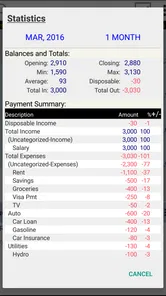
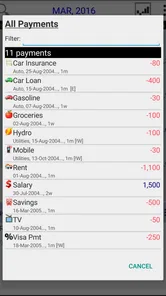
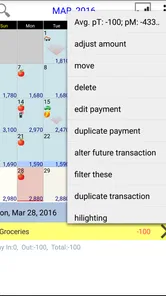
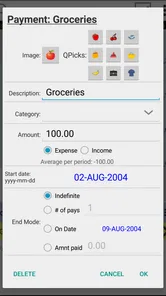
Analysis by Reviewed
Most budgeting tools ask me to think in categories, reports, and monthly totals. Budget Calendar starts from a more familiar question: what money is coming in, and what needs to be paid on each day? That difference sounds small, but it changes how I plan. Instead of treating a month as one large bucket, I can look at the timing of bills and income and judge whether the balance is likely to stay comfortable between them.
I reviewed this finance app from MiShell Software Systems as a practical planning tool rather than a full banking replacement. It costs $4.95, carries a 4.8 average from 481 ratings, and has passed 10 thousand installs. Those figures suggest a small but strongly supported product, and that matches my impression: it is focused, uncomplicated, and built around calendar-based budgeting rather than a long list of financial extras.
From an empty calendar to a usable cash-flow plan
I’ll look at how this section frames the move from a blank calendar to a practical cash-flow plan, with emphasis on choosing a manageable first set of entries. I’ll also connect that setup to a useful habit: checking whether dates and estimates reflect what is actually expected, rather than mistaking a tidy calendar for a guaranteed balance.
Starting with the real problem: timing, not just totals
The most useful way to approach this app is to begin with a situation many people recognize. Imagine that my monthly income is enough to cover rent, utilities, subscriptions, groceries, and transport. On paper, the total works. The problem is that several payments arrive before the next income deposit. A conventional budget may tell me that I am within the monthly limit, while my bank balance still feels tight during the middle of the month.
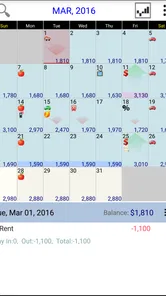
Budget Calendar is designed for that gap between a monthly total and the actual order of events. I can place expected income and expenses on a calendar, then inspect the sequence rather than relying only on a category summary. For me, that makes the planning conversation more concrete: the question becomes whether the account can handle the next few days, not merely whether the month looks affordable in theory.
I would not begin by entering every small purchase. The better starting point is the fixed structure: paydays, housing, loan payments, insurance, utilities, and recurring subscriptions. Once those anchors are visible, I can add flexible spending around them. This approach reduces setup friction and gives the calendar a useful shape quickly.
Building the first plan step by step
My first pass would be deliberately simple. I would enter the income dates I can reasonably predict, then add the bills that must be paid regardless of mood or plans. After that, I would add an estimated allowance for variable needs such as food or fuel. The aim is not to create a perfect financial record on the first attempt; it is to create a believable forward view that can be corrected as real amounts become known.
More From Our News Desk

 Gmail
GmailGmail in a Busy Inbox: Who Benefits Most?
From first account to crowded workday, Gmail earns its place through dependable search and flexible sorting—but its best fit depends on how much inbox maintenance you can tolerate.

 Prime Video
Switching to Prime Video: What Changes in Your Viewing Routine
Prime Video can make a compelling second home for streaming, but switching means learning a different catalog, rental layer, and route from browsing to playback.

 Universal TV Remote Control
Universal TV Remote Control Works Best as a Reliable Backup
A phone remote earns its place through quick setup and reliable habits. Here is how to get more from Universal TV Remote Control—and where its limits show.

 Weather - By Xiaomi
Weather by Xiaomi Review: Clear at a Glance, Less Clear Up Close
Xiaomi’s weather app makes everyday forecasts quick to scan, but its calm surface can leave useful details and recovery paths harder to find than they should be.

 X
XX Under Pressure: Can It Recover When Posting Goes Wrong?
A resilience-focused review of X, examining setup, mistaken posts, interruptions, weak connections, and the gaps that matter when recovery needs to be dependable.

 Clash of Clans
Clash of Clans Is Won Between the Battles
Its raids are quick; its community is a long-term project of coordination, teaching, rivalry, and shared responsibility—with all the friction that entails.
Latest News



The calendar format is particularly helpful when a payment date matters more than its label. A bill due near the end of one month may be easy to forget when I am looking only at a monthly category total. Placing it on the day it affects my money gives it a visible position in the flow. I can then see whether it sits before or after income and decide whether I need to reserve money earlier.
A useful habit is to separate certainty from estimation in my own planning routine. Fixed payments can be entered as firm commitments, while groceries, entertainment, or irregular travel should be treated as working estimates. That distinction keeps the calendar honest. If I enter every guess as though it were exact, the visual plan may look precise while actually being fragile.
Another practical technique is to review the next pay cycle rather than jumping immediately to a whole year. A short forward check exposes the immediate pressure points and makes corrections manageable. Once the pattern feels right, I can extend the same logic across later periods. This is one of the app’s strongest qualities: it encourages a sequence of decisions instead of demanding a perfect financial system before it becomes useful.
Using the calendar during an ordinary week
Consider a realistic case. I receive income near the beginning of the month, pay rent shortly afterward, and have several smaller automatic charges scattered through the following weeks. I also know that groceries and commuting will consume money between those dates. Before making a discretionary purchase, I can look ahead and ask whether the next cluster of obligations leaves enough room.
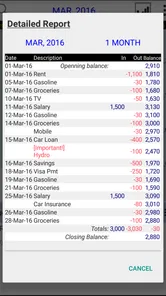
That workflow is more helpful than checking the current balance alone. A current balance can look healthy immediately after payday, yet the calendar may reveal that a large payment is approaching. Conversely, a lower balance may not be alarming if the next income event arrives before the major obligations. The app helps me connect today’s decision with the order of upcoming events.
I also find this approach useful for irregular expenses. A school-related payment, annual service, or planned trip can be placed into the same forward view instead of being left as a vague reminder. The important insight is not just remembering the expense; it is seeing what it does to the surrounding days. If the event creates a difficult gap, I can start reserving money earlier rather than reacting when the date arrives.
Where handoffs happen in the workflow
A budget rarely belongs to one person alone. A partner may need to know which bills are already covered, a housemate may need to confirm a shared payment, or I may need to move information from a calendar plan into my banking routine. Budget Calendar works best when it serves as a planning reference that supports those handoffs.
For example, I can use the calendar before a conversation about shared household costs. Instead of saying that expenses feel high, I can point to the timing of rent, utilities, and other commitments and discuss which payments belong to whom. The app does not replace that conversation, but its date-based layout gives the conversation a clearer starting point.
The same applies to a handoff between planning and execution. I might review the coming days in the app, then schedule transfers or payments through my bank’s normal tools. That separation is sensible: the calendar helps me decide what should happen, while the bank remains the place where transactions are actually carried out. I would not expect this app to become my banking app, and I prefer keeping those roles distinct.
For a personal routine, I would review the calendar before payday, after major bills clear, and whenever an unexpected expense changes the plan. Those checkpoints are more valuable than repeatedly opening the app without a decision in mind. The goal is to turn the display into an action list: reserve money, delay a purchase, adjust an estimate, or simply confirm that the next stretch is safe.
The result: a clearer sense of financial breathing room
After the initial entries are in place, the main result is not a sophisticated report. It is a more understandable view of cash flow. I can see whether the month is tight because total spending is too high or because payments are badly clustered. Those are different problems and need different responses.
If the total is manageable but the timing is awkward, I might move a discretionary purchase, build a buffer before a large bill, or arrange my own transfer earlier. If the total itself does not work, the calendar makes that visible too, but it does not pretend that arranging dates can solve an income-versus-expense shortfall. That honesty is important. A planning view can expose a problem without magically fixing it.
I also appreciate that the app can make progress feel tangible. Instead of thinking about “being better with money” as an abstract goal, I can work through the next group of obligations and compare the plan with what actually happened. This is especially useful for someone who finds category-heavy budgeting tiring but still needs a reliable way to avoid surprises.
Where the flow breaks down
The same simplicity that makes Budget Calendar approachable also limits it. People who want detailed spending analysis, extensive account automation, investment tracking, debt dashboards, or a broad financial overview may find the experience too narrow. A calendar can show when money moves, but it does not automatically explain every habit behind those movements.
It is also not the best fit for someone who wants a completely hands-off system. The value depends on entering sensible information and revisiting it when circumstances change. If my income varies substantially, bills change often, or I regularly forget to update estimates, the calendar can become outdated. In that situation, an app with stronger automatic transaction importing may reduce manual work, even if it offers a less direct view of timing.
Variable spending creates another point of friction. A fixed bill is easy to place, but groceries, fuel, and social plans do not always arrive on predictable dates or amounts. I need to use reasonable allowances and accept that the calendar is a forecast, not a guarantee. The practical solution is to review estimates after real spending occurs rather than treating the original plan as permanent.
There is also a behavioral trade-off. The calendar encourages me to think ahead, but it may tempt me to focus too closely on individual dates and lose sight of longer-term priorities. I would pair it with a simple monthly check of savings goals or debt progress if those areas matter to me. Its strength is the near-term flow; it should not be forced to serve as an entire financial life dashboard.
Who should use it, and who should choose something else
I would recommend this app to someone whose main budgeting question is, “Will I have enough available when the next payment arrives?” It is a good match for people paid on a regular schedule, households managing recurring bills, and anyone who finds a calendar easier to understand than spreadsheets. It can also suit a user who wants to pay once rather than begin with a subscription-style commitment.
It is particularly useful for a first budgeting system when the alternative is keeping dates in memory or checking a bank balance reactively. The Everyone age rating also makes it approachable for a broad audience, although younger users may still need guidance when entering shared household obligations or estimating irregular costs.
I would look elsewhere if automatic account synchronization is essential, if I need advanced reporting, or if my finances involve many currencies, investments, business transactions, or complicated shared accounts. A spreadsheet may be better for custom formulas and detailed records. A full-featured finance manager may be better for automatic categorization and historical analysis. Budget Calendar wins when the central task is visualizing planned money movement on dates.
Compatibility, cost, and the practical buying decision
The app was released on May 17, 2013, and its current version is 1.69. It requires Android 7.0 or newer, so I would check the operating system before paying for it. The price is straightforward at $4.95, which makes the decision relatively easy to frame: I am paying for a focused planning tool, not a complete replacement for online banking or a large financial platform.
That one-time cost feels reasonable to me if the calendar view directly addresses a recurring problem. If I only want to record spending after it happens, a basic notes app or spreadsheet may be enough. If I repeatedly misjudge the days between income and bills, however, the date-based perspective can justify the purchase quickly by making those pressure points visible.
My advice would be to decide based on workflow rather than on the rating alone. Before installing, I would ask whether I am willing to enter the recurring structure of my finances and review it regularly. If the answer is yes, the app has a clear purpose. If I want every transaction captured automatically with minimal involvement, its focused design is likely to feel like extra work.
My final take after following the full workflow
Budget Calendar succeeds because it turns budgeting into a sequence I can understand: enter income, place obligations, account for flexible spending, review the handoffs, and act before the next tight stretch arrives. I like that it focuses on timing without pretending to solve every financial problem. The result is a practical forward view that can support daily decisions and household conversations.
Its weaknesses are equally clear. Manual planning requires discipline, variable expenses can weaken the forecast, and users seeking automatic analysis or a broad financial dashboard will probably outgrow it. Still, for someone who wants a compact calendar-based way to plan available cash, I find the trade-off worthwhile. I would recommend it to a friend who keeps asking where the month went, but I would first explain that its real benefit comes from maintaining the calendar—not merely opening it once.
Budget Calendar Frequently Asked Questions
Is Budget Calendar available for my device, and what does it cost?
Budget Calendar is a finance app from MiShell Software Systems, offered for $4.95. It requires Android 7.0 or later, so check your device’s operating-system version before downloading. Its age rating is Everyone, making it suitable for a broad audience. Considering the one-time listed price, think about whether a calendar-based approach to planning income and expenses matches the way you prefer to manage your budget.
What is Budget Calendar, and how does it work?
Budget Calendar is a personal finance app designed to help you organize income, bills, subscriptions, and everyday expenses on a calendar. Instead of viewing your budget only as monthly totals, you can see when money is expected to arrive and when payments are due. This visual approach makes it easier to anticipate low-balance periods, plan spending, and understand your cash flow before making financial decisions.
Can Budget Calendar help me track recurring bills and subscriptions?
Yes, one of the most useful features is the ability to add recurring financial events, such as rent, utilities, loan payments, memberships, and subscriptions. You can usually set the amount, frequency, and payment date, allowing future transactions to appear automatically. However, users should still review recurring entries regularly because prices, billing dates, promotional periods, and subscription terms can change.
Does Budget Calendar connect directly to my bank account?
Budget Calendar is primarily intended for manual budgeting and calendar-based financial planning, so bank synchronization may not be available or may depend on the version and platform you use. This can require more effort than an app that imports transactions automatically, but it also gives you greater control over the information entered. Always check the current app listing for supported integrations before downloading.
Is Budget Calendar suitable for managing shared household finances?
The app can be useful for couples, families, or roommates who want to plan shared bills and monitor upcoming expenses, especially when everyone agrees on the amounts and dates being recorded. Its calendar format makes common obligations easy to review. Nevertheless, it may not replace a dedicated multi-user banking or accounting service if you need synchronized accounts, permissions, or separate personal and shared budgets.
Pros
- Clear calendar view makes upcoming income and expenses easy to understand.
- Flexible recurring transactions help track regular bills and subscriptions.
- Useful budgeting tools can reveal spending patterns over time.
- Custom categories make it easier to organize personal and household expenses.
- Works well for users who prefer planning finances manually.
Cons
- Initial setup can take time if you have many accounts and transactions.
- Manual entry may feel tedious compared with automatic bank syncing.
- Some advanced features may require a paid version or subscription.
- The interface can seem dense for users new to budgeting apps.
- Limited sharing options may not suit couples managing finances together.











