Bria Mobile: VoIP Softphone
- 133.00
- 3.9
- Installs
- 100.00K
- Price
- Free

Screenshots


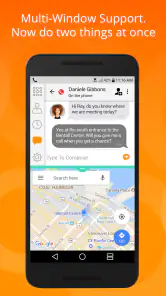
Analysis by Reviewed
I approached Bria Mobile: VoIP Softphone as the kind of communication app you install because your work calls need to follow you beyond a desk phone. It is designed for business calling rather than casual messaging, bringing voice, video, chat, and presence into one mobile interface. That sounds straightforward, but softphones depend on more than the app itself: your account, service provider, network, audio route, and call settings all have to cooperate.
My overall impression is that Bria Mobile makes sense for people who already use a compatible business communication service and want a mobile extension of that setup. It is less convincing as a standalone replacement for ordinary phone and messaging apps. The difference matters, because many frustrations that appear to be app problems are actually account or network problems.
Where the real friction appears
The first obstacle is usually not making a call. It is understanding what the app expects before a call can work properly. Bria Mobile is a softphone, so it needs business telephony credentials or an associated service arrangement. Installing it does not automatically give you a new public phone number or a complete calling system. If you open it expecting the simplicity of a normal dialer, the setup can feel unnecessarily complicated.
I would begin by identifying who manages the account. In a small company, that might be an office administrator or an IT provider. In a larger organization, it may be the communications team. You need the correct login details and service information, not merely your regular mobile number. This is one of the most important distinctions between Bria Mobile and consumer apps such as WhatsApp, FaceTime, or a standard cellular dialer.
Another common sticking point is the difference between being signed in and being reachable. A successful login does not always mean that incoming calls will arrive exactly as expected. Presence status, account registration, network availability, and the service configuration can all affect what colleagues see and whether calls reach the device. I found it useful to treat the app as one part of a larger phone system rather than as an isolated application.
The interface also asks you to think in business terms. Contacts, recent calls, chat, video, and presence are valuable when you are moving between work conversations. They may feel excessive if you only need to place an occasional call. The app is aimed at people who benefit from a unified work identity, not users looking for the quickest possible personal call.
There is also a practical issue with expectations around call quality. A softphone uses the available internet connection, so a weak wireless signal, congested public network, or unstable mobile connection can affect the experience. Even when the app is functioning correctly, audio may break up or calls may fail to remain connected if the network changes during a conversation.
You May Like

Clash of Clans Is Won Between the Battles

Android Auto Makes the Case for Quieter Car Software

MobiOffice: Transforming Mobile Productivity with Seamless Integration

EA SPORTS FC™ Mobile Soccer: Redefining Mobile Sports Gaming

How Microsoft OneDrive Became a Mobile Productivity Giant

How Google Translate Breaks Language Barriers Effortlessly
What I would check before blaming the app
Before troubleshooting, I would confirm that the account belongs to a service supported by the organization using Bria Mobile. The developer is CounterPath Corp, but that does not mean every business phone system will accept every account automatically. A company may need to provide specific credentials or configuration details, and those details are usually more important than the installation itself.
I would then check the basic path from account to call. Can the account sign in? Does it show as available? Can you place a test call? Can another person reach you? Testing those questions separately helps identify the failing layer. If outgoing calls work but incoming calls do not, the problem may involve registration or routing. If neither direction works, account details or service configuration deserve attention first.
Audio deserves its own check. A call can connect while the sound is routed to the wrong place, especially when a headset, car system, wireless speaker, or another Bluetooth device is nearby. I make a short test call before an important meeting and verify both microphone input and speaker output. This simple habit is more useful than repeatedly reinstalling the app.
Video and chat should also be tested independently. A working voice call does not prove that every communication mode is configured equally. If your work depends on video, check it before the scheduled conversation rather than discovering a camera or connection issue when everyone is waiting. The same principle applies to presence: confirm that your status reflects how you want colleagues to reach you.
Bria Mobile is free to install, which lowers the barrier to trying it. However, the app includes in-app purchases ranging from ninety-nine cents to nine dollars and ninety-nine cents per item. I would not treat that range as a reason to buy anything immediately. First establish what your employer or service provider already supplies and which functions your account is meant to support. A purchase cannot repair missing business credentials or an incorrectly configured service.
A setup routine that avoids wasted time
My preferred setup sequence is deliberately boring. I install the app, use the account information supplied by the organization, and test one function at a time. I start with sign-in, then an outgoing voice call, then an incoming call, followed by the features I actually need, such as chat, video, or presence. This gives each test a clear purpose and prevents several unknowns from being mixed together.
I also recommend making the first test on the same kind of connection you expect to use at work. A successful call on a strong home network may not predict performance in an office, hotel, train, or customer site. If your day involves moving between Wi-Fi and mobile data, make a short call while changing location and pay attention to whether the conversation survives the transition.
Keep the first test contact simple. Calling a colleague who knows you are testing is better than dialing a customer unexpectedly. Ask that person whether your voice is clear, whether your caller identity looks correct, and whether your presence appears as expected. Those details reveal problems that you may not notice from your own screen.
On a shared or managed device, I would also follow the organization’s normal support process instead of changing account settings at random. A small configuration change can affect how the business system routes calls. If the account was issued by an employer, the person who manages that system is usually in a better position to correct it than a user experimenting alone.
Recovering a workflow after a failed call
When a call fails, the fastest recovery is usually a controlled reset rather than a complete reinstall. I first note what happened: did the call fail before connecting, connect without audio, drop after a few minutes, or reach the wrong destination? Each symptom points toward a different area. Writing down the exact behavior also makes a support request far more useful.
For a failed outgoing call, I would confirm the account status and try a known internal contact if one is available. If an internal call works but an external destination fails, the issue may be related to dialing rules or business routing rather than the mobile app. If every destination fails, I would return to the account and network checks before touching anything else.
For one-way audio, I would end the call and test again with the phone held normally, then with the expected headset. I would check whether another device has taken the audio route and whether the microphone opening is obstructed. If the same problem appears across different contacts and networks, it becomes more reasonable to involve the account administrator or support team.
For a dropped call, I would record whether the device changed networks, whether the phone entered an area with poor coverage, and whether the problem affects only Bria Mobile or other internet services too. A single dropped call is not enough to diagnose the app. A repeated pattern tied to one network is much more informative.
If the interface appears stuck, I would close and reopen the app, verify the connection, and sign in again only if the account process allows it safely. I would avoid repeatedly entering credentials when I am unsure of them, because that can create confusion without addressing the original problem. Reinstallation should be a later step, not the automatic first response.
One useful recovery habit is keeping a fallback method available for important conversations. That might be an ordinary phone call or another approved work channel. This is not an argument against Bria Mobile; it is sensible planning for any internet-based business communication tool. The app can be central to your workflow without being the only route you trust during a critical appointment.
When the app is not the cause
It is easy to blame the app when the underlying business phone service is unavailable. If colleagues using other devices cannot connect either, the problem is probably broader than your installation. The same applies when account status is wrong across multiple endpoints. In that situation, reinstalling Bria Mobile only consumes time while the real issue remains on the service side.
Network conditions are another frequent source of confusion. A crowded public Wi-Fi connection may be adequate for browsing but unreliable for real-time voice or video. Mobile data can have similar limitations in buildings, underground areas, or places with inconsistent coverage. If the app works on one connection and struggles on another, that comparison is more valuable than a generic claim that the software is unstable.
Device audio can create misleading symptoms too. Bluetooth accessories, car systems, wired headsets, and phone speakers do not always behave identically. If the person on the other end hears silence, the issue may involve microphone routing or device hardware. If you hear nothing, the output route may be wrong. Separating those two cases makes troubleshooting much quicker.
There is also a human factor. Presence indicators and chat availability can lead colleagues to assume that you are ready for an immediate call. In practice, a status is only useful when the team understands how it is maintained and what it means. I would agree on simple internal habits, such as when to mark yourself unavailable and which channel to use for urgent matters. That makes the presence function more useful than leaving it to guesswork.
Bria Mobile may not be the best choice for someone who wants a personal messenger with effortless contact discovery. Consumer communication apps generally make it easier to find friends, share casual messages, and start conversations without business provisioning. A conventional cellular dialer is also better when your priority is dependable access to the mobile network rather than a unified office identity.
On the other hand, switching between unrelated apps can be less efficient for a team that already works through a compatible business communication system. Bria Mobile’s value is strongest when voice, video, chat, and presence belong to the same work context. The benefit is not simply having more buttons; it is keeping professional conversations connected to one account and workflow.
Who will get the most from it
I see the app fitting remote workers, field staff, consultants, and small business teams that need their office communication available while away from a desk. Imagine a technician leaving the office for a customer visit. With the right business account, that person can remain connected to work conversations instead of relying entirely on a personal number. The usefulness comes from continuity, provided the network and account are ready.
It can also suit people who separate work and personal communication carefully. Using a business softphone may help keep professional calls and messages within the company’s chosen system rather than mixing them with a personal address book and private messaging history. That separation is especially helpful when your role involves changing locations or handling calls for a team.
I would be more cautious for a solo user who only needs occasional calls and has no existing business telephony service. The setup effort may outweigh the benefit. Likewise, someone who expects a zero-configuration app should choose a simpler communication tool. Bria Mobile rewards preparation and a clear account arrangement; it does not hide the complexity of business calling.
The app is listed for Everyone, but that age label should not be confused with suitability for every situation. The important question is whether you have a supported work account and a reason to use business communication features. Age eligibility does not remove the need to understand who controls the account or how calls are routed.
How the current package affects the decision
Bria Mobile has been available since August 7, 2017, and its current version is 6.23.5. I mention that because a mature app can be reassuring for an established workflow, but it also means users should pay attention to the exact version installed on their device and any instructions from their organization. Compatibility is not only about the app’s age; it is about how the current release fits the account and operating system in use.
The minimum operating-system requirement is version 10. That is worth checking before planning a rollout across older phones. A single employee with an unsupported device can become a practical problem if the team expects everyone to use the same mobile communication path. I would verify the device requirement before asking a company to depend on the app outside the office.
The store presence is reasonably established, with over one hundred thousand installs and an average rating of 3.9 from around two thousand ratings. Those figures suggest that people are using it in real-world conditions, but they do not guarantee that it will suit your particular provider or network. Softphone compatibility is more personal and more technical than a rating alone can show.
CounterPath Corp’s product is therefore best judged by workflow fit. Does it connect to the business service you already use? Does your team need mobile access to voice, video, chat, and presence? Are you prepared to test account registration and audio routing? If the answer to those questions is yes, the app deserves a practical trial. If not, its business-oriented design may feel like unnecessary overhead.
My practical verdict
I recommend Bria Mobile to readers who have a clear business communication account and want a mobile softphone that keeps work conversations together. In my experience, its strongest quality is not a flashy feature but the possibility of carrying an established office communication workflow onto a mobile device. That can be genuinely useful for remote and mobile workers.
I would not recommend installing it blindly and expecting it to behave like a normal phone app. Start with the account owner, test outgoing and incoming calls separately, check audio devices, and try the network you will actually use. Those steps answer the questions that matter far more quickly than repeated reinstalls.
The free entry point makes experimentation practical, while the optional in-app purchase range means I would review the account arrangement before spending anything. The app is free to download, but the real commitment is operational: someone must manage the service, credentials, routing, and support process.
My final view is cautiously positive. Bria Mobile is a useful business tool when the surrounding phone system is ready, but it is not a magic fix for an unconfigured account or unreliable connection. Choose it when mobile access to a professional communication identity matters. Skip it when you only want casual messaging or a simple personal dialer. For the right user, careful setup turns its complexity into a practical advantage.
Bria Mobile: VoIP Softphone Frequently Asked Questions
Can Bria Mobile handle voice, video, chat, and presence?
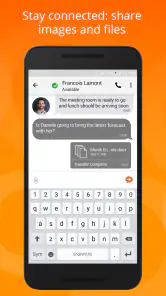
Bria Mobile is presented as a business communication app for voice, video, chat, and presence, giving it a broader role than a basic dialer. Which options you can use depends on the SIP account or communications service connected to the app and the features enabled for that account. Check with your provider or business administrator about the capabilities available to you before relying on a particular communication feature.
Is Bria Mobile free to download, and are there optional purchases?
Bria Mobile is free to download, with in-app purchases offered as well. The listed purchase range is from $0.99 to $9.99 per item, so check the purchase details shown in your app store before buying anything. Downloading the softphone does not itself provide a complete calling subscription; you may still need a separate VoIP account or business service, which can have its own terms and charges.
What is Bria Mobile: VoIP Softphone used for?
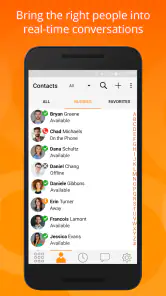
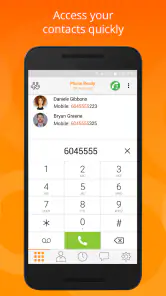
Bria Mobile is a VoIP softphone that lets you place and receive calls over the internet using a compatible SIP account or business communications service. After signing in with the credentials provided by your VoIP provider, you can manage contacts, view call history, use the dial pad, and handle calls from your Android or iOS device instead of relying only on a traditional mobile line.
Does Bria Mobile include a phone number or calling service by itself?
No. Bria Mobile is primarily a softphone application, not a standalone mobile carrier or complete calling subscription. You generally need a SIP account, hosted PBX service, or another supported VoIP provider before you can make calls. Any charges, available features, phone numbers, and international rates usually depend on the service provider connected to the app rather than on the application alone.
Is Bria Mobile easy to set up for first-time VoIP users?
The app is relatively straightforward once you have the correct account details, but setup may not be completely automatic. Depending on your provider, you may need to enter a username, password, domain, server address, and other SIP settings. Business users should request configuration instructions from their administrator, since an incorrect setting can prevent registration or cause calling and messaging features to fail.
Pros
- Clear voice quality on stable Wi‑Fi or mobile data connections.
- Supports multiple SIP accounts for managing different phone lines.
- Push notifications can help receive calls while the app is inactive.
- Useful call controls include mute
- hold
- transfer
- and speakerphone.
- Works with many SIP providers and PBX systems without carrier lock-in.
Cons
- Requires SIP account details and setup knowledge before making calls.
- Battery use may increase when persistent call availability is enabled.
- Call reliability depends heavily on your SIP provider and network quality.
- Some advanced business features may require paid services or subscriptions.
- Emergency calling support may be limited compared with a regular phone line.

- Category
- Communication
- Version
- 6.23.5











