Booktime
- 42.00
- 4.5
- Installs
- 1.00M
- Price
- Free

Screenshots


Analysis by Reviewed
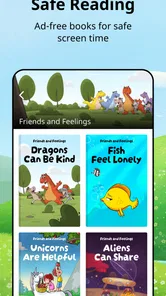
I came to Booktime looking for a straightforward way to bring children’s reading into everyday moments, rather than another service that expects the whole family to organize its life around an app. That distinction matters: this is a free Books & Reference app from Hindawi Foundation, and its focus on illustrated fiction and nonfiction for children gives it a different feel from a general ebook shop. I see it working best as a shared doorway into reading—something a parent, caregiver, or young reader can explore together—rather than as a replacement for every book a child might want.
Reading that invites a child in
Illustrations can make a big difference when a child is deciding whether to keep reading. They offer visual context, give a young reader something to talk about, and can make a new subject feel less intimidating. In Booktime, that makes browsing useful in its own right: a child can begin with a picture or an appealing topic, then discover whether the story or information holds their interest. I would use that freedom to let a child choose, rather than treating the app as a reading assignment.
That approach can also help adults who are not sure what to suggest. Instead of picking a book solely because it looks educational, sit together and ask what the child wants to find out or what kind of story sounds fun. A made-up adventure and a nonfiction book can both lead to a good conversation, but they suit different moods. The useful question is not which one is more worthwhile; it is which one the child is ready to engage with today.
Using Booktime as a family reading routine
A realistic way to fit the app into a busy day is to make it a small, predictable choice: browse together after school, read a little before bed, or open a nonfiction title when a child asks a question at breakfast. Those moments do not need a formal target. A short visit can still give a child the pleasure of choosing a book and give an adult a chance to listen, explain a word, or ask what they think will happen next.
I would also keep the phone or tablet’s role clear. If the goal is shared reading, an adult can hold the device or sit alongside the child, so the illustrations and words become the focus rather than a solitary scroll through other apps. For an independent older reader, handing over the device may be more appropriate. The best setup depends on the child, the reading task, and the household’s screen-time habits; Booktime can support a reading moment, but it does not decide how that moment should work.
Discovering a New World
When I first stumbled upon Booktime, it felt like finding a secret passage to a world brimming with stories. This app opens up a universe of books right at your fingertips. Whether you’re into thrillers that get your heart racing or romance novels that tug at your heartstrings, Booktime has got something for everyone. The app’s interface is sleek and intuitive, making it easy even for a tech novice to navigate through its treasure trove of literature.
A Reader’s Paradise
The first thing that caught my eye was the extensive library. From bestsellers to hidden gems, it’s a bookworm’s paradise. You can search for books by genre, author, or even mood - yes, mood! Feeling adventurous? Just dive into the adventure section and let the stories whisk you away. The app also offers personalized recommendations based on your reading habits. It’s like having a personal librarian who knows exactly what you might enjoy next.
More From Our News Desk

Weather by Xiaomi Review: Clear at a Glance, Less Clear Up Close

X Under Pressure: Can It Recover When Posting Goes Wrong?

Clash of Clans Is Won Between the Battles

Android Auto Makes the Case for Quieter Car Software

MobiOffice: Transforming Mobile Productivity with Seamless Integration

EA SPORTS FC™ Mobile Soccer: Redefining Mobile Sports Gaming
User-Friendly Features
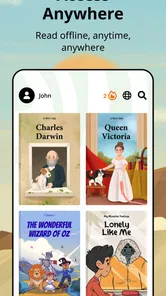
One of the standout features of Booktime is its offline reading mode. This is perfect for those moments when you’re stuck without Wi-Fi, like during a long commute or on a flight. Just download your favorite titles in advance and you’re set for a distraction-free reading experience. Another nifty feature is the ability to adjust text size and background color, which is a blessing for night owls who love to read in the dark without straining their eyes.
Oh, and did I mention the built-in dictionary? Just long-press on a word and voila, instant definition! This is especially useful for those who love expanding their vocabulary while enjoying their favorite novels.
Considering the everyday trade-offs
Children’s reading has different needs from an adult’s private reading habit. An adult may value quick searches and uninterrupted chapters; a child may need a nearby grown-up to help interpret a new word, choose a suitable book, or turn a page into a conversation. I would treat Booktime as a reading aid, not as an automatic substitute for a library visit or a carefully chosen print book. It makes digital discovery convenient, while a physical copy can still be the better choice when a child wants to handle pages, share a large illustration across a table, or take a break from screens.
That comparison is especially useful for families deciding what to install. A general ebook reader may suit people who already own a varied digital collection and want to manage it in one place. A library service may be preferable to readers who want access through their local lending options. Booktime has a narrower, child-focused purpose, which can be a strength when the aim is to help a young reader find illustrated material without starting from a broad adult-oriented catalogue. It is less suitable if the main goal is to organize a personal collection of books from many sources.
Finding a comfortable way to read
For readability, I would begin by checking how the child actually uses the screen instead of assuming one display setting will work for everyone. A child who reads comfortably at a larger text size may need a different amount of screen space than someone who prefers seeing more of a page at once. If reading feels tiring, try a shorter session and adjust the device’s brightness in the room rather than pushing through. These are practical habits, not a promise that every book or screen will suit every reader.
Navigation also deserves a little attention. A young child may be able to choose a book but still benefit from an adult helping with search terms or explaining how to move between browsing and reading. I would let the child do the parts they can manage, then step in only when they get stuck. That keeps the activity from becoming an adult-controlled menu tour, while avoiding the frustration of expecting a new reader to know how an app is organized immediately.
Motor and sensory needs in context
On a touchscreen, small or repeated gestures can be tiring for some readers, and a child with less precise hand control may find navigation harder than the story itself. A useful workaround is to set up the reading session together, place the device on a stable surface, and have an adult handle navigation when needed while the child focuses on the words and illustrations. That can preserve participation without pretending every interaction is equally easy for every person.
Sensory comfort is just as personal. Brightness, contrast, animation, surrounding noise, and the amount of visual detail can affect whether a reading session feels calm or overwhelming. I would try Booktime in a quiet, familiar setting first, then see what changes help: a shorter session, a less bright display, or a print book instead. An illustrated page can be inviting for one child and visually busy for another, so the child’s response matters more than a general assumption about what should be accessible.
When offline reading helps—and when it does not
For a family heading out, preparing a book before leaving can turn an uncertain wait into a reading opportunity. A parent might choose a title at home, then offer it during a quiet stretch on public transport or while waiting for an appointment. The small but important tip is to make that choice before the connection becomes unreliable, and to check that the child knows which book they wanted to open. A little preparation reduces last-minute searching and makes the device feel like a book rather than a browsing machine.
Offline access is not automatically the right answer for every situation. A shared device may be needed for maps, messages, or other family tasks, and an adult may prefer not to hand it over in a crowded place. In those cases, a paper book can be simpler and less distracting. I would think of downloaded reading as a useful option for travel, not as a reason to bring a screen into every waiting moment.
What families should check before settling in
Because Booktime is aimed at children, I would preview a title before making it part of a bedtime routine or an independent reading session. “For children” covers a wide range of ages, reading levels, interests, and sensitivities. A quick look lets an adult judge whether the subject and language feel right for that particular child. The app’s Everyone age rating is a broad content classification, not a personal recommendation for every child or a substitute for a caregiver’s judgement.
Families may also wonder whether the app can replace physical books, whether a child can use it alone, or whether it is better for schoolwork than for pleasure. My answer depends on the child and the task. It can be a convenient source of digital reading and a starting point for curiosity, but shared reading still benefits from an adult’s attention, and a printed book may work better for sustained focus or hands-on page turning. For school research, I would use a nonfiction title as a prompt to explore a subject, not assume that a child’s first discovery is the final word on it.
Who is likely to enjoy it most?
I would recommend trying Booktime if you want a free, child-oriented reading option that can fit into short family routines, or if an illustrated book is more likely to draw a young reader into a new topic than a wall of text. It may also suit adults looking for a simple way to give a child some choice over what to read. The key is to keep the activity flexible: let interest lead, and do not turn each session into a test of how many pages were finished.
It is not the right match for everyone. Readers looking for a broad adult catalogue, a place to manage books bought from different shops, or a complete substitute for a school or public library should compare other options. A child who dislikes reading on a screen may also prefer paper, even if the illustrations are appealing. I would not push the app as a solution to every reading challenge; it is one useful route into books, and sometimes another format or a person reading aloud is the better route.
Creating Your Own Book Club
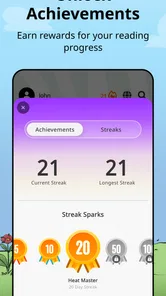
What’s reading without a little discussion? Booktime allows you to create your own virtual book club. You can invite friends, share notes, and even set up reading goals together. It’s a fantastic way to stay connected with fellow book lovers and dive deeper into your chosen reads.
Additionally, the app’s social feature lets you see what others are reading and their reviews. It’s like Goodreads but with a more personal touch, allowing you to engage with a community of readers who share your literary tastes.
A practical choice, not a perfect fit for every reader
As a product, Booktime has earned a 4.5 average from around eight thousand ratings and has passed one million installs. Those figures suggest that many people have found a reason to keep it, but they cannot tell me whether a particular child will like its selection or find the reading experience comfortable. I would use them as reassurance that the app has an established audience, then make the decision based on a child’s interests, reading habits, and comfort with a screen.
The version available is 2.6.1, and it is listed for devices running Android 8.0 or later. That makes the practical first step simple: check the device’s operating system, then try a short session before planning around it. If the app is being considered for a shared family device, test the basic routine yourself first—open a book, see how the child responds, and decide whether the device setup is manageable. The developer is Hindawi Foundation, and the app is free, so trying it does not require a purchase; the more important cost to weigh is whether screen reading fits comfortably into your household.
Final Thoughts
In a world that’s constantly on the move, having a little piece of literary heaven right in your pocket is nothing short of magical. Booktime brings the world of books closer to us, making reading more accessible and enjoyable. Whether you’re a casual reader or a hardcore bookworm, this app is sure to become your favorite companion.
So, next time you’re looking to escape into a good book, give Booktime a try. Who knows, you might find your next favorite read!
My inclusive verdict
What I value most is the possibility of making book discovery feel approachable for a child who needs pictures, choice, or an adult nearby to get started. I would judge inclusion by the experience in front of me: can this child find something they want, follow the page comfortably, and take part without being rushed? Some will manage independently; others will need a caregiver to set up the session or read together. That flexibility is a real strength, but it is not the same as guaranteeing that every interface, book, or reading situation will work for every ability.
Booktime is worth considering when illustrated digital reading is a good fit and a family can shape the session around the child. I would pair it with print books and shared reading rather than expect one app to meet every need. If a child finds the screen tiring, the controls frustrating, or the visual presentation too busy, switching formats is not a failure—it is simply the more thoughtful choice. For families who want a gentle, practical way to explore children’s books on a phone or tablet, I think it is a promising option to try together.
Booktime Frequently Asked Questions
Is Booktime suitable for children, and what kind of books does it offer?
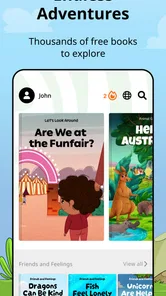
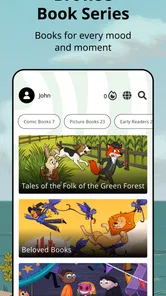
Booktime is presented as a reading app for children, with thousands of illustrated fiction and non-fiction books. Its content rating is Everyone, making it suitable for a broad audience. The range of stories and informational books gives families a way to explore reading together, while children can enjoy books with colorful illustrations.
Does Booktime work on my phone or tablet?
Booktime is available for Android and iOS devices. On Android, the minimum operating system requirement is version 8.0, so check your device’s software before downloading. The app is listed in the Books & Reference category and is developed by Hindawi Foundation. Its focus on children’s books makes it relevant for families as well as young readers.
What is Booktime and how does it work?
Booktime is a versatile reading app designed to enhance your reading experience by providing a vast library of e-books across various genres. The app offers features like customizable reading settings, offline access, and personalized recommendations. Users can select, download, and read their favorite books directly within the app, making it a convenient tool for book lovers who enjoy reading on the go.
Is Booktime free to use or does it require a subscription?
Booktime offers a free version with limited features and access to a smaller selection of books. However, to unlock the full potential of the app, including an extensive library, ad-free experience, and additional features such as offline downloads, users can opt for a premium subscription. Subscription plans vary, offering monthly or annual payment options to suit different preferences.
Can I access books offline using Booktime?
Yes, Booktime allows users to download books for offline reading. This feature is particularly beneficial for users who travel frequently or have limited internet access. By downloading books in advance, you can enjoy uninterrupted reading without worrying about connectivity issues. However, this feature might be limited to premium subscribers, so it's worth checking the app's subscription details.
Pros
- Intuitive user interface
- Wide selection of books
- Offline reading mode
- Sync across devices
- Customizable font sizes
Cons
- Limited free content
- Occasional app crashes
- Ads in free version
- Requires internet for updates
- Limited audiobook selection











