Bookshelf-Your virtual library
- 1.56K
- 4.6
- Installs
- 1.00M
- Price
- Free

Screenshots



Analysis by Reviewed
I like the idea of treating a book collection as something to care for, not just a list of titles I might forget. Bookshelf-Your virtual library is a free Books & Reference app from SquidBit for keeping track of books, reading goals and progress. It’s a cataloguing companion rather than a place to read digital books, which is an important distinction: I’d use it beside my reading routine, not instead of an ebook reader. Its focus on organizing a personal library is most useful when books are scattered between shelves, a bedside pile and a wish list.
Making a personal library easier to manage
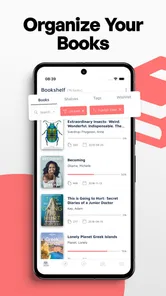
Getting started with Bookshelf-Your virtual library is as easy as pie. The app welcomes you with a clean interface that’s both visually appealing and super intuitive. You can begin by scanning the barcodes of your physical books, or, if you’re in a more manual mood, simply enter the details yourself. The app then pulls in all the juicy details from the internet—author, publication date, genre, and more. It’s like having a personal librarian at your fingertips.
Organizing beyond a single reading list
One of the standout features is the ability to organize your books into different shelves. Say goodbye to cluttered lists and hello to organized bliss. Whether you want to sort by genre, author, or even your personal favorites, the app’s got your back. Plus, there's this nifty feature where you can keep track of books you’ve lent out. No more wondering who borrowed your prized first edition of "To Kill a Mockingbird"!
That shelf approach changes how I’d use a catalog compared with a basic notes app or spreadsheet. Rather than maintaining one long list and remembering what each entry means, I can give a book a useful place in my own system: something I own, something I want to read, or a personal grouping that fits my habits. A practical tip is to decide on a few shelf names before adding a large collection. Too many overlapping categories can make browsing harder, while a small, clear structure helps me answer everyday questions quickly: what have I not read yet, and what can I lend without losing track?
Progress for the book I’m reading now
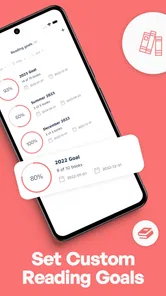
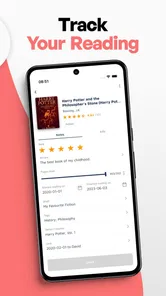
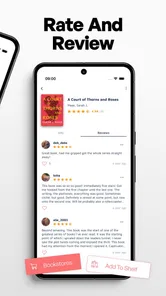
Another feature worth mentioning is the reading progress tracker. It allows you to update your reading status and even set goals. It’s a fun way to keep yourself motivated, especially if you’re tackling a massive tome like "War and Peace". And for those who love sharing their thoughts, there’s a review section where you can jot down your impressions and rate each book.
I find progress tracking most valuable when I’m reading several books at different speeds. A quick status update can help me return to a title after a busy week without relying on memory, while a goal gives a long book a manageable sense of momentum. The trade-off is that the tracker only helps if I keep it current. If I dislike logging progress or prefer to read without targets, a paper bookmark and an informal list may feel lighter. I’d treat goals as encouragement, not a scorecard; missing one should not turn reading into another chore.
Everyday use, with realistic expectations
The app's design is minimalistic yet efficient. Navigating through it feels like flipping through the pages of a well-loved book. It's all smooth sailing with no technical hiccups to throw you off course. The developers clearly understand that the last thing a reader wants is a complicated app slowing them down.
More From Our News Desk

Weather by Xiaomi Review: Clear at a Glance, Less Clear Up Close

X Under Pressure: Can It Recover When Posting Goes Wrong?

Clash of Clans Is Won Between the Battles

Android Auto Makes the Case for Quieter Car Software

MobiOffice: Transforming Mobile Productivity with Seamless Integration

EA SPORTS FC™ Mobile Soccer: Redefining Mobile Sports Gaming
For example, I can picture checking my shelves before leaving home to see whether I already own a book someone recommended, then marking a borrowed copy so I remember where it went. Later, after a few pages before bed, I can update my progress and leave a brief note while the details are fresh. That small loop—check, read, record—makes a personal catalog more useful than a list I only build once and never revisit. If a barcode scan misses a book or returns details that need correcting, manual entry is a sensible fallback; the convenience of scanning does not remove the need to check that a record is right.
Moreover, the app syncs across multiple devices. So whether you’re on your phone, tablet, or computer, your library is always up to date. This cross-platform compatibility is a game changer, especially for those constantly on the move.
Having a library available across devices can be handy if I browse on one screen and update a record on another. Still, I would not make the app the only home for notes I could never replace: anyone building a careful archive should consider keeping their own backup habits, rather than assuming a catalog is automatically a permanent record. For a simple personal inventory, the convenience may outweigh that concern; for researchers who need elaborate fields, citations or tightly controlled exports, a dedicated database or spreadsheet may offer more control.
Who will get the most from it
I’d recommend this kind of bookshelf app to readers with enough physical books that memory no longer works as an inventory, people who lend books regularly, and anyone who enjoys seeing progress build over time. It is less compelling if you mostly read through digital services that already track your place, own very few books, or want a social discovery network to suggest what to read next. The distinction from an ebook reader matters too: this is for managing a collection and reflecting on reading, not for opening and reading book files.
There are a few sensible questions to consider before committing. Can I add an unusual or older title? The manual-entry option gives me a fallback when scanning is inconvenient, though it means spending time on the record myself. Do I need a goal? No: it is best seen as an optional nudge, not a requirement for using the shelves. Can I share progress? The app is designed around tracking and sharing progress, which suits readers who like a little accountability, but I would choose it for the personal catalog first rather than expecting a full-fledged reader community.
Bookshelf has a 4.8 average from around 18,000 ratings and has been installed over a million times. It is rated for Everyone, with a minimum Android requirement of 7.0; version 1.19.9 is the current release. The app is free to start, with optional in-app purchases ranging from $2.49 to $59.99 per item, so I’d check the purchase details in the app before paying for anything. Those costs are worth weighing against how much you value a searchable, maintained record compared with a free spreadsheet or notebook.
A good fit for readers who like their own system
To wrap it up, Bookshelf-Your virtual library is a must-have app for anyone who loves books. It’s like having a personal library assistant that fits right into your pocket. The app combines functionality with simplicity, making it a joy to use. If you’re looking to bring some order to your book collection or simply want to explore new reads, this app is definitely worth checking out. So, why not give it a try and take your reading experience to the next level?
My recommendation is more measured: it is a useful companion for someone who wants to keep a physical collection visible and make reading progress easier to remember, rather than a solution for every kind of reader. If you enjoy maintaining a personal system, the shelves and tracking can earn their place in your routine. If catalog upkeep feels like work, start with a small group of books and see whether the habit sticks before adding the whole house library.
A low-effort way to keep a reading habit visible
The most practical way I’d test the app is not to catalogue every book at once. I’d begin with the titles currently on my nightstand, the next few books I plan to read, and anything I’ve lent out. That limited collection is enough to reveal whether shelves and progress updates solve a real problem for me, without turning setup into a weekend project. If the habit feels natural, I can add the older books gradually; if it doesn’t, I haven’t invested much time.
That approach also helps separate two different jobs people often expect one tool to handle: remembering what they own and deciding what to read next. A personal catalog can answer the first question well, but it is not automatically a recommendation service. I’d use a shelf for books I’m considering and rely on my own notes or conversations to choose among them. Readers who want discovery feeds, broad community discussion, or a place to consume ebooks may be happier with services built around those activities.
Small catalog habits that prevent clutter
For a growing library, I’d keep the system intentionally plain. A few shelves based on decisions I actually make—owned, reading, finished, and lent—are likely more useful than a separate shelf for every mood or genre. Genre can be helpful when browsing, but it may become an extra sorting task if I rarely search that way. The aim is not to recreate a perfect library classification; it is to make the next useful answer easy to find.
I’d also treat each entry as a living record, not a one-time scan. After adding a title, a quick check of the author and other details can prevent a mistaken match from confusing me later. When I lend a book, I’d record that while handing it over, rather than expecting to remember the detail days afterward. These small moments are where a catalog earns its keep: the app can only help with information I take the time to enter accurately.
For reading notes, I’d keep them short and personal. A sentence about why I paused, a character I want to remember, or a thought to revisit can be more useful than trying to write a polished review for every book. If I want a serious research archive with quotations, references and custom fields, I’d choose a tool designed for that level of detail instead. Bookshelf’s appeal is the lighter connection between a title, its place in my collection and my progress through it.
Where the convenience has limits
The barcode option is a helpful shortcut, but it should not be mistaken for a guarantee that every book will be added perfectly. Older editions, unusual formats, or a worn barcode may make manual entry the more dependable route. That creates a small trade-off: scanning reduces typing when it works, while hand-entering details takes longer but lets me handle the books that don’t fit the shortcut. I would reserve a little time to review the record rather than rushing through a large batch.
There is also a difference between a comfortable personal inventory and a collection that needs rigorous long-term management. Someone who wants complete control over data structure, export workflows or archival records may prefer a spreadsheet or database, even if that means more setup. A notebook is simpler and requires no catalog maintenance, but it is harder to search and update as a collection grows. Bookshelf sits between those options: more organized than a loose list, less suited to highly customized record keeping.
Sharing progress can add a gentle sense of accountability, especially if I enjoy talking about what I’m reading. I would keep expectations modest, though. The feature makes the app more than a private inventory, but it does not make it a substitute for a dedicated reading community or a book club. If discussion and recommendations are the main reason I want an app, I’d look for a service where those social tools are central rather than treating them as a bonus to cataloguing.
Who should try it, and who can pass
I think the strongest fit is a reader with a physical collection that has become hard to remember, especially someone who buys books faster than they finish them or lends titles to friends. It can also suit readers who enjoy modest routines: updating a status, setting a reachable goal, or jotting down a reaction before moving on. Those small actions make progress visible without asking the app to do the reading for you.
On the other hand, I wouldn’t recommend making a catalog if I owned only a handful of books and already knew where each one was. Nor would I choose it as my main tool if I read almost entirely in an ebook service that already remembers my place. People who dislike keeping records may find that the maintenance outweighs the satisfaction of organized shelves. In those cases, a simple bookmark, reading app, or short note may be the more honest fit.
SquidBit’s app is free to install, and its Everyone age rating makes it broadly accessible. Optional purchases are available, so I’d look at what each purchase covers and decide whether it addresses a need I actually have, rather than paying simply because I expect every catalog feature to be essential. The current Android version is 1.19.9, and Android users need version 7.0 or later. Those details make it straightforward to assess basic compatibility before building a collection inside it.
Overall, I see Bookshelf as most valuable when the collection itself is part of the pleasure of reading. It gives scattered titles a structure, makes lending easier to remember, and offers a simple way to keep track of a book in progress. I’d start small, keep the shelves practical, and let the routine prove its worth. If that sounds satisfying rather than tedious, this is a thoughtful companion for a personal library; if it sounds like extra administration, there’s no need to force it.
Bookshelf-Your virtual library Frequently Asked Questions
Can Bookshelf help me set goals and keep track of my reading progress?
Yes. Bookshelf is designed to help you set reading goals and keep track of your progress, giving you a place to manage your reading activity alongside your collection. It is intended as a companion for organizing books, rather than a place to read book content. This makes it worth considering if you want to follow your reading habits and keep your library in order.
Can I use Bookshelf to organize physical books as well as digital titles?
Bookshelf is intended to help you organize and manage a book collection, including physical or digital books. You can add titles by scanning barcodes or entering their details manually, then use the app to keep your collection arranged. If you have books in more than one format, this cataloging approach can help keep them together in one virtual library.
Which devices can install Bookshelf, and what should I know about its release and version?
Bookshelf is available for Android devices running version 7.0 or later. The app was released on May 16, 2019, and its current version is 1.19.9. Before downloading, check your device’s operating system so you know it meets the minimum requirement. Bookshelf is a library-management app, so its main role is keeping track of books and reading activity.
Is Bookshelf-Your Virtual Library free to download, and are there in-app purchases?
Bookshelf-Your Virtual Library is free to download and is listed for everyone. It also offers optional in-app purchases, with prices ranging from $2.49 to $59.99 per item. The core idea is to organize books, set reading goals, and share progress, so consider whether any paid extras suit your needs before installing.
What kind of app is Bookshelf, and who develops it?
Bookshelf is a Books & Reference app developed by SquidBit. Its purpose is to help readers keep their books and reading activity organized rather than serve as an app for reading book content. It has an average rating of 4.8 from around 18,000 ratings, giving prospective users a useful snapshot of its reception.
Pros
- Easy to organize your book collection.
- Offers personalized book recommendations.
- Supports multiple formats including PDFs.
- Allows sharing book lists with friends.
- Offline access to your library.
Cons
- Some features require a premium subscription.
- Limited customization for book covers.
- Ads can be intrusive at times.
- Occasional sync issues with cloud service.
- Not all books have detailed metadata.











