

Bold.org: Scholarships
- 667.00
- 4.6
- Installs
- 50.00K
- Price
- Free

Screenshots

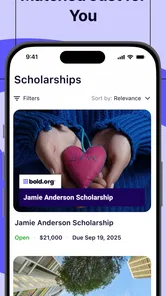
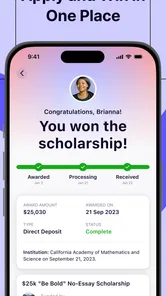
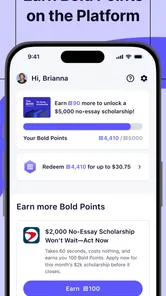
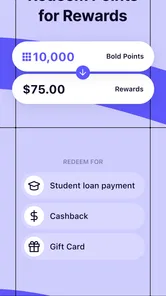
Analysis by Reviewed
Finding financial help for education can feel like a second course beside your actual studies. I tried Bold.org: Scholarships as an education app from Bold.org, Inc., and my first impression was that it is most useful when treated as a search workspace rather than a magic answer to tuition costs. It brings grants, rewards, and student-aid opportunities into one place, which can save time when the alternative is checking many unrelated pages one by one.
The app is free and suitable for everyone, so there is no payment decision before exploring it. That makes it easy to test, but the real question is not whether it costs anything to install. The important question is whether its approach matches the way you search, organize, and apply for funding. In my experience, it can be a practical starting point for students and families who are willing to read requirements carefully and keep track of deadlines themselves.
How I judged the app before recommending it
I look at scholarship tools using four simple tests: how quickly I can discover relevant opportunities, how clearly I can understand eligibility, how much work remains outside the app, and whether the process encourages careful applications instead of rushed submissions. A large collection is not automatically useful if every result requires a completely different profile, essay, or set of documents.
That distinction matters with Bold.org: Scholarships. The app is not a replacement for a school financial-aid office, a government aid application, or a conversation with an adviser. I would use it as an additional channel. Its strongest role is helping me notice opportunities I might otherwise miss, then giving me a place to investigate them further.
The public response is encouraging: the app holds a 4.6 average from around 800 ratings, with roughly 650 written reviews. It has passed 50 thousand installs, which gives it a reasonable user base without making popularity the only reason to trust it. I still recommend judging each opportunity on its own terms, because a positive app rating cannot tell me whether a particular scholarship fits my course, location, academic history, or personal circumstances.
The app was released on May 20, 2024, and the current version is 0.78.0. It runs on Android 7.0 or later. Those details make it accessible to people using older Android devices, although I would still keep the app updated when possible. Funding searches often involve personal information and time-sensitive opportunities, so using a current version is a sensible habit even when an older phone technically works.
What I check first inside a funding search
My first step is not applying immediately. I read the opportunity title, then look for the requirements that could quietly disqualify me. Some scholarships are broad in wording but narrow in practice, while others may be aimed at a particular educational path, background, interest, or stage of study. I would rather reject a poor match early than spend an evening writing an essay that was never eligible.
More From Our News Desk

 Gmail
GmailGmail in a Busy Inbox: Who Benefits Most?
From first account to crowded workday, Gmail earns its place through dependable search and flexible sorting—but its best fit depends on how much inbox maintenance you can tolerate.

 Prime Video
Switching to Prime Video: What Changes in Your Viewing Routine
Prime Video can make a compelling second home for streaming, but switching means learning a different catalog, rental layer, and route from browsing to playback.

 Universal TV Remote Control
Universal TV Remote Control Works Best as a Reliable Backup
A phone remote earns its place through quick setup and reliable habits. Here is how to get more from Universal TV Remote Control—and where its limits show.

 Weather - By Xiaomi
Weather by Xiaomi Review: Clear at a Glance, Less Clear Up Close
Xiaomi’s weather app makes everyday forecasts quick to scan, but its calm surface can leave useful details and recovery paths harder to find than they should be.

 X
XX Under Pressure: Can It Recover When Posting Goes Wrong?
A resilience-focused review of X, examining setup, mistaken posts, interruptions, weak connections, and the gaps that matter when recovery needs to be dependable.

 Clash of Clans
Clash of Clans Is Won Between the Battles
Its raids are quick; its community is a long-term project of coordination, teaching, rivalry, and shared responsibility—with all the friction that entails.
Latest News



I also separate discovery from verification. An app can help me find a promising listing, but I still read the full instructions and confirm what must be submitted, when it is due, and whether the opportunity makes sense for my situation. This is one of the most important habits for using the app well: treat each result as a lead to investigate, not as an automatic promise of aid.
A useful workflow is to create three mental groups: opportunities worth applying to now, opportunities needing more information, and opportunities that are not a fit. This prevents the common mistake of saving everything and finishing nothing. I found that a smaller list of realistic applications is more manageable than a huge collection of possibilities with no next action.
Where the app is genuinely helpful
The biggest advantage is concentration. Instead of beginning with a broad web search and sorting through pages made for different audiences, I can begin in a dedicated student-aid environment. That reduces the friction of getting started, especially when I do not yet know which search terms describe my circumstances.
I also like the psychological benefit of having grants, rewards, and scholarship-style opportunities presented together. A student may think only about traditional academic awards, while another may be more interested in a smaller reward or a less conventional form of assistance. Seeing different types of possibilities encourages a wider search without requiring me to invent every category myself.
The app is most valuable as a discovery and organization aid, not as a substitute for judgment. That sounds simple, but it changes how I use it. I do not assume that opening a listing means I am close to receiving money. I use the app to build a shortlist, compare effort with eligibility, and decide which applications deserve my limited time.
Another strength is accessibility. Because the app is free and carries an Everyone content rating, it is approachable for students who are exploring funding with a parent, guardian, teacher, or counselor. A younger user may still need adult guidance when sharing personal details or interpreting financial information, but the basic entry point does not feel restricted to a narrow audience.
A realistic everyday workflow
Imagine a student with classes during the day, a part-time job in the evening, and only a short block of time on Sunday. I would open the app during that weekly planning session, browse opportunities, and immediately record the application requirement and deadline in a separate calendar or note. I would then choose one realistic application rather than attempting five at once.
During the week, I could draft the essay or gather the requested material. At the next session, I would review the wording against the eligibility rules, check that the application is complete, and mark the task as submitted or still pending. This workflow works because it keeps the app connected to a personal system. Relying on memory alone is risky when several opportunities have different instructions.
A less obvious benefit of this approach is that repeated applications can reveal reusable themes in my own experience. I may notice that community work, a career goal, or a personal challenge appears in several prompts. I would not copy one answer everywhere, but I could build a private bank of accurate examples and revise them for each application. That saves time while preserving a genuine voice.
Where the usual alternatives may fit better
Bold.org: Scholarships is not the only route to educational funding, and I would not make it the sole source of information. A school’s financial-aid office may be better for institution-specific awards, enrollment questions, and guidance tied directly to a student’s program. A government aid service is generally the more appropriate place for official public assistance processes. Community organizations, professional groups, employers, and local foundations may also offer opportunities that require direct contact.
General web search can be better when I already know exactly what I need. For example, if I am looking for a scholarship connected to a particular profession or local organization, a focused search may lead me to the sponsoring body faster. The trade-off is that general search requires more work to judge whether a page is current, relevant, and trustworthy.
Personal spreadsheets or note-taking apps can also outperform a dedicated search app for tracking. They do not discover opportunities by themselves, but they give me complete control over columns such as deadline, eligibility, essay length, documents, status, and follow-up date. My preferred setup would combine the app for finding possibilities with a simple external tracker for execution.
Students who want a fully guided, counselor-like process may find this app less satisfying. It does not remove the need to interpret requirements or make decisions. Likewise, someone who already has a carefully maintained list from a school counselor may gain little from another discovery tool unless they want to broaden the search.
The friction I would plan for
The main limitation is the amount of work that remains after discovery. Finding an opportunity is only the beginning. I still need to assess eligibility, prepare thoughtful answers, gather documents, and meet the deadline. Anyone expecting the app to automate that entire process may feel disappointed.
There is also a risk of scattered attention. A long browsing session can feel productive even when no application moves forward. I recommend setting a time limit for discovery and ending every session with a concrete action: save a shortlist, write a draft, request a document, or remove an unsuitable result. Without that discipline, the app can become another place to scroll rather than a tool for progress.
Another trade-off is breadth versus precision. A broad funding platform may expose me to possibilities outside my initial assumptions, but not every result will be equally relevant. I should expect to filter actively. The more unusual my circumstances are, the more important it becomes to combine the app with school, community, or professional sources that understand my specific context.
I would also avoid sharing information casually. Scholarship applications can involve personal and educational details, so I would read each request carefully and provide only what is needed for the application. For a minor, I would involve a trusted adult. The app’s Everyone age rating describes its general suitability, not a reason to skip normal privacy judgment.
Three practical habits that improve the experience
First, I would search in two passes. In the first pass, I would collect only opportunities that appear plausible. In the second, I would inspect the detailed requirements and remove anything that conflicts with my enrollment status, field of study, location, or available documents. This is faster than fully researching every result as soon as it appears.
Second, I would calculate effort in plain language rather than chasing every possible award. An application requiring a substantial essay may be worthwhile if I am a strong match, but not if I barely meet the requirements. A shorter application may deserve priority when my schedule is crowded. The best choice depends on fit, effort, and deadline together, not on the headline alone.
Third, I would keep proof of what I submitted outside the app. A dated note containing the final essay, the opportunity name, and the submission status gives me a useful record. It also helps if I need to answer a follow-up message or avoid accidentally sending the same material without adapting it to a new prompt.
One further insight is to use rejection or non-selection constructively. If an application does not lead to funding, the work may still show which experiences and goals are strongest in my writing. I can refine those examples for another opportunity, but I should never assume that one unsuccessful result predicts the next one. The app is most useful when it supports a steady process rather than a single all-or-nothing attempt.
Who should install it, and who should skip it
I would recommend trying it to high-school students, college students, adult learners, and families beginning a funding search from scratch. It is also a sensible option for someone who has searched only through a school office and wants another source of possibilities. The free price makes experimentation easy, and the education focus keeps the purpose clear.
I would be more cautious about recommending it to someone who wants guaranteed financial aid, instant eligibility decisions, or one application that covers every need. That is not how I would approach any scholarship platform. Students with urgent financial problems should contact their school or relevant official aid service directly rather than waiting for an app-based search to solve an immediate issue.
It may also be a poor fit for a person who dislikes independent organization. If keeping track of deadlines, requirements, and drafts already feels overwhelming, the app alone will not fix that problem. In that case, working with a counselor or trusted adult first may be more effective, with the app used only as a supplementary search tool.
My recommendation after using it
Bold.org: Scholarships earns a place in my toolkit because it lowers the barrier to beginning a scholarship search and brings several kinds of student-aid possibilities into one focused app. I especially appreciate it for the early stage: discovering options, widening my search, and turning vague financial worries into a list of specific opportunities to investigate.
I would not rely on it as my only source, and I would not confuse a convenient listing with a likely award. The strongest results come from pairing it with a calendar, a careful eligibility check, and direct guidance from a school or aid professional when the situation is complicated. That combination gives the app a clear role without asking it to do something it was never meant to replace.
For a free education app with a current version of 0.78.0 and support for Android 7.0 or newer, it is easy to test without committing money. My final advice is simple: install it if you are willing to take ownership of the application process. Browse with a purpose, shortlist selectively, verify every requirement, and track your next step outside the app. Used that way, it can turn scholarship searching from an unfocused web hunt into a more deliberate weekly routine.
Bold.org: Scholarships Frequently Asked Questions
Can I browse scholarship opportunities before creating an account?
Bold.org: Scholarships is designed to help students explore funding opportunities, and creating a profile is part of the process for applying. A profile can make it easier to review scholarships against your education details and interests. Before signing up, consider what information you are comfortable sharing, then read the platform’s privacy information and the requirements for each opportunity you plan to pursue.
What is Bold.org: Scholarships, and how does it work?
Bold.org: Scholarships is a platform that helps students discover and apply for scholarships, grants, and other educational funding opportunities. After creating a profile, you can browse available awards, review eligibility requirements, and submit applications through the platform. Some scholarships may involve essays, personal information, or additional tasks, so reading each listing carefully is important before applying.
Is Bold.org: Scholarships free to use?
Yes, students can generally create an account, browse scholarship opportunities, and apply without paying an application fee. Bold.org: Scholarships is a free education app from Bold.org, Inc., intended to connect students with scholarship providers. Individual opportunities may have different requirements and deadlines. Be cautious of anyone requesting payment or sensitive financial information outside the official platform, and always verify the scholarship terms before submitting an application.
Who can apply for scholarships on Bold.org?
Eligibility depends on the specific scholarship. Opportunities may be available to high school students, current college or university students, graduate students, adults returning to education, or students from particular locations and backgrounds. Each listing explains its own requirements, such as academic status, field of study, age, residency, or personal interests. Review these conditions carefully because meeting one requirement does not guarantee eligibility for every award.
What information do I need to provide when applying?
The information required varies by scholarship, but applicants may need to create a student profile, provide education details, describe their goals, and answer essay or short-response questions. Some applications may request information about interests, achievements, financial circumstances, or intended career plans. Avoid submitting unnecessary sensitive data, check the privacy information, and make sure every response is accurate and written in your own words.
Pros
- Free to browse and apply for many scholarship opportunities.
- Search filters help narrow results by eligibility and study goals.
- New scholarship listings are added regularly.
- Application deadlines and requirements are clearly displayed.
- Useful for students seeking awards beyond traditional financial aid.
Cons
- Some scholarships have lengthy applications and essay requirements.
- Eligibility rules vary widely and can be easy to overlook.
- Competition may be high for popular scholarship listings.
- Not every opportunity guarantees funding after applying.
- Some listings may require creating a detailed student profile.











