

Bob Evans
- 1.43K
- 4.7
- Installs
- 100.00K
- Price
- Free
Screenshots
Analysis by Reviewed
Ordering breakfast for a family can become surprisingly complicated when everyone wants something different, the restaurant is busy, and nobody wants to stand in line. I tested the Bob Evans app with that kind of everyday situation in mind: choosing food, arranging pickup or delivery, and checking whether the rewards side actually makes repeat visits easier. My overall impression is that it is most useful when I already know I want Bob Evans and need a quicker way to organize the order.
This is a free Food & Drink app from Bob Evans Restaurants, LLC. It is available for Everyone and works on devices running iOS 11 or later. The current version is 2.6, and its audience is clearly people who regularly eat at Bob Evans rather than diners looking for a general restaurant-discovery tool. The app has built a strong reception, with a 4.7 average from around 7.6 thousand ratings, and it has passed 100 thousand installs.
From deciding what to eat to getting the order home
Before I choose a meal, I find it helpful to think about the whole handoff: who is eating, how the food will get there, and whether I want to collect it or stay home. That framing makes the ordering steps easier to judge, especially when several people are sharing one cart. Next, I look at how the app supports that decision from the first meal choice through receiving the order.
Starting with a real meal decision
The most natural starting point is not opening the app to browse randomly. I would use it when I have already decided on Bob Evans, perhaps after a long morning when cooking is not realistic or when I need a dependable family meal. That distinction matters because this is not a broad marketplace filled with unrelated restaurants. Its value begins once Bob Evans is the destination.
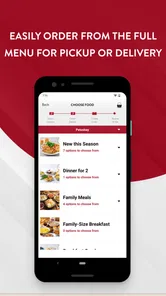
For a solo meal, the process is fairly straightforward: choose what sounds good, select the ordering route, and move toward checkout. A family order is where the app becomes more useful. Instead of passing one phone around a counter or trying to remember several spoken requests, I can build the order in one place and review it before sending it along. That review step is important for breakfast combinations, sides, drinks, and meals with different preferences.
I also found that the app suits planned orders better than impulse browsing. If I am comparing every nearby restaurant, a general delivery service may be faster because it puts more choices on one screen. If I am specifically craving Bob Evans, however, the focused design removes that extra decision-making. I am not distracted by restaurants I will not choose.
Building the order without losing track
The useful workflow is to treat the cart as a handoff document between the person ordering and the restaurant preparing the food. I would add each meal carefully, pause before checkout, and check that the selected items match the intended diners. This is especially worthwhile when one person wants a traditional breakfast while another wants lunch or dinner. A quick cart review can prevent the common mistake of assuming that a side or drink was included.
More From Our News Desk

 Instagram
Instagram’s Power Comes From Its Place in Your Phone
A close look at how Instagram turns Meta’s reach, recommendation systems and everyday camera habits into durable platform power—and what that costs users.

 Gmail
GmailGmail in a Busy Inbox: Who Benefits Most?
From first account to crowded workday, Gmail earns its place through dependable search and flexible sorting—but its best fit depends on how much inbox maintenance you can tolerate.

 Prime Video
Switching to Prime Video: What Changes in Your Viewing Routine
Prime Video can make a compelling second home for streaming, but switching means learning a different catalog, rental layer, and route from browsing to playback.

 Universal TV Remote Control
Universal TV Remote Control Works Best as a Reliable Backup
A phone remote earns its place through quick setup and reliable habits. Here is how to get more from Universal TV Remote Control—and where its limits show.

 Weather - By Xiaomi
Weather by Xiaomi Review: Clear at a Glance, Less Clear Up Close
Xiaomi’s weather app makes everyday forecasts quick to scan, but its calm surface can leave useful details and recovery paths harder to find than they should be.

 X
XX Under Pressure: Can It Recover When Posting Goes Wrong?
A resilience-focused review of X, examining setup, mistaken posts, interruptions, weak connections, and the gaps that matter when recovery needs to be dependable.
Latest News



One practical habit is to build the order in the same order that people will eat it: main meals first, then sides, beverages, and anything shared. That makes the final screen easier to audit. It also helps when the order is being placed by one family member for several people who are not standing together. The app cannot remove the need to communicate, but it provides a clearer place to settle the choices.
I would not rush through customization. Restaurant ordering apps can make an option look like a small detail when it actually changes what arrives. Before submitting, I would read the item description again, confirm the quantity, and check the selected location. This is one of the less obvious strengths of ordering digitally: the customer gets a quiet review moment that is easy to miss during a busy in-person conversation.
Choosing pickup or delivery
The central choice is whether the meal comes to me through pickup or delivery. Pickup is the better fit when I am already passing near a Bob Evans location, want more control over timing, or would rather avoid the uncertainty that can come with a driver’s route. Delivery is more convenient when I am at home, managing children, working, or simply do not want to make another trip.
That choice should be made based on the whole day, not just convenience at the moment of ordering. If I am leaving the house soon, delivery may create an awkward wait. If I am already nearby, pickup can turn the app into a time-saving ordering tool rather than a reason to stay home. For a group meal, I would also consider who is available to receive it and whether everyone can eat when it arrives.
The app’s focused nature helps here because the order remains tied to Bob Evans rather than being mixed into a large marketplace workflow. On the other hand, someone who wants to compare delivery fees, estimated arrival times, or menus from several restaurants may prefer a third-party service. The better option depends on whether restaurant loyalty or broad comparison matters more.
The handoff from phone to restaurant
Once the order is submitted, the experience changes. The app is no longer mainly a menu and cart; it becomes the place where I expect the restaurant to receive the request correctly. That handoff is where careful ordering pays off. A clear, checked order gives the kitchen and the customer the same reference point, while a rushed order can create confusion that no interface can fully repair.
For pickup, the next handoff is from the restaurant to me. I would keep the order information available until the meal is collected, then check the bags before driving away if the situation allows. This is not an accusation against the app or the restaurant; it is simply a sensible habit with any prepared-food order, especially when several meals and sides are involved.
For delivery, the handoff has one more stage. The restaurant prepares the food, a delivery process carries it onward, and I receive it at home. That makes delivery the easier option physically but the less direct option operationally. If timing is critical, pickup gives me a shorter chain to manage. If staying home is the priority, delivery wins even though it introduces another transition.
Using rewards as part of the routine
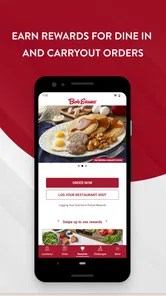
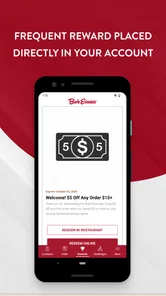
The rewards feature is the reason I would keep the app installed after a single order. The app lets customers earn rewards for dining at Bob Evans, so repeat visits can become more worthwhile than treating every order as an isolated transaction. I would make sure I am using the same account consistently, because rewards only help if the activity is connected to the account I expect to use later.
This is a useful distinction between a restaurant-specific app and a one-off delivery checkout. A general service may be convenient for comparing restaurants, but it usually does not replace the feeling of having a direct relationship with one restaurant’s ordering system. If Bob Evans is already part of my regular routine, the rewards element gives me a reason to return to this app instead of defaulting to a browser or another ordering platform.
I would still treat rewards as a bonus rather than the sole reason to order. The best meal choice remains the one that fits my schedule, appetite, and budget. A reward system can encourage loyalty, but it should not persuade me to make an unnecessary trip or choose a less suitable ordering method. The app works best when the reward follows a meal I wanted anyway.
A realistic breakfast workflow
Imagine a Saturday morning with four people at home. One person wants a breakfast platter, another wants a lighter meal, and the children are asking for different sides. I would open the app, select the appropriate Bob Evans location, and build the order one person at a time. Before paying, I would read through the cart aloud so everyone can catch a missing side or an unwanted item.
If I am already taking the children out, I would choose pickup and use the time spent getting everyone ready to place the order. That separates ordering from waiting at the restaurant. If the morning is chaotic and nobody wants to get dressed, delivery is more practical. The app’s role is not to decide which option is best; it gives me both routes so I can match the order to the situation.
After the meal, I would keep using the account for future Bob Evans visits rather than switching between several sign-in methods. That makes the rewards side easier to follow and creates a consistent personal record of how I order. The small workflow improvement is less about one dramatic feature and more about reducing repeated decisions each time the family wants the same restaurant.
Where the experience is strongest
For me, the strongest part is the direct connection between menu selection, pickup or delivery, and rewards. Those pieces belong together for a regular customer. I do not need a separate restaurant search, a separate loyalty routine, and a separate way to arrange collection. The app is at its best when I already know the restaurant and want a controlled path from meal choice to completed order.
It is also helpful for people who dislike ordering aloud. Reading the menu privately, assembling the cart, and checking it before submission can feel less stressful than making decisions while a line forms behind me. Parents, caregivers, and anyone coordinating food for several people may appreciate that extra control.
Another strength is repeatability. Once I understand my usual ordering pattern, I can approach the next visit with a familiar routine: choose the location, select the meals, review the cart, choose pickup or delivery, and keep the rewards account connected. That consistency is more valuable than flashy presentation when the real goal is getting breakfast, lunch, or dinner arranged correctly.
Where the flow breaks down
The app is not the right choice for every dining situation. If I am still deciding between several restaurant brands, a general delivery app or map-based search tool may give me a better overview. Bob Evans is a focused destination, so its convenience depends on already wanting that destination. It does not replace a broad food marketplace.
It can also be less comfortable for people who prefer personal help with substitutions or unusual requests. A digital menu is clear for standard choices, but an in-person conversation can be better when the order has complicated needs. I would not rely on the app alone for a situation where a small misunderstanding could seriously affect the meal; I would first make sure the available ordering choices express what I need clearly.
Timing is another point of friction. Pickup requires me to coordinate travel with preparation, while delivery requires me to be available when the food arrives. The app makes the request easier, but it cannot make traffic disappear or guarantee that a busy restaurant will feel as quick as an empty one. I see it as a planning tool, not a promise that every order will be effortless.
There is also a habit cost. A customer who visits Bob Evans only once may not gain much from installing a dedicated restaurant app. In that case, a browser or general ordering service could be simpler. The dedicated app earns its place when I expect to return, want the rewards connection, or regularly use pickup and delivery from Bob Evans.
Who should install it
I would recommend it to regular Bob Evans customers, families coordinating orders, and people who often switch between pickup and delivery depending on the day. It is particularly sensible for anyone who wants to avoid repeating the same spoken order process and would like dining activity to contribute to rewards.
I would be more cautious if I rarely eat there, need to compare many restaurants before choosing, or prefer handling every order through one universal delivery platform. Those users may find a restaurant-specific app less useful than a broader alternative. The question is not whether the app can place an order; it is whether Bob Evans is frequent enough in someone’s routine to justify a dedicated ordering and rewards channel.
My final take after following the full journey
Bob Evans succeeds because its purpose is narrow and understandable. I start with a Bob Evans meal in mind, build the order, choose pickup or delivery, pass the request to the restaurant, receive the food, and keep the rewards connection for the next visit. That complete path feels more coherent than using separate tools for menu browsing, ordering, and loyalty.
My honest recommendation is to install it if Bob Evans is already one of your regular choices. The free price removes the main barrier, the Everyone rating makes it suitable for a broad audience, and the strong 4.7 average suggests that many users find the experience worthwhile. I would not install it merely to explore restaurants in general, and I would not expect it to solve every timing or customization problem.
For the right customer, though, the app turns a familiar restaurant visit into a more organized routine. My best tip is to use it deliberately: confirm the location, build the cart by diner, review every side and drink, choose pickup or delivery according to the day, and keep the rewards account consistent. That small amount of care is what makes the app feel genuinely useful rather than just another way to view a menu.
Bob Evans Frequently Asked Questions
Is the Bob Evans app free, and what devices can run it?
The Bob Evans app is free to download and is intended for mobile ordering and restaurant-related features. It is available for Android and iPhone, with the Android version requiring Android 11 or later. Before installing, check that your device meets the operating-system requirement and download the app from the official app store for your device.
Who develops the Bob Evans app, and is it suitable for families?
The app is developed by Bob Evans Restaurants, LLC, making it the restaurant’s official mobile app rather than an unrelated ordering service. Its content rating is Everyone, so it is suitable for a general audience. The app focuses on food and drink tasks, including ordering and restaurant information, rather than age-restricted content.
What is the Bob Evans app used for?
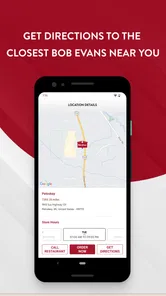
The Bob Evans app is designed to make ordering from the restaurant more convenient. Depending on your location and the services currently available, you can browse the menu, customize selected items, place pickup or delivery orders, find nearby restaurants, and review promotions. Availability may vary by restaurant, region, operating hours, and the delivery partners serving your area.
Can I order Bob Evans food for pickup or delivery through the app?
In supported locations, the app allows you to choose between ordering ahead for pickup and requesting delivery. Pickup is generally handled by the selected Bob Evans restaurant, while delivery availability may depend on local coverage and third-party services. Before confirming an order, check the estimated preparation time, delivery fees, minimum order requirements, and the address shown in the checkout screen.
Does the Bob Evans app offer coupons, rewards, or special deals?
The app may include promotional offers, digital coupons, or loyalty features when they are available in your market. Offers can have restrictions such as expiration dates, participating locations, minimum purchase amounts, or exclusions on certain menu items. It is worth checking the promotions or account sections before placing an order, because discounts may need to be activated or applied during checkout.
Pros
- Easy access to Bob Evans’ homestyle menu and comfort-food favorites.
- Useful for checking nearby restaurant locations and opening hours.
- Menu browsing helps you decide what to order before visiting.
- Convenient way to find breakfast
- lunch
- and dinner options.
- Simple interface makes restaurant information quick to access.
Cons
- Features may vary by location
- so some menu items may be unavailable.
- The app may offer limited value if you rarely visit Bob Evans.
- Online ordering availability can depend on restaurant hours and location.
- Menu prices and promotions may change without immediate updates.
- A stable internet connection is needed for current restaurant information.











