Blurrr-Capcut pro video editor
- 343.00
- 2.7
- Installs
- 1.00M
- Price
- Free

Screenshots

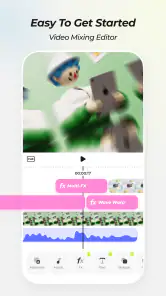
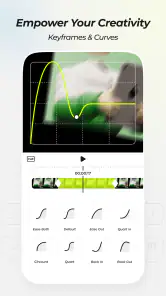
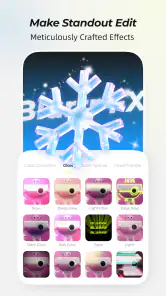
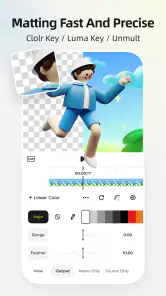
Analysis by Reviewed
When I choose a mobile video editor, I start with the kind of work I actually want to do: quick trims for a group chat, a polished vertical clip, or a project with enough layers to shape its look. Blurrr-Capcut Pro Video Editor is aimed at people who want editing and effects in one app, but its low average rating is a reason to approach it with realistic expectations rather than assume it will suit everyone. I’d test it on a short, unimportant project before moving a regular workflow over.
Match the editor to the job
Blurrr is a free video-editing app from PINGUO TECHNOLOGY HK CO LIMITED, in the video players and editors category. It is rated for teens, has over a million installs, and its average rating is 2.7 from around ten thousand ratings. Those numbers suggest a mixed reception, so I would treat the app as something to evaluate for myself, not as a safe bet based on popularity alone. The current version is 2.0.5, and it requires Android 10 or later.
For a simple clip, the most important question is whether the editing process feels clear enough to finish without fuss. For a more stylized video, I’d also consider how much control I want over layers, movement, transitions, and the final frame. Blurrr’s appeal is that it tries to serve both needs; the trade-off is that an app with a broad toolset can take longer to learn than a basic cutter.
A low-risk way to decide
I’d judge the app by a finished result, not by how many effects I can browse. A useful first project is a short vertical clip with a clear subject and a beginning, middle, and end. Make a copy of the footage, trim it, try one visual treatment, and export a draft. That small test answers practical questions at once: whether the controls make sense to me, whether the effect suits the footage, and whether the final file looks the way I intended outside the editor.
This approach also keeps the decision tied to my actual habits. Someone who edits once a month may value a quick, obvious workflow more than a deep set of creative controls. Someone who regularly builds short visual edits may be willing to spend time learning where those controls fit. I wouldn’t install any editor just because it promises a professional result; I’d ask whether it makes the kind of edit I already want to create easier to finish.
Unleashing Creativity with Ease
First things first, one of the standout features of Blurrr-Capcut Pro Video Editor is its user-friendly interface. You know how some editing apps can make you feel like you’re trying to solve a Rubik's Cube blindfolded? Well, this isn’t one of those. Everything's laid out in a way that makes sense, and you can easily find all the tools you need without breaking a sweat. It's like they’ve thought of everything to make your editing experience as seamless as possible.
Feature Galore
Now, let’s dive into the features. Oh boy, there are tons! From basic trimming and cutting to more advanced features like multi-layer editing and motion tracking, it’s all there. I particularly enjoyed playing around with the transition effects and filters. They’re so varied and customizable that you can create some truly unique videos. And don’t get me started on the music library – it’s a treasure trove of tunes to suit any vibe you’re going for.
More From Our News Desk

Clash of Clans Is Won Between the Battles

Android Auto Makes the Case for Quieter Car Software

MobiOffice: Transforming Mobile Productivity with Seamless Integration

EA SPORTS FC™ Mobile Soccer: Redefining Mobile Sports Gaming

How Microsoft OneDrive Became a Mobile Productivity Giant

How Google Translate Breaks Language Barriers Effortlessly
Another nifty feature is the app's ability to handle different aspect ratios. Whether you're creating content for Instagram, YouTube, or TikTok, the app has got you covered. Plus, with its high-quality export options, your videos will look crisp and professional on any platform.
Where its effects make the difference
The effects-focused approach is most useful when the edit itself is part of the entertainment: a quick outfit-change reel, a beat-led montage from a weekend out, or a short clip where movement and transitions need to feel deliberate. I’d build one small test first, using only a few layers and effects, then preview it from beginning to end before adding more. That makes it easier to spot whether a transition distracts from the subject or whether a filter makes faces and colors look less natural.
For everyday editing, I’d keep the original footage untouched and work from a copy. That simple habit makes experimentation less stressful, especially if a layered project becomes hard to adjust. It also gives me a clean fallback if I decide the effect-heavy version is too busy for the audience or platform I have in mind.
A practical edit for an ordinary day
Picture coming home from a walk with several clips you want to share, but only a few moments are worth keeping. I’d first decide on the order before reaching for effects: one establishing shot, the most interesting moment, and a brief ending. After trimming, I’d choose a single transition style and check that the cuts land naturally. If the footage already has strong color or movement, I’d leave it alone rather than pile on a filter simply because one is available.
That restraint is a useful way to get more from a layered editor. Each added effect creates another choice to review, and the project can become harder to adjust if I keep changing direction. I’d save a clean version before experimenting, then compare the plain edit with the stylized one. If the treatment makes the action easier to follow or adds a clear mood, it earns its place; if it competes with the subject, I’d remove it.
Where another editor may fit better
If all I need is to remove the beginning and end of a clip, a basic phone editor is often quicker and less demanding. If I’m assembling a long video with lots of precise cuts, voice work, or a detailed timeline, I’d compare dedicated editing apps before committing; the best choice is the one that makes those repeated tasks comfortable. Blurrr makes more sense when I want to experiment with visual treatments rather than simply get footage trimmed and saved.
There is also a practical difference between browsing effects and finishing a project. A large set of creative options can encourage tinkering, but too many changes can make a short social clip feel cluttered. I’d choose one visual idea at the start—such as a consistent transition style—and use the rest sparingly. That keeps the edit coherent and makes it easier to tell whether the app’s tools are helping rather than just adding decoration.
Compared with a bare-bones editor, Blurrr is the more interesting choice when I want a clip to have a deliberate visual personality. Compared with a traditional timeline-focused editing app, I’d be more cautious if the job depends on precise control across a long sequence. Those are different priorities, not a universal ranking: a casual creator may prefer fewer decisions, while someone experimenting with short-form effects may accept a longer learning process for more room to shape the look.
Performance and Usability
No app is perfect, but Blurrr-Capcut Pro Video Editor comes pretty close. The performance is smooth, even on a mid-range device, which is a huge plus. I didn't experience any lag or crashes, which, let’s be honest, is something we all dread when using editing apps. The developers have done a stellar job in optimizing the app for all sorts of devices.
Usability-wise, the app is intuitive. You don't need to be a tech wizard to figure out how to use it. The learning curve is gentle, and there are plenty of tutorials and guides to help you along the way. It’s like having a personal editing assistant in your pocket.
Small workflow choices that save time
For a cleaner first session, I’d decide the destination and framing before adding effects. A clip intended for a vertical feed needs a different crop decision from footage I want to keep wide, and changing that late can undermine careful composition. I’d also watch the export from the beginning, not just scrub through a few frames. Transitions can feel fine while editing but seem abrupt at normal speed, and a complete playback is the easiest way to catch that.
Music needs a similar bit of care. I’d pick the visual rhythm first, then see whether a track supports it instead of letting a soundtrack dictate every cut. If I’m making a clip for a particular platform, I’d preview the finished file in the place I intend to share it. That lets me judge the crop, pacing, and overall balance in context rather than assuming the editor’s preview tells the whole story.
Before moving a regular workflow
For a realistic test, I’d edit a short clip from an ordinary day: select a few moments, try one transition, add a filter only if the footage needs it, and export a version to watch outside the editor. That reveals more than tapping through effects alone. Check whether the result looks right on the screen where you plan to share it, and whether the workflow is comfortable enough to repeat next week.
Blurrr is free to install, but it includes in-app purchases ranging from $0.99 to $99.99 per item. I’d check the purchase screen carefully before paying for anything and decide whether the effect or tool solves a real need in my projects. If I only edit occasionally, the free experience may be enough to judge whether the app suits me; if a paid option is required for a particular workflow, I’d compare that cost with other editors before buying.
What switching really involves
Trying Blurrr for one project doesn’t mean I need to replace the editor I already use. I’d keep a copy of the source clips and finish a small, self-contained edit first. That makes it easy to return to a familiar app if I find the controls slower or if I prefer the other editor’s approach to routine cuts. For a creator with an established process, the main cost of switching is often the time spent learning where familiar actions live, not the act of installing another app.
I’d also avoid making a paid purchase during the first exploratory session. First find out whether the free version supports the kind of edit I want to make, then decide if a purchase is tied to a repeat need rather than one moment of curiosity. Since individual in-app items can vary substantially in price, checking the specific option matters more than assuming every project requires an upgrade. That keeps the decision grounded in how often I’ll actually use it.
Final Thoughts
In a nutshell, if you’re looking for a comprehensive video editor that’s easy to use and packed with features, the Blurrr-Capcut Pro Video Editor is definitely worth checking out. It's an app that encourages you to get creative and experiment with your videos. So go ahead, give it a shot, and see how it transforms your video editing game. Trust me, you won’t be disappointed!
My recommendation
I’d recommend trying Blurrr if you enjoy making short, effects-led videos and are happy to judge the app through your own small projects. I’d skip it if reliability, a minimal interface, or straightforward trimming matters more than creative effects; a simpler editor may be the calmer choice. Its mixed rating gives me pause, and I wouldn’t promise every device or project will feel smooth just because my own experience did. Start with a brief edit, check the export, and decide from there.
Blurrr-Capcut pro video editor Frequently Asked Questions
What devices and operating systems can run Blurrr-Capcut Pro?
Blurrr-Capcut Pro is a video editing app for Android and iOS, with Android support beginning at version 10. Before downloading, check that your device meets the operating-system requirement and has enough available storage for the app and your video projects. The app is free to download, and its content rating is Teen, so it may not be suitable for every age group.
What is Blurrr-Capcut Pro and what does it offer?
Blurrr-Capcut Pro is an advanced video editing application designed for both Android and iOS platforms. It offers a wide range of features including multi-layer editing, special effects, transitions, and audio integration. Users can create professional-quality videos with ease, making it ideal for both beginners and experienced video editors. With its user-friendly interface and powerful tools, it stands out as a top choice for mobile video editing.
Is Blurrr-Capcut Pro suitable for beginners?
Yes, Blurrr-Capcut Pro is designed to be user-friendly, making it suitable for beginners. The app features an intuitive interface that guides users through the editing process step-by-step. It provides helpful tutorials and tips, allowing newcomers to quickly learn and apply various editing techniques. Even those with no prior experience in video editing can create impressive videos using this application.
Does Blurrr-Capcut Pro offer free features, or is it entirely paid?
Blurrr-Capcut Pro is free to download, but it also offers in-app purchases ranging from $0.99 to $99.99 per item. The app’s short description highlights professional effects and animation. Check the purchase details shown in the app before buying anything, and consider whether the available free experience meets your needs before paying for optional items.
Can I use Blurrr-Capcut Pro on multiple devices?
Yes, Blurrr-Capcut Pro supports multi-device usage. Users can install the app on multiple Android and iOS devices using the same account. This allows for seamless editing across various devices, enabling users to start a project on one device and continue on another. Cloud sync ensures that edits and projects are consistently updated across all devices.
Pros
- User-friendly interface for easy video editing.
- Wide range of filters and effects available.
- High-quality video export options.
- Fast rendering and exporting speed.
- Regular updates with new features.
Cons
- Limited advanced editing tools.
- Occasional app crashes on some devices.
- Watermark on free version exports.
- In-app purchases for premium features.
- Requires stable internet for some features.

- Category
- Video Players & Editors
- Version
- 2.0.5