Blue Letter Bible
- 6.13K
- 4.6
- Installs
- 1.00M
- Price
- Free

Screenshots
Analysis by Reviewed
I tend to notice connectivity most when a Bible app promises a quick answer and then makes me wait for the material I actually want. With Blue Letter Bible, the central idea is a reader tied to deeper study resources, so the experience is strongest when I can move from a verse to its context without losing my place. That makes it useful for more than simply reading a chapter, though it also means a steady connection can matter when I’m reaching for supporting content.
Where the connection enters the study
Moving among translations, checking a word’s original-language meaning, and opening commentary are different kinds of reading, and I find the app most valuable when I use them to answer one focused question rather than open every tool at once. For example, if a passage feels unclear, I can compare its wording first, then look at a word or commentary for context. That order keeps the study manageable and makes the extra material more useful than browsing it without a purpose.
I would not treat every resource as equally necessary. A quick devotional reading may call only for the Bible text, while preparing a discussion can benefit from cross-references and commentary. When connectivity is slow, that distinction helps: I can keep my immediate goal simple instead of expecting every supporting item to appear instantly. The app is a better fit for readers who want study depth available alongside reading than for someone who wants the lightest possible text-only experience.
Using it between home, work, and church
A realistic routine might be reading a chapter at breakfast, listening while travelling, and returning to a verse later before a small-group meeting. Those are different situations: at home I can take time to compare translations, while in transit I’m more likely to listen and avoid fiddly navigation. I’d choose a passage before starting an audio session so I’m not trying to search through menus while moving.
For group preparation, a practical approach is to note the question you want to bring back to the group, then use a commentary or cross-reference to explore it. That prevents a phone session from turning into an endless chain of interesting but unrelated links. If you prefer handwritten notes or a paper Bible for sustained reading, the app can still serve as a companion reference rather than replacing the way you study.
What to do when a resource is slow
When a page or resource takes longer than expected, I’d first return to the passage and continue with the text already on screen rather than repeatedly tapping the same control. Then I’d try opening only the one tool needed for the question at hand. This is a sensible recovery habit for any connected reference app: it avoids turning a small delay into a frustrating pile of loading requests.
I also wouldn’t build an important study session around the assumption that every linked resource will be immediately available in every setting. If I know I’ll be somewhere with unreliable service, I’d keep the plan flexible and bring another reading option if uninterrupted access is essential. That is a practical limitation of a resource-rich mobile workflow, not a reason to dismiss the app for everyday use.
More From Our News Desk

Weather by Xiaomi Review: Clear at a Glance, Less Clear Up Close

X Under Pressure: Can It Recover When Posting Goes Wrong?

Clash of Clans Is Won Between the Battles

Android Auto Makes the Case for Quieter Car Software

MobiOffice: Transforming Mobile Productivity with Seamless Integration

EA SPORTS FC™ Mobile Soccer: Redefining Mobile Sports Gaming
Keeping mobile use deliberate
Readers who are mindful of mobile data can make the session more intentional by opening only the material they need, especially when comparing translations or listening to audio. Audio is a different kind of use from briefly checking a verse, so I’d save longer listening for a connection and setting that suit it. I would also avoid assuming that every resource behaves the same way when connectivity changes.
For a quick lookup, keep the question narrow: find the passage, check the relevant wording, and stop once you have enough context. For a longer study, set aside time to explore the linked tools rather than letting each new option interrupt reading. That small change makes the app feel more like a study desk and less like a stream of distractions.
Blue Letter Bible is a free Books & Reference app from Blue Letter Bible, and its 4.6 average from around 18,000 ratings, alongside over 1 million installs, suggests that many readers find this style of study useful. It is rated for Everyone, was released on January 31, 2015, and version 1.86.29 build 2069 requires Android 8.0 or later. Those details make it easy to judge whether it fits your device and expectations, but the real choice is about how much study material you want close at hand.
I’d recommend it to readers who like to investigate a passage with translations and reference tools in one place, especially when they have time and a reliable connection. If you mainly want a distraction-free reader, or need every resource to work smoothly in poor service, a simpler Bible app or a printed edition may suit you better. For my own study, the strongest approach is to use the reader for the passage, open supporting tools with a clear question, and let the extra depth serve the reading rather than take it over.
Ever found yourself in the middle of a Bible study and thought, "I wish I had a more interactive way to dive deeper into these scriptures?" Well, let me introduce you to the Blue Letter Bible app, a digital tool that’s been making waves among religious circles and casual readers alike!
What Makes Blue Letter Bible Stand Out?
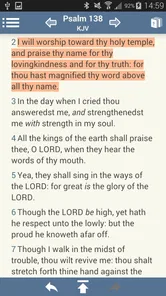
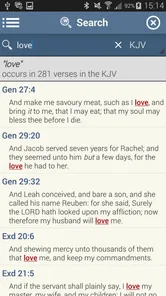
Picture this: you’re sitting in your favorite reading nook with your morning coffee, scrolling through the Blue Letter Bible app. The interface is clean and user-friendly, making it super easy to navigate through different books and chapters. What really caught my attention was the sheer amount of resources available—think lexicons, cross-references, and even audio versions of the text!
Interactive Features Galore
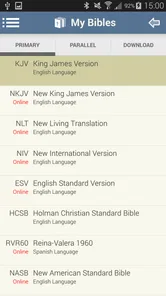
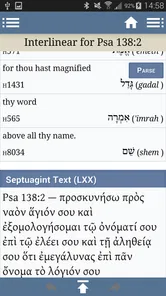
One of the standout features for me was the app’s ability to provide multiple translations of the Bible. Switching between them is a breeze, allowing you to compare different interpretations side-by-side. There’s also a nifty feature where you can tap on a word to see its original Greek or Hebrew meaning, which is perfect for those deep dives into scripture analysis.
Another feature worth mentioning is the audio version of the Bible. If you’re someone who loves soaking in the words during a morning jog or while commuting, this feature is a game-changer. The audio is clear, and the narration is engaging, making it feel like you’re listening to a story being told right to you.
Community and Study Tools
But wait, there’s more! The Blue Letter Bible app isn’t just about personal study. It also offers a community feel with its integrated commentaries and study guides. You can easily access various interpretations and thoughts from renowned theologians and pastors, which can provide fresh insights and perspectives on familiar passages.
And if you’re into creating your own study plans, the app has got you covered. It allows you to set up personalized reading schedules, track your progress, and even share insights with your study group or church community. It’s like having a Bible study group right in your pocket!
Final Thoughts
In a world where digital resources are at our fingertips, the Blue Letter Bible app stands out as a comprehensive tool for anyone looking to deepen their understanding of the Bible. Whether you're a scholar, a casual reader, or someone new to the faith, there’s something here for everyone.
The app is free, which is a delightful surprise considering the depth of content and resources it offers. So go ahead, give it a try, and see how it transforms your Bible study experience. Trust me, you’ll wonder how you ever got by without it!
Choosing it over a simpler Bible reader
The practical difference between this and a basic scripture app is not merely the number of tools; it is how often you want to move from reading into interpretation. A simple reader is usually the better companion when I want to follow a passage without interruption, keep the screen uncluttered, or read in short spare moments. Here, the advantage is having translations, word references, and commentary close to the passage, but that convenience can encourage me to keep opening another resource instead of sitting with the text.
I would treat the linked material as a set of reference shelves, not as a verdict on what a verse must mean. When interpretations differ, I find it useful to note the question or disagreement and return to the surrounding passage before settling on an explanation. That habit matters especially for readers who are new to original-language tools: a Greek or Hebrew gloss can illuminate a word, but it does not replace context or careful reading.
A routine for focused study
For a short evening session, I would choose one passage and write down a single question before opening the app: perhaps why a repeated word matters, or how a verse connects to the paragraph around it. I’d read the passage first, compare a translation if the wording feels unclear, then consult one relevant reference. If the answer remains uncertain, I’d make a note to revisit it rather than trying to resolve every possible interpretation in one sitting.
This workflow is useful for people preparing to lead a discussion, but it also works for a curious reader who wants more than a daily reading without turning study into a research project. The key trade-off is attention. Each extra tool can add context, yet switching among several screens can make it harder to remember the flow of the chapter. A narrow question helps me keep the verse connected to its wider argument.
Who will get the most from it
I think it suits readers who enjoy asking how a passage is translated, what a key term can mean, and how other study resources approach the text. It can also be handy for a small-group participant who wants to check a reference before a meeting or hear a passage while occupied with a routine task. The combination is especially appealing if you would otherwise move between a Bible app, a dictionary, and separate commentary sources.
It is less compelling for someone who wants a quiet, book-like reading experience with minimal choices, or who rarely consults study notes. A printed Bible may be more comfortable for long sessions away from a screen, while a plain digital reader may be quicker for a verse lookup. I would also choose a resource I already know works in a particular low-connectivity setting rather than assume this app will provide every linked item there.
Small habits that make the app easier to use
One useful habit is to decide whether a session is for reading, listening, or research before opening it. That keeps audio from becoming an afterthought during a text-focused study and stops a quick lookup from expanding into a long browse. If I’m comparing translations, I would compare the same short passage rather than jump among unrelated verses; it is easier to notice meaningful differences when the context stays fixed.
For a group conversation, I’d keep the final takeaway in my own words rather than relying on a chain of opened resources to remember what I found. A brief note such as “check the context around this verse” is often more helpful than collecting several interpretations without deciding what question each one addresses. The app can support that preparation, but the reader still has to judge which material is relevant.
What connectivity changes in practice
Connectivity affects more than waiting for a page. It can shape the kind of session I choose: a stable connection makes it easier to follow linked study material, while uncertain service is a good reason to keep the task to the passage and avoid planning a complicated research trail. If I’m travelling, I’d start with the reference I need and avoid relying on a sequence of resources that may be inconvenient to reopen.
That is also why I would not use a long audio session as my only plan for a commute if the route has patchy reception. A more reliable approach is to have another way to continue reading if a connected resource stalls, and to save deeper comparisons for a place where I can give them attention. The app’s strengths are still there, but the most satisfying use depends on matching the task to the connection and setting.
My verdict on Blue Letter Bible
For me, this is a reference-rich Bible app rather than a minimal reader, and its usefulness depends on whether that extra layer is something I will actually use. The strongest reason to install it is the ability to move from a verse into translation comparisons and study aids without starting from scratch elsewhere. The main caution is that a wealth of linked material can make a short reading session feel busy, and connectivity can influence how smoothly that exploration goes.
If you want a practical study companion and are willing to approach its tools with a question in mind, I think it is worth trying. If your priority is uninterrupted reading, the simplest possible interface, or dependable access to every resource in places with weak service, another approach may fit better. I’d start with one passage, compare only what helps, and decide from that first focused session whether the extra depth feels useful rather than distracting.
Blue Letter Bible Frequently Asked Questions
Is Blue Letter Bible suitable for someone who just wants to read the Bible?
Yes. Blue Letter Bible includes a Bible reader, so you can use it for reading as well as study. Its tools are linked to verses, which may be especially helpful when you want to explore a passage in more depth. If you prefer a simple reading experience, keep in mind that the app is designed with study resources alongside its reader.
How difficult is Blue Letter Bible to use for a new Bible app user?
The app is presented as an easy-to-use Bible reader, with study tools connected to individual verses. That structure can make it easier to move from reading a passage to exploring related resources. Blue Letter Bible includes a broad set of study options, so new users may find it useful to start with the reader and add tools as questions arise.
What devices and operating systems can run Blue Letter Bible?
Blue Letter Bible is available for Android and iOS, so you can use it on either platform rather than needing a particular type of phone. For Android, the app requires version 8.0 or later. It is listed as a Books & Reference app and is rated for Everyone, making it suitable for a broad range of readers interested in Bible study.
What is Blue Letter Bible and what features does it offer?
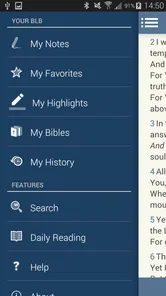
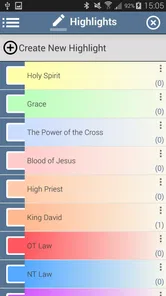
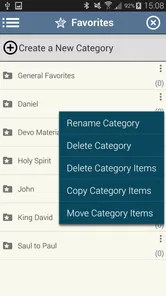
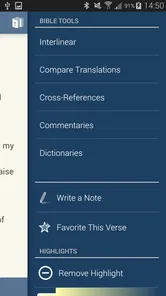
Blue Letter Bible is a comprehensive app designed for in-depth Bible study. It offers a wide range of features including multiple Bible translations, commentaries, dictionaries, and concordances. Users can access Greek and Hebrew word tools, daily devotionals, and audio Bibles. The app also supports note-taking and highlights, making it a versatile tool for both casual readers and serious scholars.
Is Blue Letter Bible free to use or does it require a subscription?
Blue Letter Bible is completely free to download and use. It does not require any subscription or in-app purchases to access its core features. However, users may optionally donate to support the app's development. This makes it an accessible resource for anyone interested in comprehensive Bible study without financial barriers.
Pros
- Comprehensive scripture study tool.
- Multiple Bible translations available.
- Offline access to resources.
- User-friendly interface.
- Regular updates and improvements.
Cons
- Some features require in-app purchases.
- Large app size may affect storage.
- Occasional minor bugs.
- Limited customer support.
- No dark mode option.











