BlackPlayer EX
- 2.54K
- 2.2
- Installs
- 100.00K
- Price
- $3.49

Screenshots
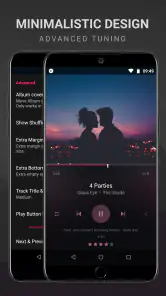
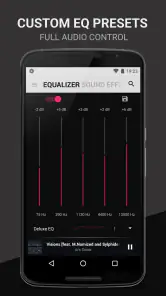
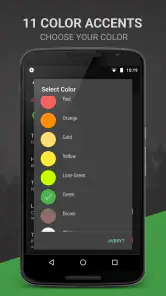
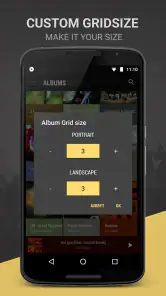
Analysis by Reviewed
Before choosing a local music player, I’d ask a simple question: do I want to press play, or do I want to shape how my library looks and sounds? BlackPlayer EX is aimed at the second kind of listener. It is a paid music and audio app from FifthSource, priced at $3.49, and its appeal rests on a dark, adjustable interface and hands-on playback controls rather than a streaming-first approach.
That distinction matters in daily use. If most of your listening happens through a streaming service, a dedicated player for music stored on your device may not change much. But if you keep albums and playlists locally, or want more control than a basic preinstalled player offers, this app is worth considering. I’d treat the purchase as a choice about how you listen, not as a replacement for every music app on your phone.
Choose it for control, not just for a play button
The key decision is whether you’ll use the customization often enough to justify a separate paid app. A clean library view can make browsing feel calmer, while sound adjustments can help when one set of headphones makes bass feel too strong or vocals seem recessed. My practical tip is to change one setting at a time and listen to a familiar track; that makes it easier to tell whether an adjustment genuinely helps instead of simply making the sound louder or more dramatic.
It also suits listeners who like to keep their music organized themselves. If album and track details are inconsistent, an in-app tag editor can save a detour to a computer. I’d tidy a few incorrectly labeled tracks when I notice them, rather than trying to fix a whole library during a commute. That small workflow is useful precisely because it keeps library maintenance close to listening.
Check that a local library fits your routine
Before buying, I’d look at where the music I actually play comes from. A player centered on files already on your device is most useful when you have albums, downloads, or personal playlists you can browse locally. If your listening is almost entirely built around searching a streaming catalog, the app may become an extra stop rather than a better home for music. Keeping both kinds of apps can make sense, but only if each has a clear job.
A realistic routine might be a commute with a downloaded album in the morning, followed by a mix of saved tracks while cooking in the evening. BlackPlayer EX can serve the moments when you want to choose music from your own collection and adjust how it plays, while a streaming app can remain the easier option for finding something unfamiliar. I’d decide based on which habit takes up more of my listening time, not on the number of controls an app offers.
There is also a practical distinction between organizing a library and repairing it. The tag editor can help with track details that are wrong or inconsistent, but I’d approach corrections in small batches and check that album, artist, and track information still makes sense together. It is easy to focus on one mislabeled song and overlook how it appears beside the rest of an album. That careful approach prevents a quick cleanup from creating a mess elsewhere.
More From Our News Desk

Clash of Clans Is Won Between the Battles

Android Auto Makes the Case for Quieter Car Software

MobiOffice: Transforming Mobile Productivity with Seamless Integration

EA SPORTS FC™ Mobile Soccer: Redefining Mobile Sports Gaming

How Microsoft OneDrive Became a Mobile Productivity Giant

How Google Translate Breaks Language Barriers Effortlessly
Design and Interface: Sleek and User-Friendly
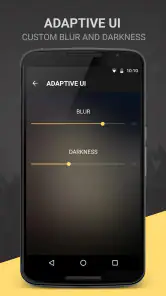
The first thing that caught my eye was the design. BlackPlayer EX sports a minimalistic and sleek interface that's incredibly easy to navigate. The black theme is not just stylish but also easy on the eyes, perfect for those late-night jam sessions. You can customize almost every aspect of the interface, from color themes to fonts, which means you can truly make it your own. It's like dressing your favorite playlist in its Sunday best every day!
Customization: Tailor Your Music Experience
Now, let’s talk about customization because, honestly, it’s where the app shines. With its robust equalizer and sound effects, you can tweak the sound to suit your mood or match the genre perfectly. Whether you’re into bass-heavy beats or crisp vocals, there's a setting for you. Plus, the app supports a wide range of audio formats, so you can play just about anything in your library.
For a realistic everyday example, I’d use the equalizer to make a podcast or spoken recording easier to follow in a noisy room, then return to a music-focused setting later. The best approach is to keep adjustments modest: strong bass can be fun for a short session but tiring over a full album. If you switch headphones, revisit your settings instead of assuming one profile will sound right everywhere. That flexibility is a strength, though it also means there’s a little experimentation before the app feels settled.
Make customization useful instead of endless
The main trade-off with a highly adjustable player is that it can invite more tweaking than listening. I’d start with the default presentation, change only the parts that bother me, and stop once browsing feels comfortable. For sound, a familiar song is a better test than jumping between unrelated tracks, because it gives me a steady point of comparison. This keeps the equalizer from becoming a collection of dramatic settings that sound impressive briefly but don’t suit everyday use.
It is also worth separating interface choices from sound choices. A darker theme or different font can make the library easier for me to scan, but those visual preferences do not tell me whether an equalizer adjustment is helping. I’d make those decisions independently: settle the library view first, then listen and adjust sound if needed. That simple order reduces the chance of changing several things at once and not knowing which change improved the experience.
Performance and Features: Smooth as Butter
Performance-wise, this app is as smooth as butter. It runs seamlessly, even with a large library of songs. I love how it supports gapless playback, ensuring uninterrupted music flow—a feature that’s a must-have for any music aficionado. The crossfade feature is another gem, blending tracks so smoothly that it feels like a live DJ set right at your fingertips.
Those playback options make a difference in specific situations: gapless playback is handy for albums where silence between tracks would interrupt the intended flow, while crossfade can suit a casual mixed playlist. I wouldn’t turn both ideas into a rule for every listening session; a carefully sequenced album may sound better without a blend. Trying the controls on a short playlist first is an easy way to decide which style you prefer.
For comparison, a phone’s built-in player is usually the easier choice if all you need is basic playback with no setup. Streaming apps make more sense when discovery, online catalogs, or synced listening are your priorities. This player sits between those habits: it focuses on managing and playing a personal music collection, with more room to adjust the interface and sound. It is not the right fit if you don’t keep music locally or would rather avoid tuning settings.
Choose the alternative that solves your actual problem
Different music apps answer different questions. A basic preinstalled player is a sensible pick when I want to open a track and get on with my day. A streaming service is better when I want to search beyond the files I already own or move between online listening and discovery. BlackPlayer EX is more appealing when the collection itself is the point: I want to browse it, correct details, and control the way it is presented and played.
That makes the comparison less about which app is universally best and more about which task I repeat. If I rarely change playback settings and already like the way my phone groups tracks, paying for extra control is hard to justify. If I often revisit albums, care about a tidy library, or want to adjust playback for different headphones, a dedicated local player has a clearer purpose. I’d keep a streaming option alongside it if discovery matters, rather than expecting one app to do both jobs equally well.
One useful test is to imagine using the app when I’m in a hurry. If I can find a familiar album quickly and press play without having to rethink my setup, customization is serving me. If I’m regularly lost in appearance choices or adjusting sound before every track, I may be asking too much of the app or may simply prefer a simpler player. The aim is a library that feels easier to use, not an ongoing project.
Another feature worth mentioning is the built-in tag editor. It's super handy for organizing your library. You can edit track info directly from the app, making it easier to keep everything neat and tidy without needing to jump to a computer.
Think about the switching effort
Moving to any new local player takes a little patience, even when the app is straightforward. I’d first check that the music I want to hear is available on the device, then spend a short session getting comfortable with the library view and playback controls. That is a more reliable test than trying to customize everything before I know what feels inconvenient. If the existing player already handles my routine, there may be no meaningful benefit to changing.
The tag editor can reduce one kind of friction, but it does not remove the need to make sensible choices about how a collection is labeled. I’d correct a small number of obvious errors, play the tracks, and see whether browsing improves before doing more. This is especially useful for a mixed collection where recordings may not follow one consistent naming style. A little selective cleanup is more practical than treating the player as a reason to reorganize every file at once.
One question people often have is whether this is a good choice for someone who mainly streams. My answer is usually no, unless they also keep enough local music to make a dedicated library worthwhile. Another is whether the sound controls require constant attention: they do not have to, but getting the most from them means spending some time finding settings that work for your headphones and listening habits. If you prefer never to adjust anything, a simpler player may feel more comfortable.
The app is rated for Everyone, and it has been available since January 20, 2014. Its current version is 20.65, and it requires Android 5.0 or later. Those details make it approachable for a broad range of Android users, though I’d still check that the device and its music collection suit a local player before paying. The 2.2 average from around 27,000 ratings is also worth weighing: I wouldn’t treat that score as a verdict on every person’s experience, but it is a reason to be cautious and confirm that its particular approach matches your needs.
Final Thoughts: A Must-Have for Music Lovers
In conclusion, BlackPlayer EX is more than just a music player; it’s a fully customizable musical experience. It's perfect for anyone who wants more control over their music and values a clean, user-friendly design. Whether you’re a casual listener or a hardcore audiophile, this app has something to offer. So, if you’re on the hunt for a new music player, give BlackPlayer EX a spin. You won’t regret it!
I’d be more measured about that last promise: paying for a player is only worthwhile if its controls and presentation improve how you actually listen. It has over 100,000 installs and around 2,500 written reviews, but neither popularity nor user feedback can tell me whether I’ll enjoy its particular interface. My recommendation is for people with a local library who want to personalize playback and don’t mind spending time setting it up. If convenience, streaming discovery, or a no-adjustment experience matters more, I’d stick with a simpler player. For the right listener, the strongest reason to choose it is not a long feature checklist; it’s having one place to browse, organize, and fine-tune music on your own terms.
BlackPlayer EX Frequently Asked Questions
Can I listen to my own music collection with BlackPlayer EX, or does it focus on streaming?
BlackPlayer EX is designed around music stored locally on your device, making it a natural option if you already keep audio files on your phone. It does not require an internet connection for ordinary playback. You can browse and organize your collection in the app, while an online connection may be useful for features such as finding album artwork or lyrics.
Is BlackPlayer EX still being updated, and what version should I expect?
BlackPlayer EX is a mature music player, with version 20.65 as its current version. Its minimalistic presentation is paired with customization and library tools, so it can suit listeners who want more control than a bare-bones player offers. Before installing, check that your Android device meets the app’s operating-system requirement and consider whether its feature set matches how you listen to music.
Is BlackPlayer EX suitable for someone who wants a simple, uncluttered music player?
BlackPlayer EX presents itself as a minimalistic premium music player, while still offering room to personalize the interface. That balance may appeal if you want a focused way to listen to music without giving up options such as themes and fonts. If you prefer a very basic player with few settings, its customization and library tools may feel more involved than you need.
What features make BlackPlayer EX stand out from other music players?
BlackPlayer EX is renowned for its customizable interface, allowing users to personalize their music listening experience with themes and fonts. It supports a wide range of audio formats and offers a built-in equalizer for sound tweaking. Additionally, it provides gapless playback, crossfading, and an ID3 Tag Editor. The ad-free experience enhances uninterrupted music enjoyment, making it a preferred choice for audiophiles.
Is BlackPlayer EX available for both Android and iOS devices?
Currently, BlackPlayer EX is exclusively available for Android devices. iOS users will have to look for alternative apps as there is no version of BlackPlayer EX available on the Apple App Store. Android users can download it from the Google Play Store or other authorized sources. It is important for potential users to check compatibility with their device before downloading. The app requires Android 5.0 or later.
Pros
- High-quality audio playback
- Customizable interface
- Supports a wide range of audio formats
- No ads for uninterrupted experience
- Gapless playback feature
Cons
- Limited online music streaming options
- No built-in lyrics feature
- Requires manual music library management
- Interface may feel outdated to some users
- No cloud backup for playlists
- Category
- Music & Audio
- Version
- 20.65











