

BitTorrent Pro - Torrent App
- 1.56K
- 4.8
- Installs
- 100.00K
- Price
- $2.99

Screenshots
Analysis by Reviewed
I think torrent apps make the most sense when they solve a practical problem: moving a large, legitimate file to a phone without tying up a computer. BitTorrent Pro - Torrent App is aimed at that job, combining torrent downloads with playback in one place. It is a paid app from Rainberry, Inc., and its appeal is less about dressing up a familiar file-sharing method than about keeping the download and the moment you use the file close together.
When one phone serves the household
A useful shared-device scenario is downloading a public-domain film or a large collection of freely distributed audio while you are home, then playing it on the phone later. The built-in player can make that handoff simpler: you do not necessarily need to finish the download, locate the file in another app, and start over there before checking whether the media is usable. For a household that passes one device around, that can reduce small bits of friction.
That convenience does not make the phone a shared library with separate personal spaces. I would treat the app as belonging to the person who manages its downloads, especially if several people use the same device. Before starting a large transfer, agree on what is being downloaded and who will use the device; otherwise, a long-running task can compete with someone else’s plans for storage, battery, or screen time.
For example, if I wanted to prepare a freely licensed video for a family trip, I would start the transfer while the phone is on Wi-Fi and charging, check that the file plays, and only then rely on it away from home. That sequence is more dependable than waiting until the last moment. It also gives me a chance to see whether the file is the right one before it becomes part of a travel plan.
Getting Started with Ease
First off, installing the BitTorrent Pro - Torrent App is a breeze. Available for both Android and iOS, you can simply head over to your respective app store, and within a few taps, you'll have it ready to go. What I love about this app is its sleek and intuitive interface. The developers have clearly put a lot of thought into making sure even the most novice of users can dive right in without feeling overwhelmed. It’s as straightforward as it gets—open the app, search for your torrent, and bam—you’re off to the races.
It is still worth setting a few boundaries before the first download. Torrents can involve substantial transfers, and a phone is a less forgiving place to discover that you chose the wrong file or started a task on a connection you meant to conserve. I recommend checking the file name and source carefully, choosing a trusted network for large transfers, and making sure there is room on the device. A quick pause to confirm those basics is often more useful than rushing straight into a queue.
One practical distinction is that finding a torrent and downloading it are separate decisions. The app can help with the transfer and playback, but the person using it still needs to judge whether a source is legitimate and whether the content is appropriate. I would not treat a search result as an endorsement. For household use, that means the person setting up a download should be comfortable explaining what it is and where it came from.
More From Our News Desk

 Gmail
GmailGmail in a Busy Inbox: Who Benefits Most?
From first account to crowded workday, Gmail earns its place through dependable search and flexible sorting—but its best fit depends on how much inbox maintenance you can tolerate.

 Prime Video
Switching to Prime Video: What Changes in Your Viewing Routine
Prime Video can make a compelling second home for streaming, but switching means learning a different catalog, rental layer, and route from browsing to playback.

 Universal TV Remote Control
Universal TV Remote Control Works Best as a Reliable Backup
A phone remote earns its place through quick setup and reliable habits. Here is how to get more from Universal TV Remote Control—and where its limits show.

 Weather - By Xiaomi
Weather by Xiaomi Review: Clear at a Glance, Less Clear Up Close
Xiaomi’s weather app makes everyday forecasts quick to scan, but its calm surface can leave useful details and recovery paths harder to find than they should be.

 X
XX Under Pressure: Can It Recover When Posting Goes Wrong?
A resilience-focused review of X, examining setup, mistaken posts, interruptions, weak connections, and the gaps that matter when recovery needs to be dependable.

 Clash of Clans
Clash of Clans Is Won Between the Battles
Its raids are quick; its community is a long-term project of coordination, teaching, rivalry, and shared responsibility—with all the friction that entails.
Latest News



Features That Stand Out
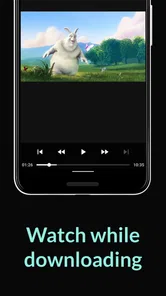
Okay, let's talk features. This app isn't just your average torrent downloader; it’s packed with functionalities that make it stand out. For starters, the built-in media player is a game-changer. You can stream files directly without having to wait for the complete download. This is perfect for those moments when patience isn’t quite your virtue and you just have to see that new episode right now!
In everyday use, playback before a transfer finishes is most helpful as a preview, not a promise that every file will play smoothly from the start. A torrent may arrive in pieces, and playback depends on the parts available at that moment. If a video stalls or will not begin, letting more of the download complete is the sensible next step. I would avoid planning a movie night around immediate streaming until I had tested the particular file and connection.
The integrated player also changes the workflow in a useful way: I can check a file from the same app that is receiving it, rather than switching between a download manager and a separate player just to see whether I picked the right item. That is a modest advantage, but it matters on a small screen. It is especially handy when I am sorting through several legitimate files and want to identify the one I actually need before spending more time or storage on it.
Another feature worth mentioning is the no-ads experience. With the Pro version, you can say goodbye to those pesky ads that interrupt your flow. It's like the developers knew exactly what we needed—a seamless, uninterrupted experience. Plus, with its battery-saving features, you won’t have to worry about your phone dying in the middle of a download.
The paid nature of the app is an important part of the decision. At $2.99, I would weigh the cost against how often I genuinely use torrents on my phone and how much I value an ad-free experience. Someone who downloads only occasionally may be happier with a free tool or with transferring files from a computer. For someone who regularly needs mobile torrent handling and playback together, paying once for a focused app may feel more reasonable than tolerating interruptions.
Battery-saving features can help, but they should not be read as a guarantee that a long transfer has no effect on battery life. Downloading uses the phone and its connection, and playback adds its own demands. For an overnight or extended task, I would keep the phone connected to power, use a suitable network, and avoid leaving the screen active unnecessarily. That is a more realistic way to protect the device than expecting any app to make sustained activity cost-free.
Coordinating Downloads and Playback
When more than one person relies on a phone, coordination is less about a special household mode and more about simple habits. Decide who starts a transfer, which files are meant to stay on the device, and when it is fine to play them. A download that is useful to one person can take up space another person needs, so reviewing completed files and removing ones no longer needed is part of keeping a shared device usable.
Scheduling can help make a transfer fit around other needs. The published app experience includes a scheduling feature, which I found useful for choosing a more convenient time rather than starting a large task in the middle of the day. I would still check the phone’s connection and power situation before relying on a scheduled start. A schedule is a planning aid, not a substitute for making sure the device will be available and connected when the task is due.
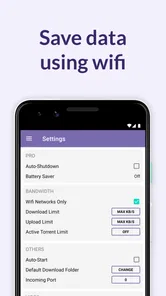
For mobile data, my rule would be to think ahead rather than assume a transfer will remain small. If a file is large, Wi-Fi is generally the safer choice for avoiding an unwelcome drain on a data allowance. On a shared plan, it is considerate to confirm that everyone is comfortable with the transfer before using mobile data. That kind of coordination is particularly useful when someone else needs the connection for work, navigation, or a video call.
Another small but useful workflow is to separate “downloaded” from “ready to rely on.” I would open the file and check that it plays before deleting another copy or planning to use it offline. If the file is for a trip, I would do that while I still have a stable connection and time to troubleshoot. This avoids discovering at the destination that the selected item was incomplete, mislabeled, or simply not the one I intended.
Performance and Usability
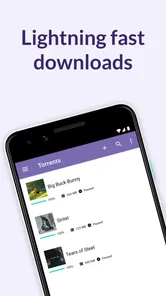
Performance-wise, the BitTorrent Pro - Torrent App is a beast. Downloads are swift and stable, and the app handles multiple downloads like a champ. I tested it on both Wi-Fi and mobile data, and it didn’t miss a beat. The app also offers a scheduling feature, which I found super handy. You can schedule your downloads to start at off-peak times, which is a fantastic way to manage your data usage effectively.
In practice, torrent performance is not something I would judge by the app alone. The availability of the file, the connection, and the device all affect how quickly a transfer progresses. A slow task does not automatically mean the app is malfunctioning; the source may simply be less available or the network may be busy. I like that the app puts downloads and playback together, but I would still keep expectations realistic when a file is coming from a source with uncertain availability.
Handling several downloads can be convenient, yet it is not always the best choice on a phone. If I need one particular file promptly, I would give that task priority rather than filling the queue with unrelated transfers. Multiple active tasks can make it harder to see which file is progressing and can make the device busier. A short, deliberate queue is easier to manage than treating a phone like a desktop that can be left to accumulate tasks indefinitely.
Usability is another area where this app shines. The interface is clean and clutter-free, making navigation a walk in the park. Whether you’re a seasoned torrent user or someone just getting started, you’ll find everything you need right at your fingertips.
The app has a long-running presence: it was released on January 31, 2013, and its current version is 8.2.53. Its average rating is 4.7 from around 11,000 ratings, with roughly 1,600 written reviews and over 100,000 installs. Those figures suggest that it has found an audience, but I would not use popularity as a substitute for checking whether its mobile workflow fits your own habits.
It is listed for everyone, but that age label is not the same thing as a guide to every file someone might find through torrenting. I would not hand a child unrestricted responsibility for choosing downloads simply because the app itself carries an everyone rating. In a household, an adult should decide what content is suitable and make sure the device is being used for lawful material. The app is a tool; the judgment around sources and files still belongs to the person using it.
That distinction also matters for privacy and trust. On a shared phone, the person who starts a transfer should be clear about what is being saved and should not assume every other user wants the same material available in the app. If the device is personal, keeping downloads organized and removing unwanted files can prevent confusion later. If several people use it, a quick conversation is a better boundary than imagining controls the app does not promise.
Who Will Get the Most from It
I would recommend this app most readily to someone who already understands torrent files, has legitimate sources in mind, and wants to download and preview media directly on a phone. It is also a reasonable fit for people who travel with files, collect freely shared media, or prefer an all-in-one mobile workflow over moving every download through a computer first.
It is less compelling for someone who only streams from mainstream services, rarely handles large files, or wants a simple way to share family videos between devices. For those jobs, a regular streaming app, a cloud-storage service, or a direct file-transfer method may be more straightforward. Those alternatives usually avoid the extra responsibility of evaluating torrent sources and managing a download queue.
Compared with a basic download manager, BitTorrent Pro is specifically built around torrent transfers and includes its own player, so it suits people who want that combination rather than a tool for ordinary web downloads. Compared with using a desktop torrent client, the phone version is convenient when the phone is already the device you want to use, but a computer may be easier for managing a large archive or many files over time. I see the mobile app as a focused convenience, not a replacement for every desktop workflow.
If you are new to torrenting, I would take time to learn how to recognize trustworthy, legal sources before making the app part of a routine. The interface may feel approachable, but ease of use does not remove the need to make careful choices. If what you really want is a catalogue of licensed films or music with clear playback rights, a conventional subscription or purchase service is likely a better fit.
Final Thoughts
So, is the BitTorrent Pro - Torrent App worth the download? In my opinion, absolutely. It combines powerful features with an easy-to-use interface, making torrenting not only efficient but also enjoyable. Whether you're downloading the latest movie, a massive game, or just a ton of music, this app has got you covered. So go ahead, give it a whirl—you might just find it’s exactly what you’ve been looking for in a torrent app.
My enthusiasm comes with a clear condition: I would use it for files I have the right to download, on a connection and device I am comfortable using, and with a quick check that the result works before depending on it. Those habits make the app’s strengths more useful and its limitations easier to manage. The price is modest for a regular user who values the ad-free experience, but someone who seldom downloads torrents should compare it with the simpler tools they already use.
For a household, my verdict is that it works best as a deliberate utility managed by an informed user, not as an unattended shared media hub. Keep expectations sensible about transfer speed and playback, coordinate before using shared data or storage, and be thoughtful about age-appropriate content. If that sounds like your situation, the combination of mobile downloading and built-in playback is genuinely convenient.
Until next time, happy downloading!
BitTorrent Pro - Torrent App Frequently Asked Questions
How much does BitTorrent Pro cost, and what should I know before buying it?
BitTorrent Pro is a paid app priced at $2.99. Its purpose is to help you find, download, and play torrents, so consider whether those features fit how you plan to use it before purchasing. The app is in the Video Players & Editors category and is rated for Everyone. As with any torrent app, make sure you have permission to download and share the files you choose.
What is BitTorrent Pro and how does it differ from the free version?
BitTorrent Pro is an enhanced version of the popular BitTorrent app that offers additional features such as no ads, built-in media player, and automatic virus and malware protection. Compared to the free version, BitTorrent Pro provides a more seamless and secure downloading experience, making it ideal for users who frequently download torrents and want a more reliable and ad-free service.
Is BitTorrent Pro safe to use for downloading files?
Yes, BitTorrent Pro is designed with safety in mind, incorporating automatic virus and malware protection to ensure that downloaded files are safe. However, users should still exercise caution and download files from reputable sources to avoid potential risks. The app's in-built media player also allows for quick scanning of files before opening them, adding another layer of security.
Can I download torrents on both Wi-Fi and mobile data using BitTorrent Pro?
Yes, BitTorrent Pro allows users to download torrents using both Wi-Fi and mobile data connections. The app provides flexibility for users who want to download files on-the-go. However, it's important to monitor data usage if downloading over mobile data to avoid exceeding your data plan limits, as torrent downloads can be data-intensive.
Are there any limitations on the number of torrents I can download simultaneously with BitTorrent Pro?
BitTorrent Pro does not impose any specific limitations on the number of torrents you can download simultaneously. However, the overall download speed and performance may be affected by the capabilities of your device and the speed of your internet connection. For optimal performance, it's advisable to manage active downloads based on your device's capacity.
Pros
- Ad-free experience
- Faster download speeds
- Stream torrents instantly
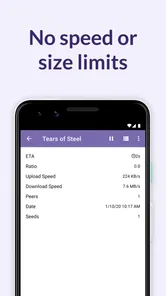
- No speed limits
- Battery saver feature
Cons
- Paid app
- Occasional glitches
- Requires stable internet
- Limited customer support
- High battery usage











