BitBible ENG -Lockscreen+Alarm
- 614.00
- 4.0
- Installs
- 500.00K
- Price
- Free
Screenshots

Analysis by Reviewed
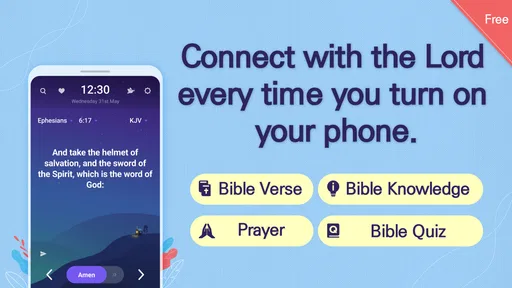
I judge a lockscreen reading app by a simple question: does it make reading feel easier, or does it turn an ordinary phone check into another interruption? BitBible takes the first route. It puts Bible reading close to a habit most of us already have—unlocking the phone—so a short moment that might otherwise disappear into notifications can become a chance to pause. I like that focused idea, though it works best if you actually want Scripture to be part of your everyday screen routine.
A small prompt, not a whole reading session
The key to deciding whether this style suits you is to separate a reading cue from a complete reading experience. A lockscreen verse can remind you to stop for a moment, but it cannot guarantee that you will have the calm or context to think deeply about what you have read. I find the approach most useful when I treat each appearance as an invitation: read the line, notice whether it speaks to the moment, then return to it later if I have time.
That distinction also answers a practical question: can this replace a regular Bible app? For me, no. It serves a different purpose. A dedicated reader is more suitable when I want to choose a book or passage and stay with it; the lockscreen approach is for making Scripture easier to encounter in passing. Using both is sensible if you want a gentle reminder during the day and a more deliberate reading session when your schedule allows.
A reading prompt built around the lockscreen
The appeal here is less about sitting down for a long study session and more about making the Bible easier to encounter in small pieces. If you reach for your phone while waiting for a bus, between tasks, or during a quiet moment at home, the lockscreen approach can give that glance a different purpose. It lowers the effort of getting started: you do not have to remember to open a separate reading app before you can engage with the text.
That convenience is also the main trade-off. A verse encountered during a quick unlock is not the same as reading a full passage in context. I would treat these brief encounters as a nudge toward a reading habit, not as a replacement for sustained reading, reflection, or a study tool with the references and resources you prefer.
Unlocking More than Just Your Phone
Alright, so imagine this: every time you unlock your phone, you're not just greeted by your usual notifications or missed calls, but also by a little dose of inspiration or wisdom. That's exactly what BitBible brings to the table. It's like having a pocket-sized companion that nudges you with thoughtful insights right from your lockscreen. The idea here is pretty simple but absolutely genius.
Features That Make You Go "Wow!"
The app is loaded with features that are designed to seamlessly blend into your routine. One of its standout features is the ability to customize the types of verses or quotes you want to see. Whether you're in the mood for some motivational quotes, daily scripture, or even a mix of both, BitBible has got you covered. It's like having a little piece of wisdom ready to greet you every time you check your phone.
More From Our News Desk

Weather by Xiaomi Review: Clear at a Glance, Less Clear Up Close

X Under Pressure: Can It Recover When Posting Goes Wrong?

Clash of Clans Is Won Between the Battles

Android Auto Makes the Case for Quieter Car Software

MobiOffice: Transforming Mobile Productivity with Seamless Integration

EA SPORTS FC™ Mobile Soccer: Redefining Mobile Sports Gaming
The useful way to think about that customization is as a choice of atmosphere, not a substitute for a reading plan. A general inspirational prompt can suit a busy stretch of the day, while Scripture is a better fit if you want the lockscreen to point you toward Bible reading specifically. I would choose what feels relevant to the reason I installed it, then leave the setting alone long enough to see whether the prompts become a welcome cue or just visual background.
How it fits into an ordinary day
For example, imagine checking your phone while waiting for a meeting to begin. A lockscreen verse can turn a few spare seconds into a small pause, without requiring you to open a book app and decide where to start. Later, if the line catches your attention, you can make a deliberate choice to read more rather than expecting the lockscreen itself to provide the whole experience. That distinction helps keep the app useful instead of asking it to do a job it is not designed for.
Compared with a conventional Bible app, this approach is more about being prompted than navigating a library of reading tools. A dedicated reader is usually the better choice when you want to choose a passage, follow a structured plan, or spend time comparing text. A paper Bible avoids adding another phone interaction altogether. BitBible’s particular advantage is that it meets you at the moment you already pick up the device; its limitation is that this moment is brief and surrounded by other screen distractions.
Making the prompt work for you
A practical way to test whether the lockscreen placement helps is to pay attention to what happens after you read a verse. If it makes you want to explore the passage, use that interest as a reason to open a Bible reader later, when you can give it attention. If you only have a moment, there is no need to turn a quick glance into a task or feel that you have completed a full reading session. The app works best when the small prompt feels like a welcome opening, not an obligation.
There is also a useful balance between familiarity and variety. A prompt that appears as part of a repeated phone routine may become easier to notice over time, but anything that is always in the same place can fade into the background. I would periodically ask myself whether I am still reading the text or merely seeing it. If it has become wallpaper, changing the type of content you want to encounter—or taking a break from the lockscreen cue—may be more helpful than expecting every glance to feel fresh.
Features That Make You Go "Wow!"
Another neat aspect is the simplicity of its interface. It's clean, intuitive, and doesn't bombard you with unnecessary distractions. The focus here is on delivering content that matters, right when you need it. Plus, the app is super lightweight, so it won't hog your phone's resources.
BitBible is a free Books & Reference app from BitBible, with an Everyone content rating. It has a 4.3 average from around 2,200 ratings, and more than 500,000 installs. Those figures suggest that plenty of people are willing to try this lockscreen-first way of reading, but the useful question for you is personal: do you want Bible content to appear during routine phone checks, or would you rather open it only when you have set aside time to read?
Privacy, pace, and everyday comfort
Because the reading prompt sits in a place you may check in public, the lockscreen has a different feel from a private app screen. That can be a plus if a discreet reminder helps you keep a personal practice in view, but it may not suit you if you prefer religious reading to stay out of sight around coworkers, classmates, or family. Think about where you usually check your phone before making the prompt part of your routine.
The same question applies to pace. If you check your phone repeatedly throughout the day, a prompt-based approach may give you several chances to pause, but frequent screen checks can also make any lockscreen content blend into the normal flow of notifications. I would not use the app as a way to measure how much I have read. Its value is in making a small moment available, not turning phone use into a tally or a test of consistency.
Personal Experience with BitBible
Now, let me share a bit of my personal experience. At first, I was a bit skeptical about having quotes on my lockscreen. I mean, who needs more clutter, right? But after a few days of using the app, I found myself actually looking forward to those little nuggets of wisdom. It's a refreshing change from the usual barrage of notifications. Plus, it subtly encourages you to take a moment to reflect, which is something I think we all could use a bit more of.
One practical tip is to notice how the prompts feel at different points in the day. If you find yourself swiping past them without reading, that is a sign the lockscreen is competing with your usual habits rather than helping. If a short pause feels welcome, keep the setup simple and use the prompt as a reminder to return to a passage when you have more time. That makes the app a better fit for people who want gentle repetition than for readers who prefer to control every part of a study session.
I also appreciated the app's offline capabilities. You don't need to be constantly connected to the internet to access your collection of quotes or verses. This is a huge plus, especially if you're someone who's often on the move or trying to conserve data.
Who will get the most from it
I would recommend this lockscreen style to someone who already reads the Bible occasionally but forgets to make room for it, or to someone who wants a small reflective prompt during an ordinary day. It is also a reasonable starting point if opening a full study app feels like too much friction. On the other hand, if you want uninterrupted phone access, dislike content appearing on your lockscreen, or need a more deliberate reading and study workflow, a standard Bible reader—or simply a book—will suit you better.
It is also worth considering what you want from the word “easy.” Here, ease means being able to encounter a prompt during a familiar phone habit; it does not necessarily mean having every feature of a study-focused Bible reader at hand. If your main goal is to follow a planned sequence, look up references, or compare passages, I would start with a reader built around those tasks. If the hardest part is remembering to begin, BitBible’s placement may be the more useful intervention.
The app is free, and its current version is 1.7.1; it requires Android 7.0 or later. That makes the basic decision fairly straightforward: if your device meets that requirement and the idea of a Bible prompt on the lockscreen appeals to you, trying it costs nothing. I would still think about whether you are comfortable having reading content visible when you check your phone around other people, since the lockscreen is naturally more public than an app you open privately.
When another format is the better fit
For someone who wants a quiet, uninterrupted stretch of reading, I would choose a paper Bible or a conventional reading app and put the phone aside. That removes the risk of a quick glance turning into a longer round of checking messages or other apps. Likewise, a person who dislikes any extra visual element on the lockscreen may find that the very feature that makes BitBible distinctive is also the reason it never becomes comfortable to use.
It may also be a poor match if you expect every prompt to be personally timed or tailored to a particular situation. A lockscreen cue is broad by nature: it gives you a text to notice, while you decide whether that moment is right for reflection. I see that as a helpful boundary rather than a flaw, but it means the app cannot replace the choice and concentration involved in a more intentional reading routine.
Wrapping It Up
All in all, BitBible is a delightful little app that brings a touch of mindfulness to your everyday phone usage. It's perfect for those who are looking to inject a bit of positivity into their daily routine without much effort. The convenience of having inspiring content right on your lockscreen is something I didn't know I needed until I tried it.
So, if you're on the hunt for an app that combines functionality with a sprinkle of inspiration, give BitBible a try. You might just find yourself unlocking more than just your phone—perhaps a little bit of motivation too.
My recommendation in one sentence
I would try it if you want Bible reading to be easier to remember during ordinary phone checks, and skip it if you need privacy on the lockscreen or want a complete study workspace. Its strongest contribution is modest but practical: it makes a familiar pause available for a short encounter with Scripture, while leaving the deeper reading to you.
BitBible ENG -Lockscreen+Alarm Frequently Asked Questions
What is BitBible, and who is it for?
BitBible is a Books & Reference app from BitBible for people who want to encounter Bible content during everyday phone use. It is described as an easy way to read the Bible, and its lock-screen focus makes it suited to users who welcome a brief spiritual prompt as part of their routine. The app is free and has an Everyone age rating.
What is BitBible and how does it work?
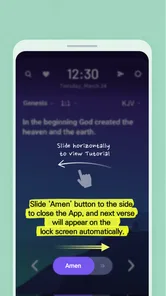
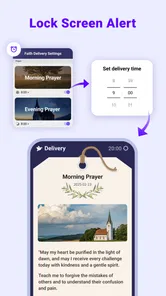
BitBible is a unique app that combines the functionality of a lock screen with the spiritual enrichment of Bible verses. Each time you unlock your phone, you are greeted with an inspirational verse from the Bible. This innovative approach not only secures your device but also provides spiritual nourishment, making it an ideal app for those looking to incorporate faith into their daily routine.
Is BitBible available for both Android and iOS devices?
Yes, BitBible is available for download on both Android and iOS platforms. Users can easily find the app on the Google Play Store for Android devices and the Apple App Store for iOS devices. This cross-platform availability ensures that a wide range of users can enjoy the features and benefits of BitBible, irrespective of the device they own.
Does BitBible require internet access to function?
BitBible does not require constant internet access to function. Once downloaded, the app operates offline, delivering Bible verses directly to your lock screen. However, occasional internet access may be needed to update the verse database or access additional features. This offline capability makes it convenient for users who may not always have internet access.
Can I customize the Bible verses displayed on my lock screen?
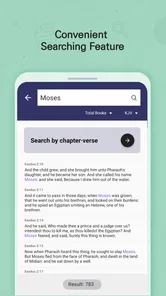
Yes, BitBible allows users to customize the Bible verses that appear on their lock screen. You can choose specific books or themes to tailor the verses to your personal preferences or spiritual needs. This customization feature ensures that the content is relevant to each user's individual journey and adds a personal touch to the app experience.
Pros
- User-friendly interface
- Comprehensive study tools
- Offline access available
- Regular updates
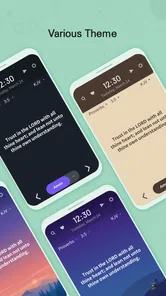
- Customizable themes
Cons
- Contains ads
- In-app purchases required
- Limited free version
- Occasional bugs
- Requires internet for updates











