Binance Smart Chain Explorer
- 4.00
- 3.9
- Installs
- 1.00K
- Price
- $2.49

Screenshots
Analysis by Reviewed
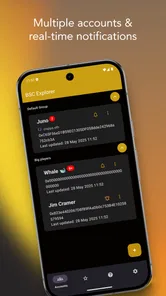
I find a blockchain explorer most useful when it answers a specific question: did a transfer go through, which address received it, or what activity is tied to a wallet I’m tracking? That practical focus is important here. Binance Smart Chain Explorer is a finance app from Crapps Crypto Apps S.R.L. built around viewing transactions for multiple accounts, so its clearest appeal is checking activity rather than managing crypto from one place.
What the price does—and doesn’t—tell you
The app costs $2.49, and it also lists in-app purchases priced from $1.99 to $19.99 per item. I would treat those as separate costs: the initial price is clear, while the extra purchases mean the full spend can depend on what you choose to buy. I wouldn’t assume that paying once unlocks every possible option, or that the in-app items are necessary for basic use. Before buying, I’d check what the current purchase screen offers and decide whether it matches the way I plan to use the app.
It has an average rating of 3.9 from around 90 ratings, with four written reviews, and more than 1,000 installs. That gives a prospective buyer some context, but it isn’t enough by itself to tell me whether the app fits my workflow. I’d weigh the narrow multi-account focus and the upfront price more heavily than the rating alone.
Exploring the Blockchain Made Easy
First things first, let’s talk about what the Binance Smart Chain Explorer does. Imagine you’re Sherlock Holmes and the blockchain is your mystery to solve. The Explorer acts as your trusty Watson, providing all the details you need to uncover the mysteries of transactions, tokens, and smart contracts. You can easily search for specific transactions, check out wallet balances, and even dive into the details of a particular block. It’s all about making the complex world of blockchain a tad bit simpler.
Features That Stand Out
One of the coolest features is the real-time tracking. You can see transactions as they happen, which is pretty exciting if you’re keeping tabs on your investments. Plus, the user interface is surprisingly friendly. I know, I know, blockchain stuff can be intimidating, but the Explorer makes it feel like a walk in the park. You’ve got all your info laid out in a clean, easy-to-navigate format, so you don’t need a PhD in Computer Science to figure it out.
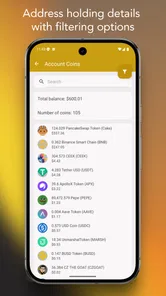
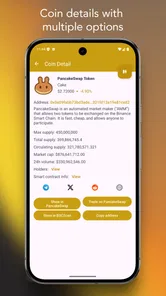
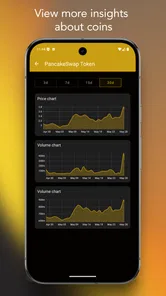
Another highlight is the way it handles token information. You can access detailed data about any token on the Binance Smart Chain, from its price changes to its transaction history. This is particularly handy if you’re into trading or just keeping an eye on market trends. It’s like having a personal finance assistant that’s available 24/7.
A Few More Perks
The Explorer also supports multiple languages, making it accessible to a global audience. Whether you’re fluent in English, Mandarin, or another language, you can set the Explorer to suit your linguistic preferences. This is a big win for inclusivity and makes it easier for non-English speakers to engage with the platform.
More From Our News Desk

 Gmail
Gmail in a Busy Inbox: Who Benefits Most?
From first account to crowded workday, Gmail earns its place through dependable search and flexible sorting—but its best fit depends on how much inbox maintenance you can tolerate.

 Prime Video
Switching to Prime Video: What Changes in Your Viewing Routine
Prime Video can make a compelling second home for streaming, but switching means learning a different catalog, rental layer, and route from browsing to playback.

 Universal TV Remote Control
 Works Best as a Reliable Backup
A phone remote earns its place through quick setup and reliable habits. Here is how to get more from Universal TV Remote Control—and where its limits show.

 Weather - By Xiaomi
Weather by Xiaomi Review: Clear at a Glance, Less Clear Up Close
Xiaomi’s weather app makes everyday forecasts quick to scan, but its calm surface can leave useful details and recovery paths harder to find than they should be.

 X
X Under Pressure: Can It Recover When Posting Goes Wrong?
A resilience-focused review of X, examining setup, mistaken posts, interruptions, weak connections, and the gaps that matter when recovery needs to be dependable.

 Clash of Clans
 Is Won Between the Battles
Its raids are quick; its community is a long-term project of coordination, teaching, rivalry, and shared responsibility—with all the friction that entails.
Latest News



Security is also top-notch. Given the sensitive nature of crypto transactions, it’s reassuring to know that the Explorer prioritizes user security. It doesn’t store any personal data, so you can browse with peace of mind. Plus, it’s constantly updated to stay in line with the latest blockchain advancements.
Making a useful routine out of transaction checks
For me, the strongest case for a dedicated phone explorer is not staring at charts all day; it is making a few careful checks easier to repeat. If I monitor separate addresses, I’d keep a private note of which address belongs to which purpose and open the relevant one before comparing activity. That small habit matters more than it sounds: similar-looking addresses and token names can make a quick glance misleading, and the chain’s record is tied to the exact address, not the label I have in my head.
A practical routine is to save a transaction identifier when I initiate a transfer, then use it to find the corresponding record rather than searching by a vague memory of when it happened. I would check the destination, token and amount against what I intended before treating the result as confirmation. If the transaction is not visible yet, I would avoid repeatedly sending another payment; first I’d recheck the identifier and allow for the possibility that the record has not appeared in the view I’m using. This is a cautious workflow, not a promise about processing times.
There is also a useful distinction between monitoring and record-keeping. An explorer can help me inspect public activity, but I would not use a screen view as my only long-term accounting system. For regular tracking, I’d note the transaction identifier and its purpose in a separate record, especially when different accounts are used for personal and shared activity. That gives me context later without assuming the app itself organizes my finances or explains why a transfer was made.
Using several accounts without mixing them up
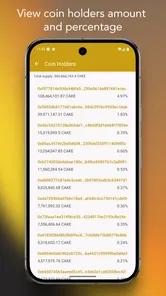
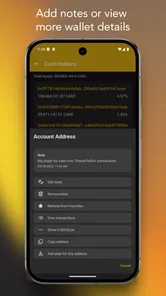
The multiple-account angle is most useful when I’m checking different wallets for different reasons—for example, separating personal activity from a shared project or keeping an eye on a wallet used for a particular token. I’d label or otherwise record each address outside the app as I set up my routine, then verify the address carefully before interpreting a balance. A blockchain lookup is only as helpful as the address entered; one character off can send me investigating the wrong history.
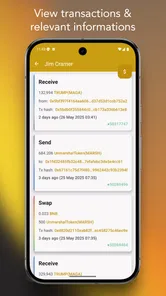
For a realistic check, imagine I send a payment and want to confirm whether it has appeared at the destination. I can use an explorer to inspect the transaction rather than repeatedly refreshing a wallet app or messaging the recipient. I’d compare the transaction identifier and destination address, then read the status and details shown on the chain. That is a useful confirmation workflow, but it isn’t the same as reversing a transfer or proving that a token is legitimate.
Reading results without over-interpreting them
When I inspect a balance or transaction, I try to separate what the record shows from what I might wish it meant. A visible transfer tells me that activity is recorded for an address; it does not establish that the sender is someone I know, that a token has dependable value, or that a project is safe. This distinction is especially important if I’m checking an unfamiliar token after seeing it in a wallet. I would treat the explorer as a way to investigate details, not as a trust badge.
For people who follow a token over time, transaction history can be more informative than one glance at a displayed price. I’d compare activity at different moments and verify that I’m looking at the intended token record, rather than drawing a conclusion from a name alone. Still, an explorer is not a complete investment analysis tool: on-chain movement offers clues, not a full explanation of a project’s finances or prospects. If I need that broader picture, I’d use other sources as well.
Where an explorer fits among crypto tools
Compared with a wallet, an explorer is for inspection, not for holding assets or authorizing transfers. Compared with a general market-tracking app, its value is in tracing on-chain activity rather than giving a broad portfolio picture. I’d keep it alongside a wallet or exchange app when I need to investigate a transaction, but I wouldn’t replace those tools with it. Likewise, a desktop browser explorer may suit someone who wants a larger view or already has a preferred site-based workflow.
The choice between this app and a browser is mostly about habit and convenience, not about assuming one is inherently more authoritative. A browser-based explorer may be enough for occasional lookups and avoids paying for a dedicated app, while a phone app can make sense if I check the same chain and several accounts often. Someone who routinely moves between networks should look at a broader multi-chain option instead. I would choose based on the network and workflow I actually need, not on the general appeal of having another crypto app installed.
One useful habit is to treat token pages as evidence about on-chain activity, not as a recommendation to buy. A token’s visible history can help me check whether transfers are occurring, but it cannot by itself tell me whether a project is trustworthy or whether a quoted market value is a good deal. For decisions involving money, I’d cross-check important details instead of relying on a single screen.
Practical limits and fit
The app is aimed at Binance Smart Chain activity, so it is not the right all-purpose choice if I need one place to inspect several unrelated networks. Its focused scope can be an advantage when I mainly follow this chain, but a multi-chain explorer is a better fit for a portfolio spread across networks. I’d also avoid treating “real-time” visibility as a guarantee that every update appears instantly; when timing matters, I would check again before acting.
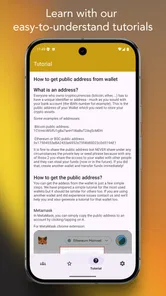
There is a learning curve even with a friendly interface. People new to blockchain may see technical records without knowing which details answer their question, while experienced users may want to compare the app’s view with a familiar browser explorer before relying on it for an important check. I’d start with a low-stakes transaction, learn how I identify its relevant fields, and only then make the app part of a more consequential routine. That approach reduces the chance of mistaking a displayed detail for a complete explanation.
The listed age rating is Everyone, and the current version is 3.6, with Android 7.0 as the minimum operating-system requirement. Those details help with basic compatibility, but they don’t change the central buying question: will I use a dedicated mobile view often enough to justify paying for it? A casual user who checks a transaction once in a while may prefer a browser-based alternative, while someone who routinely reviews several BSC accounts may value having a focused app ready on a phone.
Who is likely to get value from it?
I can see the strongest fit for someone who already knows why they need a blockchain explorer and regularly checks activity on Binance Smart Chain from a phone. That could be a small business owner confirming incoming payments, a person keeping tabs on separate project wallets, or a user who wants to inspect a transfer without opening a desktop browser. The benefit is the focused, repeatable lookup workflow; it is not a substitute for understanding what a transaction means.
I’d be more hesitant if I were a beginner expecting the app to teach me how to buy crypto, manage a portfolio, or decide whether a token is worth holding. I’d also skip it if my activity is mostly on other networks or I only look up a transaction once in a while. In those cases, a free-to-access browser tool or a multi-chain service may be more practical, depending on the specific features and costs available there. The right alternative is the one that covers the networks I use and the checks I actually make.
Wrapping Up
In conclusion, the Binance Smart Chain Explorer is a must-have tool for anyone involved in cryptocurrency. Whether you’re a seasoned trader or a curious newbie, it provides a comprehensive overview of the Binance Smart Chain with ease and efficiency. So next time you’re wondering what’s going on in the crypto world, just fire up the Explorer and start exploring. Trust me, it’s like having a superpower right at your fingertips.
My recommendation is more selective: I’d consider it if I regularly inspect Binance Smart Chain transactions across multiple accounts and prefer doing that on a phone. I’d skip it if I need broad multi-chain coverage, expect a wallet or trading platform, or only need occasional lookups and don’t want an upfront purchase plus optional in-app spending. The app is rated for Everyone, but the subject matter still calls for care: checking a transaction is useful, while acting on unfamiliar token information deserves independent judgment.
Binance Smart Chain Explorer Frequently Asked Questions
Does Binance Smart Chain Explorer cost anything to download?
Binance Smart Chain Explorer is a paid app, listed at $2.49, so check the price shown in your app store before downloading. In-app purchases are also available, ranging from $1.99 to $19.99 per item. These app costs are separate from any blockchain network fees that may apply when making transactions through other services.
What devices can run Binance Smart Chain Explorer?
The app is available for Android and requires Android 7.0 or later. Its Everyone content rating means it is suitable for a broad audience, although the finance-focused features are most useful to people who already work with cryptocurrency and blockchain transactions. Check your device’s operating system and the app-store compatibility details before installing.
Who makes Binance Smart Chain Explorer, and is it well established?
Binance Smart Chain Explorer is a finance app developed by Crapps Crypto Apps S.R.L. It has a 3.9 average rating from around 90 ratings, with 1K+ installs. Those figures offer a general sense of its reception and reach, but they do not guarantee that the app will suit every user or every device.
What is Binance Smart Chain Explorer and what does it offer?
Binance Smart Chain Explorer is a comprehensive tool designed to help users explore, analyze, and interact with the Binance Smart Chain (BSC) network. It offers features such as transaction tracking, contract interaction, and wallet management. Users can view the latest blocks, transactions, and smart contracts, making it an essential tool for anyone looking to delve deeper into the BSC ecosystem. Its store summary focuses on viewing BSC transactions for multiple accounts.
How can I track my transactions using Binance Smart Chain Explorer?
Tracking transactions on Binance Smart Chain Explorer is straightforward. Simply enter your transaction ID, wallet address, or contract address into the search bar. The explorer will provide detailed information about the transaction, including its status, block number, and timestamp. This feature is particularly useful for users who want to verify the completion of their transactions or analyze their transaction history.
Pros
- Fast transaction processing.
- Low transaction fees.
- User-friendly interface.
- Supports multiple tokens.
- High security standards.
Cons
- Limited support for certain tokens.
- Not beginner-friendly.
- Occasional network congestion.
- Limited customer support.
- Requires technical knowledge.