Bible Study: KJV, Audio & AI
- 186.00
- 4.8
- Installs
- 1.00M
- Price
- Free

Screenshots
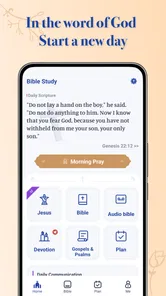
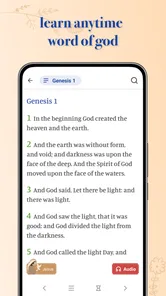
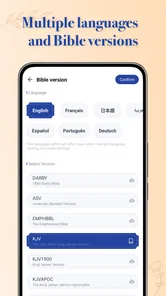
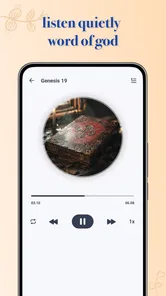

Analysis by Reviewed
Bible Study - Verse & Audio is aimed at people who want scripture close at hand, whether they prefer reading quietly, listening while busy, or building a small daily habit. I find that mix useful because it lets me choose a format to suit the moment instead of treating Bible study as something that only happens when I can sit down with a book. The app is free to start, though some in-app purchases range from $1.99 to $74.99 per item, so I’d check the purchase options before making it part of a long-term routine.
Who benefits from a flexible study routine
I’d recommend this app first to someone who wants a gentle way into regular Bible reading, or to a reader who already has a routine but would like listening, prayer, and a daily devotional alongside the text. It is also a practical option for households where people prefer different ways of engaging: one person can read a passage, while another may find listening more approachable. Its broad mix is most useful when those features support one another rather than competing for attention.
A realistic weekday use might begin with a short reading before leaving home, followed by listening to a passage during a familiar, low-risk chore. In the evening, I could return to the text, look up a phrase that stayed with me, and use a devotional or prayer to close the session. That sequence gives the app a clear role at different points in the day without requiring a long block of uninterrupted time.
Small choices that make study more focused
One useful approach is to decide what you want from a session before opening the app: encouragement, context for a particular passage, or simply time to read. If I’m exploring a topic, I’d search for a passage, read the surrounding verses, and only then compare translations. This order helps prevent a familiar trap in Bible apps: jumping between search results and versions until the original question gets lost.
I’d also keep AI Interpret in a supporting role. It can be useful for putting a question into words or identifying an angle to examine, but I wouldn’t treat a generated explanation as the final word on a passage. For a difficult or sensitive subject, I’d check the context and consult trusted study materials or a knowledgeable person. The convenience is real, but convenience should not be mistaken for authority.
When a simpler or deeper tool may suit you better
Compared with a basic digital Bible that focuses mainly on finding and reading chapters, this app brings listening, devotionals, prayer, and AI interpretation into the same study routine. That breadth is convenient if I want one place to move between those activities. On the other hand, readers who already rely on a particular study Bible, commentary collection, or church resource may prefer those tools for deeper scholarly context. I would use this app for accessible everyday reading and reflection, not assume it replaces every specialist resource.
It is especially suited to someone who wants a flexible entry point: a new reader can start with a short devotional, while a regular reader can use search and translation comparisons to explore a topic. If you need a very focused reading experience with no extra prompts or paid options to consider, a simpler Bible reader may feel more comfortable. The right choice depends on whether the bundled tools are useful to you or merely add clutter.
More From Our News Desk

Weather by Xiaomi Review: Clear at a Glance, Less Clear Up Close

X Under Pressure: Can It Recover When Posting Goes Wrong?

Clash of Clans Is Won Between the Battles

Android Auto Makes the Case for Quieter Car Software

MobiOffice: Transforming Mobile Productivity with Seamless Integration

EA SPORTS FC™ Mobile Soccer: Redefining Mobile Sports Gaming
Features that Stand Out
First off, let’s talk about the key features that make Bible Study - Verse & Audio a standout choice. You get access to multiple versions of the Bible, which means whether you're a fan of the King James Version or prefer the New International Version, this app has got you covered. Switching between versions is seamless, allowing you to compare texts and get a broader understanding of the scriptures.
Another cool feature is the audio capability. Yes, you heard that right—audio! This is perfect for those moments when you're on the move—say, during your morning jog or while cooking dinner. The app provides a soothing voice that reads out the verses to you, making it easy to absorb the Word without having to stare at your screen.
Personal Experience
Honestly, the first time I used the app, I was impressed by how intuitive and user-friendly the interface was. Navigating through the app was a breeze. The search functionality is top-notch, allowing you to find specific verses or topics with just a few taps. I can’t stress enough how much time this has saved me during study sessions.
For a less rushed session, I find it helpful to search a topic, note a passage that catches my attention, then check how another available translation expresses it. The useful trade-off is that comparison encourages slower reading, but checking many passages and versions in one sitting can become distracting. I’d keep a question in mind before searching so the extra options support the study instead of turning into aimless browsing.
Moreover, I love the daily verse feature. Every morning, I get a new verse delivered to my home screen, which is an inspiring way to start the day. It’s like having a daily motivational boost that gets you thinking and reflecting from the get-go.
Making it work in a busy day
A realistic routine might be to read the daily verse before work, then listen to a longer passage while doing a chore later. Audio is handy when my hands are occupied, but it is not ideal for every setting: traffic, noisy surroundings, or a task that needs close attention can make listening difficult. I’d choose a quiet moment for reflection and use audio only when it genuinely fits the activity, rather than expecting it to replace focused reading.
For heavy use, such as moving between search, several translations, audio, and interpretation in one sitting, I would keep the session simple and return to a passage in stages. The app’s mix of tools is a strength, but frequent switching can break concentration. A small workflow helps: start with a reading, use search to follow one question, and finish with a short prayer or devotional reflection. That makes the range of features feel purposeful rather than busy.
Speed, stability, and device fit
I’d expect straightforward reading and searching to be the least demanding parts of the experience, while audio and switching among study tools naturally involve more activity. I can’t promise identical speed on every phone; available storage, connection quality, and the device itself can affect how any reading app behaves. If audio pauses or the app feels slow, I’d first try a simpler session, close other demanding apps, and reopen it before assuming the content or device is at fault.
The app is rated for Everyone and supports devices running Android 8.0 or later. Cheryl Cook is the developer, and version 2.0.9 is the current release. It has a 4.8 average from around 4,100 ratings and over 1 million installs, which suggests it has found a broad audience, though those figures cannot tell me whether it suits a particular reading tradition or study style. It is free to download, with optional purchases, so I’d explore the basic routine first and only consider paying if a specific offering is useful to me.
What to expect from longer sessions
When I use several functions in one sitting, I’d plan the session around the passage rather than trying to test every tool. Reading first gives me the text to return to if search or interpretation broadens the discussion. Audio is a different kind of attention: I can follow it while doing a simple task, but I would not rely on it to catch every detail when my mind is elsewhere. For close study, stopping the audio and reading the passage directly is the more dependable choice.
For someone wondering whether this can replace a printed Bible, I’d say it depends on the setting and the purpose. A phone is handy when I’m away from home, want to search quickly, or need to listen; a printed edition can be more comfortable for extended reading, note-taking, and avoiding screen distractions. I see the app as a companion rather than a reason to give up a format that already works well.
Keeping the experience dependable
My practical advice for avoiding frustration is to make the first session modest. Try reading and searching before building a routine around audio or several tools at once. If the app behaves differently on a particular device, simplifying what is open and trying again is a sensible first step; it also helps distinguish an occasional interruption from a feature that does not suit your normal environment. I would not judge the whole reading experience by one difficult listening session.
Device fit matters most for people using an older phone or reading in places with an unreliable connection. The minimum supported Android version is 8.0, so I’d check that before installing on an Android device. If your phone is close to its limits, a lighter, text-only reader may be a better everyday choice. On a compatible device, I’d still treat listening as an optional convenience, not the only way to access a passage.
Sharing without losing the study
If you’re anything like me and enjoy sharing insights with friends or family, the app's sharing feature is a big plus. You can easily share verses via social media or messaging apps, which is fantastic when you come across a verse that resonates deeply and just has to be shared.
I’d use sharing selectively: sending one passage with a personal note can invite a meaningful conversation, while forwarding verses constantly can make reflection feel more like scrolling through a feed. A helpful habit is to read the surrounding passage before sharing a single line, so the message keeps its context. That extra pause is worthwhile when a verse is being used to encourage someone or discuss a difficult subject.
Comfort and the final call
And for all the night owls out there, the app has a night mode that’s easy on the eyes in low-light conditions. It’s these little thoughtful touches that make using the app a pleasant experience.
For evening reading, I’d pair night mode with a short passage and a deliberate stopping point rather than letting a study session stretch on when I’m tired. The app works best for me as a flexible companion for reading, listening, and everyday reflection, not as a replacement for every printed Bible or in-depth reference. If that balance sounds right, it is worth trying; if you want a strictly minimal reader or rely on specialist commentary, another option may fit better.
In conclusion, whether you’re a devoted Bible reader or someone just starting your spiritual journey, the Bible Study - Verse & Audio app is worth checking out. It brings the Bible to life in a modern, accessible way that suits today’s fast-paced lifestyle. So why not give it a try and see how it enriches your spiritual practice?
Bible Study: KJV, Audio & AI Frequently Asked Questions
What does the app’s Everyone age rating mean for families?
Bible Study - Verse & Audio is rated Everyone, so its age classification is suitable for a broad audience. Families may find its Bible reading, listening, devotionals, and prayer features useful for shared or individual study. As with any app, parents can decide whether its content and tools fit their children’s needs and how they want the app used.
What is Bible Study - Verse & Audio, and who develops it?
Bible Study - Verse & Audio is a Books & Reference app developed by Cheryl Cook. Its focus is Bible reading and listening, with daily devotionals, prayer, and an AI Interpret feature. It may suit people looking for a single app centered on scripture and related study activities, whether they want to read a passage, listen, or spend time with a devotional.
What features does the Bible Study - Verse & Audio app offer?
The Bible Study - Verse & Audio app offers a comprehensive suite of features designed to enhance your study and understanding of the Bible. These features include access to multiple translations of the Bible, daily devotionals, audio versions of scripture, and an extensive library of study aids such as commentaries and concordances. Additionally, the app offers personalized reading plans and the ability to highlight, bookmark, and take notes on verses.
Is the Bible Study - Verse & Audio app free to use?
While the Bible Study - Verse & Audio app is free to download and offers a variety of features at no cost, it also includes optional in-app purchases. These purchases provide access to premium features such as ad-free usage, additional study resources, and exclusive content. Users can choose to subscribe to these premium features on a monthly or yearly basis. In-app purchases range from $1.99 to $74.99 per item, so it is worth reviewing the available options before buying.
Can I use the Bible Study - Verse & Audio app offline?
Yes, the Bible Study - Verse & Audio app offers offline capabilities. Users can download specific translations of the Bible and other resources to their device for access without an internet connection. This feature is particularly useful for individuals who want to study the Bible in areas with limited connectivity or while traveling.
Pros
- User-friendly interface
- Extensive verse library
- Offline access available
- Audio features enhance learning
- Customizable reading plans
Cons
- Ads in free version
- Limited features without subscription
- Occasional app crashes
- Requires internet for updates
- Some audio features need improvement











