Bible Note Taker & Recorder
- 76.00
- 4.6
- Installs
- 500.00K
- Price
- Free

Screenshots

Analysis by Reviewed
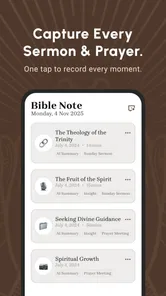
I opened Bible Note Taker & Recorder with a familiar problem: I often leave a sermon with a page full of hurried phrases, half-finished thoughts, and one or two references I cannot place later. A normal voice recorder preserves the sound but leaves me with a long file to search. A notes app gives me control, but I have to type while listening. This app sits between those two habits, turning spoken Bible-study material into something I can revisit as text and use for review.
That focus makes it more useful than a general note-taking tool for a particular kind of reader. I can begin with a sermon, devotional talk, Bible class, or my own spoken reflection, then move toward a shorter summary and study cards. The important idea is not simply recording. It is the handoff from spoken material to organized study, and that is where the app earns its place.
From a live sermon to a study session
I use this section to look at the first few moments of the workflow: how quickly I can get from wanting to capture a talk to being ready to listen, and what expectations make sense before relying on it. The key is to keep the setup modest and begin with a clear topic, so the recording has a useful purpose when I return to it.
Starting with the right kind of input
The best starting point is a situation in which my attention belongs somewhere else. During a sermon, I would rather listen than stare at a keyboard. With this app, I can capture the session first and deal with the written material afterward. That changes the pressure of note-taking: instead of trying to decide what deserves a note in real time, I can stay with the speaker and return to the content when I am ready to study.
I also found the workflow suitable for shorter recordings. A personal prayer reflection, a discussion after church, or a quick explanation of a passage can become a useful reference without requiring a separate notebook. The app is listed in Books & Reference rather than as a general productivity tool, and that distinction matters. Its value appears when the recording has a clear Bible-study purpose, not when I simply need a place for every kind of meeting.
Before recording, I would make one small habit part of the process: say the topic or passage aloud at the beginning. Even a simple opening such as the book and chapter gives the later transcript a useful anchor. It also makes the recording easier to recognize if I return to several sessions in one week. This is a practical improvement to the workflow, not a flashy feature, but it makes the resulting notes much easier to use.
Recording without abandoning the room
The recording stage is deliberately simple in concept. I start the session, put my attention back on the sermon, and let the app collect the spoken material. That is a better fit for listeners who want a fuller record than handwritten notes provide. It is also a different experience from manually building an outline, because the first pass is about preserving the message rather than interpreting it.
More From Our News Desk

Weather by Xiaomi Review: Clear at a Glance, Less Clear Up Close

X Under Pressure: Can It Recover When Posting Goes Wrong?

Clash of Clans Is Won Between the Battles

Android Auto Makes the Case for Quieter Car Software

MobiOffice: Transforming Mobile Productivity with Seamless Integration

EA SPORTS FC™ Mobile Soccer: Redefining Mobile Sports Gaming
There is a trade-off here. A transcript is only as helpful as the audio that feeds it. Distance from the speaker, overlapping voices, background noise, and unusual names or theological terms can all make the written result less dependable. I would still keep a few handwritten cues for especially important references. Those quick marks act as a safety net when I later need to check a phrase or locate the main argument.
That leads to one of the app's less obvious strengths: it encourages a two-pass method. On the first pass, I listen and capture. On the second, I read, correct my understanding, and decide what deserves a lasting place in my study routine. Trying to force the app to replace attention altogether would be a mistake. It works better as a memory aid than as a substitute for listening.
Moving from audio to readable text
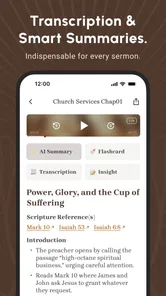
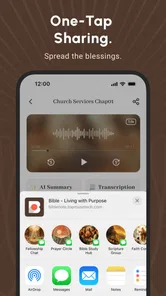
After recording, the important handoff is transcription. The sound file is no longer the only form of the session; I can work with words on the screen. That is useful when I remember a concept but not the exact moment it was discussed. Reading also makes it easier to scan a long teaching session than repeatedly dragging through an audio timeline.
I would treat the transcript as a working document, not an unquestionable record. Spoken language contains interruptions, repeated phrases, references, and context that automated text can handle imperfectly. A sensible routine is to read the transcript once for the overall meaning, then revisit the passages that will influence a lesson, personal decision, or written note. That small review step protects against building a conclusion on a misheard word.
For Bible study, accuracy has an extra dimension. A mistaken book name, chapter number, or theological term can change the usefulness of a note. My advice is to verify every reference that becomes part of a final study outline. The app can reduce the labor of getting material onto the page, but it should not be the final authority on what a speaker said or what a passage means.
Letting the summary narrow the session
Once the text is available, the next handoff is the AI summary. This is where a long recording can become a shorter review aid. I see the summary as a first draft of the session's shape: the central theme, supporting ideas, and practical direction may become easier to recognize after the spoken detail has been condensed.
The benefit is strongest when I am returning to several recordings and need to decide which one deserves deeper attention. Instead of replaying everything immediately, I can use the shorter version to refresh my memory and choose a section to investigate. That makes the app useful not only on the day of a sermon, but also later in the week when I have limited study time.
There is a clear limitation in relying on compression. A summary necessarily leaves things out, and the details it removes may be precisely the ones I care about: a qualification, an example, a pastoral nuance, or a connection to another passage. I would never use the summary as a replacement for the full transcript when preparing to teach. I use it as a map back to the material.
Turning ideas into flashcards
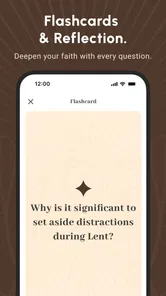
The flashcard stage gives the workflow a more active ending. Instead of only rereading a summary, I can approach the material as questions and answers. That is a meaningful shift because recognition is easier than recall. Seeing a familiar paragraph can create the feeling that I know it, while trying to answer a question exposes what I actually remember.
I find this most useful for recurring themes, definitions, key references, and the practical points I want to carry into the week. Flashcards can also help someone prepare for a small-group discussion, provided the cards are reviewed critically. If a generated card is vague or combines several ideas, I would rewrite it in my own words rather than memorizing an awkward prompt.
A helpful routine is to separate cards into two mental groups: facts I want to remember and questions I want to keep thinking about. The first group supports recall. The second prevents Bible study from becoming a list of detached answers. This is one of the app's more valuable possibilities, because the recording, transcript, summary, and cards can form a chain from listening to reflection instead of ending with passive storage.
Where the handoffs matter most
The app's workflow has several transitions, and each one changes the kind of attention I need to give. Recording asks me to be present. Transcription asks me to check wording. Summarizing asks me to judge what matters. Flashcards ask me to retrieve and apply it. If I skip those distinctions, I may mistake automation for understanding.
For example, after a Sunday service I might record the sermon, review the transcript that evening, and mark the two ideas that connect most directly with my current concerns. The next day, I could use the summary as a quick refresher and review the cards later in the week. By the weekend, I would have a compact record of the message and a better sense of which points stayed with me.
This sequence also explains why the app is not simply a recorder with extra buttons. Its usefulness comes from moving the same material through different forms. Audio preserves context, text supports searching and editing, a summary reduces the reading burden, and flashcards encourage recall. Each handoff solves a different problem, although each also introduces a new opportunity for an error or oversimplification.
What the finished result feels like
At the end of a successful session, I have more than a recording I may never replay. I have a readable account of the teaching, a shorter route back into its main point, and study prompts that can keep the subject active. That is a satisfying result for anyone whose notes usually disappear into a drawer or whose audio files become impossible to revisit.
The result is especially practical for people who learn well by hearing but need text to organize their thoughts. It can also help readers who want a repeatable personal-study routine without manually copying every important sentence. Families, small groups, and individual learners may each use the output differently, but the common advantage is the same: one spoken session can support several later forms of review.
I would still keep the original recording when the session matters. The transcript and summary are working layers, not replacements for the source. If a point seems unclear, the audio provides context; if the summary feels too confident, the transcript lets me inspect the wording. Keeping those layers together is a simple way to make the final notes more trustworthy.
Everyday friction I would plan for
The first break in the flow is audio quality. A quiet personal reflection is a friendlier test than a crowded room, a distant speaker, or a discussion with several people talking. Anyone choosing this app for regular church use should begin with a short trial recording and inspect the text before depending on it for important notes.
The second break is interpretation. AI can make a summary sound neat even when the source is complicated. That polished appearance can tempt me to accept a simplified reading too quickly. For serious study, I would compare the summary with the transcript and the relevant Bible passage. The more consequential the conclusion, the less I would rely on a condensed version alone.
The third break is workflow discipline. Recording everything can create a larger backlog rather than a better study habit. I get more value when I give each session a purpose and return to it soon. If I only collect recordings without reading, checking, or reviewing them, the app becomes an archive instead of a learning tool.
There is also a cost consideration. The app is free to start, while in-app purchases range from $4.99 to $69.99 per item. I would explore the basic experience first and decide whether the complete workflow genuinely fits my habits before paying for additional access. That is particularly important for occasional users who may only record a sermon now and then.
Who will appreciate it, and who should skip it
I would recommend it to churchgoers who regularly want a written trail of sermons, Bible-class participants who struggle to keep up with handwritten notes, and self-directed readers who enjoy turning spoken reflections into review material. It is also a good match for someone who likes the idea of flashcards but does not want to create every prompt manually.
I would be more cautious if I mainly need a general-purpose recorder, a collaborative notebook, or a fully manual research system. A standard recorder may be simpler when preserving audio is the only goal. A conventional notes app may be better when I need precise formatting, extensive cross-referencing, or complete control over every sentence. Someone who dislikes AI-generated condensation may also prefer a manual outline, even if it takes longer.
The app is aimed at Everyone, which makes its subject accessible to a broad audience, but the practical fit still depends on expectations. It is not a substitute for pastoral judgment, careful interpretation, or personal engagement with Scripture. I see it as a tool for capturing and revisiting study material, not as an authority that decides what a passage should mean.
Device details and overall value
Note AI Pte. Ltd. develops the app, which currently appears as version 1.6.1 and works on Android 7.0 or later. Its reach is already substantial, with over 500 thousand installs, and its average rating is 4.6 from around 1.2 thousand ratings. Those figures suggest that the concept is resonating with a meaningful group of users, while the version information is useful for anyone checking compatibility before installing.
The app is free, and its content rating is Everyone. That combination lowers the barrier to trying the recording-to-study workflow, although the optional purchase range means I would still inspect the available choices before making it part of a long-term routine. It was released on December 15, 2025, so I would keep expectations realistic about an evolving product and pay attention to how later updates affect the experience.
My final impression is positive but specific: this is most valuable when I follow the entire chain from listening to review. The recording alone is ordinary; the transcript alone is convenient; the summary alone can be too thin; and flashcards alone can feel disconnected. Together, they create a practical path for turning a sermon or Bible reflection into something I can actually revisit.
My recommendation is to try it as a second-pass study companion, not as an automatic replacement for attention. Start with a short, clear recording, say the topic aloud, check the transcript, question the summary, and edit any flashcards that do not sound like your own understanding. If that routine helps you remember and apply what you heard, Bible Note Taker & Recorder offers a thoughtful bridge between spoken teaching and everyday Bible study. If you only want reliable audio storage or complete manual control, a simpler alternative may serve you better.
Bible Note Taker & Recorder Frequently Asked Questions
Is Bible Note Taker & Recorder free to download and use?
Bible Note Taker & Recorder is free to download, so you can try its Bible study tools without paying upfront. It also offers in-app purchases, with items priced from $4.99 to $69.99, which may provide access to paid features or options. Check the purchase details in the app before confirming anything, especially if you plan to use it regularly.
Who makes Bible Note Taker & Recorder, and what devices can run it?
Bible Note Taker & Recorder is made by Note AI Pte. Ltd. It is a Books & Reference app for Android, with a minimum operating system requirement of Android 7.0. The app is rated for Everyone, making its stated age category suitable for a broad audience. Check that your device meets the requirement before downloading, and make sure you select the correct app for your platform.
What is Bible Note Taker & Recorder used for?
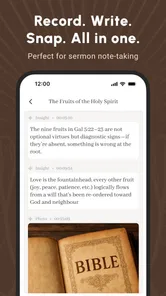
Bible Note Taker & Recorder is designed to help users capture and organize thoughts while reading or studying the Bible. You can write personal notes, record reflections, save questions, and keep related ideas together for future reference. It may be useful for private devotionals, group Bible studies, sermons, teaching preparation, or anyone who wants a more organized way to document spiritual insights.
Can I record audio notes as well as type written notes?
The app’s main appeal is the combination of written Bible notes and audio recording, allowing you to choose the format that best suits the moment. Typed notes are convenient for detailed study and searchable ideas, while recordings can be useful after a sermon or when you want to speak naturally. Its store summary also highlights sermon recording, transcription, AI summaries, and flashcards for Bible study. Before downloading, check the current app listing to confirm supported recording features and limits.
Does Bible Note Taker & Recorder work without an internet connection?
Many note-taking functions may remain available offline, which can be helpful when studying in places with weak or unavailable internet access. However, features such as cloud backup, synchronization, account services, or sharing may require a connection. Offline behavior can vary by device and app version, so users who need dependable access during travel should test the app before relying on it exclusively.
Pros
- Quickly capture sermon notes
- reflections
- and Bible study ideas in one place.
- Audio recording can help preserve important explanations for later review.
- Useful for organizing personal study material alongside written notes.
- Convenient for users who prefer combining typing with voice-based note taking.
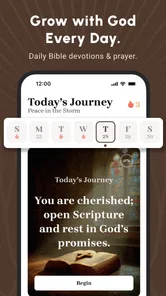
- Can support more consistent devotional habits through easy note access.
Cons
- Audio recordings may consume considerable storage during long sessions.
- Recording quality depends heavily on the phone’s microphone and surroundings.
- Notes may require manual organization if many studies are saved over time.
- Some features could be limited without an internet connection or account access.
- Users should review privacy settings before storing personal or sensitive reflections.











