Bible Hub
- 446.00
- 4.4
- Installs
- 500.00K
- Price
- Free

Screenshots
Analysis by Reviewed
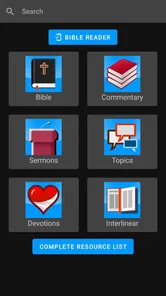
I tend to judge a Bible app by what happens when I need an answer quickly, not by how many tools it can list. Bible Hub is useful in that moment because it brings Bible Hub’s online resources into an app, making it easier to move from a passage to study material on a phone. That approach suits readers who want a reference point close at hand, though it also means the quality of the experience is tied to being able to reach the service.
When a connection changes the experience
The app is best understood as a mobile doorway to Bible Hub rather than a self-contained digital bookshelf. When the network is working, I can look up a verse and continue into related study resources without switching between several separate reference apps. That convenience matters when a question comes up during a conversation or while preparing a lesson. If reception is weak, however, loading and moving between resources can become less dependable than reading material already stored on a device.
I would keep that distinction in mind before relying on it for a long trip, a place with patchy reception, or a service where phone access is limited. The app’s purpose is quick access to the Bible Hub site, so it makes most sense when I expect to be online. For uninterrupted reading in every setting, a Bible app designed around downloaded text may be a better fit.
Small-screen use and a practical routine
On a phone, a focused lookup is a more comfortable task than treating the app as a replacement for a desk full of study books. I might check a passage before a discussion, compare a phrase while reading, then return to my main reading app or printed Bible. That keeps the phone session purposeful and avoids turning a short question into an open-ended browsing session.
A realistic routine would be to note the passage I want to understand, open the app while connected, and use its study material to clarify a particular word or context. I would then write down the useful point before leaving the screen. This is especially helpful for group leaders, students, and readers who like to prepare a question in advance. Someone who mainly wants a quiet, distraction-free reading interface may prefer a simpler Bible reader.
When Bible Hub fits into a wider study routine
I find the app most useful when I treat it as a reference stop rather than the place where every part of my Bible routine has to happen. A printed Bible or a familiar reading app can remain open for the main passage, while this app serves the narrower job of checking wording or consulting supporting material. That division is practical: it lets me benefit from the depth of an online reference without expecting a phone screen to replace every study habit.
It can also help to decide what would count as a satisfactory answer before opening the app. If I am trying to understand one phrase, I can compare the available wording and then look for context, rather than follow every related topic that catches my eye. That small boundary keeps research from expanding into a long session when I only have a few minutes. Readers who enjoy broad exploration may welcome that branching; anyone easily distracted by a chain of links should set a stopping point.
More From Our News Desk

Weather by Xiaomi Review: Clear at a Glance, Less Clear Up Close

X Under Pressure: Can It Recover When Posting Goes Wrong?

Clash of Clans Is Won Between the Battles

Android Auto Makes the Case for Quieter Car Software

MobiOffice: Transforming Mobile Productivity with Seamless Integration

EA SPORTS FC™ Mobile Soccer: Redefining Mobile Sports Gaming
Your Portable Bible Companion
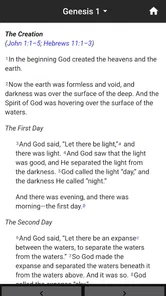
Imagine having a comprehensive Biblical library in your pocket. That’s what Bible Hub offers. The app is a treasure trove for anyone seeking to dive deep into the scriptures. From multiple translations to commentaries, lexicons, and even sermons, it’s like carrying an entire theological library with you, minus the weight. I was particularly impressed by the vast number of translations available. Whether you’re a fan of the King James Version or prefer something more contemporary like the New International Version, Bible Hub has got you covered.
Features Galore
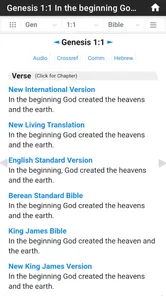
The app isn’t just about reading the Bible. It’s packed with tools that make studying the Scriptures more engaging. The built-in search function is a lifesaver when you’re trying to locate a specific verse or topic. I found the parallel Bible feature particularly useful; it allows you to view different translations side-by-side. This is great for comparing interpretations and getting a deeper understanding of the text.
Another feature worth mentioning is the interlinear Bible. For those of us who enjoy digging into the original languages of the Bible, this tool is invaluable. It breaks down the Hebrew and Greek texts, providing word-by-word translations. Let me tell you, it’s like unlocking a new layer of meaning in the scriptures.
Making comparisons without losing the thread
Translation comparisons work best for me when I start with a specific word or sentence that seems important, rather than comparing a whole chapter without a question in mind. A change in phrasing can point toward something worth investigating, but it does not by itself explain why translators made that choice. I use the side-by-side view as a way to notice differences, then turn to context and other study material before drawing a conclusion.
The same caution applies to the interlinear material. Seeing a word-by-word rendering can make a passage feel more accessible, but original-language study involves choices and context that a quick mobile lookup cannot settle on its own. I would use it to form better questions, not as a substitute for careful study or a reliable teaching resource. That makes the tool helpful for curious readers while keeping expectations realistic.
Using study tools without overloading yourself
The range of material is a strength, but I find it helps to arrive with a specific question. For example, when a verse feels unclear, I can compare translations first, then consult a commentary or lexicon if I still need context. That sequence is more manageable than opening every resource at once, especially on a small screen. The interlinear view can also be most useful as a prompt for further study, rather than a shortcut to settling a difficult interpretation on its own.
This makes the app a better companion for curious readers than for someone who wants a guided course with a fixed teaching path. Its breadth invites exploration, but the reader has to choose what to consult and decide when to stop. If I need a structured devotional schedule or a polished reading-only experience, I would compare it with apps built specifically around those priorities rather than assume one tool can do everything equally well.
Intuitive and User-Friendly
One of the things that stood out to me was the app’s user-friendly interface. It’s intuitive and easy to navigate, making it accessible to both tech-savvy users and those who might be less familiar with digital apps. The layout is clean and not cluttered, which I appreciate. It allows you to focus on what matters most – the Word of God.
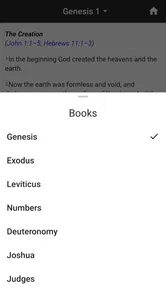
Customization options are also plentiful. You can adjust font sizes, choose between different themes, and even set up reading plans. Whether you’re looking to read the Bible cover to cover or focus on specific books, Bible Hub offers the flexibility to tailor your reading experience.
A realistic session, from question to takeaway
Suppose I am preparing for a small-group discussion and someone has asked about a phrase in a passage. Before the meeting, I can bring up the passage, compare translations, and check a commentary or lexicon if the wording still seems unclear. I would keep a short note with the explanation I want to raise, rather than rely on remembering a trail of pages later. This is a good fit for preparation in a quiet moment with a steady connection, not necessarily for searching in the middle of a fast-moving conversation.
For a reader just starting to explore the Bible, the same workflow can make a difficult passage less intimidating: begin with the text, use a comparison to spot questions, and consult one supporting resource at a time. The trade-off is that the app offers access to material rather than deciding which explanation is best for you. If you want a teacher-led sequence or a daily prompt that tells you exactly what to read, a devotional or course-focused alternative will feel more direct.
Staying mindful of network use
Because the experience connects to an online reference service, I treat longer study sessions differently from a quick verse check. If I am watching how much mobile data I use, I would keep searches focused and avoid repeatedly opening resource pages when I only need one answer. On a metered connection, using Wi-Fi for a deeper study session is a sensible habit. The payoff is access to a broad set of materials; the trade-off is that frequent browsing is less predictable than consulting a book already on the shelf.
If a page stalls, my practical first step is to check whether the connection is working, then try the lookup again once it is stable. I would not plan a study session around being able to recover instantly in a dead zone. That limitation is not unusual for an app that connects to an online reference site, but it matters if dependable access is central to your routine.
What to do when a lookup does not load
A stalled page is especially frustrating when I have already found the passage and only want one additional reference. In that moment, I would avoid repeatedly tapping through several resources; first I would check whether other online pages are loading, then retry the specific lookup when the connection is steady. If the question is time-sensitive, keeping the passage reference in a note gives me a simple way to return to it later rather than restarting the search from memory.
This is also why I would not make the app my only plan for a setting where connectivity is uncertain. A paper Bible or reading material already available on the device can cover the basic reading need, while Bible Hub can come back into the routine when service returns. That combination is less seamless than having everything in one place, but it avoids expecting an online reference tool to behave like a local library.
Who will get the most from it
Bible Hub is a free Books & Reference app from BibleHub, rated for Everyone. It has a 4.4 average from around 2,500 ratings and has passed 500,000 installs, which suggests it has found an audience among people looking for a mobile Bible reference. Version 2.2.0 is listed for devices running Android 7.0 or later. I see it as a practical option for readers who want Scripture alongside study resources, especially if they already use Bible Hub on the web.
It is less suitable as my only Bible app if I expect reliable reading without a connection, or if I want a highly guided daily devotional with little searching. The app was released on November 20, 2020, and its central role remains straightforward: quick access to the Bible Hub site. That makes it valuable for targeted study, but not automatically the best choice for every reading habit.
Choosing it over a conventional Bible reader
The main distinction I notice is purpose. A conventional Bible reader often makes the reading itself the center of the experience, while Bible Hub is more compelling when I want to move from a passage into reference material. If I am reading a chapter as part of a daily habit, a reader with a clear text-first layout may be more comfortable. If I have a question about wording or want to examine a passage from several angles, this app’s study orientation has the advantage.
Neither approach is universally better. Someone who depends on access in places with no service should prioritize an option that makes downloaded reading central. Someone who already consults Bible Hub through a browser may appreciate having that reference path on a phone. I would choose based on the task I do most often, rather than on the assumption that the app with the longest list of tools must also be the best everyday reader.
Intuitive and User-Friendly
One of the things that stood out to me was the app’s user-friendly interface. It’s intuitive and easy to navigate, making it accessible to both tech-savvy users and those who might be less familiar with digital apps. The layout is clean and not cluttered, which I appreciate. It allows you to focus on what matters most – the Word of God.
Customization options are also plentiful. You can adjust font sizes, choose between different themes, and even set up reading plans. Whether you’re looking to read the Bible cover to cover or focus on specific books, Bible Hub offers the flexibility to tailor your reading experience.
Connectivity verdict
For me, connectivity is the deciding trade-off, not a minor technical detail. With a reliable connection, the app’s route from a verse to study resources is convenient and can save time switching between separate references. With weak service, that same route can interrupt a thoughtful reading session. A useful habit is to do heavier exploration where Wi-Fi is available and keep quick mobile checks narrow when using cellular data.
If your usual routine happens at home, at work, or somewhere you can expect service, this limitation may barely affect you. If your Bible reading often takes place on a commute, outdoors, or in a building with unreliable reception, I would pair it with a reading option that works independently of the network. That is the clearest way to get the benefits of Bible Hub without letting connectivity decide whether you can read at all.
Final Thoughts
All in all, Bible Hub is a robust and versatile app that caters to both casual readers and serious Bible scholars. It’s like having a personal Bible study assistant with you at all times. Whether you’re at home, at church, or on the go, this app ensures that the Word is always within reach.
In a world where we’re constantly on the move, having instant access to the Bible through an app like Bible Hub is a blessing. It’s not just an app; it’s a companion for your spiritual journey.
Bible Hub Frequently Asked Questions
What is Bible Hub and what features does it offer?
Bible Hub is a Bible reference app that offers quick access to the Bible Hub site. It provides users with access to various versions of the Bible, including translations and commentaries. It features tools for in-depth study, such as concordances, parallel texts, cross references, and sermon helps. Additionally, it offers a search function, daily devotions, and Bible reading plans to enhance your spiritual journey.
What devices can install Bible Hub?
Bible Hub is available for Android devices running version 7.0 or later. Before downloading, check your device’s operating system to make sure it meets that requirement. The app is listed in the Books & Reference category, so it may suit readers looking for a mobile way to reach Bible Hub’s resources. Its age rating is Everyone.
Is Bible Hub available offline?
Bible Hub primarily functions as an online resource, meaning most of its features require an internet connection. However, users can access certain features offline, such as previously downloaded Bible versions and reading plans. For a fully offline experience, consider downloading specific Bible translations to your device within the app.
How user-friendly is the Bible Hub app for beginners?
Bible Hub is designed to be user-friendly for both beginners and seasoned Bible readers. The app provides intuitive navigation with a clean, organized interface. Users can easily search for verses, access commentaries, and utilize study tools. New users may find the tutorials and guides particularly helpful in maximizing the app’s potential.
Does Bible Hub include audio versions of the Bible?
Yes, Bible Hub offers audio versions for some of its Bible translations. This feature is particularly useful for those who prefer listening to the scriptures rather than reading. Users can find the audio option in the app’s menu, allowing them to listen to the Bible while on the go or during their daily activities.
Pros
- Extensive collection of Bible translations.
- Includes Hebrew and Greek texts.
- User-friendly interface.
- Offline access available.
- Daily reading plans offered.
Cons
- Some features require internet access.
- Ads can be intrusive at times.
- No audio Bible option available.
- Limited customization for notes.
- Occasional app crashes reported.











