

Best Budget
- 0.00
- 0.0
- Installs
- 10.00K
- Price
- Free

Screenshots
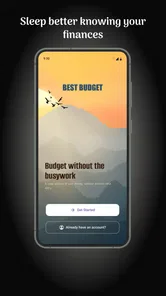
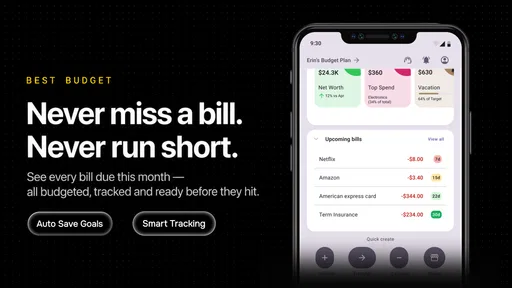
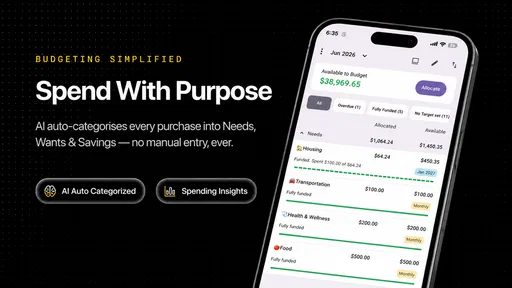
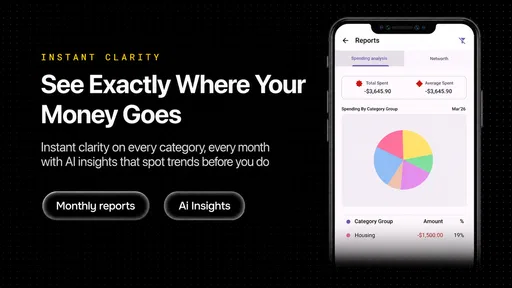
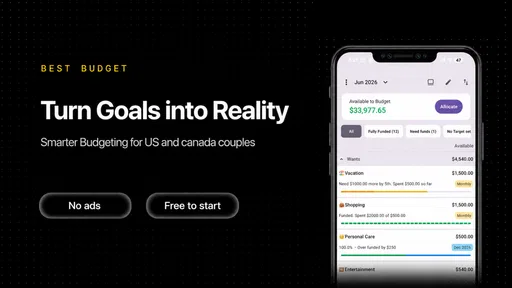

Analysis by Reviewed
I spent time with Best Budget as a personal finance app, looking at where it can fit into an ordinary money routine rather than treating it as a magic fix for spending problems. Its purpose is straightforward: help you record spending, organize a budget, work toward debt reduction, and build savings. That combination makes it more ambitious than a simple expense notebook, but it also means the quality of the experience depends heavily on how consistently you maintain your information.
What immediately makes it approachable is the free entry point. You can try the app without paying for the download, while optional in-app purchases are listed from six dollars to ninety-six dollars per item. That range matters because “free” and “free with optional paid items” are not the same thing. I would begin with the no-cost experience, learn which parts actually help me, and only then consider spending money inside the app.
How Best Budget fits into everyday money management
Best Budget comes from CREXIN Technologies and sits in the finance category. It is suitable for Everyone, runs on Android eight point zero or later, and its current version is 2.1.4. The app was released on March 9, 2026, and has passed ten thousand installs. Those details do not tell me whether it will transform my finances, but they do make the practical entry requirements clear: I need a compatible Android device, and I can test the app without committing to a purchase.
I see the app as a central place for four connected habits. First, I need to notice where money goes. Second, I need to give future spending limits or priorities. Third, I need a plan for debt rather than simply reacting to bills. Finally, I need a repeatable way to move toward savings. Many finance tools concentrate on only one of those jobs, so the appeal here is having a single routine instead of scattering information across notes, spreadsheets, and banking apps.
That does not mean the app replaces a bank account. I would still use my bank for transactions and account security, then use Best Budget as the place where I interpret those transactions and decide what to do next. That distinction is important for anyone expecting automatic banking functionality, investment management, or professional financial advice. This is a budgeting companion, not a substitute for financial institutions or a certified adviser.
The free starting point and what paid value means
The download is free, which lowers the risk of trying it. For a budgeting app, that is useful because the right system is personal: one person may enjoy entering every purchase, while another may abandon the habit after a week. I would not pay at the beginning simply because a feature sounds advanced. I would first test whether the basic workflow is quick enough to use after real purchases and whether the budget categories match my life.
Optional purchases range from six dollars to ninety-six dollars per item. Since those are item prices rather than a promise that every function is included at one level, I would read each purchase screen carefully before confirming anything. The sensible value test is simple: does the paid option save enough time or improve enough clarity to support a habit I already keep? If I am not entering spending regularly, paying more will not solve the underlying problem.
More From Our News Desk

 Gmail
GmailGmail in a Busy Inbox: Who Benefits Most?
From first account to crowded workday, Gmail earns its place through dependable search and flexible sorting—but its best fit depends on how much inbox maintenance you can tolerate.

 Prime Video
Switching to Prime Video: What Changes in Your Viewing Routine
Prime Video can make a compelling second home for streaming, but switching means learning a different catalog, rental layer, and route from browsing to playback.

 Universal TV Remote Control
Universal TV Remote Control Works Best as a Reliable Backup
A phone remote earns its place through quick setup and reliable habits. Here is how to get more from Universal TV Remote Control—and where its limits show.

 Weather - By Xiaomi
Weather by Xiaomi Review: Clear at a Glance, Less Clear Up Close
Xiaomi’s weather app makes everyday forecasts quick to scan, but its calm surface can leave useful details and recovery paths harder to find than they should be.

 X
XX Under Pressure: Can It Recover When Posting Goes Wrong?
A resilience-focused review of X, examining setup, mistaken posts, interruptions, weak connections, and the gaps that matter when recovery needs to be dependable.

 Clash of Clans
Clash of Clans Is Won Between the Battles
Its raids are quick; its community is a long-term project of coordination, teaching, rivalry, and shared responsibility—with all the friction that entails.
Latest News



I also appreciate that the cost question can be handled gradually. Someone who only wants a lightweight spending log may find the free access sufficient. A user managing several goals might eventually see value in an optional upgrade, but that value depends on the exact feature being purchased and how often it will be used. I would treat the free version as a trial of the method, not merely a sample of a premium product.
What the app can add to a normal financial routine
The strongest idea is the connection between daily spending and longer-term goals. Recording a coffee or a transport fare feels minor in isolation, but a budget becomes useful when those small decisions are compared with debt payments and savings targets. I would use the app at two different speeds: a quick check after spending, followed by a calmer weekly review where I look for patterns and adjust the coming days.
A realistic example is a month in which rent, utilities, groceries, and a credit-card payment all compete for attention. Instead of waiting until the account balance feels uncomfortable, I could enter purchases as they happen, group them into meaningful categories, and check whether discretionary spending is reducing room for the debt payment. The useful insight is not merely knowing that I spent money; it is seeing which flexible category can be reduced without touching essentials.
For savings, I would avoid setting an impressive target that leaves no room for normal life. A smaller amount that I can repeat is more useful than an ambitious figure I abandon. Best Budget is well suited to that kind of visual accountability because spending, debt, and savings can be considered together. The trade-off is that the app cannot create spare cash. It can expose choices, but I still have to make them.
A workflow that makes the app more useful
My recommended setup would begin with categories based on decisions, not just descriptions. “Food” can be too broad if groceries and restaurant meals require different responses. Separating fixed essentials from flexible choices makes a budget more actionable. If a category goes over target, I want to know whether the issue was unavoidable or whether I can change the next purchase.
The second useful step is to review spending before the end of the period, not only afterward. A mid-period check gives me time to slow down, move money between priorities, or postpone a nonessential purchase. Waiting until the month is over turns the app into a diary. Checking early turns it into a decision tool.
My third tip is to treat debt and savings as planned destinations rather than leftover categories. If I record them only after everything else is paid, they will often receive whatever remains. Giving them a visible place in the budget makes the trade-off clearer. I can then decide whether a faster debt payment or a small emergency cushion is the more urgent priority.
A fourth, less obvious habit is to write a short note about unusual spending during the review. A one-off medical cost, annual renewal, or family event should not automatically convince me that the regular budget is broken. Separating exceptional expenses from recurring behavior prevents overcorrecting next month. The app is most helpful when I use its records to understand context rather than punish myself for every deviation.
Where the experience may create friction
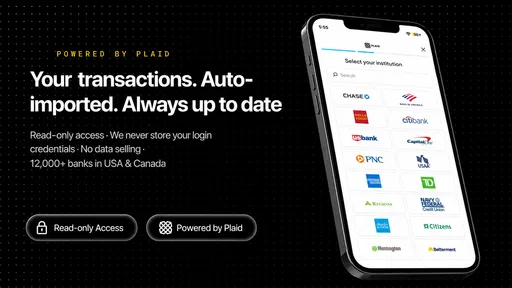
Manual budgeting requires discipline. If I forget purchases, enter them several days late, or use inconsistent categories, the resulting picture becomes unreliable. That is not a small weakness: a finance app can only be as accurate as the information I give it. People who want their accounts to update automatically may prefer a banking tool with direct transaction feeds, assuming that service meets their privacy and compatibility needs.
There is also a mental cost to tracking. Some users find frequent money checks reassuring; others find them stressful and eventually stop opening the app. I would recommend a lighter routine for the second group: record essential transactions promptly, then schedule one weekly review instead of checking every balance repeatedly. If even that feels burdensome, a simple spreadsheet or a fixed weekly allowance may be a better fit.
The broad feature promise can create another trade-off. Spending control, debt reduction, and savings planning are related, but each deserves attention. A person with complicated debt, irregular freelance income, shared household finances, or investment decisions may outgrow a general budgeting app. In those cases, a specialist debt planner, accountant, or more advanced financial platform could provide better structure. Best Budget makes sense when I need practical organization, not expert-level financial modeling.
I would also be cautious about paying for features before understanding the purchase. The available paid items span from six dollars to ninety-six dollars per item, so the highest-priced option represents a meaningful commitment compared with simply trying the app for free. I would compare the cost with my actual usage over several weeks, check whether the feature addresses a specific problem, and avoid buying on the assumption that a larger package automatically produces better results.
Who is likely to get the most value
This app should appeal to someone who wants one place to connect everyday spending with clear financial priorities. It is especially suitable for a beginner who has never maintained a budget, a household member trying to make discretionary spending visible, or a person who wants a more deliberate plan for debt and savings. The free starting point makes experimentation easier, and the Everyone rating keeps the audience broad.
I would also recommend it to someone who has tried spreadsheets but found them too easy to neglect. A dedicated finance app can make the routine feel more immediate, particularly when the goal is not just to calculate totals but to change behavior. The important condition is willingness to enter information honestly. The app can support accountability, but it cannot provide it on my behalf.
I would skip it if I expect automatic financial administration with almost no input. I would also look elsewhere if I need investment tracking, tax preparation, business accounting, or a detailed debt strategy tailored to multiple interest rates and repayment rules. Those needs call for more specialized tools. Likewise, anyone who dislikes categorizing purchases may be happier with a very simple bank balance method.
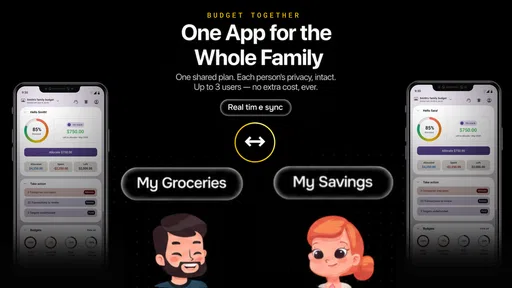
For families, the decision depends on how money is shared. If one person manages the household budget, Best Budget can provide a personal control center. If several people need simultaneous access or automatic synchronization, I would investigate those practical requirements before relying on it. A budgeting method fails when the people making purchases are not represented in the records.
My verdict on trying or skipping it
I would try Best Budget before paying for anything. The free download gives it a sensible low-risk starting point, and its focus on spending, budgets, debt, and savings is broad enough to support a complete personal routine. Its real value is not in entering one more expense; it is in helping me connect that expense with the priorities I have chosen.
My recommendation comes with a clear condition: use it as a regular decision-making habit, not as a passive record. Start with a few useful categories, review them during the period, and give debt or savings a deliberate place in the plan. After I know that the routine is helping, I can judge whether an optional purchase is worth its listed cost. Before that point, paying more would be guesswork.
In the end, this is a good candidate for Android users who want a free way to test structured money management and who are prepared to participate in the process. It is not the right choice for someone seeking automatic banking, specialist financial advice, or a completely hands-off experience. The best reason to install it is not the promise of instant savings, but the chance to turn vague money worries into visible choices.
With CREXIN Technologies behind it, a current version of 2.1.4, and a free entry point balanced by optional in-app purchases, Best Budget earns a cautious recommendation from me. I would begin small, keep the routine realistic, and judge the app by whether it helps me make better decisions week after week.
Best Budget Frequently Asked Questions
What devices can run Best Budget?
Best Budget is a finance app for devices running Android 8.0 or later. Before downloading, check that your phone or tablet meets this requirement and has enough available storage for the installation. Keeping your operating system updated can also help with compatibility and security. The app is available for free, though it offers in-app purchases.
Who developed Best Budget, and is it intended for a particular age group?
Best Budget is developed by CREXIN Technologies and is intended for a general audience. Its focus is everyday personal finance, including tracking spending, setting budgets, paying down debt, and building savings. That makes it relevant to people looking to organize their money, whether they are starting a budget for the first time or refining an existing routine.
What is Best Budget, and what can I use it for?
Best Budget is a personal finance app designed to help you organize income, expenses, bills, and savings goals in one place. After reviewing its main features, it appears most useful for people who want a clearer overview of everyday spending and a simpler budgeting routine. You can use it to monitor where your money goes, plan upcoming costs, and make more informed financial decisions.
Is Best Budget suitable for beginners who have never used a budgeting app?
Yes, Best Budget is generally suitable for beginners because its main purpose is to make personal money management easier to understand. New users can start by entering their income and regular expenses, then gradually add categories or financial goals. The app may require some initial setup, but once your information is organized, checking your budget and tracking spending becomes much more straightforward.
Does Best Budget connect directly to my bank accounts?
Bank-account connectivity can depend on the version of Best Budget, your country, and the financial institutions supported by the app. Before downloading or entering sensitive information, check the current store description and privacy policy to confirm whether automatic synchronization is available. If it is not supported, you may need to record transactions manually, which offers more control but requires regular updates.
Pros
- Simple interface makes expense tracking quick and easy.
- Useful for monitoring spending against a personal budget.
- Helps identify recurring expenses and everyday spending habits.
- Lightweight design should work well on most modern devices.
- Clear financial overview can support better saving decisions.
Cons
- May lack advanced tools for investments or detailed financial planning.
- Manual entry can become time-consuming for users with many transactions.
- Some features may require an account or premium access.
- Limited customization could frustrate users with complex budgets.
- Privacy concerns may arise when storing sensitive financial information.











