

Banger for Artists
- 597.00
- 4.5
- Installs
- 100.00K
- Price
- Free

Screenshots
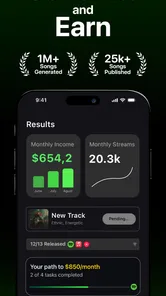
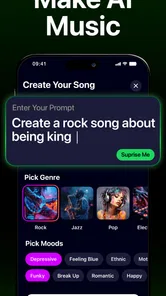
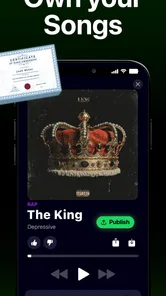
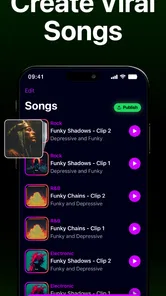
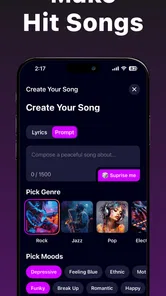
Analysis by Reviewed
I approached Banger for Artists as a practical music-making app rather than a novelty toy. Its promise is appealing: use artificial intelligence to create music and covers, then publish the results from one place. In my experience, that makes the first session easy to enjoy, especially if you have melodies in your head but do not play an instrument or know how to work through a full desktop production setup. The more interesting question, though, is whether it remains useful after the first burst of experimentation.
Developed by 42 Dijital, this free Music & Audio app is aimed at people who want to turn ideas into shareable tracks. It is available for an Everyone audience, runs on devices using Android 12 or later, and has reached more than one hundred thousand installs. Those details place it somewhere between a casual creative tool and an early-stage platform for independent artists. I would not treat it as a replacement for a complete digital audio workstation, but I do see a clear role for it when speed, accessibility, and quick publishing matter more than detailed control.
From instant experiments to a more deliberate music habit
I find that the useful question after the first burst of AI-generated ideas is how to turn experimentation into a habit that leaves room for judgment. In this section, I look at ways to keep sessions purposeful rather than letting endless variations take over, before considering how comfortably different people can navigate the app.
Why the first week feels so rewarding
The strongest part of the experience is the short distance between an idea and an audible result. Traditional music software often asks you to understand tracks, effects, arrangements, exports, and file management before you can make anything satisfying. Banger for Artists lowers that entry barrier. I can imagine opening it during a commute, trying a concept, and having something concrete to evaluate before the idea disappears.
That speed is especially useful for writers and performers who are still discovering their direction. Instead of waiting until you have a polished demo, you can use an AI-generated starting point to test the mood of a chorus, the energy of a verse, or the general identity of a cover. The result may not be the finished recording, but it can answer an important creative question: is this idea worth developing?
The cover angle gives the app another approachable entry point. A familiar song provides an immediate reference, so you can judge the generated interpretation against something you already understand. That makes experimentation less intimidating than starting with a blank project. At the same time, I would keep expectations realistic. A generated cover is best treated as an experiment or a draft of an artistic direction, not automatically as a professional replacement for a carefully recorded performance.
During the first week, I would use the app in short sessions rather than trying to build an entire release immediately. Start with one clear musical intention, compare a few approaches, and save only the versions that have a useful idea. This prevents the common AI music trap of collecting many acceptable clips without knowing why any of them should exist.
More From Our News Desk

 Gmail
GmailGmail in a Busy Inbox: Who Benefits Most?
From first account to crowded workday, Gmail earns its place through dependable search and flexible sorting—but its best fit depends on how much inbox maintenance you can tolerate.

 Prime Video
Switching to Prime Video: What Changes in Your Viewing Routine
Prime Video can make a compelling second home for streaming, but switching means learning a different catalog, rental layer, and route from browsing to playback.

 Universal TV Remote Control
Universal TV Remote Control Works Best as a Reliable Backup
A phone remote earns its place through quick setup and reliable habits. Here is how to get more from Universal TV Remote Control—and where its limits show.

 Weather - By Xiaomi
Weather by Xiaomi Review: Clear at a Glance, Less Clear Up Close
Xiaomi’s weather app makes everyday forecasts quick to scan, but its calm surface can leave useful details and recovery paths harder to find than they should be.

 X
XX Under Pressure: Can It Recover When Posting Goes Wrong?
A resilience-focused review of X, examining setup, mistaken posts, interruptions, weak connections, and the gaps that matter when recovery needs to be dependable.

 Clash of Clans
Clash of Clans Is Won Between the Battles
Its raids are quick; its community is a long-term project of coordination, teaching, rivalry, and shared responsibility—with all the friction that entails.
Latest News



The workflow I would recommend to a new user
My preferred workflow would begin with a simple brief. Decide whether you are exploring an original song, testing a cover concept, or preparing something to publish. That choice matters because an experiment can be judged by surprise and inspiration, while a publishable track needs consistency, a recognizable purpose, and enough refinement to survive repeated listening.
After generating a result, I would listen away from the excitement of the first playback. The first impression often rewards novelty. A second listen reveals whether the arrangement has a memorable shape or merely sounds unusual. I would also check the transition points, because an attractive opening can hide a weak middle or an ending that feels unfinished.
A useful non-obvious habit is to keep a small written note beside each promising result. Record what you liked, what you wanted to change, and where the track might be used. Without that note, AI-assisted projects can blur together quickly. The app can help produce ideas, but the human decision about selection is what turns a stream of outputs into a catalog.
Publishing should come after this listening step, not immediately after generation. The ability to publish is valuable because it shortens the path from creation to sharing, but convenience can also encourage premature releases. I would use the publishing function as the final stage of a simple review routine: listen on headphones, listen through a phone speaker, check the complete track rather than only the most exciting section, and then decide whether it represents you.
Where it fits beside familiar music tools
Compared with a standard digital audio workstation, Banger for Artists is easier to approach but less suited to detailed engineering. A desktop or advanced mobile workstation remains the better choice when you need precise editing, extensive mixing, manual sound design, or a highly repeatable production process. Those tools demand more learning, yet that extra friction buys control.
Compared with a conventional streaming or music discovery app, this one is active rather than passive. It asks me to make choices and shape material instead of simply listening to finished releases. Compared with a basic voice recorder, it offers a more imaginative starting point for people who want a fuller musical concept. The trade-off is that the generated result may not reflect every detail of the sound I had in mind.
That positioning is important. I would recommend it to a curious singer, songwriter, bedroom producer, or content creator who wants to explore ideas quickly. I would be more cautious about recommending it to an experienced producer whose main requirement is exact control over every note, instrument, edit, and mix decision.
What changes after the novelty wears off
The first-week appeal comes from surprise. A new generation can feel productive even when it is only exploratory. By the second or third week, the question changes from “What can this make?” to “What am I actually making with it?” That is where the app needs a personal system around it.
I would create separate working categories for sketches, possible releases, and material made only for fun. This simple separation is more important than it sounds. If every output feels equally important, the app can become a noisy folder of half-finished ideas. If each result has a purpose, repeated use becomes easier to justify.
Another practical approach is to give each session a limit. Generate a small batch, choose one direction, and stop when the session has produced a useful decision. Endless variation can feel like progress while quietly replacing composition with browsing. The app is most valuable when it helps me commit to an idea, not when it keeps me postponing commitment.
Recurring value for artists and casual creators
For an artist, the lasting value is likely to come from ideation and momentum. Creative work often stalls before the technical work even begins. A quick AI-assisted draft can provide a reference for a collaborator, a mood board in musical form, or a way to test whether a lyric has the right emotional setting. Even if the final recording is made elsewhere, the initial spark can save time.
For a casual creator, the value may be more immediate. Someone making short videos, personal projects, or social posts may need an original-feeling musical backdrop without learning a full production environment. In that situation, speed can matter more than microscopic control. The app gives the user a way to participate in music creation rather than only searching through existing audio.
There is also a useful educational angle. A beginner can compare different musical directions and start noticing arrangement, pacing, vocal character, and atmosphere. I would not call that a substitute for learning music theory or production, but it can make those subjects feel less abstract. Hearing a change is often a better lesson than reading about it.
The recurring value becomes weaker for users who want the same result every time. AI-assisted creation is attractive partly because it can surprise you, but surprise is not always helpful when you are building a consistent sound. If your work depends on strict continuity between releases, you may eventually move the important parts of the process into a more controllable tool.
The maintenance burden is mostly creative, not technical
The app itself is not the only thing that needs maintenance. Your library does too. AI music tools can produce many outputs quickly, and the real cost appears later when you need to remember which version had the strongest chorus, which one was only a rough idea, and which one was ready to share. I would name or label projects consistently and remove weak duplicates before the collection becomes difficult to navigate.
This is one of the app’s less obvious trade-offs: reducing the effort needed to create can increase the effort needed to curate. A traditional recording may take longer to produce, but its scarcity makes it easier to remember. With rapid generation, selection becomes a separate artistic task.
I would also schedule a monthly listening session. Revisit older creations without changing anything at first. Some tracks that seemed exciting on the day may feel thin later, while a quieter idea may reveal more potential after the novelty has gone. This habit helps distinguish durable material from the pleasant shock of hearing something new.
Publishing adds another layer of responsibility. Before sharing a track publicly, I would consider whether it is finished enough to represent my taste and whether the intended use is appropriate. The app makes publication part of the creative path, but it does not remove the need for judgment. A fast publishing button should not become an automatic publishing habit.
Costs, limits, and the points where patience is tested
Banger for Artists can be installed and used as a free app, but it also includes in-app purchases ranging from a few dollars to amounts close to one hundred dollars per item. That pricing range makes it important to understand your own usage before spending. Someone who opens the app occasionally for inspiration may be perfectly comfortable staying within the free experience. A frequent creator should think carefully about how quickly paid use could become part of a routine.
I would not pay simply because an output is surprising. I would pay only when the result supports a real project, solves a specific creative block, or saves enough time to justify the expense. This is a useful discipline with AI tools because the low effort of generating can make each individual attempt feel inexpensive, even when repeated attempts accumulate.
The current version is 4.7, and the app has an average rating of 4.5 from around fourteen thousand ratings. That suggests a generally positive reception, while still leaving room for individual differences in expectations. I would interpret those figures as encouragement to try it, not as proof that every workflow will feel equally smooth. AI music is highly personal: a result that inspires one listener may sound generic or unsuitable to another.
There are also creative limitations that no rating can remove. Generated material may be useful as a foundation without being distinctive enough for a final release. A cover experiment may capture a broad mood while missing the small performance details that make a human interpretation compelling. And if you need to revise one exact phrase repeatedly, the convenience of generation may become less valuable than direct editing.
Who should keep it installed, and who should move on
I think the app earns a lasting place on an artist’s phone when it is used as a sketchbook with a publishing route. It is particularly well suited to people who regularly collect ideas, need quick demonstrations, or want to explore AI covers without setting up a full studio. It can also suit beginners who would otherwise abandon music creation because conventional software feels too complicated.
I would skip it if my main goal were professional-grade control, detailed mixing, or a stable production template that behaves identically across projects. In those cases, a conventional workstation is the better long-term home, even if it takes longer to learn. I would also skip it if I knew I was vulnerable to endless experimentation without finishing anything; the app’s low friction can make that habit easier rather than harder.
For someone deciding whether to try it, my advice is to set a clear test. Use the free access to create a small set of ideas, choose one that still sounds worthwhile after a few days, and see whether the app helps you take a concrete next step. If it only produces a pile of disposable clips, the novelty is doing all the work. If it helps you write, arrange, demonstrate, or publish more consistently, then it has earned its place.
My long-term verdict
Banger for Artists is most convincing as a fast creative companion, not as a complete music studio. I like the way it reduces the distance between imagination and a playable result, and the combination of AI music, AI covers, and publishing gives the experience a clearer purpose than a generator that stops at playback. The app is free to start, available to an Everyone audience, and approachable enough for a first experiment.
Its lasting value depends on what I bring to it. If I use it to make decisions, develop sketches, and support a broader artistic process, it can remain useful after the initial excitement fades. If I use it only to chase increasingly unusual generations, fatigue arrives quickly. The strongest long-term workflow is selective: create quickly, listen critically, organize the keepers, and publish only what still feels meaningful.
With a 4.5 average from roughly fourteen thousand ratings and more than one hundred thousand installs, it has clearly attracted a substantial audience. My own recommendation is measured but positive: try it if you want an accessible way to explore music ideas and covers, especially when traditional production tools slow you down. Just remember that the app can generate possibilities; the lasting artistic value still comes from choosing, refining, and returning to the work.
Banger for Artists Frequently Asked Questions
Does Banger for Artists let me publish music I create in the app?
The app’s summary describes creating AI music and AI covers, as well as publishing. That makes it relevant if you want to explore creation and release options in one place. Before publishing, check the app’s terms and confirm that you have the rights needed for any voices, lyrics, samples, or other material used in your work.
Can I use Banger for Artists to make AI covers of songs I like?
Banger for Artists is presented as an app for creating AI covers, so this is one of its intended creative uses. A cover can involve rights belonging to songwriters, performers, or other parties, however. Review the app’s terms and applicable copyright rules before sharing or distributing a cover, especially if you plan to publish it beyond personal experimentation.
Can I create AI music and AI covers with Banger for Artists?
Banger for Artists is presented as an app for creating AI music and AI covers, as well as publishing. It is aimed at artists and other music creators who want to explore these creative options from a mobile app. If you plan to publish a result, review the app’s terms and any applicable rights requirements before sharing or distributing it.
What devices can run Banger for Artists?
Banger for Artists is a mobile app for Android and iOS users whose devices meet its minimum operating-system requirement. It requires Android or iOS version 12 or later. Before downloading, check your device’s OS version in its settings and make sure there is enough available storage for the app and the music files you plan to work with. Keeping your device’s software up to date can also help with compatibility.
What is Banger for Artists?
Banger for Artists is a mobile app in the Music & Audio category, developed by 42 Dijital. Its short description is simply “Banger for Artists,” while its summary highlights creating AI music and AI covers and publishing. It is intended for people exploring music creation and release options from a mobile device, rather than being described as a general-purpose music player.
Pros
- Direct access to artist-focused music promotion tools
- Useful analytics help track audience growth and campaign performance
- Supports independent artists without requiring a major label
- Can help connect releases with new listeners and industry contacts
- Artist profile tools make it easier to present music professionally
Cons
- Some promotional features may require paid credits or subscriptions
- Results can vary depending on genre
- audience
- and campaign quality
- Smaller artists may need consistent activity to gain meaningful exposure
- The interface may take time to understand for first-time users
- Not every contact or promotional opportunity will lead to tangible results












