Audyssey MultEQ Editor app
- 249.00
- 2.8
- Installs
- 50.00K
- Price
- $19.99

Screenshots
Analysis by Reviewed
I judge room-correction tools by whether they help me make a setup more consistent, not by how many sliders they offer. Audyssey MultEQ Editor app is aimed at owners of compatible Denon and Marantz AV receivers who want more say over their system’s calibration than the receiver’s standard process provides. It is a specialist music-and-audio app, not a general equalizer for phone playback, so its usefulness depends on the receiver and the listening room you already have.
Start with a dependable baseline
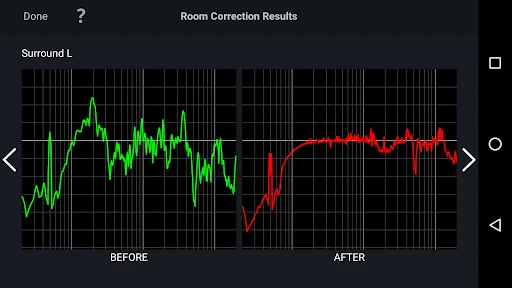
My first piece of advice is to treat the initial calibration as a reference point, not a sound you must immediately improve. Run the receiver’s Audyssey setup carefully, then use the editor to inspect the result before changing anything. That makes it easier to tell whether a later adjustment actually helps, rather than confusing a different curve with a better one.
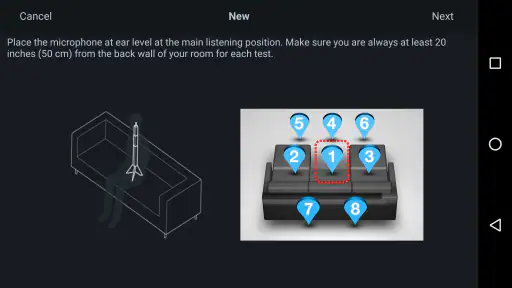
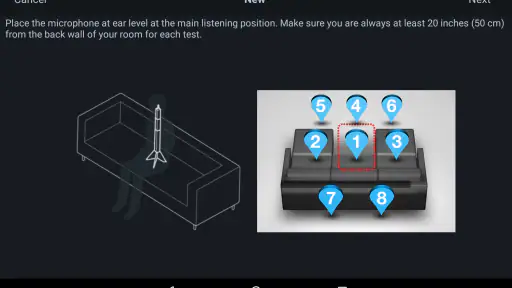
For a living room used by several people, I would begin with the main listening seat and keep the microphone positions consistent whenever I repeat a calibration. Moving the measurement pattern between runs makes comparisons less meaningful. A familiar routine—same seats, same speaker arrangement, and a quiet room—helps you make calmer decisions about the result.
Make comparisons fair, not just convenient
A useful test starts before opening the editor: choose one short film scene or a familiar music passage, set a comfortable listening level, and keep those conditions steady. If one profile is louder, it can seem clearer or more exciting even when the tonal change itself is not an improvement. I try to compare the same passage rather than relying on a vague impression from different content played hours apart.
This matters especially when more than one person uses the room. A calibration centered on the main seat may suit the person who watches most often, while someone at the end of the sofa hears a different balance. I would agree on the priority listening position before spending time adjusting the curve; otherwise, the family may be judging a profile against different seats and reaching contradictory conclusions.
Taking control of room correction
The Audyssey MultEQ Editor app gives you the power to personalize your audio experience to a level that's typically reserved for high-end professional equipment. With this app, you can visualize and adjust sound settings with ease. Gone are the days when you'd have to rely solely on your audio system's default settings. Now, you can dip your toes into the world of audio calibration without needing a degree in sound engineering.
Getting started without chasing every slider
Setting up the app is a breeze. After downloading and installing it, you connect it to your Audyssey-enabled AV receiver. The app syncs effortlessly, and you're greeted with an interface that's as intuitive as it is powerful. It's like having a sound technician in your pocket!
More From Our News Desk

Clash of Clans Is Won Between the Battles

Android Auto Makes the Case for Quieter Car Software

MobiOffice: Transforming Mobile Productivity with Seamless Integration

EA SPORTS FC™ Mobile Soccer: Redefining Mobile Sports Gaming

How Microsoft OneDrive Became a Mobile Productivity Giant

How Google Translate Breaks Language Barriers Effortlessly
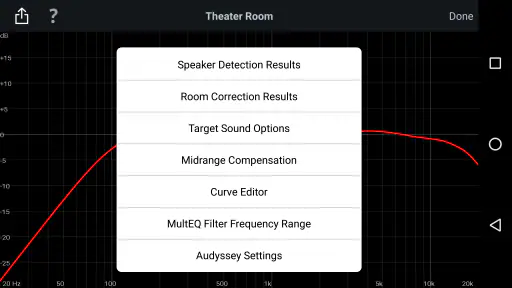
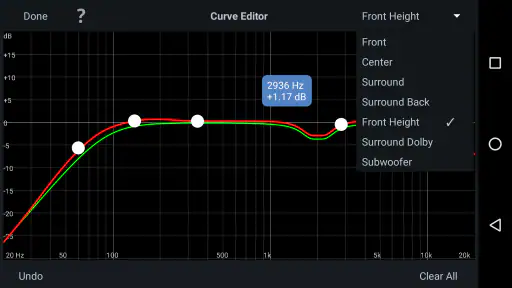
One of the cool features is the ability to customize the frequency response curve of your system. You can adjust the sound to match your room's acoustics, and the app even offers a number of presets to get you started. Trust me, playing around with these settings can be quite addictive.
Still, I would change one thing at a time and listen to a familiar track or film scene at a sensible volume before deciding. If you alter several parts of the curve together, it becomes difficult to identify which change mattered. Keep a note of what you tried; even a short record of the adjustment and your impression can save you from circling back to the same experiments.
Settings that reward careful listening
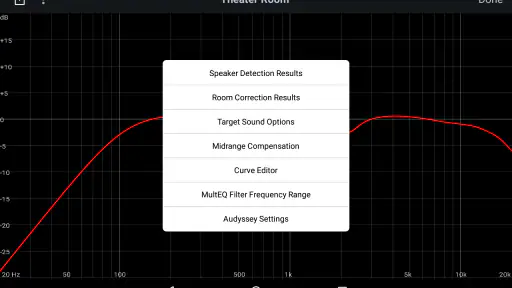
The app provides a detailed view of your system’s current settings and lets you tweak them to your liking. You can adjust parameters such as EQ frequency, gain, and Q factor for each channel in the system. It's perfect for those who want to delve deep into the intricacies of sound customization. Plus, the real-time feedback is incredibly useful for making precise adjustments.
That control is most useful when you have a specific problem to investigate, rather than a vague wish for “better sound.” For example, if dialogue seems hard to follow, compare the center channel’s behavior with the rest of the system and make small, reversible changes. If bass sounds uneven across seats, remember that a curve adjustment cannot make every place in a room behave identically; a result that suits the main chair may not suit the whole sofa.
Choose changes that match the problem
When dialogue is the issue, I would first check whether the complaint is consistent across several shows or films, rather than reshaping the whole system after one unusually quiet mix. A small center-channel adjustment may be worth testing, but boosting broadly can make voices sound unnatural or push that speaker ahead of the rest. I would keep the change modest and compare it with the baseline using both speech and a scene with music or effects.
For a bass problem, it helps to distinguish between too much bass everywhere and bass that varies from seat to seat. The first may be something a carefully chosen tonal adjustment can address; the second points to the room and listening position as part of the experience. If the main seat improves while nearby seats get worse, I would not call that a universal fix. The right choice depends on who uses the room and where they sit most often.
Repeatable habits for everyday listening
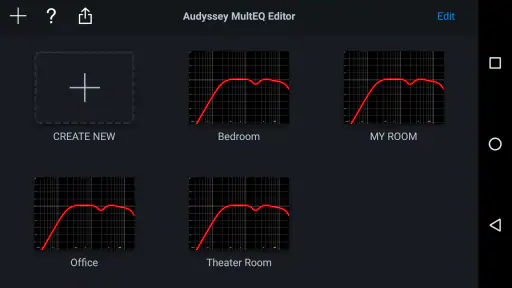
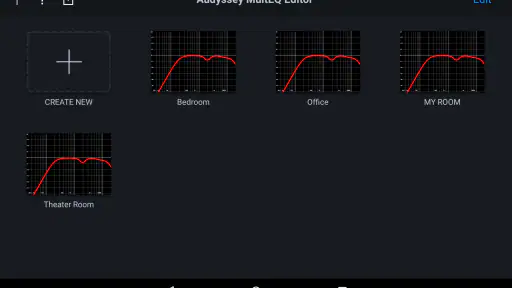
Another feature worth mentioning is the ability to save and load different calibration profiles. This means you can have different settings for watching movies, listening to music, or gaming, and switch between them with just a few taps. It's all about convenience and having the best possible audio experience for whatever you're doing.
A practical routine is to keep one profile close to the measured baseline and use another for a deliberate experiment, rather than replacing the version you already trust. On an ordinary evening, I might compare those profiles with the same dialogue-heavy scene, then leave the system on the one that sounds clear without making effects distracting. The benefit is not just having options; it is being able to return to a known starting point after testing a preference.
A living-room workflow that stays manageable
Imagine settling in after dinner to watch a series while other people are still moving around the room. I would use the familiar profile that has already worked for that space, not attempt a fresh round of adjustments during the episode. Later, when the room is quiet, I could compare a saved experiment with the baseline using the same short scene. That separation keeps casual listening enjoyable and makes calibration work feel like a deliberate task rather than an ongoing distraction.
For music, I would choose a track I know well across voices, instruments, and bass, then listen at an ordinary level instead of turning it up to make every difference more obvious. A profile that seems impressive during a quick loud comparison may become tiring over a full album. Saving the baseline also gives me a simple way to undo an experiment without trying to remember every setting I changed.
Where this editor fits—and where it doesn’t
Compared with the usual alternatives, this is more specialized than a phone equalizer or a basic receiver menu. Those options are quicker for broad tone tweaks, but they do not offer the same receiver-focused view of Audyssey correction. Conversely, someone who only wants music to sound a little warmer may find a simple tone control easier and less involved. The editor makes most sense when you are already using a supported receiver and want to understand or refine its room correction.
There is a learning curve in deciding what not to change. A visible curve can tempt you to smooth every bump, yet the room, speaker placement, and listening position all shape what you hear. I would avoid treating a graph as a score or making large corrections based only on its appearance. If you are happy with the receiver’s calibration and do not enjoy careful A/B listening, the extra control may add work without adding enjoyment.
Know when a different tool is the better answer
If you listen mainly through headphones or a phone, this is the wrong kind of app: its purpose is to work with a compatible home-theater receiver, not to shape everyday mobile playback. A general phone equalizer is the more direct option for that use. Likewise, if your only goal is a quick treble or bass change, the receiver’s own controls may be easier to reach and easier to understand.
It is also not a substitute for moving a speaker, checking its placement, or reconsidering the listening position. Software adjustments can refine a system, but they cannot make every physical arrangement equally suitable. I would deal with obvious setup issues first and use the editor afterward, when there is a clear reason to investigate the corrected sound rather than hoping the app will solve every room problem.
Who should pay for this level of control?
Developed by D+M Group, the app costs $19.99, which makes it a considered purchase rather than a casual download. Its audience is fairly clear: Denon or Marantz receiver owners who want to inspect and adjust Audyssey settings, and who are willing to spend time comparing results. It is rated for Everyone, but the controls are better suited to a patient adult or an enthusiast than to someone expecting a one-tap improvement.
The app has an average rating of 2.8 from around 1,300 ratings, alongside roughly 250 written reviews, and has been installed over 50,000 times. Those figures make me cautious about recommending it blindly. Before paying, I would check that your particular receiver supports the editor and consider whether you will actually use its manual controls. It runs on Android 5.0 or later, and version 1.13.3 is the current version.
What I would check before committing
The first practical question is compatibility: confirm that your specific Denon or Marantz receiver supports the editor before buying, because the app’s usefulness depends on that pairing. The next is intent. If you want to inspect the calibration, make measured adjustments, and keep a dependable reference profile, the price may make sense. If you are unlikely to revisit the settings after the initial setup, a receiver’s standard calibration and controls may be all you need.
I would also be realistic about the time involved. The editor does not remove the need to listen carefully or make decisions about which seat matters most. For someone who enjoys understanding how a home-theater setup behaves, that involvement is the point. For someone who wants the receiver to make a choice automatically and never think about it again, paying for more control is unlikely to feel worthwhile.
My verdict after weighing the trade-offs
After spending some quality time with the Audyssey MultEQ Editor app, I can confidently say that it’s a game-changer for anyone serious about their home audio system. It bridges the gap between a standard home setup and a professional studio experience. The app’s interface is user-friendly, yet it doesn’t shy away from offering advanced features for those who want to get into the nitty-gritty of sound customization.
While it does come with a price tag, the value it provides in terms of audio enhancement is well worth it. Whether you're a casual listener or an audiophile, the Audyssey MultEQ Editor app is a worthy addition to your tech arsenal. So go ahead, give it a try, and let your ears enjoy the difference!
Who will get the most from it
My strongest recommendation is for a receiver owner who is curious about room correction, has a stable speaker setup, and enjoys making small changes with a clear listening goal. The app gives that person a way to examine and refine Audyssey settings without treating the receiver’s first result as untouchable. Its best use is not endless tweaking; it is making a considered adjustment, comparing it fairly, and keeping the version that works in the room.
I would skip it if you do not own a compatible receiver, rarely use your home-theater system, or expect a graph to tell you exactly what sounds best. I would also be cautious if you tend to change many settings at once and then rely on memory to judge the outcome. For this app, patience and a repeatable method matter more than enthusiasm for sliders. Used that way, it can be a useful specialist tool; used without a clear purpose, it can turn listening into unnecessary tinkering.
Audyssey MultEQ Editor app Frequently Asked Questions
How much does the Audyssey MultEQ Editor app cost, and what should I consider before buying it?
The Audyssey MultEQ Editor app costs $19.99. Before purchasing, check that your AV receiver or processor supports Audyssey MultEQ and consider whether you want the additional control it provides over calibration and sound settings. The app is intended to work with compatible Denon and Marantz AV receiver products, so confirming compatibility first can help avoid buying an app you cannot use with your equipment.
What is the Audyssey MultEQ Editor app used for?
The Audyssey MultEQ Editor app is designed to enhance your audio experience by providing advanced room calibration options for home theater systems. It allows users to fine-tune the sound settings and customize the audio output according to their personal preferences and room acoustics, ensuring an optimized listening experience.
Is the Audyssey MultEQ Editor app compatible with all devices?
The Audyssey MultEQ Editor app is specifically compatible with certain AV receivers and processors that support Audyssey MultEQ technology. It's important to check the compatibility list on the official website or in the app description to ensure your device is supported before purchasing and downloading the app.
Do I need any additional equipment to use the Audyssey MultEQ Editor app?
Yes, to use the Audyssey MultEQ Editor app effectively, you will need an AV receiver or processor that is compatible with Audyssey MultEQ technology. Additionally, a microphone is typically required to measure room acoustics accurately during the calibration process, ensuring optimal sound performance.
How user-friendly is the Audyssey MultEQ Editor app?
The Audyssey MultEQ Editor app has a user-friendly interface, but it is geared towards users who have a basic understanding of audio calibration and acoustics. While beginners can navigate the app, some features may require a learning curve to utilize the advanced customization options effectively, making it more suitable for audio enthusiasts.
Pros
- Customizable sound profiles.
- Enhances audio calibration.
- User-friendly interface.
- Real-time sound adjustments.
- Supports multiple devices.
Cons
- Limited to specific AV brands.
- Requires technical understanding.
- Paid app without free trial.
- Occasional connectivity issues.
- Complex setup for beginners.
- Category
- Music & Audio
- Version
- 1.13.3











