Audubon Bird Guide
- 2.46K
- 4.2
- Installs
- 500.00K
- Price
- Free

Screenshots



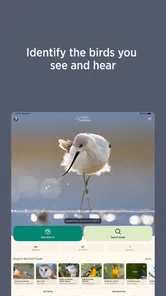
Analysis by Reviewed
I’d treat Audubon Bird Guide as a field companion, not a magic bird-identification button. When I see an unfamiliar bird, the useful part is having a place to compare what I noticed—its shape, colors, and where I am—with reference material, then check whether the result makes sense. That makes the first outing feel manageable: I don’t need to know bird names already, just pause long enough to observe.
What to expect on your first visit
This is a reference app for people who want to learn birds while they encounter them, rather than a promise that every sighting can be identified instantly. I’d expect to do some looking, comparing, and thinking. That small shift in expectations matters: a guide is most useful when it helps you weigh clues, not when you treat its first plausible match as a verdict.
The app’s scope is broad, so a new user may find that there are several possible matches for a bird seen only briefly. That isn’t necessarily a flaw in the guide; it’s a reminder that many species share colors or silhouettes. I find the experience more satisfying when I approach it as a gradual narrowing process and accept that some observations will remain uncertain.
Start with what you can actually see
Before opening the guide, I’d make a quick mental note of a few clues: approximate size, bill shape, main colors, behavior, and habitat. A distant bird may hide its markings, so I wouldn’t try to identify it from color alone. Narrowing possibilities with more than one clue is less frustrating, and it helps avoid turning a confident guess into a false sighting.
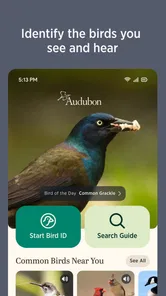
For a first attempt, choose a bird that stays visible for a moment—a feeder visitor, a bird on a pond, or one perched in a nearby tree. Use the app’s identification options to explore likely candidates, then compare the descriptions and photos with what you observed. The guide covers over 800 species, but that breadth works best when you search thoughtfully rather than scroll at random.
A practical routine for the first walk
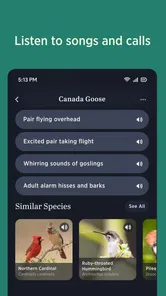
I’d use the guide in two passes. While the bird is present, focus on watching and remembering details instead of staring at the screen. Once it moves on, check the possibilities and listen to the available call recordings when sound is relevant. Then save a sighting to a personal list if the identification feels solid. That simple order keeps the phone from taking over the moment and gives the list more value later.
If you’re unsure, leave the bird unidentified or treat the result as a candidate to revisit. That is more useful than recording a species based on one vague feature. Maps and seasonal information can help put an observation in context, but I’d use them as supporting clues, not proof: a bird’s presence can depend on location and time, and a map cannot replace what you saw.
More From Our News Desk

Weather by Xiaomi Review: Clear at a Glance, Less Clear Up Close

X Under Pressure: Can It Recover When Posting Goes Wrong?

Clash of Clans Is Won Between the Battles

Android Auto Makes the Case for Quieter Car Software

MobiOffice: Transforming Mobile Productivity with Seamless Integration

EA SPORTS FC™ Mobile Soccer: Redefining Mobile Sports Gaming
Setting up a useful birding habit
On your first outing, keep the goal modest: identify one bird you can observe well, rather than trying to name everything around you. A short walk near a familiar place is a good starting point because you can spend more attention on the bird and less on navigating a new area. If the app is already installed, opening it before you leave gives you a moment to get comfortable with its reference material without rushing to use it outdoors.
I’d also decide in advance what counts as a confirmed sighting for my own list. For instance, I might save a bird only when its size, shape, and at least one other detail agree with the candidate. That personal rule makes the list more trustworthy over time. If the evidence is thin, a brief note about what I did notice is more honest than choosing the closest-looking option.
Birdwatching at Your Fingertips
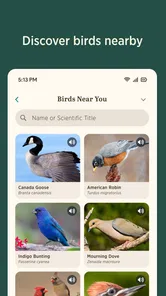
The Audubon Bird Guide provides an extensive database of North American birds, making it a handy companion for any bird enthusiast. With over 800 species documented, you can explore detailed descriptions, high-quality photos, and even audio clips of bird calls. The app allows you to identify birds by shape, region, and color, which is super helpful when you're out in the field and spot a new feathery friend.
Interactive and User-Friendly
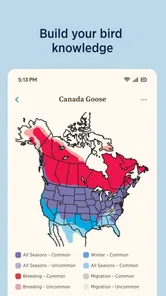
One of the features that I really appreciate is the interactive nature of the app. You can create personal lists of birds you've spotted, which is perfect for tracking your birdwatching adventures. The app also offers seasonal and migratory maps, allowing you to understand the birds' movements throughout the year. It's like having a pocket guidebook, but way cooler!
For a first-time user, I’d make the personal list serve two purposes: remembering what I’ve seen and giving me a reason to look more closely next time. A list is more meaningful when each entry reflects an observation I can explain, even in simple terms. Was the bird near water? Did it stay on the ground or move through the canopy? Those little details turn later browsing into a useful learning loop instead of a tally of names.
As a Books & Reference app from the National Audubon Society, it sits between a traditional field guide and a broad birding community tool. I’d reach for it when I want descriptions, photos, calls, and a way to keep track of what I’ve seen in one place. A printed regional guide may be quicker if you prefer browsing without a phone, while a general web search can be useful for a single quick fact but less convenient for building a consistent personal record.
Community and Conservation
Beyond being just a guide, the Audubon app fosters a sense of community among bird lovers. You can connect with other users, share your sightings, and participate in bird counts. This not only enhances your experience but also contributes to conservation efforts. It's great to see technology being used to support environmental awareness and preservation.
That social side will appeal most to someone who enjoys seeing birdwatching as a shared hobby, not just a private identification task. If you’d rather keep your notes to yourself, the reference and list functions still have value; you don’t need to make community participation the point of every outing. I’d think of sharing as an optional way to connect, while being thoughtful about what details I choose to post.
For example, on a neighborhood walk I might recognize a familiar robin but be unsure about a smaller bird in the hedge. I can watch its movement first, use the visual clues to narrow the search, and return to the guide after it flies off. If I’m confident, I can add it to my list; if not, I can keep the observation tentative. This is a better fit for curious walkers and beginning birders than for someone who wants a hands-free, instant answer every time.
There’s also a practical reason to wait until the bird has moved on before searching: it leaves you free to watch its behavior and notice details that a still image can’t show. I might remember whether it hopped along a branch, fed near the ground, or stayed close to water. Those observations can help distinguish candidates later, and they make the outing itself more engaging than looking down at the phone whenever a bird appears.
Another aspect worth mentioning is the app's commitment to educating its users. With articles and tips on birdwatching techniques, even beginners can feel confident and informed. The app encourages users to be mindful of their surroundings and respect the wildlife they encounter.
Who will get the most from it
I think this guide is especially well suited to a beginner who wants to build confidence without buying a stack of books, or to a casual walker who often spots birds and wants a dependable place to investigate them afterward. It also makes sense for someone who enjoys learning from pictures and calls, then keeping a record of sightings. The free price removes a major barrier to trying it, and its Everyone content rating makes it suitable for a broad audience.
It may be a less comfortable fit for a birder who needs a compact reference that never depends on a phone, or for anyone who expects a single automatic answer from a quick glance. A paper guide can be easier to consult with gloves on or when you want to avoid screen use. A specialist identification app may be preferable if automatic image recognition is your main priority. I’d choose this one for its combination of reference, learning, and personal tracking rather than for instant certainty.
What to expect from the app
The app is free, rated for Everyone, and has an average rating of 4.3 from around 5,400 ratings, with over 500,000 installs. It first appeared in 2010, and version 8.3.2 supports devices running Android 7.0 or later. That gives a first-time user a straightforward starting point, though I’d still check that my phone meets the system requirement before planning a walk around it.
Those figures suggest that it has found a substantial audience, but they don’t tell me whether it will suit a particular person’s habits. I’d judge it by whether I enjoy comparing field marks and returning to a personal list. If I only want an occasional answer, a quick reference search may be enough; if I want to keep learning species over repeated walks, a dedicated guide has a clearer long-term role.
One practical trade-off is that identification depends on the quality of your observation. A quick glimpse, poor light, or a bird seen only from behind may leave several plausible matches. I wouldn’t assume the app can settle every close call; a second look, a call recording, or a printed guide can be more useful in those moments. And if I’m walking somewhere unfamiliar, I’d rather keep my attention on the path and wildlife than try to operate the phone while moving.
Common points of confusion
One easy mistake is treating a map as a guarantee that a species must be present. I’d use seasonal and migratory information to see whether a candidate makes sense for a place and time, but I wouldn’t let it overrule what I can actually observe. Maps offer context; they don’t identify a bird on their own.
Calls can be equally easy to misread. Listening to a recording helps me become familiar with a sound, but hearing something similar outdoors does not automatically confirm the species. Other birds may be calling nearby, and a bird can be difficult to see. I’d compare the sound with visual clues where possible and keep the record tentative if the match is uncertain.
Another question a new user may have is whether a list should include every possible sighting. I’d keep uncertain birds separate in my mind from confirmed ones, even if I later decide to save a candidate for follow-up. That distinction avoids building false confidence into the record. It also gives you a useful reason to return to a familiar place and see whether you can observe the bird more clearly.
Making the guide useful beyond one outing
After a walk, I’d revisit my saved birds and use the descriptions and seasonal maps to learn what makes each one distinctive. That turns a list from a collection of names into a memory aid: where I noticed the bird, what caught my eye, and what I should look for next time. Calls are especially helpful for learning to recognize birds I hear before I see, though I’d use recordings for study rather than play them repeatedly near wildlife.
A useful next step is to choose one saved species and learn a feature you can spot in the field, such as its general shape or a distinctive behavior. On your next walk, try to recognize that clue before opening the guide. This makes the app a teacher rather than a substitute for looking, and it helps you gradually depend less on searching through possibilities.
New users may wonder whether they need birding experience before opening the guide. I don’t think so: starting with a common, clearly visible bird is enough to practice comparing traits. The app is less suited to someone who wants a compact, offline-first reference without social or tracking elements, or who expects automatic certainty from a photograph. For those preferences, a paper guide or a dedicated identification tool may fit better; for learning and keeping personal sightings together, this one has a more rounded role.
A grounded recommendation
I’d recommend giving it a try if you’re curious about birds and enjoy learning through observation. It can make a familiar walk feel richer by giving you a way to investigate a call, compare a few visual traits, and remember what you saw. The strongest results come from patience and honest uncertainty, not from tapping quickly until a name appears.
If you prefer not to use a phone outdoors, want a purely offline paper reference, or need an automatic answer for a fleeting sighting, another approach may suit you better. For a beginner who wants a broad bird reference alongside lists and learning material, though, this is a welcoming place to start. I’d take it along, keep my first goal small, and let curiosity—not a perfect identification streak—shape the walk.
Final Chirp
In a nutshell, the Audubon Bird Guide is more than just an app; it's a gateway to the fascinating world of birds. Its user-friendly design, comprehensive database, and interactive features make it a must-have for birdwatchers of all levels. So, if you're planning your next outdoor adventure, don't forget to have this app handy. Happy birdwatching!
Audubon Bird Guide Frequently Asked Questions
Who develops Audubon Bird Guide, and who is it intended for?
Audubon Bird Guide is developed by the National Audubon Society and is a reference app for anyone interested in identifying and learning about birds. Its content rating is Everyone, so it is suitable for a broad audience, including families and beginners. Experienced bird watchers may also find it useful as a convenient companion when they want to look up species information.
What is the Audubon Bird Guide app and how does it work?
The Audubon Bird Guide app is a comprehensive and interactive tool designed for bird enthusiasts to help identify and learn about birds in North America. It offers detailed descriptions, high-quality images, and bird songs for over 800 species. Users can also log their bird sightings and explore birding hotspots. The app functions both online and offline, making it a valuable resource for both casual bird watchers and serious ornithologists.
Is the Audubon Bird Guide app available for free?
Yes, the Audubon Bird Guide app is available for free on both Android and iOS platforms. It offers a vast array of features without any hidden costs or subscription fees. Users can enjoy full access to the app’s content, including the extensive bird database, sightings logging, and community features, all without any charges. However, donations to support the Audubon Society are encouraged.
Can the Audubon Bird Guide app be used offline?
Absolutely, the Audubon Bird Guide app is designed to be used offline, which is a significant advantage for bird watchers in remote locations with limited internet access. Before heading out, users can download necessary bird profiles and maps. This offline functionality ensures that users have access to vital information about birds and their habitats no matter where they are.
How accurate is the bird identification feature in the Audubon Bird Guide app?
The bird identification feature in the Audubon Bird Guide app is highly accurate, utilizing an extensive database of bird species and their characteristics. The app allows users to input various criteria such as size, color, and habitat to narrow down possibilities. Additionally, it provides high-resolution images and bird calls to aid in accurate identification. Feedback from users and experts continually improves its precision.
Pros
- Comprehensive bird species database.
- User-friendly interface.
- Offline access available.
- High-quality bird images.
- Includes bird call audio.
Cons
- Large app size.
- Limited free content.
- Occasional app crashes.
- Requires frequent updates.
- Some features need internet.











