Audiomack: Music Downloader
- 194.50K
- 4.8
- Installs
- 100.00M
- Price
- Free

Screenshots

Analysis by Reviewed
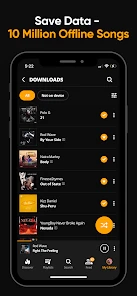
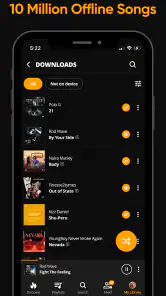
I judge a music app by what happens when I lose my connection, not just by how many songs I can browse at home. Audiomack: Music Downloader makes offline listening its clearest practical strength: I can save music ahead of time and keep listening when mobile data is scarce or a signal drops. That changes the app from a discovery feed into something useful for a commute, a walk, or a trip where I do not want playback to depend on reception.
Why downloads change the listening routine
Offline playback is most valuable when it removes small, repeated hassles. I can pick music while connected, then use those saved tracks later without streaming them again. For someone who listens on the same journey every day, that means less reliance on a stable connection and fewer reasons to spend mobile data on familiar songs. The benefit is not that every listening situation becomes effortless; it is that the music I chose in advance is ready when the network is not.
I also like the way downloads can give a playlist a clearer purpose. Instead of making one enormous collection and scrolling through it on the move, I would make a few focused lists: a short set for the trip to work, a longer one for exercise, and a separate queue for new discoveries. That keeps offline listening intentional. It also makes it easier to notice whether I want dependable favorites or fresh music for a particular mood.
The Latest on Audiomack: Music Downloader
A practical way to use it
My routine would be to explore and choose tracks when I have a reliable connection, then save the music I expect to revisit before leaving. I would start with a compact playlist rather than trying to download everything I might possibly want. That is a useful trade-off: a smaller, deliberate selection is easier to browse, while a broad collection offers more variety but takes more effort to keep organized.
For example, on a morning when I have a train ride followed by a walk, I could use the connected part of the day to look through music and build a playlist that suits both stretches. Before setting out, I would make sure the tracks I actually want are available offline. If the connection becomes unreliable during the journey, I can turn to that prepared selection rather than repeatedly searching and waiting for playback. The key is to plan the listening before the signal becomes the problem.
Making downloads useful over time
A saved playlist is most helpful when it reflects what I will actually listen to, not what I might someday want. I would review it after a week or two of ordinary use: keep the tracks that became regular choices, remove anything I skipped repeatedly, and make room for a few new finds. That makes preparation a small routine rather than a one-time project that leaves me with a crowded offline collection.
I would also separate music by context, not just by genre. A playlist for a short errand can be easy to start and finish, while a longer travel selection can mix familiar tracks with discoveries. This is a practical way to make unlimited playlists work for me: each list answers a clear question about the moment, so I spend less time scrolling when I am already on the move.
More From Our News Desk

Android Auto Makes the Case for Quieter Car Software

MobiOffice: Transforming Mobile Productivity with Seamless Integration

EA SPORTS FC™ Mobile Soccer: Redefining Mobile Sports Gaming

How Microsoft OneDrive Became a Mobile Productivity Giant

How Google Translate Breaks Language Barriers Effortlessly

Why Google Sheets Is the Ultimate Mobile Productivity Tool
One useful habit is to check the saved selection while still connected, rather than waiting until I am on a train platform or in a low-signal area. That gives me a chance to notice whether I prepared the right music and adjust it before leaving. The point is not to turn listening into a chore; it is to spend a little attention at a convenient time so playback is less dependent on the network later.
Discovering a World of Music
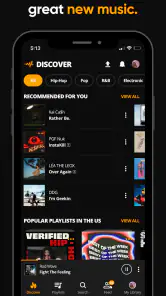
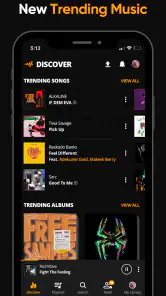
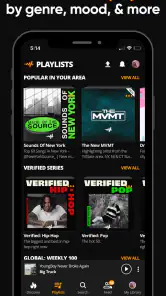
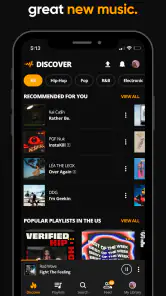
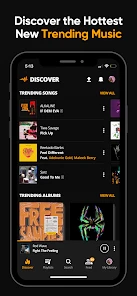
First things first, Audiomack is all about discovery. When I fired up the app, I was greeted with a sleek and intuitive interface that made navigation a breeze. The home screen is brimming with trending songs and albums, playlists curated by mood or genre, and even exclusive releases. It’s like stepping into a music wonderland where every corner holds a new sound to explore.
Offline Listening: A Game Changer
One of the standout features that made me fall in love with Audiomack is the offline listening option. Let’s be honest, data isn’t cheap, and there are times when you find yourself in a place with spotty Wi-Fi. Audiomack lets you download your favorite tracks so you can listen to them anytime, anywhere, without burning through your data. It’s a lifesaver for those long commutes or when you’re out for a jog.
That convenience is strongest when I treat the download option as preparation rather than a replacement for browsing. I would refresh my offline picks now and then, removing songs I have stopped playing and saving different ones for a new routine. That small bit of curation helps avoid the common trap of having plenty downloaded but nothing that fits the moment. It also gives a clear answer to a practical question: yes, the app can help with listening away from a connection, but I still need to choose and save what I want beforehand.
Keeping a commute dependable
For a routine trip, I would prepare one playlist for the route rather than expect discovery features to solve everything on the spot. A useful selection could include a few dependable favorites at the start, followed by newer tracks I want to give a proper listen. If I only have a short ride, that balance means I do not have to hunt for something familiar, but I still leave room for the app’s discovery side.
The same approach works for a workout or a walk, though I would choose music for the activity rather than simply reuse my travel list. The important distinction is that offline access supports planned listening; it does not remove the need to decide what belongs in the queue. I find that a fair exchange if I already enjoy making playlists, but it may feel like extra maintenance to someone who wants the app to make every choice automatically.
Vast Library and User-Friendly Experience
The app boasts a vast library that caters to a diverse range of musical tastes. Whether you’re into hip-hop, reggae, electronic, or something more niche, Audiomack has got you covered. I found myself diving into genres I hadn’t explored before, all thanks to the app’s easy-to-navigate design and smart recommendations.
That discovery-led approach is a useful contrast with music services I mainly use to replay a carefully maintained personal collection. Audiomack makes more sense when I want to browse by sound, follow a trail into a different genre, and then decide which finds deserve a place in my own playlists. I would not assume every listener will find the same depth in every style, though; if my priority were a particular artist or a very specific back catalogue, I would search for those essentials first before making this my main music app.
How it compares with familiar music apps
Compared with a service I use mainly to manage a long-established library, Audiomack feels better suited to exploration and building a fresh listening routine. The difference is less about declaring one approach universally better and more about what I want to do: revisit known albums with a familiar setup, or browse, discover, and save tracks for later. If I already have a paid service that reliably covers my favorite artists and keeps my playlists organized, Audiomack may work better as a second place to find music than as a replacement.
Against a basic radio-style listening habit, its playlist-making and offline preparation give me more control over what is ready for a particular trip. But if I enjoy pressing play and letting a service make the decisions, having to curate downloads may be a drawback. I would choose based on the listening job: Audiomack suits someone who wants to steer discovery and prepare a selection, while a more automated alternative may suit someone who prefers not to manage playlists.
Features That Stand Out
Aside from offline listening, Audiomack offers features like playlist creation, song sharing, and even the option to follow your favorite artists to keep up with their latest releases. The app’s user-friendly experience is further enhanced by its seamless integration with social media platforms, allowing you to share your musical discoveries with friends.
Following artists can make discovery feel less random: I can use playlists to save music I already enjoy, while artist follows help me keep an eye on new releases from the people I care about. Sharing is best treated as a bonus rather than the reason to choose the app. If I mostly listen alone and do not want to pass tracks around, playlists and offline access still have value without any social activity.
A simple workflow I would use is to follow a few artists whose new music I want to notice, then decide later which tracks deserve a place in a listening playlist. That keeps a feed of possible discoveries separate from the music I have deliberately prepared for offline use. It is a small distinction, but it helps prevent every new find from turning into another saved track I never play.
Everyday fit and fair trade-offs
Audiomack is a free music and audio app from Audiomack Music Apps, and its audience is clearly substantial: it has an average rating of 4.8 from around 7.4 million ratings, with more than 100 million installs. Those figures suggest broad appeal, but they cannot tell me whether its catalog matches an individual listener’s taste. I would use the free access to test the music I actually seek, rather than assuming popularity guarantees a perfect fit.
The app is rated Teen, and optional in-app purchases range from about $0.59 to $24.99 per item. I would keep that in mind if I am choosing an app for a younger listener or managing spending on a device. The free experience makes it easy to try, but ads can interrupt the flow, as the original experience here notes. If I want uninterrupted listening above all else, or I already rely on another service whose library and routine suit me, switching may not be worth the adjustment.
For someone deciding whether the free option is enough, I would start by using it for the exact situation that matters most: a commute, a workout, or music discovery at home. If the interruptions are tolerable and the tracks I want are available, there is little reason to rush into spending. If ads repeatedly break the kind of listening I care about, that is a more useful signal than simply assuming an optional purchase will solve every annoyance; I would check what an item offers before paying for it.
For an everyday test, I would spend a few minutes searching for favorite artists, try a couple of recommendations outside my usual genres, and build one playlist for offline use. That answers the questions that matter more than a feature checklist: can I find music I like, is it convenient to prepare for a weak-signal journey, and do the ads bother me enough to change how I listen? Audiomack was released on January 8, 2015, and its long-running presence gives it a familiar place in the category, but my own trial would still come down to those practical checks.
Who gets the most from it
I would recommend Audiomack to listeners who enjoy exploring beyond their regular rotation and want a free way to prepare music for commutes, workouts, or travel. It is especially useful if I am happy to organize a few playlists and accept some ad-supported friction in exchange for access and offline convenience. I would be less likely to choose it as my only option if I need a particular hard-to-find catalog, dislike interruptions, or prefer an app built around a collection I already know by heart.
It is also a sensible option for someone who wants to try a different listening routine without immediately replacing the app they already depend on. I would keep the established service for must-have albums if its catalog is a better match, then use Audiomack to explore and prepare a separate set for offline listening. That split approach avoids an all-or-nothing decision and lets the app prove its value through the music I actually find and replay.
On the other hand, I would skip it as my main choice if I expect every track I search for to be available, want an entirely uninterrupted session, or dislike deciding what to save before going offline. Those are not small preferences: they shape the whole listening experience. A more familiar, collection-centered or automation-focused alternative could be the better fit if those needs matter more than discovery and playlist control.
Final Thoughts
In a world overflowing with music streaming apps, Audiomack: Music Downloader stands out by offering a rich blend of discovery, offline listening, and a user-friendly interface. Whether you’re a casual listener or a hardcore music enthusiast, Audiomack has something to offer. So, go ahead, give it a whirl, and let the music take you places you’ve never been before.
My recommendation is to judge it through one prepared playlist, not a quick scroll through the home screen. Search for a few artists you genuinely care about, save a compact selection while connected, and see how naturally it fits into a real journey. If those tracks are useful, the offline feature earns its place; if the catalog or ad interruptions get in the way, you will know before rebuilding your whole music routine around it.
Audiomack: Music Downloader Frequently Asked Questions
Can I listen to saved Audiomack music without an internet connection?
Yes. Once tracks have been downloaded to your device, Audiomack can play them offline. This is useful for travel, areas with unreliable connectivity, or times when you would rather not stream. Remember to save the music you want while you are connected, and keep your offline collection manageable so it does not take up more device storage than you intend.
Will Audiomack work well if I mainly want to discover unfamiliar music?
Audiomack is designed for discovering and listening to music, so it can be a good fit if you want to explore beyond tracks you already know. You can browse and stream music, then save tracks that you want to revisit or organize them into playlists. That combination makes discovery part of the listening experience rather than only a way to find music to download.
Can I use Audiomack on a phone or tablet?
Audiomack is available for Android and iOS, so it can be used on compatible phones and tablets. The central experience brings music discovery, streaming, downloads, and playlists together. Before installing, check your device’s app store for the version that works with your device, then consider whether you have enough storage for any tracks you plan to save for offline listening.
Is Audiomack free to download, and can I use it without paying?
Audiomack is free to download, and you can get started with its music listening, track downloads, and playlist features without treating a purchase as a requirement. Optional in-app purchases are also available. If you are considering one, review the purchase details shown in your app store before confirming, especially if your device or payment method is shared with someone else.
What should I know about Audiomack before installing it for a teenager?
Audiomack has a Teen content rating, which is worth considering before a younger listener uses the app. It focuses on music discovery and listening, and users may encounter a wide variety of music. Parents can decide whether the rating fits their household and discuss listening choices with younger users so they understand what content is appropriate for them.
Pros
- Offline listening available
- User-friendly interface
- Diverse music library
- Ad-free with subscription
- Regular updates
Cons
- Ads in free version
- Limited offline downloads
- Requires account to download
- Some songs are premium
- Occasional streaming issues
- Category
- Music & Audio
- Version
- Varies with device











