Artistry Virtual Beauty
- 324.00
- 4.3
- Installs
- 1.00M
- Price
- Free
Screenshots
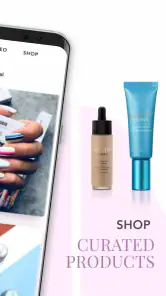
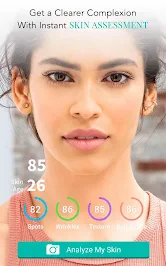
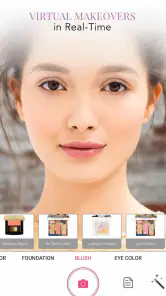
Analysis by Reviewed
I like using a virtual beauty app best when I have a specific question in mind: would this lipstick suit the outfit, or does a stronger eye look feel like too much for daytime? Artistry Virtual Beauty is designed for that kind of low-pressure experimenting, letting me explore makeup and skincare ideas on a phone before deciding what to try in person. It is a free beauty app from Perfect Corp., and its approachable focus makes it more useful as a testing ground than as a replacement for a real makeup routine.
The difference between a useful test and aimless scrolling is having a small decision to make. I might be choosing between a soft lip and a brighter one, or wondering whether a more defined eye would suit an evening plan. When I use the app with that question in mind, its virtual preview gives me a quick visual comparison. It cannot decide what I will enjoy wearing, but it can help me notice which direction feels more like me before I spend time applying anything.
Your Personal Beauty Playground
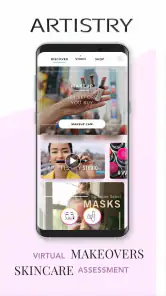
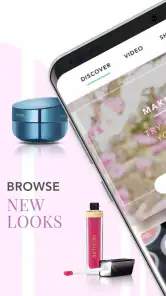
First off, let's talk about the user interface. Artistry Virtual Beauty greets you with a sleek and intuitive design that makes navigation a breeze. Whether you're a makeup novice or a seasoned pro, the app feels welcoming and easy to use. One of the coolest features is the virtual try-on tool. You simply upload a selfie, and voila! You can experiment with countless looks without ever touching a makeup brush. I mean, who doesn't love trying out bold lipstick shades or daring eyeshadow palettes without the commitment?
For a more useful first session, I’d start with a clear, front-facing selfie in even light, then change one element at a time. If I switch lip color, eye makeup, and complexion effects all at once, it becomes hard to tell what actually improved the look. Comparing a subtle choice with a bolder one on the same image gives me a much better sense of preference. It is also a handy way to narrow down options before shopping, though a screen preview cannot promise that a real product will match perfectly under different lighting or on skin.
Features That Shine
Beyond just virtual try-ons, the app offers personalized product recommendations tailored to your skin tone and preferences. It's like having a beauty consultant who knows exactly what works for you. Plus, the app keeps you updated with the latest beauty trends and tips. Whether it's mastering the art of contouring or finding the perfect skincare routine, Artistry Virtual Beauty has got you covered.
Another standout feature is the augmented reality (AR) technology that brings the virtual makeup experience to life. It's so realistic that you might forget you're not actually wearing the makeup! This tech-savvy approach not only makes the app fun but also incredibly useful for decision-making before purchasing any beauty products.
That preview is strongest as a style guide, not a shade guarantee. Phone displays, room lighting, camera angle, and the way makeup sits on real skin can all change the result. I treat recommendations as ideas to investigate rather than a definitive shopping list, especially when choosing skincare: a digital suggestion cannot replace checking ingredients or considering how my own skin reacts. This distinction keeps the app fun without asking it to answer questions it cannot settle.
More From Our News Desk

Clash of Clans Is Won Between the Battles

Android Auto Makes the Case for Quieter Car Software

MobiOffice: Transforming Mobile Productivity with Seamless Integration

EA SPORTS FC™ Mobile Soccer: Redefining Mobile Sports Gaming

How Microsoft OneDrive Became a Mobile Productivity Giant

How Google Translate Breaks Language Barriers Effortlessly
Making the Routine More Useful
A realistic use is getting ready for a dinner after work: I can test a more defined eye or a brighter lip during a spare minute, then choose one direction instead of buying several products on impulse. For a makeup beginner, that visual comparison can make beauty terms and looks easier to understand. Someone who already knows their routine can use it to explore variations without unpacking products. If I want precise color matching, hands-on swatches, or advice for a skin concern, I would rather compare products in person or speak with a knowledgeable professional.
Compared with browsing beauty photos or watching tutorials, a selfie-based preview makes the experiment more personal; compared with applying testers, it is quicker and cleaner. The trade-off is that tutorials show technique and real products show texture, while a virtual image is only a simulation. I also find it more helpful to save a simple personal habit—try one look, compare it with a familiar baseline, and note what I actually like—than to keep cycling through dramatic effects without a decision in mind.
For a repeatable routine, I use the same selfie as a baseline when I am comparing options. It reduces the chance that a changed pose or expression will influence my choice more than the makeup itself. I also keep the test narrow: one lip direction, then one eye direction, rather than trying every available effect in a single sitting. This is not a special setting; it is simply a practical way to make the visual comparison easier to judge. If I return later with a different photo, I treat it as a fresh experiment rather than assuming the previews are directly comparable.
Lighting is worth treating as part of the test. A look that seems balanced in a bright room may read differently on the way outside, so I avoid treating one screen view as a final verdict. If I am deciding on a look for a particular event, I think about where I will actually be and whether I want something understated or more noticeable. That mindset makes the app more useful than using it as a catalog of effects: the question becomes how a style fits a real occasion, not whether an image can be made more dramatic.
Settings and Habits That Save Time
I would not begin by changing every available option or assuming that a more elaborate setup will give a truer result. The most important choice is the image I use: a clear selfie with my face facing the camera gives the preview a fairer starting point than a dim, angled, or heavily edited picture. If an effect appears misplaced or uneven, I check the image before blaming the style. Retaking a simple photo can be a more useful troubleshooting step than repeatedly changing several makeup choices at once.
There is also a useful distinction between exploring a look and evaluating a product. For exploration, I can enjoy trying a more playful color even if I would not wear it every day. For a buying decision, I slow down and ask whether I like the general direction, then confirm the real shade and finish elsewhere. A screen can help me decide that I prefer a muted lip to a vivid one; it cannot tell me exactly how a particular formula will feel or wear. Keeping those two purposes separate prevents a fun preview from becoming false certainty.
When time is short, I use a simple sequence: settle on the photo, test the feature I am unsure about, compare it with a familiar or more restrained option, and stop once I have a preference. This avoids the common trap of treating more choices as better advice. If I am still undecided after a few comparisons, I may not need another effect; I may need to see the style in person, consider the outfit, or ask someone whose taste I trust. The app is most efficient when it helps me reach a decision, not when it keeps me browsing.
For someone who is learning makeup vocabulary, the tips and trend content can offer a starting point for questions to explore. I would pair that reading with a practical check: what part of the look is doing the work, and could I recreate it with products I already own? A virtual preview may make the overall idea easier to picture, while a tutorial is better for seeing the steps and tools involved. Using each for what it does well is more helpful than expecting one app to teach technique, recommend a routine, and verify product suitability all at once.
Who It Suits, and Where It Falls Short
The app is a good fit for curious makeup users, people planning a look for an occasion, and anyone who wants a low-cost way to explore before making a purchase. Its listing shows a 4.3 average from around 6,600 ratings, with over a million installs, and it is rated for Everyone. It was released on August 7, 2018; version 5.19.5 supports Android 6.0 and later. Those details make it straightforward to check whether an older Android phone meets the minimum before installing. The experience is free, so trying it does not require an upfront purchase.
There are limits to the convenience. A selfie-based tool depends on having a useful image, and an effect that looks polished on a screen may not translate to the same finish in daylight. I would skip it if I dislike experimenting through a camera, want an exact product match, or need clinical skincare guidance. The social side may appeal to users who enjoy exchanging looks, but anyone seeking a private, strictly practical tool may find that community element less important than the try-on itself.
It is particularly appealing if I want inspiration without having to make a full face of makeup just to test a general idea. A beginner can use the preview to build confidence in choosing a direction, while an experienced user may value the quick visual check before an occasion or a purchase. But someone who already knows exactly what they want and relies on real swatches may get less from a virtual layer. Likewise, if the goal is to learn how to apply eyeliner or blend shadow, a step-by-step video or in-person practice is more instructive than seeing a finished effect on a selfie.
On an ordinary weekday, I could use it during a lunch break to think through an evening plan. I would pick a recent, clear photo, compare a restrained look with one that feels a little more dressed up, then make a note of the direction I prefer. Later, I could recreate that idea with products I own or check a real shade at a counter. That small workflow keeps the app from turning into an impulse-shopping prompt. It is a way to test the mood of a look, not a reason to buy every product associated with it.
Compared with a standard beauty inspiration feed, the personal preview is the distinctive advantage: I can see an idea on my own face rather than trying to imagine it from a model or a tutorial thumbnail. Compared with physical testers, the app is cleaner and quicker for broad experimentation, but it loses the tactile details that matter when choosing a formula. And compared with a makeup lesson, it offers less practical instruction. I see it as a useful middle ground between browsing and trying a product, not as a replacement for either.
One question people often have is whether they can trust a preview enough to buy something. My answer is: trust it for narrowing the style, not for confirming the exact color, finish, or suitability of a product. Another is whether it can help with skincare. It can make recommendations and introduce ideas, but I would still read labels and pay attention to my own skin rather than treating an app suggestion as personal medical advice. Those boundaries are easy to overlook when a polished preview looks convincing, so I keep them in mind from the start.
It is also fair to ask whether a current-looking result requires a newer phone. The minimum Android requirement is version 6.0, which gives owners of older compatible Android devices a clear starting point for checking fit. The app is free, so there is no upfront price to weigh against that basic experiment. On the other hand, the image quality and viewing conditions still matter: a technically compatible phone cannot make a poor selfie or misleading light into a reliable product test. I would judge the experience by whether it helps me make a style choice, not by expecting identical results in every situation.
A Practical Verdict
What truly sets this app apart is its community aspect. You can connect with other users, share your looks, and get feedback. It's like a social media platform exclusively for beauty lovers. And let's not forget the convenience factor—having all these features in a single app saves you time and money, making your beauty routine more efficient and enjoyable.
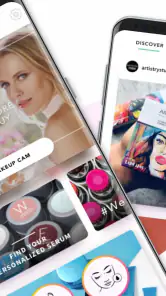
For users who enjoy sharing looks, that community dimension can make experimentation feel less solitary and give a style choice a second opinion. I would still decide how much I want to participate. If I mainly want a quick preview, I can focus on that practical use rather than feeling that every look needs to be posted or discussed. People who prefer not to share beauty experiments may find the social features easy to set aside, while those who enjoy feedback may see them as part of the appeal.
My main advice is to make each visit purposeful. Choose a photo you can judge comfortably, test one question at a time, and use the result to guide a real-world next step. That might mean wearing a look you already own, trying a product in person, or simply deciding that a bolder color is not for you. If the app leaves you with a clearer preference, it has done its job. If you need accuracy about formula, skin reaction, or application technique, another source of help is the better choice.
In conclusion, Artistry Virtual Beauty is not just an app; it's an experience. It's perfect for anyone who loves experimenting with makeup and staying ahead of beauty trends. So, if you're looking to elevate your beauty routine, this app is definitely worth a download. Happy beautifying, folks!
Artistry Virtual Beauty Frequently Asked Questions
What should I consider before installing Artistry Virtual Beauty?
Artistry Virtual Beauty is a beauty app from Perfect Corp. It is free and rated for Everyone, making it suitable for a broad audience interested in exploring beauty virtually. The app has a 4.3 average from around 6.6K ratings, and more than 1 million installs. If you enjoy experimenting with beauty looks on your device, its focus on virtual makeup and skincare may be worth exploring.
What is Artistry Virtual Beauty and how does it work?
Artistry Virtual Beauty is an innovative app designed to help users explore different beauty styles and products virtually. Using augmented reality (AR) technology, the app allows you to try on various makeup looks and hairstyles in real-time through your phone's camera. This way, you can experiment with different styles without actually applying any products, saving time and effort in finding what suits you best.
Is Artistry Virtual Beauty free to use?
Yes, Artistry Virtual Beauty is free to download and use. The app focuses on virtual makeup and skincare, giving users a way to explore beauty options through their device. Its free price makes it easy to try without an upfront purchase, although availability of particular features or content can depend on the app itself and may change over time.
What devices are compatible with Artistry Virtual Beauty?
Artistry Virtual Beauty is compatible with devices running Android 6.0 or later. The app requires access to the device's camera for its virtual beauty features, so make sure your device has a functioning camera and that you allow camera access when prompted. Its current version is 5.19.5, so keeping the app updated can help you use the latest available release.
How accurate are the virtual makeup and hairstyle simulations?
The virtual makeup and hairstyle simulations provided by Artistry Virtual Beauty are quite accurate, thanks to its advanced AR technology. While it does provide a realistic view of how different styles will look, there may be slight variations due to lighting conditions and camera quality. It's a fantastic tool for getting a general idea of how a look will suit you, but it's always good to try the products in person if possible.
Pros
- User-friendly interface.
- Wide range of beauty tools.
- Realistic virtual makeup try-on.
- High-quality AR technology.
- Regular updates and new features.
Cons
- Requires stable internet connection.
- Some features require in-app purchases.
- Limited free options available.
- Occasional AR glitches.
- High battery consumption.
- Category
- Beauty
- Version
- 5.19.5











