Arkansas News from THV11
- 652.00
- 4.5
- Installs
- 100.00K
- Price
- Free

Screenshots



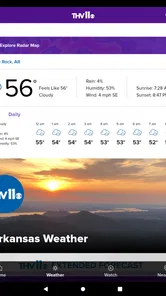
Analysis by Reviewed
I use news apps differently depending on where I am and what I need to know. A national outlet is useful for major headlines, but it often leaves out the road closure, storm warning, school update, or local decision that affects my day directly. Arkansas News from THV11 is built for that gap. It is a free news and magazines app from TEGNA that brings Arkansas-focused reporting together with weather and traffic information, making it more practical than a general headline reader when local awareness matters.
After spending time with it, I see the app as a focused companion rather than a complete replacement for every source of information. Its strongest quality is its regional purpose: it keeps the attention on Arkansas instead of making me dig through a national feed to find something happening nearby. The app has an average rating of 4.5 from around 2.5 thousand ratings, and its audience has also left hundreds of written reviews. That level of response suggests it has become a familiar tool for many people who want local updates in a convenient format.
How I use Arkansas News from THV11 during a normal day
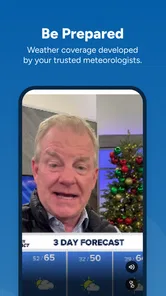
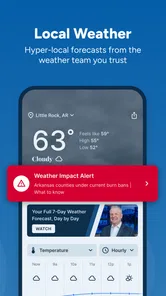
My baseline workflow starts with a quick check rather than a long reading session. In the morning, I look at the main news stream to see whether anything important happened overnight. I then move to weather when conditions could affect commuting or plans outside. Traffic is especially useful when I am deciding whether to leave earlier, change a route, or postpone a trip. This sequence feels more natural than opening separate national, weather, and traffic apps one after another.
A realistic example is a weekday morning after heavy rain. I can scan the local headlines for disruption, check the weather information for the broader situation, and then look at traffic before heading out. The value is not that every screen tells me something dramatically different. It is that the app keeps these related decisions in one Arkansas-centered place. That reduces the small amount of friction that often causes people to skip checking local information altogether.
During the day, I use the news side more selectively. If I have a few minutes, I read the headline and open the stories that affect my area or interests. If I am busy, I treat the app as a quick awareness tool instead of trying to consume everything. That distinction matters because a local news app can become tiring when every update feels equally urgent. My advice is to decide what you need from it before opening it: a fast situation check, a deeper local read, or practical travel information.
The app is suitable for general audiences, with an Everyone content rating, so it is not aimed at a narrow age group. It also supports older Android devices, with a minimum operating system of Android 7.1. That makes it a reasonable option for someone keeping an older phone in service, although the experience will naturally depend on the device and its software condition.
What to check before relying on it regularly
The first setting-related habit I recommend is reviewing how the app behaves on your phone after installation. Check whether notifications are useful for your routine and whether they interrupt you at inconvenient times. Local news alerts can be valuable during severe weather or a developing event, but constant interruptions can make the app feel noisy. I prefer keeping alerts only when they help me make a decision, then opening the app on my own schedule for ordinary stories.
More From Our News Desk

Weather by Xiaomi Review: Clear at a Glance, Less Clear Up Close

X Under Pressure: Can It Recover When Posting Goes Wrong?

Clash of Clans Is Won Between the Battles

Android Auto Makes the Case for Quieter Car Software

MobiOffice: Transforming Mobile Productivity with Seamless Integration

EA SPORTS FC™ Mobile Soccer: Redefining Mobile Sports Gaming
I also pay attention to location-related choices and the way weather or traffic information is presented. A regional app is most useful when I know which part of Arkansas I am checking. If I travel around the state, I avoid assuming that information relevant to one city automatically applies to another. Before a long drive, I check the area along the route rather than relying on a single local snapshot.
Another worthwhile check is the app’s current behavior after updates. The current version is 50.23.2, and keeping an app updated can help maintain compatibility with the phone. At the same time, an update can change the placement of controls or the way a feed is organized. When something feels slower or less familiar, I first look for a changed navigation pattern instead of assuming that a feature has disappeared.
I would also consider storage and background activity as part of a sensible setup, especially on an older device. News apps display a changing stream of content, and phones with limited space or aggressive battery controls may not behave consistently. I do not treat this as a reason to avoid the app, but I do recommend checking the phone’s own battery and storage tools if loading becomes unreliable.
Because the app is free, the decision to try it is easy. The more important question is whether its local focus matches your needs. I would install it for Arkansas news, weather, and traffic, but I would not expect it to replace a dedicated emergency alert system, a detailed navigation service, or a national publication. Those tools serve different purposes, and combining them is more sensible than forcing one app to do everything.
Small habits that make the information faster to use
Experienced use is mostly about repetition. I keep a simple pattern: check headlines once in the morning, weather before leaving, and traffic immediately before a longer drive. This prevents random browsing and makes it easier to notice meaningful changes. If I open the app repeatedly without a purpose, I tend to skim the same items and lose time.
I also separate reading from monitoring. When I want context, I open a story and read it carefully. When I am only checking conditions, I stay with the relevant weather or traffic area and avoid wandering through unrelated headlines. This sounds basic, but it is one of the clearest ways to get more value from a local news app without turning it into a constant distraction.
For commuters, a useful routine is to check traffic before putting the phone away, not while already driving. I use the app to inform a decision before departure, then rely on safe driving practices and an appropriate navigation tool once I am on the road. The app’s traffic role is best understood as an early warning or planning aid, not as a substitute for turn-by-turn navigation.
For people who follow local government, schools, public safety, or weather developments, I recommend reading beyond the first headline when the subject affects a real decision. A headline can tell me that something happened, but the article usually provides the detail needed to understand where, when, and who is affected. The time saved by a quick scan is useful, but the time spent opening an important story can prevent a misunderstanding.
Another practical habit is comparing a local report with the conditions I can personally observe. Weather information helps me plan, but conditions can vary between neighborhoods. Similarly, a traffic report can point to trouble without telling me every detail of a route I am considering. I treat the app as a strong local reference point, then use judgment for the final decision.
Where the app is strong, and where its boundaries show
The main strength is concentration. Arkansas News from THV11 does not ask me to sort through a worldwide stream before reaching Arkansas information. That makes it more useful than a broad news aggregator when the question is local: What is happening here, what might affect my commute, and what should I know before making plans?
Its combination of news, weather, and traffic is also more practical than a news-only application. A general news reader may offer more sources and broader coverage, while a standalone weather app may provide more specialized forecasting tools. The THV11 app sits between those options. It offers a convenient local starting point, especially for people who prefer one familiar place for several everyday checks.
The trade-off is depth and breadth. Someone who wants international reporting, financial coverage, political analysis from many viewpoints, or a large selection of publications will probably prefer a national aggregator or a dedicated newspaper app. Likewise, a person who needs detailed radar interpretation, extensive route planning, or highly specialized alerts may be better served by a purpose-built weather or navigation service.
I also would not use any single local app as my only source during a serious event. Local reporting is valuable, but important situations can develop quickly, and official announcements or direct instructions may be more appropriate for immediate action. The sensible role here is to keep informed and provide context, not to replace every official channel.
There can be ordinary friction too. A news feed may contain stories I do not personally care about, and switching between information types may take a moment when I am in a hurry. The app’s usefulness depends on my willingness to use it deliberately. If I want an ultra-minimal weather screen or a pure traffic map, the focused alternative may feel faster.
Who should install it, and who should look elsewhere
I recommend it to Arkansas residents who want local headlines close at hand, commuters who regularly check conditions before leaving, and families who want a simple way to follow regional weather and public-interest news. It is also a sensible choice for anyone who prefers a familiar local source instead of a crowded feed built around national stories.
It is less suitable for readers who mainly follow events outside Arkansas, want several competing publications in one interface, or need advanced tools that belong to specialized services. Travelers passing through the state may find it helpful for local awareness, but they should not mistake it for a complete travel planner. Likewise, people who already have separate apps they trust for news, weather, and traffic may not gain enough convenience to justify adding another feed.
The free price removes a major barrier to testing it, and the Everyone rating makes it approachable for a household audience. With over one hundred thousand installs, it is not an obscure experiment, although install count alone does not determine whether its local coverage matches a particular reader’s interests. I would try it for several days, establish a morning and commute routine, and then decide whether it earns a permanent place on the phone.
My verdict after building a repeatable routine
Arkansas News from THV11 works best when I treat it as a local dashboard rather than an endless entertainment feed. The most effective pattern is simple: scan the news for relevance, check weather when plans depend on conditions, and review traffic before travel. Notifications should support that routine, not take it over. Those small choices make the app feel more useful and less distracting.
TEGNA has positioned this app around a clear everyday need, and that focus is its biggest advantage. I like having Arkansas-specific information close by without needing to assemble three separate sources. I also appreciate that the app can serve both a quick check and a more deliberate reading session, depending on how much time I have.
My final recommendation is positive, with a clear qualification: install it if local Arkansas information is central to your day. Keep a dedicated navigation tool for detailed driving, use official channels for urgent instructions, and choose a broader news service if your interests extend far beyond the state. For the right audience, the best feature is the repeatable local workflow it creates, not any single headline or screen.
In my experience, that makes Arkansas News from THV11 a worthwhile free app for staying oriented in the places and situations that matter most locally. It does not need to replace every other information source to be valuable. It simply needs to make the first useful check quicker, and for Arkansas residents, it does that well.
Arkansas News from THV11 Frequently Asked Questions
Can I use Arkansas News from THV11 to follow news beyond my immediate area?
The app is intended for people looking for news and information from across Arkansas, rather than only updates from one neighborhood. It brings together regional reporting, weather, and traffic coverage in one mobile destination. That can make it useful when you want to keep an eye on developments in other parts of the state, as well as news closer to home.
What is Arkansas News from THV11?
Arkansas News from THV11 is a local news app focused on delivering updates from across Arkansas. It typically includes breaking news, weather reports, traffic information, sports coverage, community stories, investigative reports, and video content from the THV11 newsroom. The app is designed for readers who want convenient access to regional news without relying only on television broadcasts or a desktop browser.
What type of news and information can I find in the app?
The app covers a broad selection of Arkansas-related topics, including local and state politics, crime and public safety, education, health, business, entertainment, sports, and community events. Users can also find weather forecasts, severe-weather alerts, traffic updates, livestreams, video reports, and articles from different areas of the state. Available sections may change as THV11 updates its coverage and app features.
Does Arkansas News from THV11 provide weather alerts and breaking-news notifications?
Yes, the app is intended to keep users informed about important developments through breaking-news updates and, where supported, weather information and severe-weather notifications. After installation, notification permissions may need to be enabled in the device settings. Alert availability and timing can depend on location settings, internet connectivity, newsroom activity, and the user’s notification preferences, so the app should not be the only source used for emergency instructions.
Is Arkansas News from THV11 free to download and use?
The app is generally available as a free download, allowing users to browse THV11 news stories, videos, weather information, and other local content without purchasing the application. However, it may contain advertising, sponsored material, or links to external services. Some content can also require an internet connection, and mobile-data charges may apply when using cellular data, especially while watching video or livestreams.
Pros
- Covers local Arkansas news
- weather
- traffic
- and community updates.
- THV11 video reports make major stories easier to follow on the go.
- Push alerts can help users stay informed about breaking local events.
- Includes weather radar and forecasts useful for daily planning.
- Content comes from a familiar Arkansas television news source.
Cons
- Frequent breaking-news notifications may feel excessive for some users.
- Some articles rely heavily on video or external content to provide details.
- Coverage is primarily Arkansas-focused
- limiting its value elsewhere.
- Advertising can interrupt browsing and reduce the reading experience.
- Weather and news features may require a stable internet connection.













