ArcStory - AI Comic generator
- 25.00
- 2.7
- Installs
- 100.00K
- Price
- Free

Screenshots
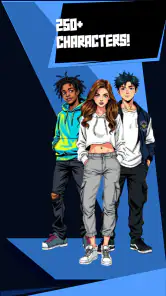
Analysis by Reviewed
I like making up comic scenes, but the blank page can turn a small idea into a daunting project: a character needs a look, the action needs to read clearly, and each panel has to move the story along. ArcStory - AI Comic Generator is aimed at lowering that first barrier by bringing AI-assisted comic making to a phone. I’d treat it as a way to sketch out a visual story, not as a replacement for a writer or artist who wants precise control over every detail.
When a phone-based comic maker makes sense
I can see the appeal when an idea arrives at an inconvenient time: on a commute, during a break, or while chatting with someone who inspires a small scene. Instead of waiting until I have drawing software and a clear afternoon, I can work from a short premise and see whether it has visual potential. That makes ArcStory more useful as a low-friction starting point than as a promise that a complete comic will emerge without decisions from me.
A realistic use would be turning an ordinary moment into a few panels for a friend: a missed train, an overconfident cooking experiment, or a pet interrupting a video call. I’d keep the setup familiar and the cast small, then judge whether the generated sequence actually communicates the joke. If it does, I have a shareable draft; if it doesn’t, I’ve learned what needs rewriting without investing hours in finished artwork.
From a loose idea to a finished strip
First things first, the setup was a breeze. I just downloaded the app, and within minutes, I was ready to create my first comic strip. The interface is super intuitive, which was a pleasant surprise. No need for any tutorials or extensive guides here; it’s all about diving straight into the action.
Start with a story small enough to finish
For a practical first attempt, I’d begin with one clear moment rather than a sprawling series: a character misses a bus, a strange visitor arrives, or a pet causes a harmless mess. That gives the AI a focused brief and makes it easier to judge whether the pictures and pacing support the joke or scene. If I were making a comic for a friend, I’d write the beginning, turning point, and payoff in plain language before choosing panels.
Features That Stand Out
The ArcStory - AI Comic Generator is loaded with features that make comic creation feel like a walk in the park. You start by choosing from a variety of templates that suit your story’s theme. Whether you're into sci-fi, fantasy, or everyday slice-of-life, there's something for everyone. The app uses AI to help you with plot suggestions, which I found incredibly helpful when I hit a creative block.
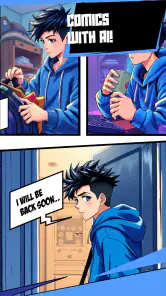
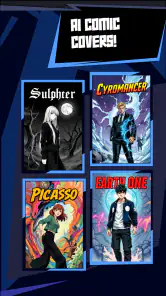
What really blew me away was the image generation feature. You don't need to be an artist to create stunning visuals. Simply describe the scene you envision, and the AI works its magic to generate artwork that fits your description. It's like having a professional illustrator at your disposal!
More From Our News Desk

Clash of Clans Is Won Between the Battles

Android Auto Makes the Case for Quieter Car Software

MobiOffice: Transforming Mobile Productivity with Seamless Integration

EA SPORTS FC™ Mobile Soccer: Redefining Mobile Sports Gaming

How Microsoft OneDrive Became a Mobile Productivity Giant

How Google Translate Breaks Language Barriers Effortlessly
In my experience, the useful trick is to keep descriptions concrete and consistent. Rather than changing a character’s clothes, age, or setting between prompts, I’d repeat the few details that matter and vary only the action. That can make a sequence feel more intentional, even when individual generated images don’t match perfectly. I’d also save a copy of the story outline outside the comic workflow before experimenting, so a promising idea is not tied to one attempt.
Keep the draft manageable while prompting
There is a practical trade-off between giving the image generator enough direction and burying it in a long description. I’d write each scene as a visible action, not as a paragraph of backstory: who is present, what they are doing, and one or two details that affect the image. The character’s motivation can live in the dialogue or in my outline; it does not all need to be squeezed into a visual prompt.
For a multi-panel joke, I’d also decide what must remain stable before generating the sequence. A signature accessory, a distinctive color, or a repeated location can help a reader recognize the same character, while changing the camera angle or action gives the panels movement. This is a useful compromise when I want the strip to feel connected but do not need the exact same face or pose in every image.
Give the panels a readable rhythm
Once you’ve got your story and visuals sorted, arranging them into a comic strip is as easy as dragging and dropping. The app gives you full control over the layout, so you can let your creativity run wild. I spent hours tweaking my panels, and it was nothing short of satisfying to see my story come to life.
Panel order is more than decoration. I’d place the clearest image first, then use a reaction or detail panel to slow the reader down before the punchline or reveal. On a small phone screen, too many busy scenes in a row can make a strip feel crowded, so I’d favor a few readable moments over trying to fit a whole chapter into one page. This is also where I’d check whether a reader can understand the action without needing me to explain it in a message.
Before I call a draft done, I’d read it twice in different ways: first by following the images without focusing on the words, then by reading the dialogue in order. The first pass catches confusing movement; the second catches lines that feel too long for a small panel or repeat information the artwork already shows. This small check can save a comic from looking finished while still being hard to follow.
Sharing is a handoff, not the finish line
The app also allows for easy sharing. Whether you want to show off your work to friends or publish it online, ArcStory makes it simple to export your comic in various formats. I found this particularly useful when I wanted to get feedback from a few friends before finalizing my masterpiece.
That feedback step is worth using for more than praise: ask someone which panel they understood first, where they hesitated, and whether the ending landed. If you’re sharing a draft publicly, I’d review every image and line yourself before posting; AI-generated results can need human editing, and a polished-looking panel does not automatically make the story clear. For a private gift or a quick social post, the speed may matter more than perfect continuity. For a long-form comic intended for print, I’d compare the export and editing workflow with a dedicated art or layout tool before committing to a full project.
I’d treat the handoff as a separate quality check, too. A strip that looks clear while I’m editing it may be less obvious to someone who has not heard the idea explained. Sending a draft to one person before sharing it more widely can reveal whether a caption needs context or a panel transition is unclear. If the comic is meant as a small gift, I’d make sure the ending feels personal rather than relying on a generic visual gag; the app can help shape the presentation, but the specific detail that makes it meaningful has to come from me.
How it compares with drawing and writing apps
Compared with a conventional drawing app, ArcStory’s main appeal is the shorter distance between an idea and a visual draft. A drawing tool gives me direct control over every line and is better when the character design must stay exact, but it also expects me to supply the art. ArcStory shifts more of that work to AI, which can be encouraging when I want to explore a scene quickly, while making the result less predictable and harder to art-direct precisely.
A writing app is a stronger choice if my real problem is developing dialogue, outlining a long plot, or keeping track of a large cast. ArcStory is aimed at turning comic ideas into visual sequences, so I would not use it as my only planning space for a complex story. My preferred division of labor would be to keep the outline and character notes somewhere easy to revise, then use the comic maker to test selected scenes and decide whether they read well as panels.
That distinction also helps answer whether a beginner needs artistic skills. I would not expect someone to draw confidently before trying it, but I would still expect them to make editorial choices: what the scene is about, which generated images work, and what needs to be rearranged or rewritten. The app lowers the drawing barrier; it does not remove the storytelling part of making a comic.
Who will enjoy the process—and who may not
This is most appealing if you have story ideas but little drawing experience, or if you want to make a playful one-off comic without learning a full illustration package first. A parent and child could turn a familiar family mishap into a short strip, while a writer might use generated scenes to test whether a sequence reads visually. The trade-off is that AI can help you get moving, but it does not remove the need to choose the story, refine the prompts, and make the final panels coherent.
If your priority is exact character design, precise lettering, or a consistent visual style across many pages, a conventional drawing app or a workflow with a human illustrator is likely a better fit. Likewise, anyone who wants complete control over each mark may find generated art frustrating rather than freeing. I’d approach ArcStory as a fast idea-to-draft tool and keep another editor available if the comic needs careful finishing.
I’d also skip it if I needed a dependable production pipeline for a deadline-sensitive project. AI-assisted creation can make an early draft feel quick, but reviewing images, adjusting the story, and preparing a clean final version still take attention. For a personal experiment, that flexibility is part of the fun. For a client-facing comic with fixed brand requirements, I’d rather start in a tool where every visual choice is deliberate.
Cost, access, and expectations
ArcStory is a free comics app from Wexpy, with in-app purchases ranging from $2.49 to $59.99 per item. I’d try the basic creation flow before paying for anything and check what a purchase unlocks at the moment I need it. The app is rated for Everyone, has reached over 100,000 installs, and its average rating is 2.7 from 447 ratings, so I would not assume every user has a friction-free experience. Those figures make it sensible to test a small project first rather than build a major comic around it straight away.
The average rating is a reason to approach it with realistic expectations, not a verdict that every session will go badly. I’d make a small test comic before deciding whether its particular mix of generation, layout, and sharing suits me. I’d also avoid buying anything until I understand how the free workflow handles the kind of project I actually want to make. That way, I’m judging the tool on a real use case rather than on the excitement of a first idea.
It was released on June 3, 2024, and version 3.8.9 requires Android 7.0 or later. If you’re deciding whether to use it on an older device, that minimum is the practical starting point; if the app does not suit your workflow, a standard drawing app offers a more hands-on alternative, though it asks more of your own art skills. I’d choose based on whether quick AI-assisted drafting or direct control matters more to me.
For someone who mainly wants a short comic to share, the key question is not whether the app can produce a perfect page on the first try, but whether the first draft gives enough to work with. For someone planning a continuing series, the more important test is whether they can keep characters and tone consistent from one scene to the next. I’d answer those questions with separate small experiments before deciding which workflow deserves more time.
The Final Word
In conclusion, this app is a game-changer for anyone looking to dip their toes into the world of comic creation. It combines the power of AI with user-friendly tools to make comic creation accessible to everyone, regardless of their artistic skills. I can see myself spending countless hours exploring all the possibilities this app offers. If you’ve ever dreamed of creating your own comic, ArcStory - AI Comic Generator is definitely worth checking out. It’s fun, easy to use, and incredibly rewarding.
My recommendation is more measured than that last burst of enthusiasm: I’d use it for a short experiment, a personalized gag, or a visual draft when drawing from scratch would stop me from starting. I wouldn’t rely on it blindly for a tightly controlled series, and I’d review the finished panels before sharing. If quick momentum sounds more useful than precise art direction, it’s worth trying; if every visual detail has to stay exact, another route will probably be less frustrating.
ArcStory - AI Comic generator Frequently Asked Questions
Who is ArcStory intended for, and what can I make with it?
ArcStory is a comics app for people who want to turn ideas into visual stories. Its focus includes comics, manga, and manhwa created with AI, so it may suit hobbyists, aspiring storytellers, or anyone curious about making illustrated narratives. The app is free to download, and its content rating is Everyone, though individual users may still want to consider whether its creative tools fit their needs.
Which devices can run ArcStory, and how current is the app?
ArcStory is an app developed by Wexpy, and its listed minimum operating-system requirement is version 7.0. The current version is 3.8.9, and the app was released on June 3, 2024. Before downloading, check that your device meets the minimum requirement and has enough available space for the installation and any content you create.
What is ArcStory - AI Comic Generator?
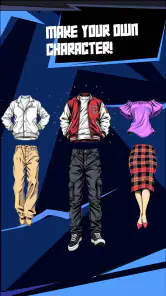
ArcStory - AI Comic Generator is a cutting-edge app that allows users to create their own comics using artificial intelligence. The app provides a variety of templates and tools to help users craft unique stories, complete with custom characters and vivid illustrations, all generated by AI technology.
How does the AI feature work in ArcStory?
The AI in ArcStory analyzes user inputs, such as text descriptions and storyline outlines, to generate comic panels. It uses machine learning algorithms to understand the context and create visually appealing and coherent storylines, making it easier for users to visualize their stories without needing artistic skills.
Is ArcStory suitable for beginners?
Yes, ArcStory is designed to be user-friendly for beginners. It provides intuitive tools and templates that guide new users through the comic creation process. Even without prior experience in comic creation, users can easily navigate the app and produce high-quality comics with the help of AI-driven suggestions and automation.
Pros
- User-friendly interface for easy navigation.
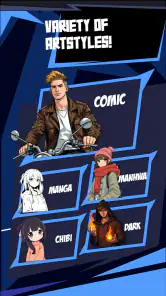
- Wide range of comic styles available.
- Fast AI processing generates comics quickly.
- Customizable characters and settings.
- Supports both Android and iOS platforms.
Cons
- Requires internet connection to function.
- Limited free version with few features.
- Occasional glitches in comic rendering.
- In-app purchases can be expensive.
- High battery usage during operation.
- Category
- Comics
- Version
- 3.8.9