AR Draw Sketch & Paint
- 9.00
- 4.3
- Installs
- 1.00M
- Price
- Free
Screenshots
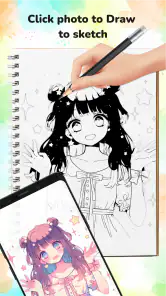
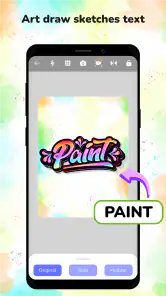
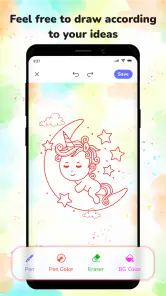
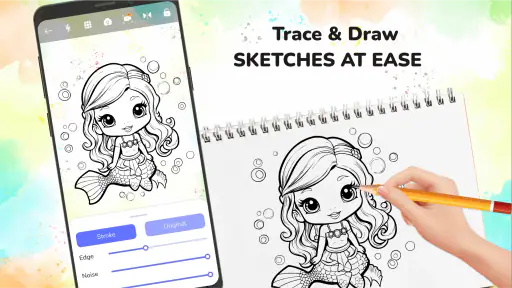
Analysis by Reviewed
I see AR Draw Sketch & Paint as a practical way to get past the intimidating blank page: it puts a visual guide in front of you while you draw on a real surface. That can make a first sketch feel more manageable, especially for beginners or a family art session. The trade-off is important, though: a tracing guide can help you make marks, but it does not replace the observation and practice that build drawing skills.
My main takeaway is that this is best treated as a drawing aid, not a substitute for learning to draw or for a full-featured digital art program. Its appeal lies in giving your hand a visible guide to follow: that can make a first attempt less intimidating, while still leaving the actual tracing and coloring to you.
Getting Started with AR Creativity
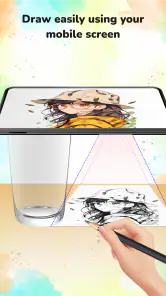
Imagine being able to project your sketches onto any surface with the help of augmented reality. Sounds like something out of a sci-fi movie, right? Well, that's exactly what AR Draw Sketch & Paint does! Setting up the app is a breeze. Once you’ve downloaded it from the app store, you’re just a few taps away from turning your world into a canvas.
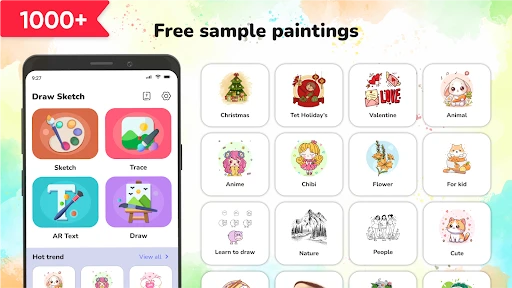
The user interface is pretty straightforward – no need to be a tech wizard to figure this one out. You simply choose a sketch, adjust it to fit the surface you’re working on, and voila! Your guide is ready to be traced, painted, or just admired.
In a practical session, I’d start by choosing a simple design and placing it on a stable, well-lit surface before reaching for a pencil. A phone or tablet needs to remain positioned so the guide stays useful as you work, so it helps to decide where your paper, device, and drawing hand will go before beginning. For a child or a first-time sketcher, a large outline with a few clear shapes is usually a better starting point than a busy illustration: it leaves room to learn how curves and proportions translate onto paper.
Features That Make It Shine
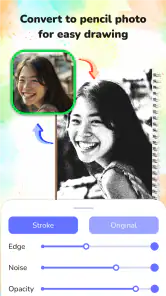
One of the coolest features is undoubtedly the ability to adjust the size and orientation of your sketch. Whether you're working on a tiny notebook or a large canvas, the app adjusts perfectly. Plus, you can lock the focus so your guide doesn't shift around while you work.
That focus lock is more than a convenience: it addresses a common frustration with tracing guides, where a small change in device position can make the reference drift away from the mark you are trying to follow. I’d use it after framing the image, rather than repeatedly adjusting the composition mid-drawing. If the guide still feels awkward, changing the paper’s position or choosing a simpler design may be easier than trying to force a complicated image into a cramped workspace.
More From Our News Desk

Clash of Clans Is Won Between the Battles

Android Auto Makes the Case for Quieter Car Software

MobiOffice: Transforming Mobile Productivity with Seamless Integration

EA SPORTS FC™ Mobile Soccer: Redefining Mobile Sports Gaming

How Microsoft OneDrive Became a Mobile Productivity Giant

How Google Translate Breaks Language Barriers Effortlessly
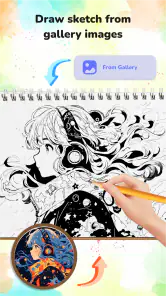
Another neat aspect is the variety of sketches available. From simple cartoons to more intricate designs, there's something for everyone. And if you’re feeling extra creative, you can even import your own designs. It's like having a portable art studio in your pocket!
Importing a personal image makes the app more flexible than a tracing tool limited to its built-in selection. For example, you could use a reference you already like for a greeting card or a small craft, then focus on transferring its broad shapes before adding your own details. I would still choose an image with clear edges and a readable silhouette; a crowded photograph can be difficult to interpret as a tracing guide, even when the source image matters to you.
But wait, there’s more! The app also supports multiple languages, which is a huge plus if English isn’t your first language. It’s clear the developers wanted to make this app as accessible as possible, and they’ve done a stellar job at it.
AR Draw is free, is rated for Everyone, and is made by Cheer Up Studio. It sits in the art and design category, where its defining difference from a conventional drawing app is the camera-based tracing approach rather than a blank digital canvas and a set of editing tools. It has a 4.3 average from around 4.9 thousand ratings and over a million installs. That reach suggests it has found an audience, but the practical question is whether tracing is the kind of creative help you want.
Making a Tracing Session Work in Everyday Life
A useful everyday project does not need to be ambitious. If I had a spare half hour before dinner, I might choose a simple outline, set up a sheet of paper on a table, and use the guide to make a handmade card or decorate a notebook. The app helps turn a vague intention into a sequence: select an image, position the guide, trace the main shapes, then decide how to finish the drawing. That structure is particularly helpful when the hardest part is deciding what to draw.
One small workflow choice can make the result feel more personal: treat the guide as a starting layer, not a final answer. I would trace only the outside shape and a few essential details, then add my own pattern, expression, or background after the outline is down. This avoids spending the whole session copying every mark and gives the finished paper drawing a bit of individual character.
There is also a practical trade-off between image size and detail. A compact page may be convenient, but fine features become harder to follow when the guide is reduced. For a first attempt, I’d prioritize a bold silhouette over intricate decoration, and leave tiny details for a later pass. This is not a limitation unique to a particular subject; it is a consequence of trying to translate a screen reference into pencil strokes on paper.
Where the Tracing Approach Helps—and Where It Doesn’t
For a relaxed evening project, I can see the appeal: pick a manageable sketch, set a sheet of paper in place, and spend a little time following the outline before adding color by hand. The app gives the activity a clear starting point, which is useful when “I want to draw something” feels too open-ended. It can also help someone practice steady strokes or notice the relationship between a large outline and smaller details.
The trade-off is that a guide can make the first lines easier without teaching every underlying skill. If your goal is to improve freehand observation, perspective, or confident drawing from imagination, tracing should be one exercise among several, not the whole routine. I’d trace the basic shape, then put the device aside and try a second version from memory; that small step turns a copy into a more useful practice session.
It is also not the strongest fit for someone who wants to create and revise finished illustrations entirely on a screen. Traditional sketchbooks are simpler when you want to draw anywhere without arranging a camera view, while a standard digital art app is a better choice for layered editing and detailed touch-based work. AR Draw’s value is specifically in using a projected guide to support drawing on a physical surface, so the extra setup is worthwhile only if that workflow suits you.
How It Compares with Other Ways to Draw
Compared with a normal sketchbook, the main advantage is the visible reference: you do not have to keep glancing between a separate image and your paper or invent the proportions from scratch. A sketchbook remains the more direct choice for quick doodles, observational practice, and drawing in places where positioning a device would be inconvenient. I’d choose this app when I want an outline to follow, not as my default for every pencil-and-paper session.
Against a conventional digital illustration app, the distinction is just as clear. A digital canvas is better suited to editing marks, revisiting details, and building a finished image on screen. This app instead supports the physical act of drawing, which can be more satisfying for someone who wants to color with real pencils or paints. The useful question is not which approach is universally better, but whether the goal is a digital image or a guided drawing on paper.
For a child’s activity, the comparison may favor the app when an open-ended blank page leads to frustration. Yet a simple printed outline or a drawing copied from a book can serve a similar purpose without needing to keep a device aligned. The app earns its place when its adjustable guide makes setup easier or when choosing an image together is part of the activity; it is not automatically necessary for every craft afternoon.
Who Will Love This App?
If you're a beginner, this app is a fantastic way to start honing your skills. The guided sketches offer a level of confidence that’s perfect for those just starting out. And for the seasoned artists? Well, it’s a fun way to explore new techniques and mediums without the pressure of a blank canvas staring back at you.
Parents, this one's also a gem for keeping the kids entertained on rainy days. Trust me, they’ll love projecting their favorite cartoons onto the wall and tracing them with ease. It's educational, fun, and a wonderful way to encourage creativity in young minds.
I’d recommend it most to beginners, casual doodlers, and families who want a structured, hands-on art activity. A parent can set up a simple outline, let a child trace it on paper, and then encourage them to choose their own colors or add a background. That keeps the activity from becoming only a test of copying and gives the child a decision to make after the guide has done its job. For shared use, choosing a design together can be part of the fun rather than treating the app as a quick distraction.
Someone who already draws confidently may still enjoy using a personal reference for a craft or experimenting with a new subject, but they may not need a tracing guide for everyday practice. Likewise, anyone hoping for a complete painting workspace should look elsewhere: the central appeal here is getting a sketch onto a physical surface, not replacing paper, pencils, or paints with a digital studio.
What to Expect Before You Start
A reasonable first question is whether a separate drawing surface and pencil are still needed. Yes: the point of the workflow is to follow a guide while making marks on a physical surface, so have your paper and drawing materials ready before setting the image in place. It is also worth choosing a spot where the device can remain steady; repeatedly moving it while tracing can make it harder to follow the same outline consistently.
Another practical question is whether you need to be good at drawing already. I don’t think so. The guide lowers the barrier to beginning, but the result still depends on how patiently you follow it and what you do after tracing. If you are learning, use the outline to notice where shapes meet and how large details relate to the overall form, rather than judging the session only by how closely the finished drawing matches its reference.
For people wondering whether it suits more experienced artists, I’d call it an occasional helper rather than a serious studio tool. It may be handy for transferring a design onto a physical craft or trying a subject outside your comfort zone, while artists who mainly need digital editing or freehand study will likely prefer their existing methods. That difference is central to deciding whether the app deserves a place in your routine.
Final Thoughts
In a nutshell, AR Draw Sketch & Paint is a must-have app for anyone with a passion for art. It’s versatile, user-friendly, and a fantastic way to experiment with new art forms. Whether you're young or just young at heart, this app will open up a world of possibilities for you.
So why not give it a shot? You might just discover a hidden talent or reignite a forgotten passion. Happy creating!
The app’s current version is 1.1.5, released on July 2, 2024, and it requires Android 7.0 or later. If you’re deciding whether to try it, I’d start with one short project and a simple image rather than expecting an elaborate finished piece straight away. That gives you a fair sense of whether the camera-guided workflow feels comfortable and whether tracing makes drawing more inviting for you.
My verdict is positive with a clear qualification: this is a friendly bridge from looking at a picture to making marks on paper, not a shortcut to artistic skill or a replacement for every drawing tool. If a visible outline helps you get started, or you want an approachable family activity, it is worth trying. If you prefer spontaneous freehand work or need detailed digital editing, a sketchbook or a conventional art app will likely fit you better.
AR Draw Sketch & Paint Frequently Asked Questions
Who developed AR Draw Sketch & Paint, and is it free to download?
AR Draw Sketch & Paint is an Art & Design app from Cheer Up Studio, and it is free to download. Its focus is helping people explore drawing, tracing, and painting, whether they are just starting out or already enjoy making art. The free price makes it easy to try the app, while the age rating of Everyone means it is presented for a broad audience.
What is AR Draw Sketch & Paint and how does it work?
AR Draw Sketch & Paint is an innovative application that leverages augmented reality (AR) technology to help users create stunning sketches and paintings. By using the camera on your smartphone or tablet, the app overlays virtual sketches onto real-world surfaces, guiding you in drawing or painting step-by-step. Its user-friendly interface makes it accessible for beginners and experienced artists looking to explore AR in art creation.
Is AR Draw Sketch & Paint suitable for beginners?
Yes, AR Draw Sketch & Paint is designed to cater to both beginners and experienced artists. The app provides easy-to-follow tutorials and guides that help users learn the basics of sketching and painting using augmented reality. It allows beginners to practice and improve their skills by tracing virtual images on real-world surfaces, making the learning process intuitive and engaging.
What devices are compatible with AR Draw Sketch & Paint?
AR Draw Sketch & Paint is compatible with a wide range of iOS and Android devices that support augmented reality capabilities. Generally, devices with ARKit (for iOS) or ARCore (for Android) are needed for optimal performance. It's always recommended to check the app's compatibility with your specific device model in the app store before downloading to ensure a smooth experience. The Android version requires Android 7.0 or later.
Are there any costs associated with using AR Draw Sketch & Paint?
While AR Draw Sketch & Paint is available as a free download, it may offer in-app purchases or subscription options for additional features, such as premium tutorials, exclusive art tools, and ad-free experiences. Users can enjoy the basic functionalities without any cost, but purchasing additional features can enhance the overall experience and provide more advanced tools for creating art.
Pros
- Intuitive user interface for easy navigation.
- Wide range of drawing tools available.
- Supports layers for complex sketches.
- Regular updates with new features.
- Offline mode for drawing without internet.
Cons
- Limited free version features.
- Occasional app crashes reported.
- Ads in the free version can be intrusive.
- Requires significant storage space.
- Lacks advanced photo editing tools.
- Category
- Art & Design
- Version
- 1.1.5











