

Appcompanist: Vocal Training
- 40.00
- 4.4
- Installs
- 10.00K
- Price
- Free

Screenshots
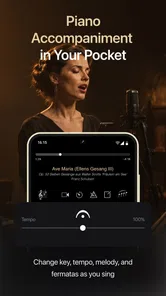
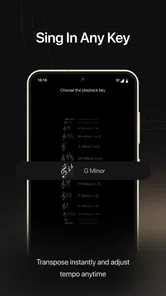
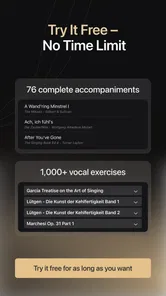
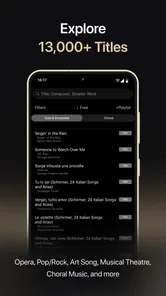
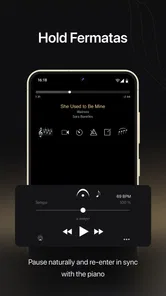
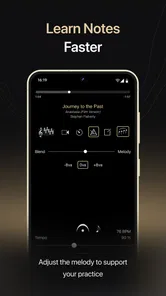
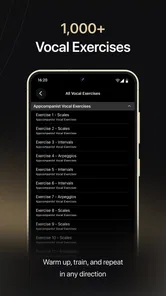
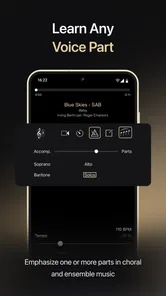
Analysis by Reviewed
I approached Appcompanist: Vocal Training as a practical music and audio tool rather than another general singing app. Its purpose is focused: it provides piano accompaniment for singers, opera, musical theatre, choir, and vocal practice. That narrow focus is important because the experience makes the most sense when you already know what you want to rehearse. I found it much closer to a portable rehearsal partner than to a lesson platform that tries to teach every part of singing.
The app is developed by Appcompanist, LLC, and it is available free of charge to install. There are in-app purchases ranging from $9.99 to $299.99 per item, so the word “free” should be understood as an entry point rather than a promise that every useful part of the experience costs nothing. It is rated for Everyone, works from Android 9 onward, and the current version is 2.1.47. Those details make it accessible to a broad range of users, although the practical value depends far more on your repertoire and rehearsal habits than on your phone or tablet.
What makes the accompaniment useful in real practice
The strongest part of the concept is its immediacy. A singer can work with piano accompaniment without arranging a rehearsal around another person’s schedule. That matters for short practice sessions: warming up before work, reviewing a difficult entrance between classes, or running through a song before a choir rehearsal. I especially like the idea of using it for targeted repetition rather than playing an entire piece every time. If one transition keeps causing trouble, an accompaniment app can make it easier to return to that passage with less preparation.
This is also where the app differs from ordinary music-streaming services. A recording of a finished performance is useful for listening and interpretation, but it does not leave the same space for the singer to lead. A karaoke track may offer a similar convenience, yet it is usually designed around popular-song playback rather than the needs of classical voice, opera, musical theatre, or choir work. Appcompanist: Vocal Training is aimed at the moment when the singer needs musical support while still remaining responsible for breathing, phrasing, diction, pitch, and timing.
That distinction changes who should consider it. If you are preparing an audition, studying a role, practicing a choir part, or maintaining repertoire between lessons, the idea is immediately relevant. If you want guided vocal lessons, automatic pitch scoring, vocal-health advice, or a complete beginner course, this is probably not the right first download. The app’s value comes from accompaniment, not from replacing a teacher or diagnosing your technique.
One realistic use case is a musical-theatre singer preparing for a callback. Instead of waiting for a pianist, the singer can use the app to rehearse the opening, check whether the tempo feels manageable, and repeat the section that tends to rush. Later, the same singer can practice performing without stopping whenever a small mistake occurs. That kind of uninterrupted run-through is useful because it tests concentration, not just note accuracy.
A better workflow than simply pressing play
I would not use the app passively. The most productive approach is to give each session a narrow purpose. Start with a comfortable run to understand how the accompaniment sits under your voice. Then repeat the difficult material while listening for the relationship between your consonants, breaths, and the piano’s pulse. Finally, perform the selection without interrupting yourself. This three-stage routine turns accompaniment into a rehearsal tool instead of background sound.
More From Our News Desk

 Gmail
GmailGmail in a Busy Inbox: Who Benefits Most?
From first account to crowded workday, Gmail earns its place through dependable search and flexible sorting—but its best fit depends on how much inbox maintenance you can tolerate.

 Prime Video
Switching to Prime Video: What Changes in Your Viewing Routine
Prime Video can make a compelling second home for streaming, but switching means learning a different catalog, rental layer, and route from browsing to playback.

 Universal TV Remote Control
Universal TV Remote Control Works Best as a Reliable Backup
A phone remote earns its place through quick setup and reliable habits. Here is how to get more from Universal TV Remote Control—and where its limits show.

 Weather - By Xiaomi
Weather by Xiaomi Review: Clear at a Glance, Less Clear Up Close
Xiaomi’s weather app makes everyday forecasts quick to scan, but its calm surface can leave useful details and recovery paths harder to find than they should be.

 X
XX Under Pressure: Can It Recover When Posting Goes Wrong?
A resilience-focused review of X, examining setup, mistaken posts, interruptions, weak connections, and the gaps that matter when recovery needs to be dependable.

 Clash of Clans
Clash of Clans Is Won Between the Battles
Its raids are quick; its community is a long-term project of coordination, teaching, rivalry, and shared responsibility—with all the friction that entails.
Latest News



For opera and musical-theatre singers, I would also separate musical preparation from dramatic preparation. First use the accompaniment to settle entrances, tempo, and phrasing. Then repeat the same material while adding text, character, and physical intention. Trying to solve every issue at once can make it difficult to tell whether a problem comes from the music or from performance choices. The app is most helpful when you use it as one controlled part of a larger practice plan.
Choir singers can use the same principle differently. A part may feel secure when surrounded by the ensemble but less certain alone. Individual practice with accompaniment can expose places where you rely too heavily on neighboring voices. I would mark those moments before a rehearsal and use the app to prepare them separately, especially entrances after rests or passages where the harmony makes the vocal line less obvious.
Where the free starting point becomes a decision
The free installation lowers the barrier to trying the app, but the in-app purchase range means you should decide carefully before treating it as your main rehearsal system. A singer who only needs occasional support may find the initial experience sufficient. Someone building a large repertoire or relying on the app throughout a school term, production, or audition cycle will need to examine which paid choices are relevant before committing.
I would approach the purchase screen with a specific question: does the available material match the repertoire I actually sing? That is more useful than buying broadly because the app sounds promising. A classical singer, a musical-theatre performer, and a choir member may have very different needs. The fact that the app serves several vocal communities is a strength, but it also means not every user will value the same part of the catalog or workflow.
The purchase range itself is a reason to slow down. The lower end may feel reasonable for a focused need, while the upper end represents a much larger commitment. I would avoid assuming that the most expensive option is automatically the best value. For a singer with one audition piece, a limited choice may be enough; for a student or working performer who repeatedly prepares new repertoire, broader access could make more sense. The right decision depends on frequency of use, not on the size of the available option.
Trust, controls, and moments that deserve attention
When I review a practice app, I look beyond whether the central feature works. I also want to know whether the user can understand what is being chosen, what is being paid for, and what level of commitment is involved. Here, the clearest visible facts are the free installation, the Everyone age rating, the Android compatibility from version 9, and the presence of paid items. Those details give a useful starting point, but they do not remove the need to read each purchase screen carefully.
The most important user-control moment is the transition from trying the app to spending money. Before confirming anything, I would check the exact item name, whether it is a one-time purchase or another type of billing arrangement, and whether the selection covers the repertoire I intend to use. I would also make sure the purchase is being made through the correct store account. This is ordinary digital hygiene, but it matters more when the possible commitment ranges from a modest amount to a much larger one.
I would take the same care with account controls. If the app asks me to sign in, I would use an account I can access and manage easily, then review the device’s account and subscription settings after any purchase. I would not create multiple accounts simply to test different options, because that can make ownership and restoration harder to track. Keeping a record of the purchase confirmation is sensible, particularly for a practice tool that may become part of a longer preparation period.
Data-sensitive moments are usually less dramatic in a music app than in a social network, but they still exist. A user may encounter account prompts, purchase records, device permissions, or settings related to saved choices. I would read any permission request in context and decline anything that does not appear necessary for the action I am trying to perform. I would also avoid entering personal information into free-text fields unless the app clearly explains why it is needed.
That cautious approach is not an accusation against Appcompanist, LLC. It is simply the sensible way I use any app that combines content access with paid options. The visible product facts tell me that the app is intended for a general audience and supports a broad Android range; they do not justify assumptions about hidden data practices. I prefer to judge privacy through the choices actually shown on the device: permission prompts, account screens, purchase confirmations, and the operating system’s controls.
How much control does the singer really have?
The practical form of user agency here is the ability to decide when, why, and how intensely to rehearse. I can choose a short session instead of opening a full lesson, focus on one selection instead of browsing endlessly, and stop before practice becomes unproductive. That sounds simple, but it is valuable for singers who already have instruction and need a dependable way to work independently.
There is also an important limitation: accompaniment can support a singer without correcting the singer. If I consistently enter late, sing flat, take inefficient breaths, or force the top of my range, the app will not automatically turn those habits into healthy technique. I still need a teacher, coach, or informed self-review process. I would record myself separately when possible, then compare the result with my written goals rather than expecting the accompaniment alone to provide feedback.
For beginners, that limitation may be decisive. Someone who does not yet understand notation, rhythm, vocal registration, or basic practice structure could feel lost even if the accompaniment itself is easy to start. A teacher-led app or regular lessons would likely offer better guidance. Conversely, an experienced singer may appreciate the lack of hand-holding because it leaves more time for repertoire work.
Another trade-off is device dependence. A phone is convenient, but its speaker may not provide the presence or balance needed for serious rehearsal. I would place the device where I can hear the piano clearly without turning the volume so high that it overwhelms my voice. Headphones can help in some situations, but they may also make it harder to judge how the voice projects in a room. For audition preparation, I would always finish with at least one session that resembles the actual performance environment.
When another option is the better choice
A live pianist remains the better option when you need flexible interaction, immediate adjustment, or detailed coaching. A human accompanist can respond to a breath, hold a phrase, change an interpretation, and notice when the singer is struggling. An accompaniment app cannot replace that musical conversation. I see it as a way to make more practice possible between coached sessions, not as a substitute for collaboration at an important rehearsal.
Sheet music with a piano at home may also be preferable for singers who already play well enough to accompany themselves. Self-accompaniment develops a different set of skills and gives complete control over tempo and repetition. The app becomes more attractive when the singer wants to concentrate entirely on singing or does not have access to a pianist.
General karaoke services may be better for casual entertainment, familiar popular songs, and social singing. Appcompanist: Vocal Training is more specialized, which is exactly why it may feel less useful to someone who simply wants a large party playlist. Its focus is a benefit for repertoire practice and a limitation for broad entertainment.
My measured recommendation
After considering both the musical purpose and the trust-related choices, I see this as a focused tool for singers who already know how to practice. The free entry makes it reasonable to explore, while the in-app purchase range means I would not buy impulsively. I would test the workflow with a real piece, check how well it fits my routine, and only then decide whether paid access is justified.
The app is particularly appealing for opera singers, musical-theatre performers, choir members, and vocal students who need accompaniment outside scheduled rehearsals. It can make a short practice window productive, help expose weak entrances, and give a singer more independence. Its biggest weakness is equally clear: it provides musical support, not personal correction. Users looking for structured teaching, detailed vocal analysis, or a replacement for a pianist should keep their expectations modest.
Its average rating is 4.4 from around 159 ratings, with roughly 40 written reviews, and it has passed 10K+ installs. Those figures suggest a real audience without making the app a universal standard. I would read that reception as encouragement to try it, not as proof that it will suit every voice or every repertoire list.
My final view is cautious but positive. Appcompanist: Vocal Training is worth trying when your main problem is access to accompaniment, not lack of singing instruction. Use the free starting point deliberately, inspect every paid choice, keep control of your account and device permissions, and judge the app against one concrete rehearsal goal. If it helps you practice more consistently between lessons or rehearsals, it can earn a useful place in your routine. If you need a teacher, a responsive pianist, or a complete vocal course, I would choose those alternatives first.
Appcompanist: Vocal Training Frequently Asked Questions
Can Appcompanist: Vocal Training help me practice songs for opera, musical theatre, or choir?
Yes. Appcompanist is designed around piano accompaniment for singers, including people working on opera, musical theatre, choir, and general vocal practice. That makes it useful when you want musical support while rehearsing rather than only a set of vocal exercises. How well it fits your needs depends on the repertoire and practice material available in the app, so it is worth exploring the available content before relying on it for a specific performance.
Is Appcompanist: Vocal Training suitable for someone who is new to singing?
It can be a helpful place to begin practicing, especially if you want accompaniment and structured vocal material in one app. However, a new singer may benefit from working with a teacher who can demonstrate healthy technique and correct problems in real time. Start at a comfortable range and volume, and stop if singing causes pain or lasting hoarseness. The app is best treated as a practice aid, not a substitute for personal coaching.
What is Appcompanist: Vocal Training, and who is it designed for?
Appcompanist: Vocal Training is a practice app aimed at singers, vocal students, teachers, and performers who want structured support while rehearsing. It combines vocal exercises, guided practice material, and accompaniment-focused tools in one place. During testing, it felt most useful for people who already sing regularly and want to improve consistency, pitch, breath control, and confidence rather than for complete beginners seeking a full music theory course.
Can I use Appcompanist: Vocal Training without a vocal teacher?
Yes, the app can be used independently for personal practice, although it should not be considered a complete replacement for professional instruction. Its exercises and guided material can help you establish a routine and become more aware of your voice, but the app cannot listen and respond like an experienced teacher in every situation. Beginners should start gently, avoid forcing high or low notes, and seek guidance if they experience pain, persistent hoarseness, or vocal fatigue.
Does Appcompanist: Vocal Training require an internet connection?
Some features may depend on an internet connection, particularly when accessing streamed lessons, downloading new content, signing in, or synchronizing practice information. Availability can also vary according to the specific version installed and the content included with your account. It is a good idea to open the app and download any available practice material before leaving home if you expect to rehearse somewhere with unreliable mobile data or Wi-Fi.
Pros
- Large library of professionally recorded accompaniment tracks
- Adjustable tempo and pitch support personalized vocal practice
- Clear audio makes it easy to hear phrasing and musical details
- Useful for auditions
- lessons
- rehearsals
- and independent practice
- Supports multiple vocal ranges and performance styles
Cons
- Many useful tracks and features require a paid subscription
- Some songs may not be available in the exact arrangement you need
- Changing keys can sometimes make the accompaniment sound less natural
- Requires a stable internet connection for accessing parts of the library
- Beginners may need basic musical knowledge to use all controls effectively











