AnyStories-Top Novels & Books
- 895.00
- 4.4
- Installs
- 500.00K
- Price
- Free

Screenshots
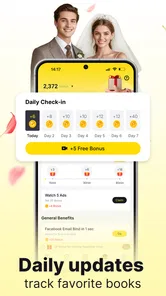
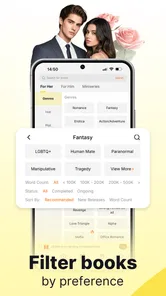
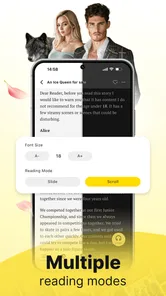
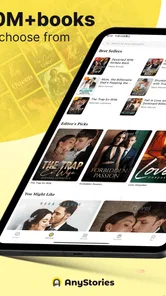
Analysis by Reviewed
I can see the appeal of AnyStories in a very ordinary moment: someone in the household wants a romantic fantasy to read while waiting for an appointment, another person is looking for a werewolf serial, and nobody wants to pass around a single paperback. This is a reading app rather than a shared family library, so I would approach it as a personal reading space that happens to live on a phone or tablet. That distinction matters if several people use the same device: browsing and reading can feel personal even when the hardware is communal.
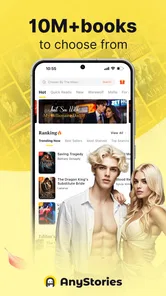
AnyStories is a free Books & Reference app from HONG KONG ZHONGHE CO.,LIMITED, focused on serialized fiction, especially romance, fantasy, and werewolf stories. I find that focus more useful than a broad promise of “something for everyone.” It tells you what kind of reading mood the app is built around, and it helps set expectations before you install it. If you enjoy dramatic relationships, heightened settings, and stories that invite you to return for another installment, the premise is clear. If your household mostly reads reference material, nonfiction, or children’s books, this is unlikely to become the shared reading hub you need.
Reading together on one device without treating it as one shared library
I’d start this section by separating a shared screen from a shared reading identity: one household tablet can be convenient without making everyone’s tastes, account access, or purchase choices communal. A simple handoff routine—closing the session and leaving a note about the title and chapter—can prevent mix-ups while keeping reading casual. That practical boundary leads to the next question: what should be agreed before anyone else opens the app?
A practical shared-device routine
For a household with one tablet left on the coffee table, AnyStories can work as an easy way for different adults to discover fiction during spare moments. I would not assume that one person’s reading setup is automatically suitable for everyone else. Instead, I’d make a simple routine: each reader takes a turn browsing, keeps their own preferences in mind, and avoids treating the app as a communal shelf where every recommendation reflects the whole household.
That approach is especially helpful when one person likes romance and another wants fantasy with supernatural themes. A recommendation that delights one reader may be irrelevant to the next, so it is worth judging the app by the individual reading experience rather than expecting a shared profile to represent everyone. If you are the person who usually manages a common device, agree on when it is available and whether others should change any reading or account settings. This is basic coordination, but it prevents a casual reading break from turning into confusion about whose story is open.
One useful habit is to finish a reading session by noting the title or chapter you reached, rather than relying on memory when the device changes hands. That matters most when someone else might open the app soon after you. If you read in short bursts—during a commute, a lunch break, or while waiting for an appointment—keeping track of your own progress makes it easier to return without needing to retrace the household’s recent activity.
Keep personal preferences and account boundaries clear
Shared hardware does not automatically mean shared account access should be treated casually. Before letting another person browse freely, I would check whose account is active and whether the device is signed in the way its owner intends. I wouldn’t assume that separate household members have separate profiles or that reading history can be divided between them. If keeping tastes private matters, the safer choice is to use a personal device or agree on a clear sign-in routine instead of passing around an already-open account.
More From Our News Desk

Weather by Xiaomi Review: Clear at a Glance, Less Clear Up Close

X Under Pressure: Can It Recover When Posting Goes Wrong?

Clash of Clans Is Won Between the Battles

Android Auto Makes the Case for Quieter Car Software

MobiOffice: Transforming Mobile Productivity with Seamless Integration

EA SPORTS FC™ Mobile Soccer: Redefining Mobile Sports Gaming
There is also a small but important distinction between sharing a screen and sharing purchasing decisions. The app is free to download, but it includes in-app purchases ranging from $0.49 to $299.99 per item. That wide span makes it sensible to discuss purchases before someone else uses a device with access to payment options. I’d keep purchase approval with the person responsible for the account and avoid leaving a shared device in a situation where another reader could mistake a paid option for part of ordinary browsing.
For a household, this is less about making the app complicated and more about setting expectations. Decide who can make purchases, whether anyone may change account details, and whether the device should be returned to a neutral screen after a session. These small boundaries are more reliable than assuming the app will enforce a family workflow. They also make the experience easier for the next reader, who can start fresh without wondering whether they are continuing someone else’s novel.
Coordinate reading without turning it into homework
AnyStories makes most sense when each reader chooses stories for themselves, but household members can still coordinate informally. If two people enjoy the same kind of romantic fantasy, they can recommend a title to each other and talk about it away from the device. I like that lightweight approach: one person can share a story they enjoyed without requiring everyone to use the same account or read at the same pace.
A practical tip is to keep a short note outside the app with titles you want to revisit or recommend. On a shared device, that avoids relying on another person’s browsing session as a memory aid. It is also useful if you are trying to compare several stories before committing your attention: write down what caught your interest, then return when you have time to read properly. The app’s focus on serial fiction naturally suits readers who dip in and out, but a personal note can be more dependable than expecting a communal device to preserve everyone’s mental bookmark.
Another trade-off is that household coordination can make browsing feel less spontaneous. If several people use the same device, they may encounter each other’s open screens or have to wait their turn. For someone who reads privately and often, a personal phone is a better fit. For occasional reading at home, a shared tablet can still be convenient as long as nobody assumes it is a multi-user library with clearly separated tastes and progress.
Age context and trust should come before recommendations
The app is rated Mature 17+, so I would treat it as adult-oriented rather than as a general family reading app. Its romance, fantasy, and werewolf focus may sound like broad genre entertainment, but the age rating is the more useful guide when deciding who should have access. In a household with teenagers or younger children, I would not hand over an unlocked shared device and assume that the app’s subject matter makes it suitable for every reader.
That does not mean the app needs to be excluded from every home. It means the adult who owns the account should make a deliberate choice about access, explain the boundary, and keep the device available to younger users separate when necessary. I would also avoid presenting it as a substitute for a child-oriented reading service. Families looking for age-curated books, school references, or a children’s reading collection should choose a product built around those needs instead.
Trust is part of this decision too. A mature rating tells me to think carefully about the audience, but it does not replace a household conversation about what someone is allowed to read or buy. If a younger person uses the same hardware for other tasks, the simplest protection may be keeping the app off that device rather than relying on assumptions about separate access. That is a clearer boundary than hoping every reader will recognize which account or section they have opened.
What the audience numbers suggest—and what they cannot decide for you
AnyStories has an average rating of 4.4 from around 16,000 ratings, with roughly 894 written reviews, and it has passed 500,000 installs. Those figures suggest that a substantial group of readers has found it worth trying, but they do not tell me whether a particular story will suit your taste or whether the app fits a shared-device routine. I would use them as a reason to consider giving it a try, not as a substitute for checking whether its genres and mature audience fit your household.
The app was released on February 14, 2025, and its current version is 3.1.6. It requires Android 7.0 or later, so older compatible devices may be an option if you want to reserve a spare phone or tablet for reading. That can be a neat household arrangement: keep one device for adult reading, agree who may use it, and avoid mixing it with a child’s general-purpose tablet. I would still check that the device itself is comfortable to read on and that its owner is happy with how accounts and purchases are handled.
How it compares with other ways to read
Compared with a general ebook reader, AnyStories has a narrower identity. That can be a strength if you specifically want romance, fantasy, or werewolf fiction and prefer discovering stories within those interests. A broad ebook service is usually the better choice when your reading ranges across nonfiction, classics, reference works, and books you already own. For household use, a general library app may also suit families better if the main goal is sharing a wide range of age-appropriate material rather than exploring adult serial fiction.
Compared with reading on paper, a phone-based app is easier to carry and can fit into short stretches of downtime. The compromise is that the phone is also a shared screen, a place where other household members may have accounts or activities of their own. If you value a distraction-free session or want a book that can be passed around without account questions, a physical book may be the simpler option. If you prefer choosing a story on the device you already have with you, AnyStories is more convenient.
I would also separate the question “Is this a good app for my genre?” from “Is this the right reading setup for my family?” A reader who loves the app’s genres may still prefer to use it privately. A household that wants coordinated reading, child-focused discovery, or a common collection should compare other options before settling on it. The most sensible choice depends on whether genre discovery or shared access matters more.
Who I would recommend it to, and who should pass
I’d recommend giving AnyStories a look if you are an adult who enjoys romance-led fiction, fantasy settings, and werewolf stories, and you like to read in short sessions on a mobile device. It could also suit a couple or group of adults who want to recommend stories to one another while keeping their reading decisions personal. Since the app is free to install, you can explore whether its focus appeals to you before deciding whether it deserves a regular place in your routine; just keep the optional purchase range in mind.
I would skip it if you want one carefully organized library for everyone in the household, if your priority is children’s books, or if you mainly need factual reference material. I would also choose another format if you dislike reading on a phone, do not want to manage account boundaries on shared hardware, or prefer to avoid in-app purchase decisions altogether. A broad ebook service, a library app, or paper books may be a better match in those situations.
My household verdict
My overall impression is that AnyStories is best treated as a personal fiction app that can be used at home, not as a ready-made household reading system. Its clear genre focus gives the right readers a reason to explore, and the free install lowers the barrier to trying it. The mature rating and purchase options make a little planning worthwhile when a device is shared, especially if younger people also use it.
If I were setting it up in my own home, I’d decide who the intended readers are, keep purchasing decisions with the account owner, and agree on how the shared device gets handed back after a session. That is enough to make casual reading more orderly without pretending the app offers family controls or separate household profiles. For adults who already know they enjoy romance, fantasy, and werewolf fiction, it is worth considering. For a family looking for one safe, coordinated library for every age, I’d look elsewhere.
AnyStories-Top Novels & Books Frequently Asked Questions
What is AnyStories – Top Novels & Books?
AnyStories is a reading app for discovering and reading serialized fiction and novels on a mobile device. Its catalog can include stories in genres such as romance, fantasy, mystery, and drama, with availability varying by region and over time. Readers can browse titles, follow stories as they develop, and keep track of their reading. Check the app’s current listing and catalog before downloading if you are looking for a particular book or genre.
Is AnyStories free to use?
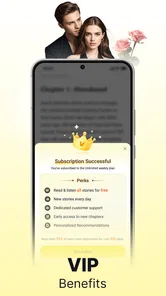
You can generally download AnyStories and browse at no cost, but access to every chapter may not be free. Some stories may offer free chapters while later installments require in-app purchases, coins, a subscription, or another payment option. Pricing and unlock rules can change, so review the payment details shown in the app and in your app-store account before buying. If you share a device or payment method, check that purchase controls are set appropriately.
Can I read AnyStories novels offline?
Offline reading may depend on the title, the app version, and whether the relevant chapters have been downloaded or saved in advance. Do not assume that every story will be available without an internet connection; browsing, syncing progress, or unlocking chapters may still require connectivity. Before travelling or going offline, open the chapters you want while connected and check whether the app offers a download or offline-reading option for them.
Does AnyStories contain mature or user-created content?
The app’s fiction catalog may include themes intended for older readers, such as romance, violence, or other mature subject matter. Story content and suitability can vary, so review descriptions, ratings, and any available content notices before reading, particularly when choosing books for a younger user. Also check the current store listing and in-app controls for age guidance or parental restrictions, since these details and the catalog may change.
Is AnyStories available on Android and iOS, and what should I check before downloading?
Availability can differ by country, device, and operating-system version, so look for AnyStories – Top Novels & Books in the official Google Play Store or Apple App Store for your region. Confirm the publisher, supported-device requirements, recent reviews, and requested permissions before installing. It is also sensible to review the privacy policy and in-app purchase information, and to make sure your device has enough storage and a stable connection for setup.
Pros
- Large selection of romance
- fantasy
- and other popular fiction genres.
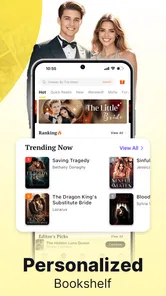
- Personalized recommendations help readers discover new stories.
- Reading progress is saved
- making it easy to pick up where you left off.
- Adjustable reading settings make long sessions more comfortable.
- Regular story updates give readers new chapters to look forward to.
Cons
- Many stories require coins or a paid subscription to continue.
- Free coins and rewards may not cover the cost of reading regularly.
- Some novels have uneven writing or editing quality.
- Chapter-by-chapter releases can mean long waits for new content.
- The app may show ads or prompts encouraging in-app purchases.











