

AnkiDroid Flashcards
- 5.57K
- 4.8
- Installs
- 10.00M
- Price
- Free

Screenshots
Analysis by Reviewed
I find AnkiDroid most useful when I treat it as a steady review habit rather than a shortcut to learning. It is an Android education app from the AnkiDroid Open Source Team, and its free access makes it easy to try without committing money. The practical question is whether you are willing to make or choose good cards and return to them regularly; that effort matters more than downloading a large deck.
What free access means for its value
The app is free, so there is no purchase decision to weigh before getting started. Its value comes from helping you revisit information over time, especially when a subject has details that are easy to forget. AnkiDroid has a 4.8 average from around 150,000 ratings and over 10 million installs, which suggests it has found a substantial audience, but I would still judge it by whether its review routine fits your own study style.
It is rated for everyone, though that does not mean every shared deck is equally suitable or well made. I would preview a deck before relying on it, check that its wording matches what you are studying, and be ready to edit or replace cards that are confusing. The app itself costs nothing; the time spent choosing useful material is the real investment.
AnkiDroid: Your Personal Study Buddy
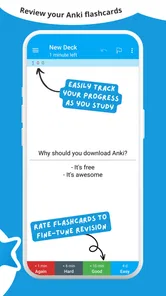
Have you ever wished for a study partner who never gets tired and is always ready to help you revise? That's exactly what AnkiDroid Flashcards offers. The app is based on the proven concept of spaced repetition, which boosts your memory by reminding you of information just before you're likely to forget it. This scientifically-backed method makes sure that your study sessions are as productive as possible.
Setting Up and Getting Started
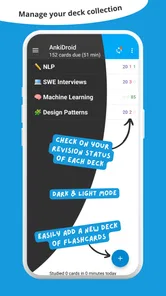
Getting started with AnkiDroid is a breeze, even for those who aren't tech-savvy. After downloading the app, you can either create your own decks of flashcards or browse through the extensive library of shared decks created by other users. This flexibility means you can tailor your learning experience to suit your specific needs. Plus, the user interface is intuitive and straightforward, making navigation a piece of cake.
For a first deck, I recommend starting small and writing each prompt so it tests one fact or idea. A card that asks for a whole paragraph is harder to review honestly: you may recognize the topic without knowing which details you missed. If you find a shared deck, try a handful of cards first. That gives you a quick sense of its language, difficulty, and accuracy before you make it part of a long-term routine.
Features That Stand Out
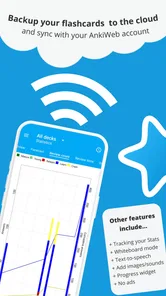
One of the standout features of AnkiDroid is its ability to sync across devices. Imagine starting your study session on your Android phone and continuing seamlessly on your computer. This cross-platform functionality ensures that your learning never has to pause. Additionally, the app supports text, images, audio, and even videos, allowing you to create rich and engaging flashcards. It's like having a multimedia study tool right in your pocket!
More From Our News Desk

 Gmail
GmailGmail in a Busy Inbox: Who Benefits Most?
From first account to crowded workday, Gmail earns its place through dependable search and flexible sorting—but its best fit depends on how much inbox maintenance you can tolerate.

 Prime Video
Switching to Prime Video: What Changes in Your Viewing Routine
Prime Video can make a compelling second home for streaming, but switching means learning a different catalog, rental layer, and route from browsing to playback.

 Universal TV Remote Control
Universal TV Remote Control Works Best as a Reliable Backup
A phone remote earns its place through quick setup and reliable habits. Here is how to get more from Universal TV Remote Control—and where its limits show.

 Weather - By Xiaomi
Weather by Xiaomi Review: Clear at a Glance, Less Clear Up Close
Xiaomi’s weather app makes everyday forecasts quick to scan, but its calm surface can leave useful details and recovery paths harder to find than they should be.

 X
XX Under Pressure: Can It Recover When Posting Goes Wrong?
A resilience-focused review of X, examining setup, mistaken posts, interruptions, weak connections, and the gaps that matter when recovery needs to be dependable.

 Clash of Clans
Clash of Clans Is Won Between the Battles
Its raids are quick; its community is a long-term project of coordination, teaching, rivalry, and shared responsibility—with all the friction that entails.
Latest News



Media is most helpful when it tests something that words alone cannot: a pronunciation, a diagram label, or a visual distinction. It can also make cards more cumbersome to create, so I would not add images or audio just to decorate a deck. A useful workflow is to make a plain-text card while learning, then add a visual or sound only when a specific recall problem calls for it.
Another feature worth mentioning is the app's flexibility in scheduling. You can set your own study targets and the app will remind you to review your cards at the optimal time. This level of customization is perfect for learners with busy schedules.
Where the routine takes effort
Spaced repetition works best when the cards are clear and reviews are consistent. If I skip sessions for a while, a backlog can make opening the app feel like another task rather than a quick study break. I would set a manageable daily target instead of creating a huge deck and expecting to catch up later. The system can help schedule practice, but it cannot decide which facts matter for your exam or correct a poorly phrased answer for you.
This is also where AnkiDroid differs from a conventional notes app or a linear video course. Notes are better when I need to understand a topic as a connected whole; a course is better when I need someone to explain unfamiliar material step by step. Flashcards are strongest after that first explanation, when I want to retrieve key terms, formulas, vocabulary, or distinctions without looking. I use them as a companion to learning, not a replacement for it.
A realistic study day
For example, someone learning a language could make a short set of cards from words encountered in a lesson, then review them during a commute or while waiting for an appointment. Audio can help when recognizing a spoken word matters, while a simple text prompt may be enough for spelling or meaning. The important choice is to keep the cards focused: a sentence with one new expression is often easier to learn from than a card crowded with several unrelated terms.
For a student preparing for a history test, the same approach can turn dates, names, and cause-and-effect links into separate prompts. I would still use class notes or a textbook to understand the story behind those facts. That division of labor is practical: study materials explain, while the cards reveal whether I can recall the important details on my own.
Features That Stand Out
Another feature worth mentioning is the app's flexibility in scheduling. You can set your own study targets and the app will remind you to review your cards at the optimal time. This level of customization is perfect for learners with busy schedules.
Why You'll Love AnkiDroid
One of the reasons I personally love using AnkiDroid Flashcards is the community behind it. The app has a vibrant user base that shares decks on virtually every topic imaginable. Whether you're learning Japanese kanji, medical terminology, or preparing for a history exam, there's a good chance you'll find a deck that suits your needs.
Shared decks save the effort of entering every card yourself, but I would not assume that a popular-looking deck matches my course, terminology, or preferred level of detail. Before committing, I would test it against a chapter or lesson I already know. If its prompts are too broad, too advanced, or based on a different syllabus, editing selected cards—or building a smaller personal deck—may be more useful than studying it unchanged.
Moreover, the app is open-source, which means it's constantly being improved by developers around the world. You can expect regular updates and new features that enhance the user experience. And the best part? It's completely free! This makes it accessible to everyone, regardless of budget.
Making reviews fit an ordinary day
A useful way to make the habit stick is to attach a short review to a moment that already exists in your routine: after breakfast, during a quiet break, or while waiting for a class to begin. I would avoid opening a large deck with the vague plan to “study everything.” Instead, I’d decide what I want to retrieve today, complete a manageable session, and stop before the app starts to feel like a penalty. The benefit is consistency, not heroic marathon sessions.
There is also a practical distinction between collecting facts and learning to use them. For a language, a card that asks for a translation can help with recall, but it does not by itself teach natural conversation or listening comprehension. For a technical subject, memorizing a definition is useful, yet solving a problem may require applying it in context. I’d make cards for the pieces that need repeated retrieval and keep practice exercises for the skills that need doing.
Choosing cards without inheriting their weaknesses
When a shared deck looks relevant, I would check whether its prompts have a clear answer and whether the answers are short enough to judge. If a card contains several facts, split it into separate prompts where that makes sense. This is more than tidying: it helps reveal exactly what I remember and what still needs work. A deck is a starting resource, not a guarantee that its structure is right for me.
It is worth keeping an eye on duplicated or near-duplicated cards, too. If the same fact appears in several forms, reviews can become repetitive without adding much understanding. I would keep the card that asks the most useful question, then use the freed-up attention for material I actually confuse. That small bit of editing can make a large borrowed deck feel more personal and less like a pile of someone else’s notes.
Where it sits among study options
Compared with a standard flashcard tool that emphasizes a ready-made course or a highly guided path, AnkiDroid puts more responsibility on the learner to select material and shape the review habit. That freedom is valuable if I want control over a deck, but it can feel less welcoming when I want an app to tell me exactly what to learn next. A notebook is easier for capturing broad explanations, while AnkiDroid is more useful for checking whether I can bring individual details back to mind.
I would also choose a textbook, teacher, or structured lesson when I am encountering a topic for the first time and need the ideas connected in a sensible order. After that, cards can help preserve definitions, vocabulary, and distinctions that fade between lessons. The strongest setup is often a combination: learn the idea from a full explanation, make a few targeted cards, and return to examples when recall alone is not enough.
Who is likely to get the most from it?
I would recommend it to people who need repeated recall practice and are comfortable building a habit: language learners, students memorizing terminology, and anyone maintaining knowledge they do not use every day. It is less appealing if you mainly want a guided course, polished explanations, or a tool that automatically turns a complete subject into understanding. If making and maintaining cards sounds like a chore, a structured lesson app or a simple set of notes may suit you better.
One practical question is whether you have to create everything yourself. No: shared decks give you a starting point, while personal cards let you target exactly what you keep forgetting. Another is whether flashcards can replace other study methods. In my view, they cannot; use them to check recall after reading, listening, or practice, and return to the source when you do not understand an answer.
A few questions worth settling before you begin
Is it suitable for a complete beginner? Yes, if you already have a source that explains the subject and are willing to start with a small deck. The app can support recall, but I would not rely on flashcards alone to introduce unfamiliar concepts. Is a shared deck automatically the easiest route? Not necessarily: it saves typing, but checking a sample for fit and quality can prevent a poor match from becoming a frustrating routine.
Can it work for brief study windows? That is one of its more natural uses, since a short review can fit into otherwise idle time. But I would not mistake convenience for a complete study plan. If I have a difficult chapter to understand, I would set aside time for the chapter itself and use the cards afterward to keep important details accessible.
My recommendation
In conclusion, if you're looking for a reliable, efficient, and user-friendly app to aid your learning process, AnkiDroid Flashcards could very well be your new best friend. Its blend of powerful features, ease of use, and community support make it stand out in the crowded field of educational apps. Give it a try, and you might just find yourself wondering how you ever studied without it!
AnkiDroid Flashcards Frequently Asked Questions
Does AnkiDroid Flashcards work on both Android phones and iPhones?
AnkiDroid Flashcards is an Android app, designed to bring flashcard study to Android phones and tablets. If you use an iPhone or iPad, check the relevant app store for an iOS version before downloading; this app’s name specifically refers to its Android edition. On a compatible Android device, it offers a mobile way to review study material in short sessions.
Do I need to know how spaced repetition works before using AnkiDroid?
No special background in study techniques is needed to get started. AnkiDroid uses spaced repetition, arranging flashcard reviews over intervals to support memory retention. You can begin with a deck and learn the routine as you study: review the cards, respond to prompts, and keep returning to the material. The approach does require regular practice, so it is most useful when you build reviews into your study habits.
Is AnkiDroid Flashcards suitable for studying on a phone or tablet?
AnkiDroid Flashcards is an education app for Android that brings flashcard study to a mobile device. Its format is useful for reviewing material in short sessions, whether you are learning a language, revising facts, or working through another subject. The app focuses on helping you memorize information, so it can complement other study methods rather than replace a complete course or textbook.
Can I find ready-made study material in AnkiDroid Flashcards?
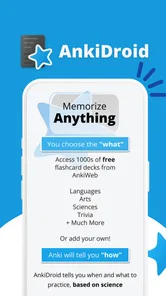
Yes. AnkiDroid’s summary highlights that many pre-built decks are available, which can give you a starting point instead of requiring you to create every card yourself. Decks can cover different subjects, so it is worth checking whether one fits what you want to learn. You can also make your own flashcards when you need material tailored to your course, goals, or preferred wording.
What is AnkiDroid Flashcards and how does it work?
AnkiDroid Flashcards is a mobile app designed to help users memorize information using flashcards. It utilizes the spaced repetition technique, which optimizes the timing intervals between reviews to enhance memory retention. Users can create their own flashcards or download pre-made decks from its extensive library, making it versatile for learning various subjects.
Pros
- Highly customizable flashcard decks.
- Supports multimedia content.
- Syncs with AnkiWeb easily.
- Open-source and free to use.
- Effective for spaced repetition learning.
Cons
- Complex interface for beginners.
- Limited card design options.
- Occasional sync issues.
- Requires manual setup for some features.
- Lacks integrated community support.











