

America's Test Kitchen
- 1.20K
- 4.8
- Installs
- 100.00K
- Price
- Free

Screenshots





Analysis by Reviewed
I have used America's Test Kitchen as a practical cooking companion rather than treating it like a simple pile of recipe cards. Its strongest idea is helping me move from “What can I make tonight?” to a workable plan for a weeknight meal, with collections that make browsing less random. The app comes from America's Test Kitchen, a familiar name in recipe testing, and it sits in the Food & Drink category as a free app for everyone.
That free starting point matters, but it does not mean every part of the experience is included without limits. In-app purchases range from $9.99 to $89.99 per item, so I would approach it as a service to explore first rather than assuming the entire library is open immediately. The app has an average rating of 4.8 from around 3.9 thousand ratings, with roughly 1.2 thousand written reviews, and it has passed 100 thousand installs. Those figures suggest a solid audience, although popularity alone is not a substitute for checking whether its cooking style suits your household.
How I build a useful routine around the recipe library
I find the recipe library most useful when I give it a small, repeatable role in my week rather than expecting it to plan every meal for me. I’d set aside a brief moment to choose a few candidates, then check ingredients and effort before shopping; that keeps browsing purposeful and makes it easier to spot which recipes suit the time I actually have.
My baseline workflow for a busy evening
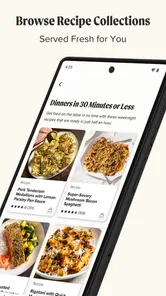
When I open the app, I try not to browse aimlessly. My first question is usually practical: do I need something quick, something lighter, or simply a way to use ingredients already in the kitchen? The store summary points toward quick, easy, healthy recipes for weeknight meals, and that focus is more useful to me than a broad promise to cover every kind of cooking. I can begin with a collection that matches the occasion, then narrow my choice by the time and effort I am willing to spend.
A realistic example is a weekday when I finish work late and still need to feed two people. Instead of scrolling through unrelated dishes, I look for a weeknight-oriented collection, choose a recipe that does not require a special shopping trip, and read through the full method before committing. That last step is important. A recipe may look fast in a preview but still involve preparation that makes it unsuitable for a rushed evening. The app helps with discovery, but I still make the final judgment.
I also find it useful to treat collections as planning tools rather than just themed folders. If I know I will cook several times during the week, I can review a few related recipes together and notice repeated ingredients. That can reduce waste and make shopping simpler. It is a small habit, but it turns the app into something more useful than a one-off source of inspiration.
The best result comes from choosing the meal before hunger takes over. I prefer to save or note a likely recipe earlier in the day, check the method, and then decide whether it fits my schedule. Waiting until the last minute makes any recipe app feel slower because the real problem is planning, not searching.
More From Our News Desk

 Instagram
Instagram’s Power Comes From Its Place in Your Phone
A close look at how Instagram turns Meta’s reach, recommendation systems and everyday camera habits into durable platform power—and what that costs users.

 Gmail
GmailGmail in a Busy Inbox: Who Benefits Most?
From first account to crowded workday, Gmail earns its place through dependable search and flexible sorting—but its best fit depends on how much inbox maintenance you can tolerate.

 Prime Video
Switching to Prime Video: What Changes in Your Viewing Routine
Prime Video can make a compelling second home for streaming, but switching means learning a different catalog, rental layer, and route from browsing to playback.

 Universal TV Remote Control
Universal TV Remote Control Works Best as a Reliable Backup
A phone remote earns its place through quick setup and reliable habits. Here is how to get more from Universal TV Remote Control—and where its limits show.

 Weather - By Xiaomi
Weather by Xiaomi Review: Clear at a Glance, Less Clear Up Close
Xiaomi’s weather app makes everyday forecasts quick to scan, but its calm surface can leave useful details and recovery paths harder to find than they should be.

 X
XX Under Pressure: Can It Recover When Posting Goes Wrong?
A resilience-focused review of X, examining setup, mistaken posts, interruptions, weak connections, and the gaps that matter when recovery needs to be dependable.
Latest News



What makes the collections more useful than random recipe searches
Many cooking apps are built around endless individual searches. That approach is convenient when I already know exactly what I want, but it can be tiring when I only know that I need dinner. America's Test Kitchen is more comfortable when I start with a purpose: a quick meal, a healthier direction, or a group of recipes suited to weeknight cooking. The collection structure gives me a starting point and reduces the number of unrelated results competing for attention.
This is also where the app differs from a general web search. Search engines are excellent for finding a very specific dish or adapting to an unusual ingredient, but their results can vary widely in quality and presentation. Here, the developer's identity gives the app a more focused editorial personality. I am not simply choosing between pages that happen to match a keyword; I am browsing within a cooking resource shaped by America's Test Kitchen.
That focus may feel narrower if you want a social feed, viral recipes, restaurant-style experimentation, or a giant database covering every regional variation. I would not choose this app mainly for novelty. I would choose it when I want dependable direction for ordinary meals and prefer a curated cooking environment over a noisy stream of suggestions.
Settings and account choices worth checking early
Before settling into a routine, I would review the app's available settings and account screens, especially anything related to notifications, saved content, and access to paid material. I do not turn on every alert automatically. Recipe reminders can be useful when they support a meal plan, but frequent prompts can make a cooking app feel like another source of interruption. I prefer notifications that serve a clear purpose and leave the rest off.
The purchase structure is worth understanding before investing time in a large personal recipe collection. Since the app is free to install but offers in-app purchases, I would first test the browsing experience and confirm that the available content matches my needs. If a recipe or collection is locked, I would decide based on how often I expect to cook from that style, not on the pressure of seeing it while planning dinner. This is particularly important for occasional cooks, who may get more value from free access and their existing resources than from a broad subscription-style commitment.
I would also check how the app behaves on my device before relying on it during cooking. The listed minimum operating system is Android 7.0, which covers older Android devices, but compatibility on paper is not the same as comfort in daily use. A small screen, an aging battery, or a kitchen with poor connectivity can affect how pleasant recipe reading becomes. I like to open the method in advance and make sure I can move through it without needing to solve technical problems with flour-covered hands.
The current version is 6.19.0-rc.2. I treat that version detail as a reminder to keep the app updated through the normal store process when possible, particularly if I depend on it regularly. Updates can change navigation or the way saved material is displayed, so I avoid making a complicated meal plan immediately after an update without first checking that my usual workflow still feels familiar.
A faster pattern for choosing recipes
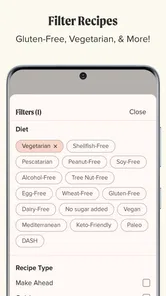
My quickest approach is a three-pass scan. First, I choose the collection or general purpose. Second, I reject recipes that conflict with the evening's time or ingredient limits. Third, I read the complete recipe before adding it to the plan. This sounds simple, but it prevents a common mistake: selecting a dish because its name sounds appealing and discovering only later that it demands more preparation than expected.
I also compare recipes by effort, not just by cooking time. A dish that cooks quickly may still require chopping, marinating, or several pans. Conversely, a recipe with a longer cooking stage may be easy to manage if most of that time is hands-off. The app can help me find candidates, but this distinction comes from reading carefully and matching the method to my actual evening.
Another useful habit is keeping a short rotation of reliable choices. I do not need to explore a new recipe every night. Once I find meals that work for my household, I can return to them when energy is low and use collections to add variety on days when I have more time. This makes the app less like entertainment and more like a repeatable system for reducing decision fatigue.
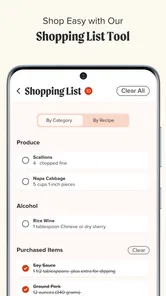
For shopping, I read several recipes together and look for overlapping staples before heading to the store. I do not assume that every ingredient can be substituted successfully, especially in baking or recipes where texture depends on precise proportions. However, I can often plan around shared vegetables, grains, herbs, or proteins. The trade-off is that this method requires a few minutes of preparation, but it is more efficient than buying ingredients for separate recipes without a common plan.
Where the app is strong for experienced home cooks
Experienced cooks may not need instructions for basic techniques, but they can still benefit from a curated starting point. I use the app to break out of repetitive meals without committing to an elaborate project. Its weeknight orientation makes it easier to find ideas that fit normal life rather than special occasions only.
I also appreciate the distinction between inspiration and execution. A recipe collection can inspire me to cook something different, but the full method is what determines whether I will actually make it. My advice is to read for sequence: what happens first, what can be prepared while something cooks, and which steps cannot be delayed. This lets me reorganize the work without changing the recipe itself.
That workflow is especially helpful for people who already know their way around a kitchen. Beginners can follow the app as a guide, while more confident cooks can use it as a framework and adjust seasoning or sides within reason. I would be cautious about changing key ratios in baking or removing an ingredient that provides structure, but flexible cooks can make the surrounding meal their own.
Limits that affect the advanced workflow
The main limitation is that a recipe app cannot remove the practical constraints of cooking. It cannot know whether my pan is the right size, whether my oven runs hot, or whether an ingredient at the local store is unavailable. Even a carefully written recipe needs judgment. I still inspect the method, prepare the workspace, and keep alternatives in mind before starting.
The purchase model is another consideration. Someone looking for a completely open recipe archive may find the free entry point less satisfying if the most relevant collections require payment. The range of available in-app purchase prices, from $9.99 to $89.99 per item, makes it sensible to decide slowly. I would not pay simply because I had already spent time browsing; I would pay only if the content fits a repeated cooking need.
This app is also not the best choice for every type of cook. If you want instant answers for a very unusual ingredient, a community-driven stream of personal variations, or a tool centered on detailed pantry inventory, a different app may suit you better. A general search engine can be faster for one-off questions, while a dedicated meal-planning service may offer a more structured household system. America's Test Kitchen is strongest in the middle: curated recipe discovery with a practical weeknight emphasis.
There is also a difference between healthy cooking as a useful direction and healthy cooking as a personalized medical plan. I would use the app to find lighter meal ideas, but I would not treat a general recipe collection as a substitute for professional dietary advice. People managing allergies, strict medical diets, or complex nutritional requirements should verify every ingredient and preparation detail independently.
Who should install it, and who should pass
I would recommend trying it if you cook at home several times a week, often run out of ideas, and prefer recipes grouped around real situations. It is particularly suitable for someone who wants to improve the transition from browsing to dinner: choose a collection, inspect the method, shop with a plan, and return to dependable favorites.
It is less compelling for someone who only wants a free, unlimited collection with no purchase decisions. It may also be unnecessary for a confident cook who already has a stable personal repertoire and does not enjoy following written recipes. In that case, the app's value depends on whether its collections introduce enough useful variety to justify another cooking tool.
The Everyone content rating makes it broadly approachable for households, but that does not mean every recipe will suit every age, preference, allergy, or skill level. I still check ingredients and difficulty for the people I am feeding. The rating describes the app's general audience, not a guarantee that every meal is appropriate for every person.
My verdict after using it as a repeatable cooking tool
America's Test Kitchen works best when I use it deliberately. The app is not merely a place to collect attractive meal ideas; its real value appears when I use collections to narrow the search, read recipes before committing, and build a small rotation around my schedule. That approach makes it more useful than casually scrolling, especially on weeknights when time and attention are limited.
I like the focused identity behind the app and the way its Food & Drink design points me toward practical cooking rather than endless novelty. The free installation lowers the barrier to trying it, while the paid options mean I should inspect access carefully before making it central to my routine. That balance will feel reasonable to some cooks and restrictive to others.
My final recommendation is straightforward: install it if you want curated help deciding what to cook and are willing to do a little planning around the recipes. Start with the free experience, test it on a normal weekday, and judge it by whether it genuinely shortens the path from “I need dinner” to a meal on the table. For me, the strongest feature is the repeatable habit it encourages, not the act of browsing itself. Used that way, this app earns a place in a home cook's routine; used only as an endless idea feed, its advantages are much easier to miss.
America's Test Kitchen Frequently Asked Questions
Is America’s Test Kitchen suitable for everyday meal planning?
The app is geared toward practical cooking, with a store summary focused on quick, easy, and healthy recipes for weeknight meals, alongside recipe collections. That makes it a useful place to look for ideas when planning routine dinners, rather than only special-occasion cooking. You can browse recipes and save favorites to keep appealing options easier to revisit.
What is America’s Test Kitchen?
America’s Test Kitchen is a cooking platform that provides tested recipes, instructional videos, cooking techniques, equipment recommendations, and food-related articles. Its content is created by a team of chefs, editors, and testers who evaluate recipes repeatedly before publishing them. The service is designed for both beginners and experienced home cooks who want dependable results and practical kitchen guidance.
What can I do with the America’s Test Kitchen app?
The app lets you browse and search a broad collection of recipes, save favorites, organize cooking ideas, and follow detailed instructions while preparing meals. Depending on your subscription and the current app version, you may also access cooking videos, technique lessons, product reviews, seasonal collections, and content from America’s Test Kitchen publications such as Cook’s Illustrated and Cook’s Country.
Is America’s Test Kitchen free to use?
America’s Test Kitchen may offer some free recipes and introductory content, but many of its most useful features require a paid membership or subscription. Premium access can include the complete recipe library, videos, equipment reviews, and additional learning materials. Before downloading or subscribing, check the current pricing, trial terms, renewal conditions, and available content in your country.
Does America’s Test Kitchen work for beginner cooks?
Yes. The platform is particularly helpful for beginners because recipes generally include clear ingredient lists, organized steps, preparation notes, and explanations of important techniques. Videos and instructional articles can make unfamiliar methods easier to understand. However, some recipes may require specialized equipment or multiple preparation stages, so checking the difficulty and estimated cooking time is recommended.
Pros
- Trusted recipes developed and tested by professional cooks.
- Clear step-by-step instructions suit beginners and experienced home chefs.
- Helpful cooking videos demonstrate techniques visually.
- Recipes often include practical testing notes and ingredient explanations.
- Strong variety of cuisines
- baking projects
- and everyday meal ideas.
Cons
- Many premium recipes and features require a paid subscription.
- Some recipes use specialty ingredients that may be hard to find locally.
- Video and image-heavy content can consume considerable mobile data.
- The large recipe library may feel overwhelming without effective searching.
- Advanced recipes can require significant preparation time and kitchen equipment.











